Tag: sql server

  • Stretch Pricing

    I have to admit that I was really excited about the Stretch Database feature in SQL Server 2016. This will automatically archive older data away from your database, but let the query optimizer go get the data if needed. That’s outstanding. That’s the type of archive solution I’ve struggled to implement in the past, finding the effort complex and requiring application change or active DBA management. Often I’ve found that only 10-20% of the data in my database was accessed often, and the rest relatively rarely. Maybe old data was queried every day, but still somewhat rarely compared to a small percentage of the data.

    Then the pricing for Stretch was released, and I think it’s definitely aimed at the Enterprise. If you stretch a sales database, say a 100GB database and want to move 60GB of that data away, you’re going to pay at least US$930/month for the compute at the lowest performance level. Regardless of whether anyone queries the data. If you want better performance, you can run up in roughly multiples of that amount ($1860, $2790, $3720, etc), however, that’s just for compute. If you add in storage, and you must, it’s a minor cost even 1TB, but still, having a $1k bill for access to archive data, especially when you might find people make the mistakes and do query cold(er) data might seem like a lot for a small or medium sized business (SMB). If you have to get better performance, you’ll pay more per month.

    I’m not the only one that doesn’t love the pricing of stretch. It seems to me that the pricing very much favors the Microsoft share price more than the value of my own business. Perhaps this makes more sense at an enterprise level where storage costs can be high, and separating out older data could result in savings. However for smaller companies, if you’re running a SQL Server, even a 1TB (or 10TB) database, is the addition of another 1TB of storage going to cost much? I’m not sure it does.

    Of course, there are other factors. Less data should mean much better performance from your local system. With some tuning of the feature, I would bet that plenty of people might be able to get 90% of their queries satisfied by on premise resources, when they have a substantial amount of older data stored in Azure. That’s not something I can easily do in my own archival system, or with the addition or more storage.

    What I’d really like to see is a stretch to another SQL Server feature added. I’m guessing we’ll see that, likely in SQL Server 20,18 as I don’t think this would be hard to implement. However since this looks like a cash cow for MS, I bet when we get stretch to an on premise SQL Server, this will be an Enterprise only feature, once again, ignoring SMB needs and desires. Maybe in 2020 or 2022 we’ll be able to stretch on premise at a reasonable cost.

    Steve Jones

    The Voice of the DBA Podcast

    Listen to the MP3 Audio ( MB) podcast or subscribe to the feed at iTunes and LibSyn.

  • It’s 2016 RLS for T-SQL Tuesday #79

    tsqltuesdayIt’s T-SQL Tuesday time again. I missed last month, being busy with travel, though I should go ahead and write that post. Maybe that will be next week’s task.

    In this case, Michael J Swart is hosting this month’s blog party and he asks us to write about something to do with SQL Server 2016. Read the rules at his invitation.

    Row Level Security

    I’ve wanted this feature to be easy for a long time. In fact, I’ve implemented a similar system a few times in different applications, but it’s been a cumbersome feature to meet, plus each developer needs to understand how the system works for it to work well. Even in the case where we once used views to hide our RLS, it was a performance issue.

    Microsoft has made things easier with their Row Level Security feature. This was actually released in Azure in 2015, but it’s now available in SQL Server 2016 for every on premise installation as well.

    Essentially for each row, there is some data value that is checked to determine if a user has access. This doesn’t mean a join. This doesn’t mean you write a lot of code. The implementation is simple, and straightforward, and I like it.

    Security Predicate Functions

    The one piece of code you need is an inline table valued function (iTVF) that returns a 1 for the rows that a user should see. You need to have some way to match up a row with a user, and that can be tricky, but if you identify a row, even in another table, you can use it.

    For example, I have this table.

    CREATE TABLE OrderHeader
      (
        OrderID INT IDENTITY(1, 1)
                    PRIMARY KEY
      , Orderdate DATETIME2(3)
      , CustomerID INT
      , OrderTotal NUMERIC(12, 4)
      , OrderComplete TINYINT
      , SalesPersonID INT
      );
    GO

    There’s nothing in this table that really helps me identify a user that is logged into the database. However, I do have a mapping in my SalesPeople table.

    CREATE TABLE SalesPeople
      (
        SalesPersonID INT IDENTITY(1, 1)
                          PRIMARY KEY
      , SalesFirstName VARCHAR(200)
      , SalesLastName VARCHAR(200)
      , username VARCHAR(100)
      , IsManager BIT
      );

    Granted, this could mean some change of code, but perhaps you can somehow use a user name in tables to query AD or other directory and map this to a user name.

    Once I have that mapping, I’m going to create a function. My function will actually look at the SalesPeople table, and map the parameter passed into the function to the value in the table.

    CREATE FUNCTION dbo.RLS_SalesPerson_OrderCheck ( @salespersonid INT )
    RETURNS TABLE
        WITH SCHEMABINDING
    AS
    RETURN
        SELECT
                1 AS [RLS_SalesPerson_OrderCheck_Result]
            FROM
                dbo.SalesPeople sp
            WHERE
                (
                  @salespersonid = sp.SalesPersonID
                  OR sp.IsManager = 1
                )
                AND USER_NAME() = sp.username;
    go

    In the function, I look at the USER_NAME() function and compare that to a value in the table. This is in addition to checking the SalespersonID column.

    I can use a Security Policy to bind this function to my OrderHeader table as shown here:

    CREATE SECURITY POLICY dbo.RLS_SalesPeople_Orders_Policy
      ADD FILTER PREDICATE dbo.RLS_SalesPerson_OrderCheck(salespersonid)
      ON dbo.OrderHeader;

    This sets the function, passing in a column from the OrderHeader table, which is the column I want evaluated in the function.When I now query the OrderHeader table, I get this:

    2016-06-13 11_42_16-Photos

    There is data in the table. However, I don’t get rights by default, even as dbo. My USER_NAME() doesn’t match anything in the table, therefore no SalesPersonID matches. However, for other users, it works.

    2016-06-13 11_42_32-Photos

    There is a lot more to the RLS feature, but I think it’s pretty cool and it’s something that will be highly used in many applications moving forward, especially those multi-tenant systems.

    Go ahead, get the free Developer Edition and play around with RLS.

  • A New Sample Database

    When I started working with SQL Server we had the pubs database. This was in SQL Server 2014, and I only used it because code samples from the Internet used it. It wasn’t a great database, but it was consistent and known. When Northwind came along, it was a welcome improvement. The schema was larger and a better fit for showcasing various features. However those two samples were superseded by AdventureWorks.

    AdventureWorks (ADW) was a fictional bicycle company, and we got a much larger, more complex schema. Perhaps overly complex, but many of us have learned to work with AdventureWorks for our sample code and demos through the years. This sample was released with SQL Server 2005 and then expanded and grown with 2008, 2012, and 2014, including newer features like Filestream and Memory-optimized Tables. However the complexity sometimes caused issues for people that didn’t want those features.

    There are multiple versions of ADW from MS, a script to make it larger, or even larger, a workload generator, a version for Azure, and more. It seems as though lots of time and effort has been put into building demos and tests against the ADW database. However that might need to change. I saw a note that Microsoft has a new sample database, Wide World Importers, on Github. It’s for SQL Server 2016+ as it includes a number of items that are only available on that version. So far, it’s bare bones (31 tables, many of them System-Versioned), and MS is looking for comments for improvement. There isn’t a lot at Github yet, but I’m expecting that to change over time.

    The idea of having sample database is good, but there’s effort to maintain them. We’ve had a few over the years at Redgate for demos, but we may move to using a Microsoft one so we don’t have to maintain it. Our preference is AdventureWorks, and maybe we’ll end up keeping it alive over time. I’m not sure I want a new database, but I also disliked the confusion of which AdventureWorks database versions would work with which SQL versions. Over time the database was named to include the version year, but it could still be confusing.

    Perhaps we should get a new sample every version, but not completely new. Let’s have a core schema that’s always available, with some tables that are normalized, some not. Some with PKs and FKs, somewithout. We can add new objects for new features. Let’s ensure that older scripts work by leaving old objects alone, but new items covering all aspects of database development, are included. Let me know what you think today.

    Steve Jones

    The Voice of the DBA Podcast

    Listen to the MP3 Audio ( 3.8MB) podcast or subscribe to the feed at iTunes and LibSyn.
  • Running Multiple Threads Quickly

    Recently I was looking to generate a quick workload against an instance. I wanted to add to the amount of work my system was doing by executing a number of queries simultaneously. There are a variety of ways to do this, but I just wanted a quick set of queries. I’ll show a couple ways to do this and then look at a few other tools in later posts.

    The Cumbersome Way

    I can open queries in two windows in SSMS. Note, each of these will execute 50 times.

    2016-05-20 14_17_34-SQLQuery1.sql - 192.168.1.71.SQLServerCentral (sa (56))_ - Microsoft SQL Server

    Now I have two windows, and I can click execute in one, then click to the other, and click execute again. That’s easy. When I do this, I’ll have two threads, each running a query 50 times.

    A Better Way

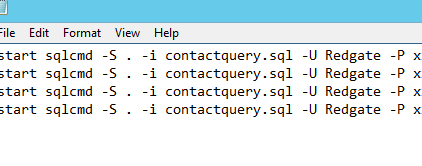
    A better way is to use a SQLCMD call with my query in it. In this case, I’ll create a notepad file and add multiple SQLCMD calls in it.

    2016-05-20 14_29_03-SalesDemo-2015-12-01-1745-export-i-fgod4b6h - VMware Workstation

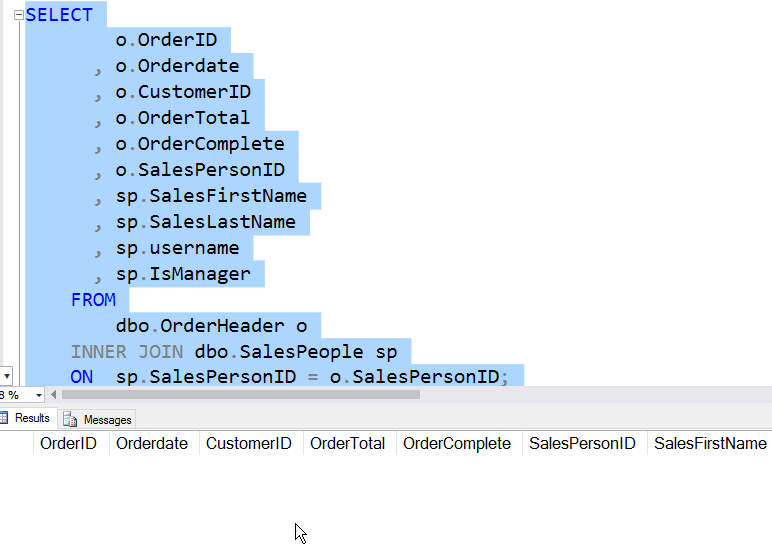
    The key here is the “start” at the beginning of the line. This will spawn a new thread with the program being called in it. In this case, I’ll get 5 windows very quickly, each running my query. My query is in another file:

    2016-05-20 14_28_19-SalesDemo-2015-12-01-1745-export-i-fgod4b6h - VMware Workstation

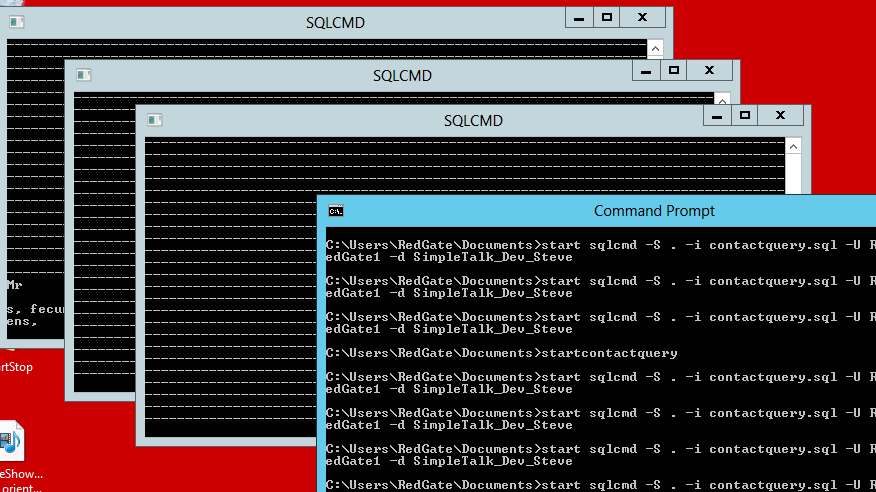
    If each query is set to run multiple times, I’ll have a simple load generated. In my case, I’ll run the .CMD file from the command line, but I could double click it. When I do, I see this:

    2016-05-20 14_30_13-SalesDemo-2015-12-01-1745-export-i-fgod4b6h - VMware Workstation

    You can see the window where I started the queries in front. Three of the command windows are in the background, each of them running queries over and over. The output from the query, with all the dashes for spacing between the headers and data, are in each window.