Tag: sql server

  • Missing Full Text Extensions in Express

    I was tasked recently with removing the full text indexes in Adventureworks for a demo. The full text indexes were causing a few extra items to appear in a SQL Compare demo and weren’t needed. The individual that had set up the VM I was using wasn’t sure what to do, so they asked me.

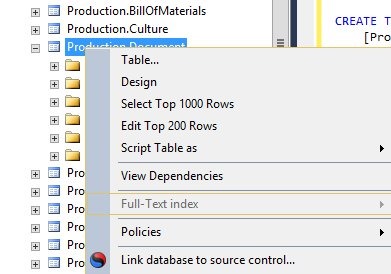
    I logged on to AdventureWorks and right clicked the Production.Document table. I knew that had full text indexes because I’d tested them before. However, what I got was this:
    fts1

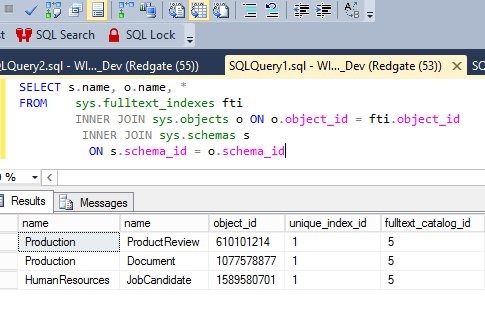
    The Full Text index part was grayed out. Strange, since the database was attached, and with a query, I could see FTS indexes below.
    fts2

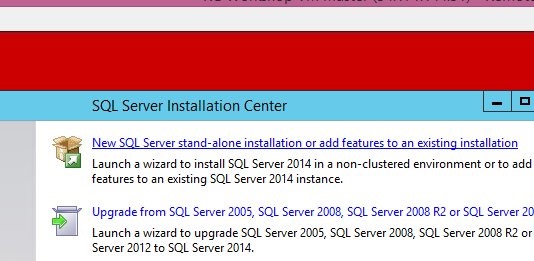
    I suspected that the FTS extensions weren’t installed. I decided to check by running setup. When it started, I clicked the top item to "add features", as shown here.
    fts3

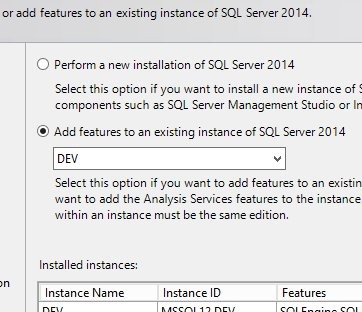
    That brought up a list of instances. The default is the top radio button below, but I selected the second one, which let me select an existing instance.
    fts4

    Next, I saw the features, and sure enough, FTS wasn’t checked.
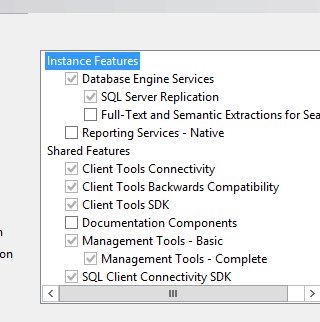
    fts5

    I checked it and then clicked next to continue the installation.
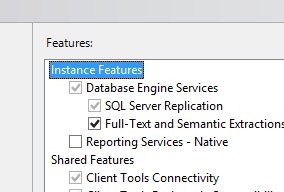
    fts

    Once this was done, I could run SSMS and sure enough, I could delete the FTS indexes (shown below).
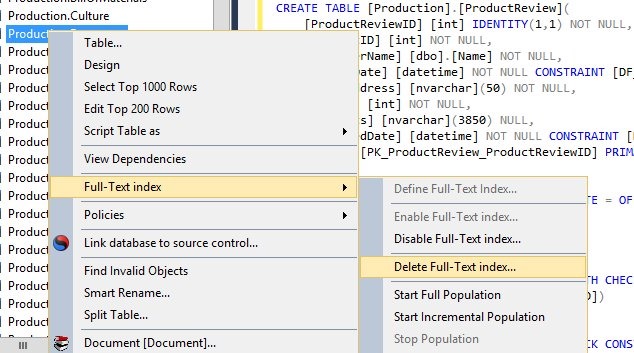
    fts6

    I actually had two instances on this VM, but this FTS feature isn’t in SSMS. It comes from the instance. After I deleted these three indexes, I connected to the second instance and tried to delete the FTS indexes, but things were grayed out, as shown in the first image above.

    I had to re-run setup for the second instance and add the FTS components there as well to delete the indexes from that database. Once that was done, I could easily delete all the FTS indexes and complete this simple task.

  • Starting a New Job

    I’ve had practice here, and was reminded of this when I ran across this thread on starting a new job. In my career, I’ve had far too many employers. I’d like to think it’s not my fault, but after having double digit jobs, I have to take some of the blame. I’ve often been looking for positions that I expected to last for many years, but something always seems to crop up. Even the jobs I’ve loved have ended sooner than I would have liked.

    As a result, I’ve gotten used to starting new jobs, learning a new environment, and quickly getting familiar with people and processes. I thought of this when I ran across a thread that talked asked about the first few things you should do at a new job. There are some good answers, and it’s worth a read.

    For those of you that start new jobs regularly, or are consultants, do you have a routine? Do you have scripts you bring along? When I saw sp_Blitz presented a few years ago, it seemed like exactly the type of thing you would want to have with you and go through on each instance you encounter. Something that gives you a good overview of how things look. While each environment is different and the configuration and settings will vary, it helps to have a view of the situation you’re familiar with. Even if you don’t change anything, at least you understand how the systems are set up.

    There was a time when I had a complete evaluation routine similar to sp_Blitz and an install that would create jobs for backups and maintenance in a consistent way. I had more a few jobs switch to my way of managing things because it was very efficient. These days, I think I’d use tools that are tried and true, using sp_Blitz, Ola’s backup routine, and @SQLFool’s indexing routine. I wonder if the rest of you have similar preferences.

    Steve Jones

    The Voice of the DBA Podcast

    Listen to the MP3 Audio ( 2.4MB) podcast or subscribe to the feed at iTunes and LibSyn.

  • The Cost of Switching

    I read the book Space Prison a few years ago. It’s about a group of humans, attacked and left as prisoners on a harsh planet. There’s a few hundred of them, many dying in the first few weeks. They must fight just to survive against the planet’s weather, as well as it’s plant and animal life. However they persevere and get revenge on the race that left them there. Not the survivors themselves, but their descendents, hundreds of years later. It’s a story about a group of people truly investing for the future. Not one they’ll see, but one their children’s children’s children will experience.

    I thought about that when I saw a post from Ray Terrill asking for AlwaysOn Availability Groups to be a part of Standard Edition in the next version of SQL Server. He makes a few arguments, but one that is interesting is the idea that the other possibilities for databases with good HA/DR cost less. I certainly agree that the cost of switching, and retraining (or rehiring) is high, it’s all about how you approach things.

    If a company really wants to play long ball, to look to the future and start making decisions for not the next year or two, but for ten years in the future, then is the cost of switching high? Imagine I’m a medium sized company with 500 employees. I have some IT staff (10-20) and say 20 SQL Server standard instances for various things. Replacing one SQL Server that provides basic database services now with something like PostgreSQL might slow me down in development for a couple years, but my staff would gain experience, and I’d have options. I might easily be able to replace more of, or all of, my instances in the next five years. Every decision from then on might be whether I get value specific to SQL Server, or can I use another platform that costs less.

    I know that overall SQL Server provides fantastic value and there isn’t anything else that can replace it wholesale, but the base level of database services that many applications need can be provided by other products, and unless Microsoft gives us good value in Standard Edition, I think it’s a matter of time before the people writing the checks start to think about other options. Good security, encryption, and HA/DR are becoming not “nice to haves”, but necessary for many applications. However not so necessary that I think I want to pay Enterprise Edition prices for most of my applications.

    Steve Jones

    The Voice of the DBA Podcast

    Listen to the MP3 Audio ( 3.4MB) podcast or subscribe to the feed at iTunes and LibSyn.

  • Taking Care of Things Today

    I get the weekly SQLskills newsletter, which I always find interesting. There’s usually a video on a topic that teaches me something, and as an avid reader, I enjoy hearing about the books that Paul Randal has read. However the main part is called Paul’s Ponderings and often has some thoughts that really make me think.

    In one of the recent newsletters, Paul talked about carpe diem, seize the day, and how we shouldn’t let things slide to tomorrow if we can do them today. The examples relevant to DBAs are some maintenance or preparation items that can be tedious or onerous (Paul’s words), like practicing restores for DR, checking indexes, and tackling some documentation.

    Many of us procrastinate tasks at times. Some of us procrastinate constantly, and if we don’t have any impetus pushing us to complete an item, we may delay it indefinitely. I’ve certainly been guilty of that, but I also have learned that I need to tackle some of those tasks regularly. I certainly want to be sure that my instances are healthy, and for me that’s often meant the tedious tasks of checking backups, space, and indexes as well as practicing restores, even when things were running smoothly. These can be mind numbing tasks, especially when you have scripts that do much of the work, but they really do ensure things continue to run smoothly for long periods of time.

    There are plenty of methods for motivating yourself, but I’ve found that setting a few monthly reminders and bunching up smaller tasks allows me to get all the busy work over with at one time. Being a DBA requires some creativity and skills, but it can also require a nose to the grindstone on a regular basis, no matter how boring that may be.

    Steve Jones


    The Voice of the DBA Podcast

    Listen to the MP3 Audio ( 2.2MB) podcast or subscribe to the feed at iTunes and LibSyn.