Tag: sql server

  • Test Your Situation

    I gave a talk on Transparent Data Encryption (TDE) recently and a number of people in the audience were using the feature. However when I asked how many of them had restored a TDE database, not all hands remained up. When I asked how many people had restored their TDE encrypted backup  to a different server, one that didn’t have TDE enabled, very few hands remained in the air.

    That’s not good, and I certainly hope those people don’t experience a disaster from which they cannot recover. I’m sure they are not alone. I suspect that many of the people managing a TDE database have restored a database this year, and are confident they can do so. However what they don’t know is if they can restore those TDE databases on any other instance, including a newly installed one.

    They’re not alone. I see many, many people implement features they don’t really understand. Microsoft has made it easy to set up replication, clustering, and more in your environment, but without providing some of the robustness and reliability that many people need. The ease of setting up a feature is one thing. The ease of ongoing management and recovery when issues occur is something else entirely.

    I really wish that Microsoft would go further than making implementation easier and include direction for ongoing tasks. When databases are created, ask the user to set up backups and help them create the jobs. When encryption is implemented, do more than display a warning message. Help adminstrators prepare for recovery with templates or jobs that automatically build certificate or key backups. When replication is set up, include a script to rebuild the environment for when it breaks.

    I doubt we’ll get this, and many companies and employees will continue to implement features they don’t understand. You can only help your own situation, and you should be ensuring you understand and can rebuild all the extra features you’ve installed in the event of a disaster.

    Steve Jones

    The Voice of the DBA Podcast

    Listen to the MP3 Audio ( 2.3MB) podcast or subscribe to the feed at iTunes and LibSyn.

  • What’s Coming True?

    It’s the start of the new year, and the first day of work for many of us. As I start to work this year, I see that much of my work is based on that planning we did at the end of last year. We made predictions for our business, set goals, and today begin to execute on things. However, we are assuming our predictions are somewhat accurate in order to achieve success. What if our predictions aren’t correct?

    There’s no shortage of prognosticators out there, and I found a number of predictions about IT, the Cloud, and Microsoft. I have no idea if any of these will actually come true, but I wanted to ask you this week:

    Which of these predictions will come true in 2015?

    • Increased automation and less staff
    • more BYOD acceptance and support
    • More telecommuting
    • containerization of software in the cloud (or the data center)
    • More hybrid applications using the cloud
    • IoT growth – more sensors, more data for you
    • Windows 10 will be a hit
    • SQL Server 2015 will come out
    • Windows Phone will become competitive
    • You’ll get hacked at your company.
    • You will encrypt your databases?

    The IT trends listed are fairly general, and all of them are really underway now, so I’m not sure there’s much of a prediction there. For you individually, will you see more automation and less people? More BI and cloud usage? Any of the Microsoft predictions likely to come true? Do any these apply to your environment?

    This isn’t an exhaustive list, and certainly there’s lots of people expecting 3D printing and more mobile technologies to emerge. If you think any of these will, or won’t, definitely come true, take a vote and we’ll rerun this thread at the end of the year. If you have other predictions, let us know as well.

    Steve Jones

    The Voice of the DBA Podcast

    Listen to the MP3 Audio ( 2.1MB) podcast or subscribe to the feed at iTunes and LibSyn.

  • Powershell – Copy the Latest Backup

    I got an email recently where someone asked me how they can refresh a dev environment with Powershell. I guess I’d written something about this in 2009, though that would have been for testing as Red Gate had already banned me from development on SQLServerCentral by that time.

    I dug around and came up with a few partial scripts and cleaned them up for these posts. This post will look at getting the backup and a later one will examine the restore.

    Finding the Latest Backup

    I’ll assume that you make backups on a known path somewhere. My philosophy is that I want the machines to stand alone as much as possible. That means that I don’t want the source machine (the one making the backup) to be working on refreshing the backup elsewhere. I want a pull system.

    For a high level overview, this process looks like this:

    • Search the backup path for files matching a pattern.
    • Find the most recent one, based on date.
    • Copy that most recent file to another location.

    For the sake of consistency and easy, I want to copy the file with the same destination name every time. That will simplify my restore process, which I could easily then do in T-SQL.

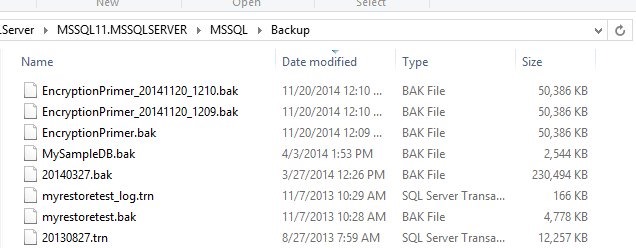
    Let’s examine how to do this. I’ve got a folder with a few backups in it.

    backuplatest

    For my PoSh, I’ll start by setting a variable to the path.

    $backuppath = "D:\SQLServer\MSSQL11.MSSQLSERVER\MSSQL\Backup" 

    Once I have this, I can now look for the files in this path. To do that, I’ll use Get-Children.

    get-childitem -path $backuppath

    This will return to me a list of the files. That’s what I want, but I want to limit the files to a pattern. In this case, I’m looking for .bak files, from the EncryptionPrimer database. All of these

    There’s nothing special about what I do that’s not contained in plenty of places. I don’t have this running on an environment currently as someone else manages that process, but here’s the process I’ve followed in the past:

    • Find the latest backup (whatever the date) in the source folder.
    • Copy this with a set name to the destination folder, overwriting previous backups with the same name.
    • Restore the known name to the development database, moving files as needed.

    I’ll go through each of these steps in my PoSh script.

    Find the Latest Backup

    This is fairly easy. I’ll use the Get-ChildItem method, which I found in a StackOverflow post. I’ll use a variable for the path I need, and then check the path.

    $backuppath = "D:\SQLServer\MSSQL11.MSSQLSERVER\MSSQL\Backup"

    get-childitem -path $backuppath

    That works well, but since I’m building a process for a specific backup type, I’ll add a filter.

    $backuppath = "D:\SQLServer\MSSQL11.MSSQLSERVER\MSSQL\Backup"

    get-childitem -path $backuppath -Filter "EncryptionPrimer*.bak"


    To find the latest backup, we’ll pipe the output through the Where-object filter, removing folders. Then we use sort-object to order things by creation date and select-object to get just the one file.

    $backuppath = "D:\SQLServer\MSSQL11.MSSQLSERVER\MSSQL\Backup"

    get-childitem -path $backuppath -Filter "EncryptionPrimer*.bak" |

        where-object { -not $_.PSIsContainer } |

        sort-object -Property $_.CreationTime |

        select-object -last 1


    The last part of the script is the copy-item command, which is again the recipient of piped output. We give a standard name, and path (another variable).

    $backuppath = "D:\SQLServer\MSSQL11.MSSQLSERVER\MSSQL\Backup"

    $destpath = "d:\SQLServer\Backup"

    get-childitem -path $backuppath -Filter "EncryptionPrimer*.bak" |

        where-object { -not $_.PSIsContainer } |

        sort-object -Property $_.CreationTime |

        select-object -last 1 | copy-item -Destination (join-path $destpath "EncryptionPrimer.BAK")

    Once this is done we can restore things. I learned how to do this from PoSh using this post: http://stuart-moore.com/day-11-31-days-sql-server-backup-restore-using-powershell-basic-restore/

    However, since I have a standard backup file name, I’d probably do this in T-SQL and set a job that I can just run anytime. It’s simpler and easier, and since most of the time I’d want to do this from SSMS, a job works well.

    Here’s the PoSh script.

    Import-Module "SQLPS" -DisableNameChecking

    $sqlsvr = New-Object -TypeName  Microsoft.SQLServer.Management.Smo.Server("JollyGreenGiant\SQL2012")

    $BackupFile = "D:\SQLServer\Backup\EncryptionPrimer.BAK"

    #

    #echo ""

    #echo "Databases"

    #echo "———"

    #foreach ( $db in $sqlsvr.Databases) { write-host $db.name }

    echo " "

    echo "Begin Restore"

    echo "============="

    $Restore = New-Object "Microsoft.SqlServer.Management.Smo.Restore"

    $Restore.NoRecovery = $false

    $Restore.ReplaceDatabase = $true

    $Restore.Action = "Database"

    $Restore.PercentCompleteNotification = 10

    $BackupDevice = New-Object ("Microsoft.SqlServer.Management.Smo.BackupDeviceItem") ($BackupFile, "File")

    $Restore.Devices.Add($BackupDevice)

    $RestoreDetails = $Restore.ReadBackupHeader($sqlsvr)

    $logicalFileNameList = $Restore.ReadFileList($sqlsvr)

    $Restore.Database = $RestoreDetails.Rows[0]["DatabaseName"]

    foreach($row in $logicalFileNameList) {

        $RestoreDBFile = new-object("Microsoft.SqlServer.Management.Smo.RelocateFile")

        $RestoreDBFile.LogicalFileName = $row["LogicalName"]

        $RestoreDBFile.PhysicalFileName = $row["PhysicalName"]

        $Restore.RelocateFiles.Add($RestoreDBFile)

            }

    $Restore.SqlRestore($sqlsvr)

    write-host ("Completed the Database Restore operation on server for Database " +  $RestoreDetails.Rows[0]["DatabaseName"] + " on server $server")


    That’s it. I ran this a few times, and it worked well. A handy script to get the last backup and have it ready in a dev/test environment.
  • SQL Server Disk Space Emergencies

    One of the things I’ll see happen often with SQL Server instances is that the system will run out of space on a drive. This could be for a variety of reasons, some of which can be prevented, and some cannot. You might have:

    • Don’t delete old backup files
    • Data growth fills the disk over time, usually years
    • tempdb rapid growth that uses all space
    • old import files not deleted over time

    There are other reasons, but I’ve often found that some process will cause an emergency and the SQL Server stops working, or stops backing up database, and administrators are in a panic to free space so the server can continue to function.

    Here’s what I suggest to smooth the way with a series of placeholders and a job.

    Create Placeholders

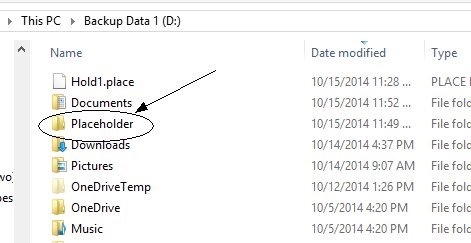
    First, create a folder on your SQL Server (or really every server) called Placeholder. I’d put it in the root to make it easy to find and standardize on it.

    placeholders3

    In the folder, place a series of files to save space. If you don’t know how to do this, I can show you an easy way. I have 4GB reserved here.

    placeholders4

    Now create a SQL Server Agent job. I might standardize this on every server I have with the same name and path.

    placeholders5

    The job has one step, which is designed to delete one file, each time it’s run.

    Note that I had a slight bug in what I shot above. I had the contig.exe utility in the folder and the first execution of the job deleted that file. Not a big deal in an emergency, because I can run the job again, but I’d make sure that only the place holder files are in this folder on machines.

    Here’s the job. It’s a PoSh type of step.

    placeholders6

    The actual PoSh code is here:

    $fileEntries = [IO.Directory]::GetFiles(“d:\placeholder”);
    $delete = 1;
    foreach($fileName in $fileEntries)
    {
    if ($delete -eq 1)
    {
    Remove-Item $fileName
    $delete = 0;
    }
    }

    When I run this, each time I run it, it’s just a single click or sp_start_job call.

    placeholders7

    After it runs, I have 1GB more free space. If I need more, run it again.

    placeholders8

    However, once you clear your low space condition, I’d be sure I put the placeholders back.

    For the next emergency.