Tag: sql server

  • What Do We Want to See in SQL Server?

    I like the feedback system that Microsoft built for SQL Server. This used to be the Connect system, but all the bug reports and feature requests are now at feedback.azure.com. That’s the place where you can send notes to Microsoft or vote on those that others have submitted.

    In case you are wondering if this makes a difference, it does. Years ago, there pushback for Service Packs from Microsoft, and after a lot of lobbying from myself and others, and a number of votes, Microsoft released more Service Packs for a few versions. They’ve also made a few other changes in the product, or fixed bugs when enough people vote. Not always, but it does happen at times.

    When this system was first released, I wondered if Microsoft would email a digest or some list of items that they had triaged of how the various items were rated. I could see this as a way customers might learn what others think is important, as well as what Microsoft sees as feasible. Maybe where would be some repeat voting that could influence the products’ direction.

    Recently I saw Brent Ozar posted the top 10 items by votes with a few comments. Of the items on this list, I found some interesting ones. I know STRING_SPLIT gets an ordinal in Azure and SQL Server 2022, so that’s one item that MS responded to. I see a few SSMS ones, which are always interesting to me. I’d hope that MS would include a dark theme and the (maybe) the debugger back in as many people request those features. I’m not sold on the debugger, and it wasn’t always stable for me, so I wouldn’t use it, but lots of people like the idea of a debugger. Maybe if it were limited to the dev edition?

    Microsoft looks at the feedback, but the feedback isn’t a vote in their mind. It’s a metric that helps them triage and decides when things are important enough to work on, assuming the effort isn’t extremely high. Working in a software company gives me a better appreciation for the decisions made on which features to include or not, especially given the long-term support effort for any features.

    It can feel hopeless when you vote for something and Microsoft doesn’t build it, but when enough people, especially big customers, want something, it gets built. If you look through the top items, a few have been added to SQL Server 2022. Personally, I want a FOR CSV along with a BULK EXPORT command. I appreciate some difficulties here and possible permission/security issues, but this would be very handy.

    What changes do you want today? Is the dark theme or the debugger at the top of your list or is there something else?

    Steve Jones

    Listen to the podcast at Libsyn, Stitcher, Spotify, or iTunes.

  • New in SQL Server 2022 – Generate_Series

    One of the new language features added in SQL Server 2022 is the GENERATE_SERIES function. This allows you to generate a

    SELECT * FROM GENERATE_SERIES(start=1, stop=7)

    This gives me a simple sequence of numbers in a result set, with the column header, value.

    2022-03-31 14_57_20-SQLQuery3.sql - ., 51433.sandbox (sa (80))_ - Microsoft SQL Server Management St

    Let’s take this code from Dwain Camps article, Tally Tables in T-SQL:

    DECLARE @S VARCHAR(8000) = 'Aarrrgggh!';
    SELECT value, s
    FROM
    (
         -- Always choose the first element
         SELECT value=1, s=LEFT(@S, 1) UNION ALL
         -- Include each successive next element as long as it’s different than the prior
         SELECT value, CASE
             WHEN SUBSTRING(@S, value-1, 1) <> SUBSTRING(@S, value, 1)
             THEN SUBSTRING(@S, value, 1)
             -- Repeated characters are assigned NULL by the CASE
             END
         FROM GENERATE_SERIES(start=1, stop=100)
         WHERE value BETWEEN 2 AND LEN(@S)
    ) a
    -- Now we filter out the repeated elements
    WHERE s IS NOT NULL;

    Now the original code has a CTE that generates the series, or tally table. I’ve replaced that with GENERATE_SERIES. The code works as expected, which in this case is to remove repeating characters.

    2022-03-31 14_58_21-SQLQuery3.sql - ., 51433.sandbox (sa (80))_ - Microsoft SQL Server Management St

    SQL Server 2022 is now out in preview and I’d urge you to give it a try. This is a neat new feature, and it does provide more standard code than the variety of ways I see people building tally tables.

    I haven’t tested performance, but I am hoping it does as well as cross joining system tables or using a CTE.

  • The 2022 Preview

    This was a strange week for me. Traveling in Brussels with my wife and prepping for a few presentations. Then Techorama, an even more 2019-era conference in Belgium where I spoke around a few customer calls sprinkled in during the week. I have a new SQL Saturday I was trying to get scheduled, while coordinating with my doctor for a surgery Friday, and keeping up with some travel plans for the next month.

    In the middle of all that, Microsoft Build took place this week. Needless to say I didn’t see any presentations from the event, but I did see quite a few blog posts and entries this week from various MVPs and others. I took a few minutes to watch Data Exposed, and I read a few posts. I liked the thoughts from Paul Andrew on the Intelligent Data Platform. He is more of a BI person, and I think a lot of the evolution of the platform is moving to add more BI and get more intelligence from the database for customers.

    I’ve been playing with the CTP lightly for a few months. Many of the MVPs have as well, and while most things work the same, there are some new things that might be useful in your workload. You can get the CTP of SQL Server 2022 at https://aka.ms/getsqlserver2022, and see what’s changed, test your current apps, and in general get excited about the future of SQL Server.

    If you want some ideas and demos to follow around, check out Bob Ward’s demos at https://aka.ms/bobsqldemos. He’s put his various scripts and notebooks for the platform, where you can reproduce and examine some of the features. Bob has been showing off some of these things at various conferences for awhile, and now you can get his code to do some testing. Aaron Bertrand also has a number of posts on SQL 2022.

    As always, if you find issues, send in feedback. MS does read this stuff, and while they don’t always agree with you or I, they do consider things. The more you put the reason you want a change in business terms, the better off things are. Rather than saying “an empty CATCH clause hides an error”, you might say that “the empty catch clause was unexpected and caused clients to resubmit a form 22 times before customer service could track down a bug.” Be specific and show a relation to a tangible business problem for all your errors.
    In many ways SQL Server is a very mature product for me. The core engine meets most of the needs I have for SQL Server Central as well as those of many of my customers. However, there are lots of organizations that might benefit from one or more of these features. Whether on premises or in the cloud, we want the platform to grow and improve.

    Plus, it can be exciting to reproduce one of Bob’s demos and learn something. As we move towards a new version of SQL Server, take a little time to get excited about technology and see what changes are coming in SQL Server and the Data Platform.

    Steve Jones

  • Removing a LocalDB Instance

    Another post for me that is simple and hopefully serves as an example for people trying to get blogging as #SQLNewBloggers.

    This might be obvious and easy, but I spent a couple minutes learning how to remove a LocalDB instance.

    I tried to use remote, but that didn’t work:

    2022-03-03 09_17_39-C__Windows_System32_cmd.exe

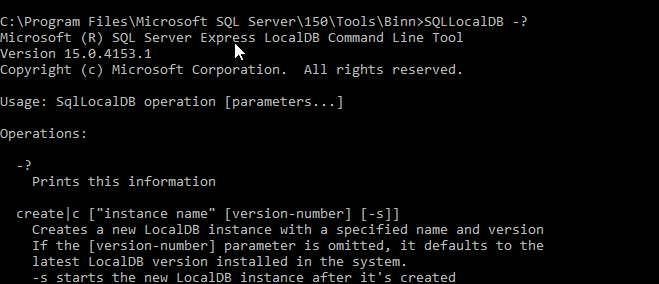
    There error reminded me that in my day, most commands use –? or /? to get help. A lot of CLIs these days use –help (two dashes). That doesn’t work here. But /? does.

    2022-03-03 09_18_33-C__Windows_System32_cmd.exe

    This shows me the delete option is the one to use. I tried that, but I needed to stop the instance.

    2022-03-03 09_19_55-C__Windows_System32_cmd.exe

    Running stop and then delete allowed this to succeed.

    2022-03-03 09_20_51-C__Windows_System32_cmd.exe

    SQL New Blogger

    After writing a previous post, which took me 10 minutes or so, I went to clean up my environment. I realized this was easy, but also worth a post about how I learned this.

    Just 5 minutes. You could write posts like this to further your knowledge and help your career.