Tag: sql server

  • Starting LocalDB–#SQLNewBlogger

    Another post for me that is simple and hopefully serves as an example for people trying to get blogging as #SQLNewBloggers.

    Lots of people have never worked with LocalDB, which is an in-process version of SQL Express. No service account, just a SQL Server instance running with your app. It’s a nice lightweight way to get SQL Server running quickly without a hassle.

    This is a SQL Server Express version, but the bare bones for development. This post looks at how you can get this running.

    This version of SQL is installed with SQL Express, and with Visual Studio. If you look in this path: C:\Program Files\Microsoft SQL Server\150\Tools\Binn, there is a SQLLocalDB.exe. You can see that here.

    2022-03-03 09_08_00-Binn

    This is my SQL Server 2016 version of LocalDB. I can start a new instance by calling this with the CREATE option. I can give this a name as well, as I might want to stat multiple instance for different apps. Here I’ll create an instance called app1.

    SQLLocalDB create app1

    I then call the same command, but use START instead of CREATE. You can see this reports as started from the CLI. I also add the INFO call to get status.

    2022-03-03 09_10_35-C__Windows_System32_cmd.exe

    Now I can connect. I use (LocalDB)\app1 to connect:

    2022-03-03 09_11_39-Connect to Database Engine

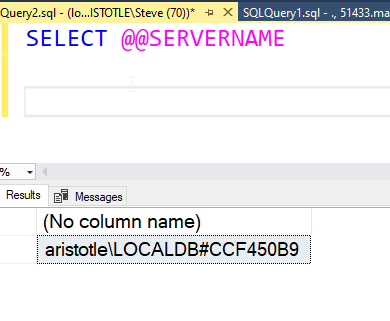
    I see I’m connected to a version of LocalDB then:

    2022-03-03 09_12_03-SQLQuery2.sql - (localdb)_app1.master (ARISTOTLE_Steve (70))_ - Microsoft SQL Se

    Now it’s just an instance of SQL Server I can use.


    SQL New Blogger

    I needed to check something for a customer and realized I hadn’t started LocalDB in a long time, so I needed to check the docs. I spent 10 minutes putting this post together.

    An easy type of post for any of you out there. Learn something, try something, write something.

  • The Usefulness of Database Features

    SQL Server is constantly growing and changing, as are most database platforms. There are lots of platform changes, among them enhancements to the T-SQL language. Microsoft has added window functions, in-memory structures, the ability to execute code in other languages, and more. Some of these features are well built and some need more work. What’s always interesting to me is what actually gets built and what doesn’t.

    There was an article recently on evaluating features in an RDBMS, and the article uses the JSON data type in Google’s Big Query as an example. The evaluation is interesting, examining whether the feature actually helps the user, or if it is mostly marketing. In this case, the feature is outside of the “normal” conventions of the platform,  but it is useful.

    When I look at SQL Server, there are features that I think are well implemented and others that aren’t. There are some that are very helpful, but some that don’t perform well, at least not at scale. There are also changes that people have requested, but Microsoft hasn’t decided to build (please upvote the numbers table).

    Many of us use a limited number of features inside the database platforms. We SELECT, INSERT, and UPDATE often, sometimes with the built-in functions, sometimes not. Many data professionals know what to use and avoid, but often developers may assume that any feature added will perform well. Most of them do very well with a few rows of data, but can be problematic at the scale of millions of rows. While we would want all features to work well at all scales, that isn’t something that’s going to happen.

    I accept that some features are there to help customers in different ways. I can’t imagine wanting to run Java code from a database call, but some organizations see value in this, so it’s a capability in SQL Server. I’m sure some people can’t fathom why I think a built-in numbers table is needed when there are easy ways to build one. I guess that’s why my priorities, yours, and Microsoft’s will differ, at least with regard to what things should change in the platform. What gets built is up to Microsoft.

    When you use a feature in any datastore, there may be tradeoffs with other techniques, and there may be problem domains where the feature works well or doesn’t. It’s important that you understand and learn the limits and advantages of any particular feature. It’s also important you know how to adopt a feature when it’s better or abandon one when it doesn’t meet your needs.

    Steve Jones

    Listen to the podcast at Libsyn, Stitcher, Spotify, or iTunes.

  • T-SQL Tuesday #146–Changing Preconceptions

    tsqltuesdayIt’s the start of a new year, and the first T-SQL Tuesday is from Andy Yun. I’ve known Andy a long time and this is his third time hosting with a creative prompt for us all to consider.

    I really like this one as it could be taken as a technical or a non-technical prompt. What did you think was one way and you learned it was another way. Always good to stop and double check that your view is actually representing what you think.

    We all do this in our views of life as well as work, and it can be hard to change what or how we think. This is especially true for many of my customers, as I find them wanting to adopt DevOps, but not really wanting to change.

    I’ll tackle this one in a couple ways, one technical and one non-technical.

    Separate Accounts for Each Instance

    For a long time, I always used separate domain accounts for each SQL Server service. Even in a large environment, with hundreds of instances, I did the work (or have junior DBAs do it) to ensure that each service was account separated. This was important because I’ve had change passwords and other issues break services in the past. None of the incidents seemed worth saving a bit of time to set up separate accounts.

    Over time, and as SQL Server evolved, Group Managed Service Accounts came into being. I resisted using these at first, but over time I’ve realized that these are valuable and provide security as well as ease of administration. If I went back to managing servers, even single ones, I’d likely look to ensure that gMSA was the standard.

    Take Feedback as An Opportunity

    I’ve struggled with having someone criticize me for my work. I’ve even struggled when they suggest something else, bristling at the idea that I wasn’t doing something well. Often I was successful and doing something well, but there might be a better way.

    Across time, and age, I’ve learned to appreciate other points of view and not become defensive to feedback. Instead, I’ve started to look at other views as a chance to learn or grow, or even just try something. I can still reject the advice or suggestion, but I ought to consider it.

    I’ve started to adopt the “strong opinions, loosely held” philosophy at work.

    Note, I’m trying to do this in my personal life, but I still very much suck at this.

  • SQL Server vNext

    We now know when the next version of SQL Server is coming. At Ignite last week, Microsoft announced SQL Server 2022, which comes nearly 3 years after the last version, SQL Server 2019. Apparently, the pandemic’s effects include delays in product development as it’s been nearly three years since SQL Server 2019. The new version is in preview, with a few new features announced. There’s also a video version from the Ignite site, but if you want a quick summary of things, read on.

    There were a few items that get me a bit excited about the changes. The first is that we get some query improvements with regard to parameter sniffing in stored procedures. This has been a constant problem for many databases and workloads for years. This is because only one plan has been kept in the cache. That changes in SQL Server 2022, as the instance can now keep multiple plans around. It will be interesting to see if this helps many customers.

    The Query Store was an interesting edition to SQL Server and plenty of people have found it valuable. However, its use was optional and you had to enable it. In SQL Server 2022, Query Store is now on by default and there is support for read replicas as well. This change is there to enhance the intelligent query processing (IQP) work that has been growing in each new version. This new version gets MAXDOP and Cardinality Estimator being incorporated into the feedback loop. IQP isn’t perfect, and it might cause you some issues with certain workloads, but many of the changes made in the last few versions do seem to be helping customers.

    There was a quick note in the Ignite video about multi-write replication is now available. Not true peer to peer, but this version should automate the last write wins rule, based on UTC timing. I’ve been skeptical of using peer-to-peer replication in the past, mostly because of the need to code conflict scenarios, but a last-writer wins scenario might work well for some applications. If you can accept this rule, and you have good resources for propagating data, this might be something you can use.

    Blockchain is coming to SQL Server. There is a Ledger feature that provides an immutable ledger of data changes. This ensures that data integrity is maintained with full auditability. Trusted storage is needed to ensure this meets all audit and regulatory requirements, though if the data has been tampered with, you might only know something happened. It’s not perfect, but it does provide the ability to prove there is trust in the data you are watching. I suspect this will be a feature like TDE that auditors want enabled, even if it isn’t perfect. I do wonder what this will do to storage costs and complexity.

    Azure Purview is being integrated into SQL Server 2022. The big takeaway here is that you can scan on-premises data for free. Now I don’t know if this means you can use your data for free in any way, but I do think that this does start to make governance easier. I think that’s a big deal for all of us in the future if companies were to better know what data is risky and work on protecting it. Normalizing the way we look at data governance is a big step forward. This certainly is a long way from most applications using the “sa” account.

    One of the challenges I’ve seen in many companies is dealing with reports. Often companies try to run complex queries on their OLTP system, or they spend a lot of time and effort to build ETL structures. Synapse Link provides automatic change feeds from a SQL Server to a SQL pool in Synapse. This is like an automatic replication of the table(s) into your data warehouse. It’s been available for CosmosDB, but now it comes to SQL Server. Given the cost of development and managing ETL jobs, I could see some organizations upgrading to SQL Server 2022 just for this feature. If it works well and quickly.

    Disaster Recovery (DR) is something I’ve always been concerned about. I’ve had too many issues over time to treat this lightly. In this new version, you can set Azure SQL Managed Instance as a target for a DR recovery, with failover to the cloud through a distributed availability group. That’s has been possible before, though now this seems easier than ever (as it should be). The failover is a good feature, but a lot of us wouldn’t necessarily want to live in the cloud, so the big announcement here is that you can restore the backup from MI back to an on-premises SQL Server 2022 instance. We can restore back from the cloud to our own systems, which has been a hassle for a long time.

    Now, this isn’t failback. I have no idea if logs can be backed up and restored, or if this means a lot of downtime to leave the cloud if you have a big database. From the demo’s, it doesn’t look practical to backup and restore a database of any size to fail back. My guess is this is really a first cut, but the ability to move from MI back on-premises is a huge step forward. If for no other reason than you can backup things for dev work inside your organization. That’s a big win for a lot of customers I know, at least it is if Azure SQL DB and Azure SQL MI are close in functionality from the inside-the-database perspective.

    There are other enhancements as well. The cloud offerings from Microsoft gain some scale, which is good. Most of us don’t have huge systems, but more scale usually trickles down with better pricing for the mid levels. Azure Arc grows, allowing you to run Azure SQL MI and Hyperscale PostgreSQL on your own hardware. You’ll pay something to Microsoft, but having these systems stand up, keeping data local, and having them managed easily is a big deal. I expect that more companies will consider things like Azure SQL DB on their own hardware over time, especially as standing up and managing a Kubernetes cluster becomes easier. This feels like the early days before vSphere when we struggled to manage lots of virtual machines. I suspect we will find better ways to deploy and manage container orchestrators on-premises over time.

    It feels like a long time since we talked about SQL Server. Certainly the last 18 months have felt like the world is frozen and not much has happened. I know I’ve done some things, but it’s been a strange feeling of suspension for much of life. For me, the announcement of a new version of SQL Server brings some excitement. It feels as though the world is moving forward, and I’m looking forward to learning and writing about the future. I’m also hoping to get the chance to deliver some presentations on something new in SQL Server in 2022.

    Steve Jones

    Listen to the podcast at Libsyn, Stitcher, Spotify, or iTunes.