Tag: SQLNewBlogger

  • Changing the Owner Removes Permissions: #SQLNewBlogger

    This is actually inspired by an article SQL Server Central, which taught me something new. I decided to verify what was in the article and do some research. The summary

    tl;dr if you change the schema owner, all permissions are dropped.

    Another post for me that is simple and hopefully serves as an example for people trying to get blogging as #SQLNewBloggers.

    The Scenario

    We start by creating three logins and their corresponding database users. Think of them as three colleagues with different roles:

    • User1 — will own the schema
    • User2 — will be granted access to a table
    • User3 — will eventually take over schema ownership

    Imagine there are a lot of User2 variants, as different logins are granted access to this table. To me, this is a problem, and I would use a role if I managed the system.

    CREATE LOGIN User1 WITH PASSWORD = 'Demo12#1'
    CREATE USER User1 FOR LOGIN User1
    GO
    CREATE LOGIN User2 WITH PASSWORD = 'Demo12#2'
    CREATE USER User2 FOR LOGIN User2
    GO
    CREATE LOGIN User3 WITH PASSWORD = 'Demo12#3'
    CREATE USER User3 FOR LOGIN User3
    GO

    Next, we create a schema explicitly authorised to User1, then add a table to it and populate it with some sample data.

    CREATE SCHEMA MySchema AUTHORIZATION User1
    GO
    CREATE TABLE MySchema.MyTable (myid INT)
    GO
    INSERT MySchema.MyTable (myid)
    VALUES (1), (2), (3)
    GO
    SELECT * FROM MySchema.MyTable
    GO

    At this point, User1 owns MySchema. Any objects inside it — like MyTable — fall under that ownership.

    Now we grant User2 SELECT permission on the table. This is straightforward, explicit, and intentional. I’ll perform an explicit grant of permissions here.

    GRANT SELECT ON MySchema.MyTable TO User2
    GO

    We can verify it works by impersonating User2 and running the query:

    SETUSER 'User2'
    GO
    SELECT * FROM MySchema.MyTable
    GO
    SETUSER
    GO

    The query succeeds and returns all three rows. So far, everything is working as expected, as we see below..

    2026-06_0119

    Now, the tricky part I didn’t know.

    Here’s where things get interesting. A database administrator decides to transfer ownership of MySchema from User1 to User3:

    ALTER AUTHORIZATION ON SCHEMA::MySchema TO User3;
    GO

    This might seem like a routine administrative change — just updating who “owns” the schema. No permissions were explicitly revoked. No error is raised. But something has quietly changed.

    If I now run the code above, I can’t access the table as User2.

    2026-06_0120

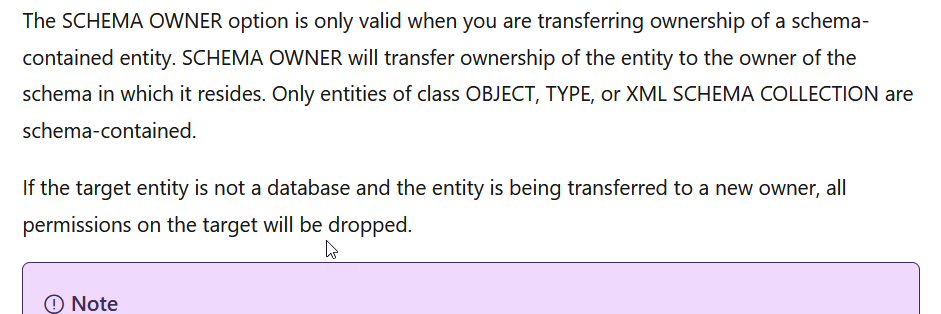
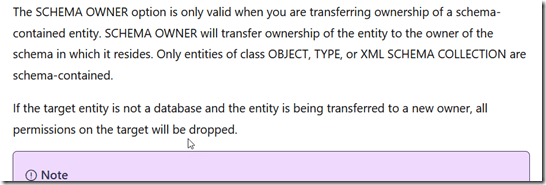
    I’ve lost access. If I check the ALTER AUTHORIZATION docs, I see this, with the last sentence being the important one. Permissions are dropped.
    2026-06_0122

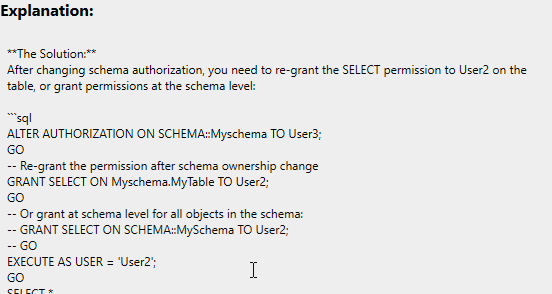
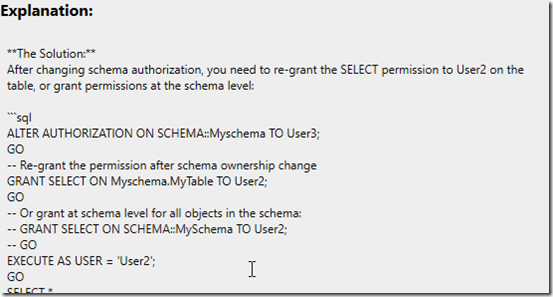
    Something to know, and glad that Prompt AI knows this:
    2026-06_0121

    Summary

    If you change the owner (authorization) on an object, and it’s not a database, permissions are dropped. This should be a warning at the very least, though to be fair, I’ve never changed schema ownership. It could happen, but in general, I try to keep dbo as the owner of all schemas.

    In any case, something good to know.

    SQL New Blogger

    I took some code from an article I read (edited, really) and then used it to setup a scenario to test the concept. I likely will never forget this, and if I an AI suggests this, or can’t figure out what went wrong, I’ll have some idea myself to verify or validate a fix.

    This post took about 20 minutes, including running the code a few times to test things, but it was a good exercise to show what I know, how I can use AI, and how I can spot issues.

    You could use something like this as a learning exercise and to showcase your skills, even in the age of AI.
  • Capturing My Own Metrics: #SQLNewBlogger

    A customer was trying to compare two tables and capture a state as a performance metric. In this case, they were wanting to use Redgate Monitor and custom metrics, but since the tables were in a Memory-Optimized table, they couldn’t as Redgate Monitor runs inside a transaction.

    Note, there are workarounds, but they’re clunky.

    Fortunately, I had a quick solution, which involved SQL Server User Settable Objects. This post looks at how this works.

    The Scenario

    Let’s take the transaction out of the equation by using my own metric. SQL Server includes a few procedures that fall into a pattern. They are named with numerics as shown:

    • sp_user_counter1
    • sp_user_counter2
    • sp_user_counter3
    • …
    • sp_user_counter10

    Each of these corresponds to a value that is captured in a perfmon counter. The counters are in the objects called “SQLServer:User Settable”. The counter name is “query” and the instance is “User Counter n” where n is the number corresponding to the stored procedure.

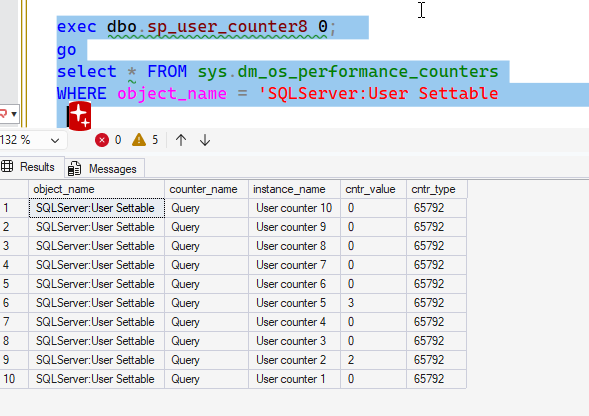
    By default, these are 0, and you can see them here:

    2026-06_0191

    You can also see them in Perfmon

    2026-06_0192

    I’ll stick with SQL Server.

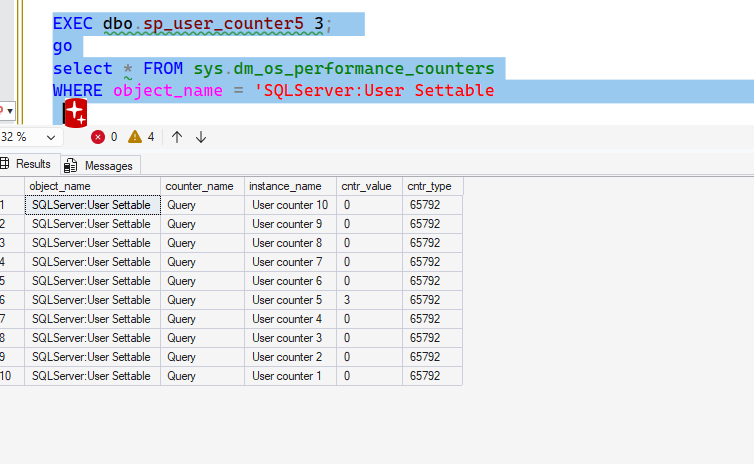
    If I want to alter a value, I call the appropriate procedure. I can do something like call the proc for 5 and set a value. I’ll then query the counters from T-SQL. You can see this below as the value for counter 5 is set to 3.

    2026-06_0193

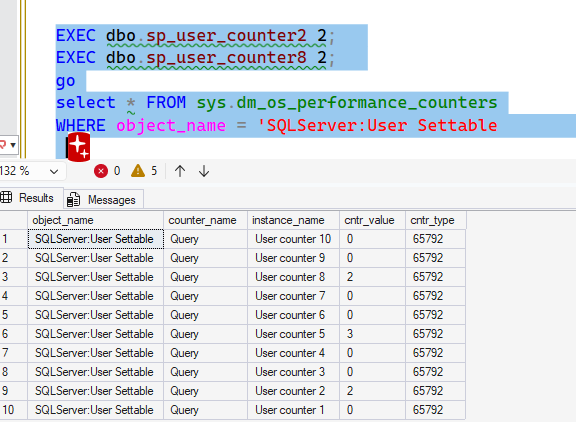
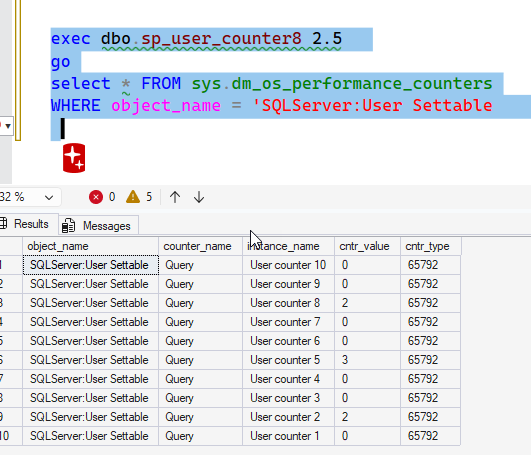
    This value remains set. I’ll set counters 2 and 8 to 2, and then query again. Note that 5 is still set.

    2026-06_0194

    If I want the value set to 0, I need to set it. I’ll do that for counter 8.

    2026-06_0195

    These are metrics, so I need to pick an integer. I can’t set a decimal (or other type) and have it work. If the implicit conversion works, it works, but the value is a decimal.

    2026-06_0196

    If I make this a string, it fails with an error as ‘2.5’ doesn’t convert to an int. Same for a date. Using an int, like ‘5’, works.

    Solving the Issue

    In this case, for the customer, we solved the issue with a proc that performed their query The result of this query (and int) is sent to a counter value like this:

    CREATE or alter proc My_Checker AS BEGIN declare @i int select @i = count(*) from dbo.Customer a INNER JOIN dbo.Candidates b on a.CustomerName = b.PersonName select @i = @i + 1 EXEC dbo.sp_user_counter1 @1; END

    This can run from an Agent job on their schedule, updating the counter as appropriate.

    For their alerting, they can query this metric and set the boundaries that matter to them. In this case, whenever this is greater than 0, they want an alert.

    The user settable values aren’t that useful, especially as there are 10, but I’ve used them in a few places when I wanted to get instrumentation for an application. This allows me to easily capture values and watch them from any monitoring system.

    Worth knowing about and using if you need random things captured.

    SQL New Blogger

    This post took me around 15 minutes to write, though I spent about 10 minutes mocking this for our customer based on their system and then stripping out a few items that are specific to them.

    This is a post that shows how I can use features of SQL Server to solve a problem, which is something every employer wants. An AI would make this code easier, but I have to know to guide an AI in this direction and evalaute if this works. I’d certainly need to check if other apps were using these counters, which isn’t something an AI might think to do, especially as there could be lots of repos to scan.

    You can write something like this, showing how you’re use this features. Bonus points if you use an AI to help you (and disclose how).

  • No Shortcuts for the SQLCMD Batch Terminator: #SQLNewBlogger

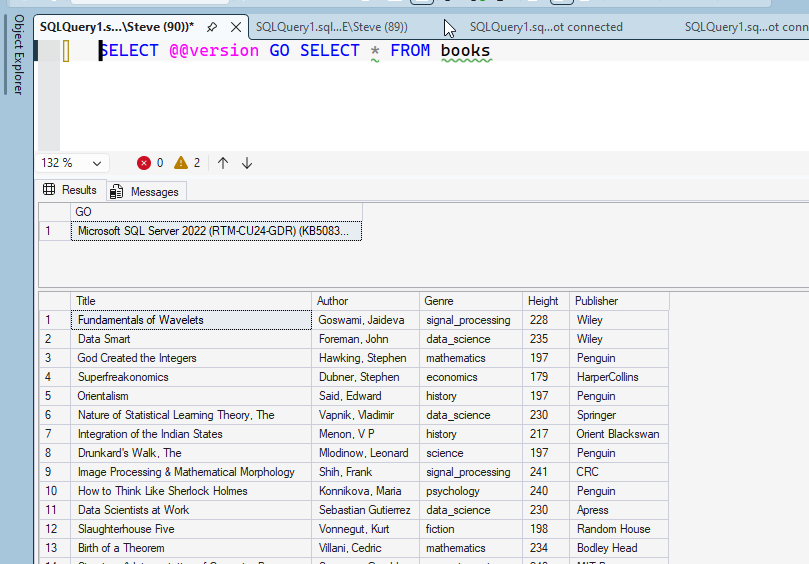
    I was messing around with SQLCMD and I realized something I hadn’t known. I’ve never tried it, but the batch separator has to be separate, which I’ll show.

    Another post for me that is simple and hopefully serves as an example for people trying to get blogging as #SQLNewBloggers.

    The Batch Terminator

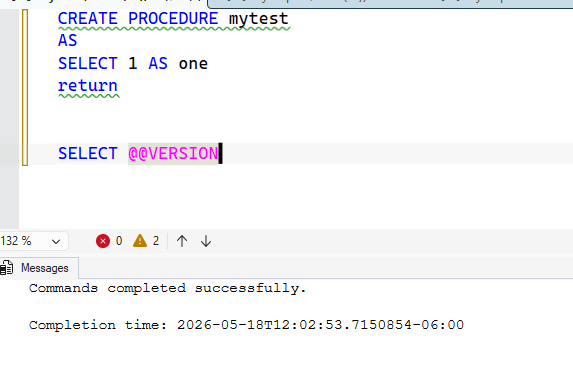
    The default batch terminator in SQL Server tools is “GO”. We tend to use this in SSMS, and many of us know to type this in SQLCMD when we use it. In SSMS, we sometimes need it. Here’s an example where I create a proc and add a RETURN, which some people think means the proc ends.

    It doesn’t.

    2026-05_0092

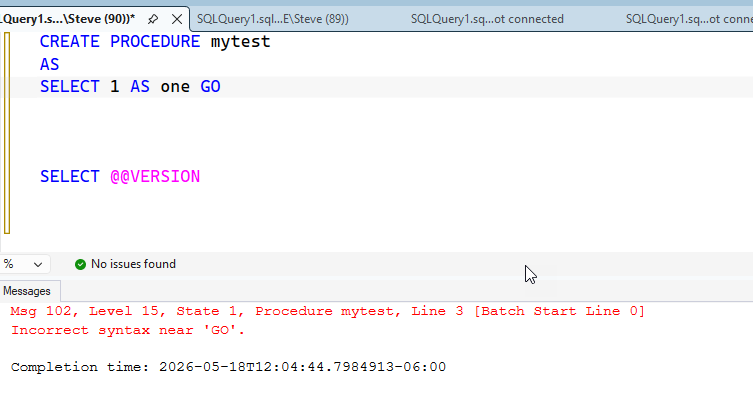
    The SELECT @@VERSION is a part of the proc. Now, if I drop the proc and then add a GO at the end of a line, , I get this:

    2026-05_0093

    Makes sense. Let’s try two commands. In this case, the GO is skipped and I get two results.

    2026-05_0094

    Using SQLCMD

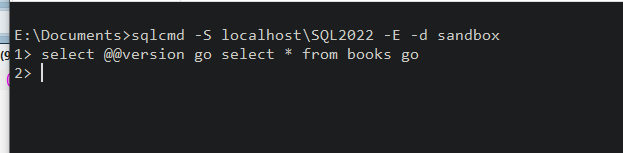
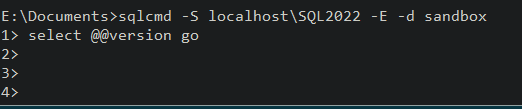
    If I run SQLCMD and enter that code, I get a new prompt. That’s because the batch separator in SQLCMD is a batch terminator. This is in the SQLCMD docs, and since I haven’t terminated a batch, nothing happens.

    2026-05_0095

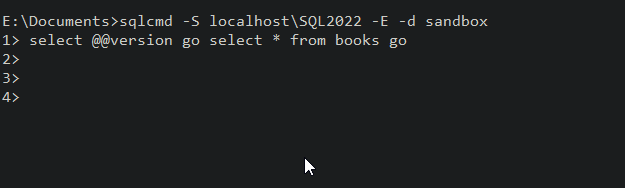
    If I hit enter, I get a new prompt. This continues until I enter a go.

    2026-05_0096

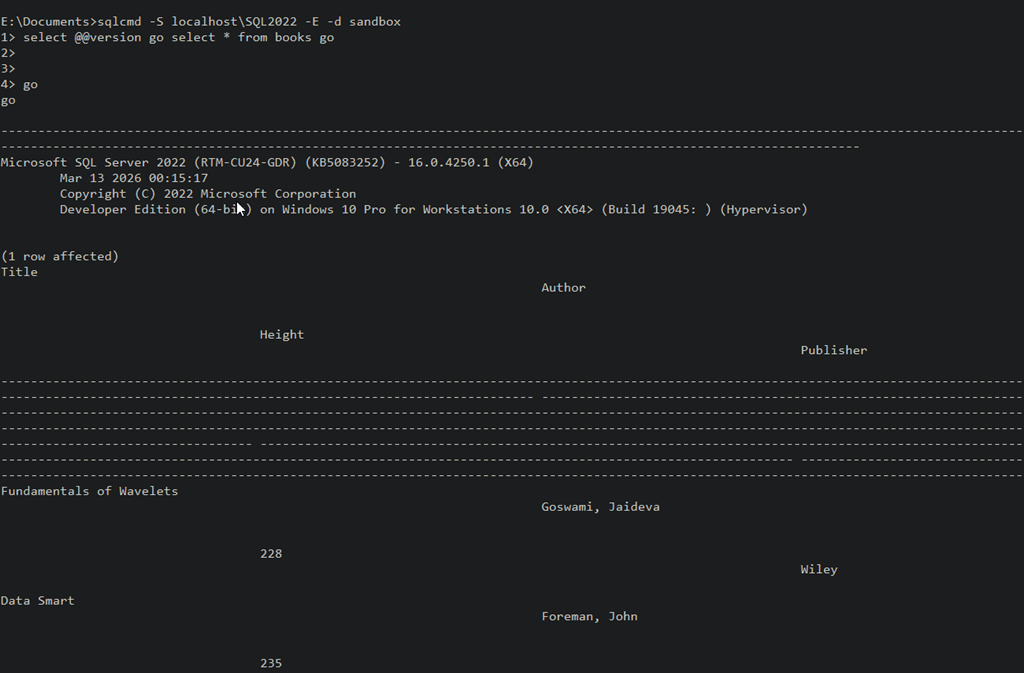
    Once I enter Go, I’ll see my results.

    2026-05_0097

    A good thing to know, as you might think you can enter “select * from @@version go” and think it might execute. It won’t, as you see below:

    2026-05_0098

    This isn’t likely a problem for most people as they’ll instinctively enter GO if something doesn’t run, but newbies might miss this.

    SQL New Blogger

    This was about a 10 minute post, based on an experiment to see if I could get something to run quickly. Since I ran the experiment, I captured some screenshots and built this post.

    Showcase continued learning, especially in this era of AI where you might need to guide an LLM along a better path.

  • Funny Money: #SQLNewBlogger

    While wandering around the documentation looking for some Question of the Day topics, I learned something new about the money data type. This post discusses what I learned.

    Another post for me that is simple and hopefully serves as an example for people trying to get blogging as #SQLNewBloggers.

    The Money Type

    Did you know that you can add a currency symbol to the money data type for assignment? I didn’t. This isn’t in the documentation, but it’s something I need to submit as a PR.

    In any case, I can assign money like this:

    DECLARE @YenAmount MONEY;
    SET @YenAmount = ¥1500; 
    
    SELECT @YenAmount AS RawValue; 

    Note that this isn’t really assigning Yen values. It’s just a number, but since the money type supports certain literals, this works. If I select the amount, I get just a number.

    2026-05_0087

    If I change the symbol, it still works because SQL Server doesn’t really interpret the amount and symbol or the variable name. That being said, this is bad code.

    2026-05_0089

    The money and smallmoney data type page lists the symbols you can use, but none of them are stored. Where this page fails is that it doesn’t help you get the values back out as the currency.

    Format helps here. I can use this with some culture to determine what I want to get out. For example, I get Yen with this:

     FORMAT(@YenAmount, 'c', 'ja-JP')

    You can see the results here:

    2026-05_0090

    I can also get Pounds.

    2026-05_0091

    SQL New Blogger

    This post took me about 5 minutes to assemble as I’d already had the code, but it’s an example of a quick thing based on other work I was doing.

    You can showcase this and help others see that you are learning and growing.