Tag: SQLNewBlogger

  • Get a Range of Sequence Values: #SQLNewBlogger

    I discovered a procedure recently that I wasn’t aware of: sp_sequence_get_range. This post looks at how the proc works.

    Another post for me that is simple and hopefully serves as an example for people trying to get blogging as #SQLNewBloggers.

    The Setup

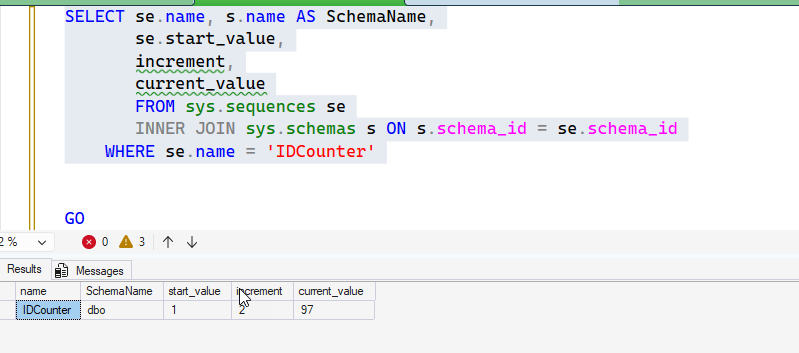
    I have a sequence object, IDCounter, that is an integer with an increment of 2. The next value that is returned is shown here:

    2026-04_0249

    The next value returned will be 99 (increment by 2).

    However, imagine that I know I need 10 new values. I don’t want a loop to get these values. Instead, I want to move the sequence to 10 values ahead.

    These ten values will be 99, 101, 103, 105, 107, 109, 111, 113, 115, 117. The current value should then be 117 if we get 10 rows.

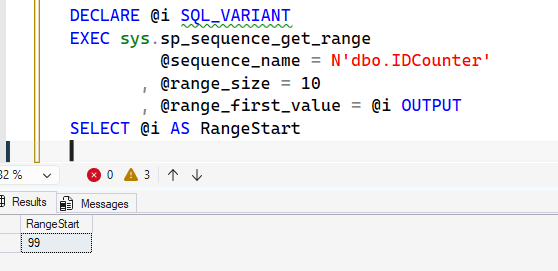
    Let’s use sys.sp_sequence_get_range to do this. I’ll use this code:

    DECLARE @i SQL_VARIANT
    EXEC sys.sp_sequence_get_range @sequence_name = N'dbo.IDCounter', @range_size = 10, @range_first_value = @i OUTPUT
    SELECT @i AS RangeStart

    I need to use a SQL_VARIANT as the output, though I can cast this to anything once I have the value.

    When I run this code, notice the output.

    2026-04_0251

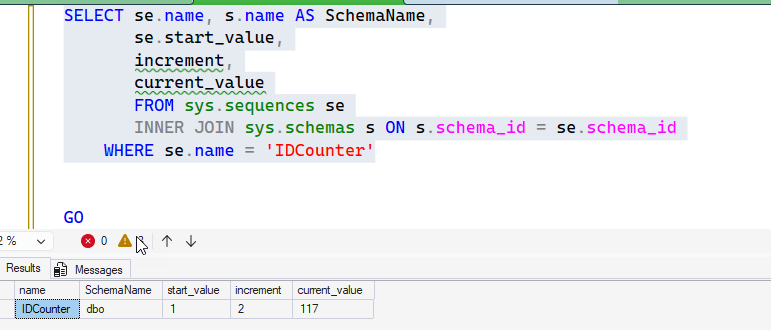
    Now if I check the metadata, I’ll see the current value below as 117.

    2026-04_0252

    There are client side applications that gather a bunch of data and know they need to insert xx rows. This helps them both update the sequence and also reserve these values for themselves. Of course, if the application fails, these values might be lost.

    SQL New Blogger

    A quick post. This took me about 5 minutes to test and about 10 minutes to structure a quick post on something I learned.

    As a follow-up, I’ll use another post to show how this works in an application that reserves these values and then another application performs an insert.

    You could easily do this on your blog and show some knowledge.

  • Finding the Next Sequence Value: #SQLNewBlogger

    I saw a question asking about the next sequence value and decided to try and answer it myself. I assumed this would be easy, and it was, but I used some AI help to make it very quick to get the value and learn something.

    Another post for me that is simple and hopefully serves as an example for people trying to get blogging as #SQLNewBloggers.

    Checking for Sequences

    I know I’ve done some testing lately with sequences for a customer, so I decided to ask Prompt AI to help. I connected to a database and asked this question after clicking ALT+Z.

    2026-03_0133

    I got this response, which I executed before accepting the code. One thing I like about SQL Prompt is I can execute code and then adjust my prompt (or paste in an error). As you can see, I have 3 sequences in this database. I get a bunch of the meta data, including the current_value.

    2026-03_0134

    However, is that the next value or the last one? It could be interpreted multiple ways. I could look this up, but I decided to ask again. I accepted the code, then wrote a quick SQL statement to get the next value. If you’ve never done this, you might not know how sequences work, which is a different issue. In my case, a “se” tab, “ne” tab “i” got e this code. I then asked to find this.

    2026-03_0136

    UPDATE: From this article, the current_value has an issue. For new sequences, it shows the starting value, even if that value hasn’t been used, so the last_used_value is a better choice.

    SQL Prompt AI returned this query, which gets me the current_value, but I know that. I decided to ask for an explanation rather than Google or work my way through MSLearn.

    2026-03_0137

    The explanation is good. It’s not the current value + 1 it’s the current value + increment, which is a subtlety that some people might miss.

    2026-03_0138

    Let’s test this. I wrote some code and then executed it. I get 17, which makes sense. The current value (seen above) is 15 and the increment is 2.

    2026-03_0139

    Problem solved. This short session likely will help me remember this detail for future code (or prompts).

    SQL New Blogger

    This post took me about 8 minutes to setup the code, capture the images, and write this up. I’ve done a lot of these, but I showed how to investigate a question, use AI for help, and then make sure the AI is actually giving me something good.

    You could write these types of posts and show your fluency with both data engineering and AI assistance. Take a minute and start writing some blogs that showcase how your skills and career are growing.

  • Finding and Updating Duplicate IDs: #SQLNewBlogger

    Finding duplicates was an interview question for me years ago, and I’ve never forgotten it. Recently I got asked how to easily do this and delete them, so I decided to write a couple of posts on the topic. This one looks at simple, single column IDs. The next one will look at more complex situations.

    Another post for me that is simple and hopefully serves as an example for people trying to get blogging as #SQLNewBloggers.

    A Simple Scenario

    Like many people, I like identity fields for primary keys. However, lots of people build tables like this:

    CREATE TABLE PurchaseOrder
    (
         poid INT IDENTITY(1, 1),
         purchaseordernumber VARCHAR(20),
         podate DATETIME,
         active INT
    )
    GO

    No nullability, and no PK constraint. People think an identity prevents duplicates. Run the query above and then the script below.

    INSERT INTO PurchaseOrder
    (
         purchaseordernumber,
         podate,
         active
    )
    VALUES
    ('PO-2023-00001', '2023-01-15 09:30:00', 1),
    ('PO-2023-00002', '2023-01-22 11:45:00', 1),
    ('PO-2023-00003', '2023-02-05 14:20:00', 1),
    ('PO-2023-00004', '2023-02-18 10:15:00', 0),
    ('PO-2023-00005', '2023-03-03 16:30:00', 1),
    ('PO-2023-00006', '2023-03-17 08:45:00', 1),
    ('PO-2023-00007', '2023-04-02 13:10:00', 0),
    ('PO-2023-00008', '2023-04-15 15:25:00', 1),
    ('PO-2023-00009', '2023-05-01 09:50:00', 1),
    ('PO-2023-00010', '2023-05-14 12:05:00', 1),
    ('PO-2023-00011', '2023-06-01 14:40:00', 0),
    ('PO-2023-00012', '2023-06-15 10:35:00', 1),
    ('PO-2023-00013', '2023-07-02 16:55:00', 1),
    ('PO-2023-00014', '2023-07-17 08:20:00', 0),
    ('PO-2023-00015', '2023-08-03 11:30:00', 1),
    ('PO-2023-00016', '2023-08-18 13:45:00', 1),
    ('PO-2023-00017', '2023-09-04 15:10:00', 1),
    ('PO-2023-00018', '2023-09-19 09:25:00', 0),
    ('PO-2023-00019', '2023-10-05 12:40:00', 1),
    ('PO-2023-00020', '2023-10-20 14:15:00', 1)
    GO
    SET IDENTITY_INSERT dbo.PurchaseOrder ON
    GO
    INSERT INTO PurchaseOrder
    ( poid,
         purchaseordernumber,
         podate,
         active
    )
    VALUES
    (19, 'PO-2023-00021', '2026-01-15 09:30:00', 1),
    (14, 'PO-2023-00022', '2026-01-22 11:45:00', 1)
    GO
    SET IDENTITY_INSERT dbo.PurchaseOrder OFF
    GO

    Now if we select all the rows from this table, we might think things are fine. After all, all the purchaseordernumber fields are unique.

    Checking Duplicates

    I’ll run this query. Notice I use a GROUP BY on the poid to list these together with a count. In the image, we see some counts that are greater than 1, which indicates a duplicate. We are grouping, or putting all the rows with the same value together.

    2026-02_0139

    I often will add a HAVING clause to this, which lets me filter the grouped items. When I do that, I just see two items.

    2026-02_0140

    Notice if I change this to purchaseordernumber, I don’t get duplicates. This is because those are unique.

    2026-02_0142

    However, a lot of people often build software that edits using the underlying key, so they can edit the PO number. Let’s do that. I’ll change the PO number for id 19. First we’ll get the current values, and then re-query.

    If we look below, we see separate purchase order numbers, but when we try to update one of them, we get two changed. Because we have duplicate hidden surrogate ID keys.

    2026-02_0143

    We want to fix this, so what can we do?

    What we want to do is find the duplicate 14s and 19s (and others) and change them.

    Fixing the Issue

    While trying to fix this, I realized that one can’t update an identity field. That actually makes the fix really, really simple.

    Since I want to give the rows new poid values, I need to find those rows which are duplicates and then re-insert them into the table. I also need a way to delete the old duplicate values as well.

    This can be tricky, as the purpose of an identity (usually) is to ensure there are not duplicate rows. It’s possible every field in the row is duplicate, which could be an issue. In this case, I’d likely just copy the data back in and delete all the “old” rows, which were the same.

    In my case, the purchaseordernumber is different, so we can use that with the date to decide which is a duplicate and which row we keep.

    SQL New Blogger

    This is a little longer post, and it somewhat got away from me, but this isn’t an easy thing to write about, nor is it short. Easy to mess this up.

    This post took me about 45 minutes to write. The code part wasn’t long, but I had to think about how to frame the issue with test code and explain that. SQL Prompt made the coding easy once I knew what I wanted. I built this over 3-4 days, working on it at 5-10 minutes at a time.

    That’s a great way to tackle complex topics.

    You could do this and impress an interviewer. Highlight this post in your resume/LinkedIn/etc.

  • Identity Columns Can’t Be Updated: #SQLNewBlogger

    I’m not sure I knew identity column values could not be updated. I ran into this while trying to solve a problem recently and had to check the error I was getting. This post shows what happened.

    Another post for me that is simple and hopefully serves as an example for people trying to get blogging as #SQLNewBloggers.

    Setup

    A quick setup for you. I need to go to the store soon, so hence, here is my sample table (created and filled by SQL Prompt).

    CREATE TABLE Vodka
    ( id INT NOT NULL IDENTITY(1,1) PRIMARY KEY,
      brandname VARCHAR(100) NOT NULL
      , rating TINYINT
    );

    INSERT INTO dbo.Vodka
    (
        brandname,
        rating
    )
    VALUES
    ('Grey Goose', 9),
    ('Belvedere', 8),
    ('Absolut', 7),
    ('Smirnoff', 6),
    ('Stolichnaya', 8),
    ('Ketel One', 9),
    ('Tito''s', 8),
    ('Ciroc', 7),
    ('Skyy', 6),
    ('Russian Standard', 7););

    I then tried this:

    2026-02_0157

    OK, what about IDENTITY_INSERT. I know this isn’t an insert, but I thought this “unlocked” the identity column. It doesn’t work.

    2026-02_0158

    I searched on MS Learn and found the UPDATE statement documentation. In here, you can see what it says below. I can’t do this.

    2026-02_0159

    The error reference provides no info, but apparently this isn’t a thing.

    What’s amazing to me is that in 30 years either I’ve never done this, or I’ve rarely encountered it and forgotten. Either is possible.

    In any case, if I want to change this, I likely need to “re-insert” the row with a new value (either take the seed or use identity_insert) and then delete the old one.

    Crazy.

    SQL New Blogger

    I was testing something else and ran across this. I decided it’s a great showcase of me learning something and giving a workaround. I’ll show the workaround in another post, which is actually about the thing I was doing.

    Of course, that post needs to change.

    This took about 10 minutes to write.