Tag: SQLNewBlogger

  • Sparse Columns Can Use More Space: #SQLNewBlogger

    I saw this as a question submitted at SQL Server Central, and wasn’t sure it was correct, but when I checked, I was surprised. If you choose to designate columns as sparse, but you have a lot of data, you can use more space.

    This post looks at how things are stored and the impact if much of your data isn’t null.

    Another post for me that is simple and hopefully serves as an example for people trying to get blogging as #SQLNewBloggers.

    Setting Up

    Let’s create a couple of tables that are the same, but with sparse columns for one of them.

    CREATE TABLE [dbo].[NoSparseColumnTest](
         [ID] [int] NOT NULL,
         [CustomerID] [int] NULL,
         [TrackingDate] [datetime] NULL,
         [SomeFlag] [tinyint] NULL,
         [aNumber] [numeric](38, 4) NULL,
      CONSTRAINT [NoSparseColumnsPK] PRIMARY KEY CLUSTERED 
    (
         [ID] ASC
    )WITH (PAD_INDEX = OFF, STATISTICS_NORECOMPUTE = OFF, IGNORE_DUP_KEY = OFF, ALLOW_ROW_LOCKS = ON, ALLOW_PAGE_LOCKS = ON, OPTIMIZE_FOR_SEQUENTIAL_KEY = OFF) ON [PRIMARY]
    ) ON [PRIMARY]
    GO
    CREATE TABLE [dbo].[SparseColumnTest](
         [ID] [int] NOT NULL,
         [CustomerID] [int] NULL,
         [TrackingDate] [datetime] SPARSE  NULL,
         [SomeFlag] [tinyint] SPARSE  NULL,
         [aNumber] [numeric](38, 4) SPARSE  NULL,
      CONSTRAINT [SparseColumnPK] PRIMARY KEY CLUSTERED 
    (
         [ID] ASC
    )WITH (PAD_INDEX = OFF, STATISTICS_NORECOMPUTE = OFF, IGNORE_DUP_KEY = OFF, ALLOW_ROW_LOCKS = ON, ALLOW_PAGE_LOCKS = ON, OPTIMIZE_FOR_SEQUENTIAL_KEY = OFF) ON [PRIMARY]
    ) ON [PRIMARY]
    GO


    Once we have these, I used claude to help me fill this with data. That’s coming in another post, but I uploaded the script here. This is for the SparseTable Test, where I replaced the select on line 59 with NULL values. In the NoSparse table, this selected random data.

    If I select data from the tables and count rows, I see 1,000,000 rows in each. However, the Sparse table is all NULL values in these columns.

    2025-09_0228

    Checking the Sizes

    I can use sp_spaceused to check sizes. The results of running this is below, but here is the summary

    • NoSparse Columns – 42MB and 168KB for the index
    • Sparse Columns – 16MB and 72KB for the index

    A good set of savings. Here is the raw data:

    2025-09_0229

    Adding Sparse Data

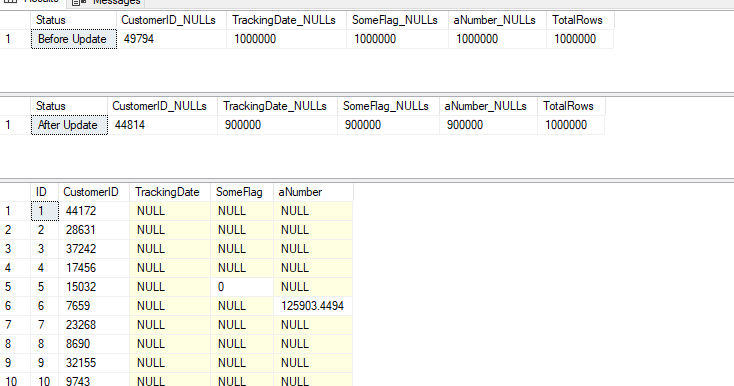
    I’m going to update 10% of the rows to be not null in different columns. Not 10% total, but a random 10% amongst all the columns. Again, Claude gave me a script to do this and I have run it. This is the SparseTest_UpdateData.sql in the zip file above.

    After running this, I have 900,000 nulls i the TRackingDate, as well as the other columns. You can see the counts below, and a sample of data.

    2025-09_0230

    If we re-run the size comparison, it’s changed. Now I have:

    • NoSparse Columns – 42MB and 168KB for the
      index
    • Sparse Columns – 33.7MB and 88KB for the index

    Not bad, and still savings.

    Let’s re-run the update script and aim not for 10% updates, but 65% updates. This gets me to only 315k NULL values in the tables, or a little over 70% of my sparse columns are full of data. My sizes now are:

    • NoSparse Columns – 42MB and 168KB for the
      index
    • Sparse Columns – 67MB and 192KB for the index

    My sparse columns now use more space than my regular columns.

    Beware of using the sparse option unless you truly have sparse data. I didn’t test to find out where the tipping point it, but I’d hope it was less than 50% of data being populated.

    SQL New Blogger

    This is another post in my series that tries to inspire you to blog. It’s a simple post looking at a concept that not a lot of people might get, but which might trigger a question in an interview. That’s why you blog. You can share knowledge, but you build your brand and get interviewers to ask you questions about your blog.

    This post took a little longer, about 30 minutes to write, though the AI made it go quicker to actually generate the data for my tables. There were a few errors, which I’ll document, but pasting in the error got the GenAI to fix things.

    This post showed me testing something I was wondering about. In a quick set of tests, I learned that I need to be careful if I use a sparse option. You could showcase this and update in 10% increments (or less) and keep testing sizes until you find when there is a tipping point. Bonus if you use a column from an actual table in your system.

    https://learn.microsoft.com/en-us/sql/relational-databases/tables/use-sparse-columns?view=sql-server-ver17

  • Adding a Named Default Constraint to a Table: #SQLNewBlogger

    As part of a demo recently I was adding a default value to a new column with a simple DEFAULT and a value. Under the covers this creates a constraint, however, I want to ensure this is named explicitly and not auto generated. This post shows how to do this.

    Another post for me that is simple and hopefully serves as an example for people trying to get blogging as #SQLNewBloggers.

    Setup

    Let’s create a simple table like this one:

    CREATE TABLE dbo.OrderHeader (
    OrderHeaderID INT NOT NULL CONSTRAINT OrderHeaderPK PRIMARY KEY,
    OrderDate DATETIME,
    CustomerID INT
    )
    GO

    Now I want to add a Created column to the table, with a default value of the current date and time. I decide to do this with an ALTER TABLE statement. In the past, I’ve done this with this code:

    ALTER TABLE dbo.OrderHeader 
    ADD Created DATETIME DEFAULT GETDATE()

    The problem is this creates a constraint with a system generated name. If I deploy this code to different systems, I get different names. If I need to change the constraint or drop it, I have to query to find the name as it isn’t explicit. You can see this below.

    2025-05_line0061

    What I’d rather do is have a named constraint that makes sense to me. Let’s drop this column and do a better job. However, I cant’ just drop the column because I need to drop the constraint and that means I need to get the name.

    2025-05_line0063

    That’s the problem I’m trying to solve. Here is what I need to do.

    2025-05_line0064

    Now that I’ve dropped this, let’s add it back with an explicit name. This is simple SQL, and easy to add, just like I can do for Primary Keys. We’ll add a CONSTRAINT keyword and name before the default.

    ALTER TABLE dbo.OrderHeader 
    ADD Created DATETIME CONSTRAINT df_OrderHEader_Created_Getdate DEFAULT GETDATE()
    GO

    When I run this, now I see a named constraint.

    2025-05_line0066

    Note that I’ve named this for the column as if I need similar constraints in this table, they need to be uniquely named. This is in the database, not the table, as all constraints are stored in sys.default_constraints.

    Do this and your database deployments go easier, especially across multiple systems.

    SQL New Blogger

    This is a simple thing, but it’s a good coding practice and better software engineering than allowing the system to name things. I explained how to do this and related this to a real issue in database development: deployments.

    This post took me about 10 minutes, and it would likely take you about the same to start showcasing your knowledge. In today’s world, maybe you use AI to help you solve this problem and showcase that skill.

  • Better Trigger Design: #SQLNewBlogger

    I had someone ask me about using triggers to detect changes in their tables. This is the third post in the series. The first one

    Another post for me that is simple and hopefully serves as an example for people trying to get blogging as #SQLNewBloggers.

    The Setup

    We’re using the same table from the first post.  This is the dbo.Customer table with a PK and 5 other fields. Here is the data in the table:

    2025-05_0231

    I had this trigger in the last post, and showed how it captured updates to the ContactEmail field.

    CREATE OR ALTER TRIGGER Customer_tru ON dbo.Customer FOR UPDATE
    AS
    BEGIN
         IF UPDATE(CustomerName)
             INSERT dbo.logger (logdate, logmsg) VALUES (DEFAULT, 'dbo.Customer.CustomerName changed')
         IF UPDATE(AddressKey)
             INSERT dbo.logger (logdate, logmsg) VALUES (DEFAULT, 'dbo.Customer.AddressKey changed')
         IF UPDATE(CustomerStatus)
             INSERT dbo.logger (logdate, logmsg) VALUES (DEFAULT, 'dbo.Customer.CustomerStatus changed')
         IF UPDATE(CustomerContact)
             INSERT dbo.logger (logdate, logmsg) VALUES (DEFAULT, 'dbo.Customer.CustomerContact changed')
         IF UPDATE(ContactEmail)
         BEGIN
             INSERT dbo.logger (logdate, logmsg)
             SELECT GETDATE(), 'ContactEmail updated from ' + d.ContactEmail + ' to ' + i.ContactEmail
              FROM inserted i
              INNER JOIN Deleted d ON i.CustomerID = d.CustomerID
         END
    END

    This seemed to work, but did it really?

    The Problem

    Let’s illustrate the big problem with this change. I’ll run this code:

    UPDATE dbo.Customer
      SET ContactEmail = ‘andy@sqlservercentral.com’
      WHERE CustomerID = 2;

    If I do this, here are the results:

    2025-05_0232

    I get a NULL? Why, the original value is null and when I concatenate null with other values, I get NULL. Not ideal.

    Let’s fix this problem. I’ll use a function to handle null values. Note, I need to do this for both the inserted and deleted tables. Here’s the new trigger.

    CREATE OR ALTER TRIGGER Customer_tru ON dbo.Customer FOR UPDATE
    AS
    BEGIN
         IF UPDATE(CustomerName)
             INSERT dbo.logger (logdate, logmsg) VALUES (DEFAULT, 'dbo.Customer.CustomerName changed')
         IF UPDATE(AddressKey)
             INSERT dbo.logger (logdate, logmsg) VALUES (DEFAULT, 'dbo.Customer.AddressKey changed')
         IF UPDATE(CustomerStatus)
             INSERT dbo.logger (logdate, logmsg) VALUES (DEFAULT, 'dbo.Customer.CustomerStatus changed')
         IF UPDATE(CustomerContact)
             INSERT dbo.logger (logdate, logmsg) VALUES (DEFAULT, 'dbo.Customer.CustomerContact changed')
         IF UPDATE(ContactEmail)
         BEGIN
             INSERT dbo.logger (logdate, logmsg)
             SELECT GETDATE(), 'ContactEmail updated from ' + COALESCE(d.ContactEmail, 'null') + ' to ' + COALESCE(i.ContactEmail, 'null')
              FROM inserted i
              INNER JOIN Deleted d ON i.CustomerID = d.CustomerID
         END
    END

    We can see this handles the null appropriately.

    2025-05_0233

    In this case I’ve chosen to replace a NULL value with the word ‘null’. This means something to me, but I could have just as well replaced this with “blank” or any other word. In many applications a developer might display a null value as a blank, so choose what works for you.

    I’m also including an example to show this works for multiple rows. Here I’ll update multiple rows and we can see each is inserted into my log.

    2025-05_0234

    This is a good reason to audit certain activities, as people will sometimes make these mistakes and updates lots of data.

    This trigger is slightly more useful, and handles the NULL cases, but it still isn’t perfect. Imagine I need to parse out changes, or generate the reverse transactions, or even search for certain changes. Stuffing a lot of data into a single field is overloading it, and making it less useful over time. What we’d really want to do is separate pertinent data into different fields. In a NoSQL world, we might do this by using a JSON schema to track the before and after.

    We could do that here, just stuff JSON into the log message and read it back out and de-serialize it.

    SQL New Blogger

    This post modified our trigger to address a previous design problem: not handling nulls. We also showed how to test the trigger with multiple rows. This shows I’ve added knowledge to my skillset and can test what I’m trying to do.

    Write your own blogs that might examine what you’ve done poorly in the past and how to fix the problems you’ve identified, even in simple code. Many of us do this a lot.

    This was a 20-30 minute post for me. You could likely do it in a similar amount of time.

  • Modifying a Trigger to Capture More Info: #SQLNewBlogger

    I had someone ask me about using triggers to detect changes in their tables. This is a second post looking at triggers, in this case, modifying my trigger to detect more changes and using that information.

    Another post for me that is simple and hopefully serves as an example for people trying to get blogging as #SQLNewBloggers.

    The Setup

    We’re using the same table from the last post.  This is the dbo.Customer table with a PK and 5 other fields.

    In this case we want to track the changes to an email and capture what those changes are. In other words, if I update the email from ‘sjones@sqlservercentral.com’ to ‘steve.jones@red-gate.com’, I want to capture

    To do this, let’s modify our trigger. We can still test if the field is updated with UPDATE(). We did this in the last post.

    This will let us know that the column changes by returning a boolean. If this is true, we want to insert the new values into our logger. We also want to capture the old value. These values are stored in the inserted and deleted tables, which are available in a trigger. I’ll use a join between these on the PK to get the same data from both.

    I’m also using a query with these tables because more than one row can be updated and we want to capture all the changes.

    Here is my new trigger, with the OR ALTER added to the code.

    CREATE OR ALTER TRIGGER Customer_tru ON dbo.Customer FOR UPDATE
    AS
    BEGIN
         IF UPDATE(CustomerName)
             INSERT dbo.logger (logdate, logmsg) VALUES (DEFAULT, 'dbo.Customer.CustomerName changed')
         IF UPDATE(AddressKey)
             INSERT dbo.logger (logdate, logmsg) VALUES (DEFAULT, 'dbo.Customer.AddressKey changed')
         IF UPDATE(CustomerStatus)
             INSERT dbo.logger (logdate, logmsg) VALUES (DEFAULT, 'dbo.Customer.CustomerStatus changed')
         IF UPDATE(CustomerContact)
             INSERT dbo.logger (logdate, logmsg) VALUES (DEFAULT, 'dbo.Customer.CustomerContact changed')
         IF UPDATE(ContactEmail)
         BEGIN
             INSERT dbo.logger (logdate, logmsg) 
             SELECT GETDATE(), 'ContactEmail updated from ' + d.ContactEmail + ' to ' + i.ContactEmail 
              FROM inserted i
              INNER JOIN Deleted d ON i.CustomerID = d.CustomerID
         END
    END

    This is mostly the same code, but now I’ve changed the last conditional test. If the email is updated, I want to query the inserted and deleted tables and create a log message. This is the type of thing I’ve seen often in systems, and while it’s not a great pattern, it does let me capture some information. There are some problems with this, I’ll discuss in the next post.

    We can see below that when I run this code, I get the updated captured and logged.

    2025-05_0230

    This post has introduced a few new things, the inserted and deleted tables, which I didn’t discuss in the last post. However, they are useful when you want to capture information affected in triggers, which can be more than one row. Using these tables helps you set up triggers that handle multiple changes.

    There are problems with this trigger, mainly with NULLs, potential performance, and architecture in what is captured, but we’ll address those in the future.

    SQL New Blogger

    This post looks at enhancing a previous post and providing more information. You (hopefully) learn from your work, from both feedback  and experiments, and you should modify your thinking and work. This shows how I’ve adapted something I did previously, which is a skill we all need.

    This was a 20-30 minute post for me. You could likely do it in a similar amount of time.