Tag: SQLNewBlogger

  • I learned about the order of logical operations #SQLNewBlogger

    Another post for me that is simple and hopefully serves as an example for people trying to get blogging as #SQLNewBloggers.

    I had logic in a CS curriculum many years ago and I’ve worked with AND and OR statements for years. I’ve sometimes confused myself, but I usually ensure I have parenthesis included to clarify the code. Not just for me, but for anyone that might glance at the code later.

    As a side note, I also try to format code so a quick glance can reveal what happens.

    However, I learned something new this week. I saw a question about the order of logical operations in this form: a or b and c.

    I had somewhat assumed, like math, we’d use a left to right evaluation. However, that’s not correct. Look at this snippet:

    2018-03-22 10_06_22-SQLQuery1.sql - (local)_SQL2014.SimpleTalk_1_Development (PLATO_Steve (57))_ - M

    If we went left to write, we’d have two rows from the OR (n=1, n=2) and then an AND that produces no rows. So no results?

    That’s not correct. According to BOL for OR,  the AND operations occur first. So n=2 AND n > 3 occurs, with 0 rows. Then the OR with n=1 is evaluated to return 1 row.

    Fascinating.

    At least to me. I’ve never thought because I’d write

    WHERE (n = 1 OR n = 2) AND n > 3

    or

    WHERE n = 1 OR (n = 2 AND n > 3)

    and be sure that what I wanted to occur would occur.

    A quick lesson. While it’s good to know what the order or evaluation is for your platform, don’t count on this. If there is a chance for confusion or unintended consequences, use parenthesis. It’s simpler and easier, and I might argue, more elegant.

  • Enabling Guest in a Database–#SQLNewBlogger

    Another post for me that is simple and hopefully serves as an example for people trying to get blogging as #SQLNewBloggers.

    The guest account exists in all your databases. This is installed by default, and guest is used to map a login that doesn’t otherwise have access to a database.

    Sound scary?

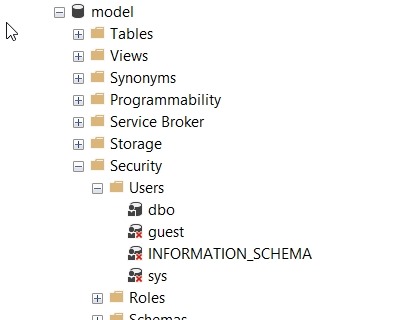
    It should. This would be bad if any login could connect to any database, potentially reading data using the guest account. Fortunately Microsoft has done two things. First, guest is disabled in all user databases. This is because it’s disabled in model, which is our template.

    2018-02-08 08_51_24-SQLQuery8.sql - (local)_SQL2016.AdventureWorks2014 (PLATO_Steve (74))_ - Microso

    Second, guest is typically assigned no rights. It’s a member of the public role, which also has no rights by default.

    Enabling Guest

    If you want to allow anonymous access for logins through the guest account, it’s easy. Be wary and careful of doing this and be sure you understand what rights have been granted to public if you do this. In general, I’d expect auditors and any compliance/security officers to be against this, but you should check.

    The user exists already, and just needs the CONNECT permission to get enabled. You can do this with this code:

    GRANT CONNECT TO guest

    If you want to remove permission, use

    REVOKE CONNECT FROM guest

    That’s it. Remember, by default this user can’t access any objects. I would recommend you not grant rights to guest, but use roles. Either one of the built in ones, or better yet, create your own role and choose limited permissions.

    SQLNewBlogger

    One of the ways you can showcase your knowledge, show you’re learning, and show you’re motivated to enhance your career is blogging. This post is an example of what you could write, in your own words, about something you’ve learned.

    This one took my about 5 minutes after I’d spent a little time getting guest enabled for a test project.

  • Advent of Code 2017 Day 5–#SQLNewBlogger

    Another post for me that is simple and hopefully serves as an example for people trying to get blogging as #SQLNewBloggers.

    This is day 5 of the Advent of Code 2017. If you want to read about the puzzles, start with Day 1. This is going to be a crazy looping item, since it will move through the list, relative to the current spot, and incrementing items, I know this won’t be good in SQL.

    Still. Worth solving.

    Let’s load the data. I’ll use a table, but first, I’ll also add an identity. This will help me number instructions and figure out what the next one is.

    CREATE TABLE Day5
    ( InstructionKey INT IDENTITY(1,1)
    , Instruction INT)
    GO

    There are issues with identities, but this is a great trick:

    CREATE VIEW Day5V
    AS
    SELECT d.Instruction FROM dbo.Day5 AS d
    GO
    -- reusable code
    BULK INSERT Day5V FROM 'e:\Documents\GitHub\AdventofCode\2017\Day5\Input.txt' WITH (ROWTERMINATOR='\n')
    GO

    Now I can get to work. Here’s the logic I used.

    I wanted to first set some starting points. I have a counter (0 based, increment first). This determines how many times I jump around. I also need to track the current instruction key and the next key. And, of course, I need the instruction value.

    The identity is the array index, or the instruction key (which place am I in). In this case, I’ll try to follow this logic.

    Get the end (out of bounds, which is the max + 1). I loop until I get an jump outside of the end range. The loop does these items:

    • Get the current instruction jump
    • Set the next location to be the current key + the current jump
    • Update the current jump to increment by 1
    • Set the current instruction key to the next key
    • loop

    This seems to be what I need. On the test set, this worked fine. When I first set this up, I used this code:

    DECLARE @end INT ,
             @CurrentInstructionKey INT = 1 ,
             @Instruction INT ,
             @NextInstructionKey INT ,
             @counter INT = 0;
    SELECT @end = MAX(InstructionKey) + 1
    FROM dbo.Day5 AS d;
    
    -- SELECT [end] = @end;
    
    WHILE @CurrentInstructionKey < @end
    BEGIN
         SET @counter = @counter + 1;
         SELECT @Instruction = Instruction
         FROM Day5
         WHERE InstructionKey = @CurrentInstructionKey;
         SELECT @NextInstructionKey = @CurrentInstructionKey + @Instruction;
         UPDATE dbo.Day5
         SET Instruction = Instruction + 1
         WHERE InstructionKey = @CurrentInstructionKey;
         SET @CurrentInstructionKey = @NextInstructionKey;
    --PRINT @CurrentInstruction
    END;
    
    SELECT Counter = @counter ,
            [current] = @CurrentInstruction;

    When I ran this, it chugged for some time. I bet in Python or C#, which would solve quickly with arrays. With updates, it’s slow. Like minutes slow for 1074 rows.

    However, it worked.

    Part II

    In this part, this instructions are almost the same, but based on the current instruction value, we either increase or decrease the value. Not a big change. Our new update looks like:

    UPDATE dbo.Day5
    SET Instruction = Instruction + CASE
                                         WHEN @Instruction >= 3 THEN
                                             -1
                                         ELSE
                                             1
                                     END
    WHERE InstructionKey = @CurrentInstructionKey;

    This also works, albeit slowly. I left this around 5:30 and went to the gym.

    One of the easier puzzles.

  • Advent of Code 2017 Day 4–#SQLNewBlogger

    Another post for me that is simple and hopefully serves as an example for people trying to get blogging as #SQLNewBloggers.

    This is day 4 of the Advent of Code 2017. If you want to read about the puzzles, start with Day 1.

    This is Day 4, which deals with checking a series of passphrases for duplicates. The idea is that for some input, each of the “words” in the string must be unique. This means that if I have a phrase of “dog cat horse”, it’s valid. If I have “dog cat bird cat”, it’s invalid.

    This feels like an easy thing to do in SQL. Let’s begin.

    First, I’ll build a table and load some data.

    CREATE TABLE Day4
    (
         passphrase VARCHAR(100)
    )
    GO
    INSERT dbo.Day4
    (
         passphrase
    )
    VALUES
        ('aa bb cc dd ee' )
      , ('aa bb cc dd aa')
      , ('aa bb cc dd aaa')

    This is the test set. In this set, there are two values that are valid and one that isn’t. I need to figure out which is which.

    This seems like a perfect place to use String_Split(). Since this is a small set (512 rows), performance isn’t a big concern. If it were, I’d be moving to use Jeff Moden’s string splitter.

    For my tests, I decided to try something quick and dirty. I built a quick inline TVF to return string_split values. This is the code:

    CREATE FUNCTION dbo.words
         (@input AS VARCHAR(100))
    RETURNS TABLE
    AS
    RETURN ( SELECT value FROM STRING_SPLIT(@input, ' ') AS ss )

    This made things easier for me to read. I like seeing the code clean, and this way I could easily most to a custom version of Jeff’s code if I wanted.

    I quickly tried a short CTE with a CROSS APPLY to get the sets of rows that didn’t have unique passphrases. I thought this was easier since I know these are incorrect. If I look for corrects, it’s a harder issue as I’ll have counts of 1 in both correct and incorrect strings.

    WITH ctePass
    AS
    (
    SELECT d.passphrase 
            , ss.value, 
            cnt = COUNT(*)
    FROM day4 AS d
         CROSS APPLY dbo.words(d.passphrase) AS ss
    --WHERE d.passphrase = 'aa bb cc dd ee'
    GROUP BY d.passphrase, ss.value 
    HAVING COUNT(*) > 1
    )

    I also added a CTE that just gets me the total count.

    , cteCount
    AS
    (SELECT total = COUNT(*) FROM day4)

    Next, I added a CTE that would get my unique passphrases from the first CTE.

    , cteUnique
    AS
    (
    SELECT ctePass.passphrase
    , cnt = COUNT(cnt) 
      FROM ctePass
      GROUP BY ctePass.passphrase
      )

    Finally, I subtract the invalids from the total to get the vlaids. This gave me the answer that solved the puzzle.

    SELECT total - COUNT(*) FROM cteUnique, cteCount
    GROUP BY cteCount.total

    Now let’s load the actual data. I cut and pasted data into a file. Let’s load that.

    TRUNCATE TABLE day4
    GO
    BULK INSERT dbo.Day4 FROM 'e:\Documents\GitHub\AdventofCode\2017\Day4\Day4_Input.txt'
    GO
    SELECT 
      *
      FROM dbo.Day4 AS d

    I can see I have 512 rows in my table, so my result must be between 1 and 512.  When I ran this, I got the correct result.

    A slight admission here. I misread at first, so I didn’t have the total and just got the 57. When that didn’t work, I re-read things and realized this. I tried to check for the valids, but realized that it was simpler if I just subtracted.

    Part II

    Part II is tricky, and I made a mistake the first time I tried to solve this. It took a bit, but I eventually figured out the issue.

    In this part, we have to avoid anagrams. That means if the phrase as ‘car’ and ‘rac’, it’s invalid. Getting anagrams is tricky, and I looked around to find a post on SO that covers this. I adapted that code from Pawel Dyl to search for anagrams.

    My first task was to put this into a function:

    CREATE OR ALTER FUNCTION dbo.CheckAnagram
         (@w1 VARCHAR(50)
         , @w2 VARCHAR(50)
    )
    RETURNS int
    AS
    begin
    
    declare @r INT;
    
    WITH Src
    AS
    (
    SELECT T.W1 ,
            T.W2
    FROM
    (
         VALUES
             (@w1, @w2)
    ) AS T (W1, W2)
    ) ,
          Numbered
    AS
    (
    SELECT Src.W1 ,
            Src.W2 ,
            Num = ROW_NUMBER() OVER (ORDER BY (SELECT 1))
    FROM Src
    ) ,
          Splitted
    AS
    (
    SELECT Num ,
            Word1 = W1 ,
            Word2 = W2 ,
            L1 = LEFT(W1, 1) ,
            L2 = LEFT(W2, 1) ,
            W1 = SUBSTRING(W1, 2, LEN(W1)) ,
            W2 = SUBSTRING(W2, 2, LEN(W2))
    FROM Numbered
    UNION ALL
    SELECT Num ,
            Word1 ,
            Word2 ,
            L1 = LEFT(W1, 1) ,
            L2 = LEFT(W2, 1) ,
            W1 = SUBSTRING(W1, 2, LEN(W1)) ,
            W2 = SUBSTRING(W2, 2, LEN(W2))
    FROM Splitted
    WHERE LEN(W1) > 0
           AND LEN(W2) > 0
    ) ,
          SplitOrdered
    AS
    (
    SELECT Splitted.Num ,
            Splitted.Word1 ,
            Splitted.Word2 ,
            Splitted.L1 ,
            Splitted.L2 ,
            Splitted.W1 ,
            Splitted.W2 ,
            LNum1 = ROW_NUMBER() OVER (PARTITION BY Num ORDER BY L1) ,
            LNum2 = ROW_NUMBER() OVER (PARTITION BY Num ORDER BY L2)
    FROM Splitted
    )
    SELECT @r =  CASE
                       WHEN COUNT(*) = LEN(S1.Word1)
                            AND COUNT(*) = LEN(S1.Word2) THEN
                           1
                       ELSE
                           0
                   END
    FROM SplitOrdered AS S1
         JOIN
         SplitOrdered AS S2
             ON S1.L1 = S2.L2
                AND S1.Num = S2.Num
                AND S1.LNum1 = S2.LNum2
    GROUP BY S1.Num ,
              S1.Word1 ,
              S1.Word2
    
    IF @r IS NULL 
      SET @r = 0
    RETURN @r
    end
    GO
    

    Next, I wanted to get a list of items to check. Again, STRING_SPLIT is what I used, but a Jeff’s code works as well. I decided to use another function, which will split the string and then do a cross join to run both combinations of works against each other to check for anagrams.

    CREATE OR ALTER FUNCTION dbo.SplitandCheck
    (@string AS VARCHAR(100))
    RETURNS int
    AS
    BEGIN
    DECLARE @r INT = 0;
    
    WITH mycte
    AS
    (
    SELECT checks = CASE WHEN a.value = b.value then 0
    ELSE dbo.CheckAnagram(a.value, b.value)
    end
    FROM STRING_SPLIT(@string, ' ') AS a CROSS JOIN STRING_SPLIT(@string, ' ') AS b
    )
    SELECT @r = SUM(a.checks)
    FROM mycte a
    

    This seemed to work, but when I got the final result with this code, it was wrong. Too high.

    WITH mycte
    AS
    (
    SELECT d.passphrase, IsAnagram = dbo.SplitandCheck(d.passphrase)
    FROM dbo.Day4 AS d
    )
    SELECT mycte.IsAnagram, COUNT(*)
    FROM mycte
    --  WHERE mycte.IsAnagram = 0
    GROUP BY mycte.IsAnagram
    

    I had checked for 0s, but also included other results to try and debug my code. As I went through here, I realized that some fo the input data had a string like “oicgs rrol zvnbna rrol”. Clearly “rrol is an anagram of “rrol”. Initially I was knocking those out as a cross join includes those anyway.

    As a result, I added this code to my function.

    IF @r = 0
    AND EXISTS(
    SELECT COUNT(*)
    FROM STRING_SPLIT(@string, ' ') AS ss
    GROUP BY ss.value
    HAVING COUNT(*) > 1
    )
    SET @r = 1
    

    This will check for duplicate values. If there are dups, then clearly we have an issue already.

    This give me a set of items with 1 dup as well as those with anagrams. The 0 result is the count of valid passphrases.