Tag: SQLNewBlogger

  • Changing the Default DB for a Login–#SQLNewBlogger

    Another post for me that is simple and hopefully serves as an example for people trying to get blogging as #SQLNewBloggers.

    Recently I got into a bit of a pickle. I was detaching some databases for a demo, which is something I do periodically to make it easier for someone to see what’s doing on. The database detached fine, and I ran my demo.

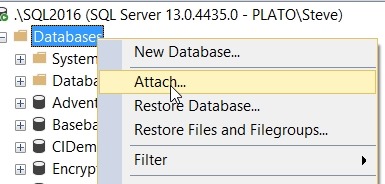
    Then, as a sysadmin, I right clicked to attach a database back.

    2017-10-23 15_59_17-SQLQuery6.sql - (local)_SQL2014.SimpleTalk_1_Development (PLATO_Steve (57))_ - M

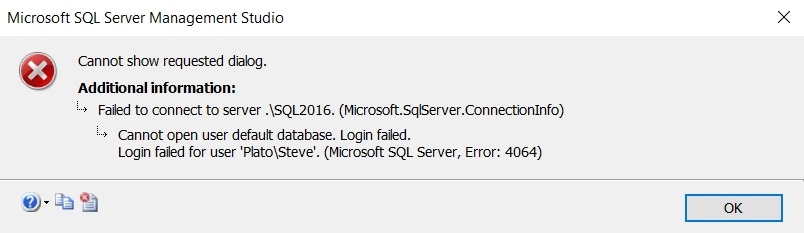
    and all of a sudden I get this error:

    2017-10-23 15_59_08-Microsoft SQL Server Management Studio

    Interesting. I could have attached the database back from the command line, or with dbatools, but I thought this was interesting. As I go to the attach dialog, a new connection is made. However, in this case, the default database for my sysadmin account was the one I’d detached.

    Fortunately, this is easy to fix. First, I opened a query window with master as the specific database:

    2017-10-23 16_01_20-Connect to Database Engine

    Then, I have a couple options to reset my default database. For old SQL Servers, many of you might have used sp_defaultdb. That’s marked as a deprecated procedure, so ALTER LOGIN is the new way. The syntax uses the WITH to include various options. In my case, I needed the DEFAULT_DATABASE item. This was my code:

    ALTER LOGIN [PLATO\Steve] WITH DEFAULT_DATABASE = MASTER

    If you are on an older version, something like this will work:

    exec sp_defaultdb @login = ‘Steve’, @defaultdb = ‘master’

    Once that was done, the GUI dialog worked. A quick and easy fix in this case.

    SQLNewBlogger

    As soon as I found the error, I knew what was happening. Resetting the default database took less than a minute, but I decided to spend 10  grabbing a few screenshots and putting this post together.

    You could do the same thing. Show that you can recover from errors.

  • ROLLing UP Totals–#SQLNewBlogger

    Another post for me that is simple and hopefully serves as an example for people trying to get blogging as #SQLNewBloggers.

    I was editing an article recently that talked about ROLLUP, and I wanted to play with this a bit more. I hadn’t used this much in my career, but it’s a handy operator that’s worth including in your toolkit.

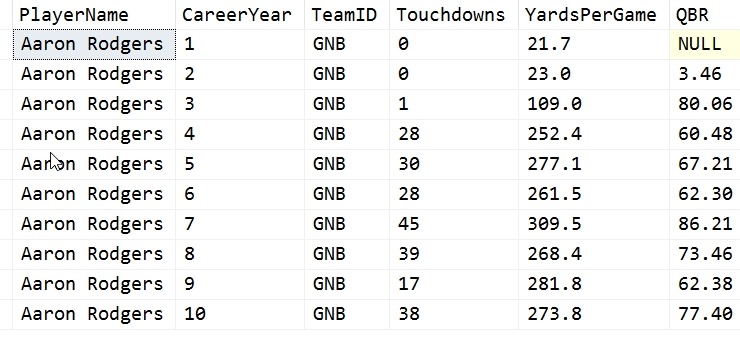
    ROLLUP is used to provide additional totals for your aggregates while using GROUP BY. Here’s a little example. I’ve got some data for American Football quaterbacks. In this case, I’ve extracted some stats for a few noteworthy players today. Here’s a sample:

    2017-10-16 13_05_05-SQLQuery1.sql - (local)_SQL2016.NFLAnalysis (PLATO_Steve (74))_ - Microsoft SQL

    I want to aggregate some data together. For example, let’s say that we want to look at the total touchdowns scored per year by these players in their first 5 years. That’s a simple query:

    SELECT
       Season = qs.CareerYear
       , TDs = SUM(qs.Touchdowns)
      FROM dbo.QBStats AS qs
      WHERE qs.CareerYear <= 5
    GROUP BY qs.CareerYear

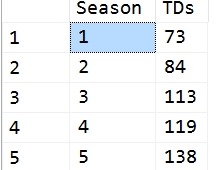
    This gives me data like this:

    2017-10-16 13_06_28-SQLQuery1.sql - (local)_SQL2016.NFLAnalysis (PLATO_Steve (74))_ - Microsoft SQL

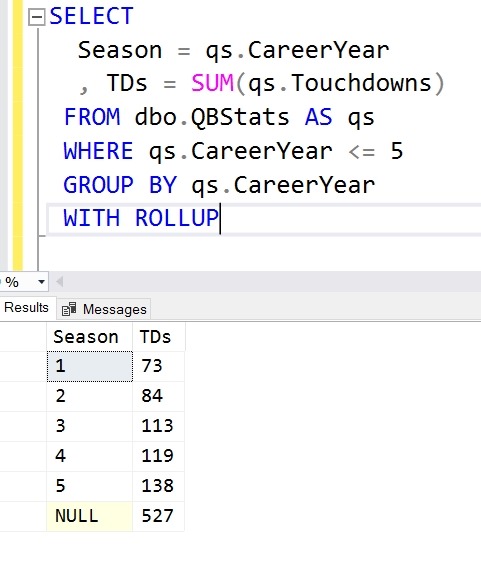
    However, when I look at this, I don’t have a total across all years. In my set, there are players that have played up to 18 seasons, and I want to know the aggregate number of TDs. I can get that by adding WITH ROLLUP. This is added

    2017-10-16 13_07_25-SQLQuery1.sql - (local)_SQL2016.NFLAnalysis (PLATO_Steve (74))_ - Microsoft SQL

    after the group by. However, I can also change this to GROUP BY ROLLUP and include the columns in parenthesis.

    SELECT
       Season = qs.CareerYear
       , TDs = SUM(qs.Touchdowns)
      FROM dbo.QBStats AS qs
      WHERE qs.CareerYear <= 5
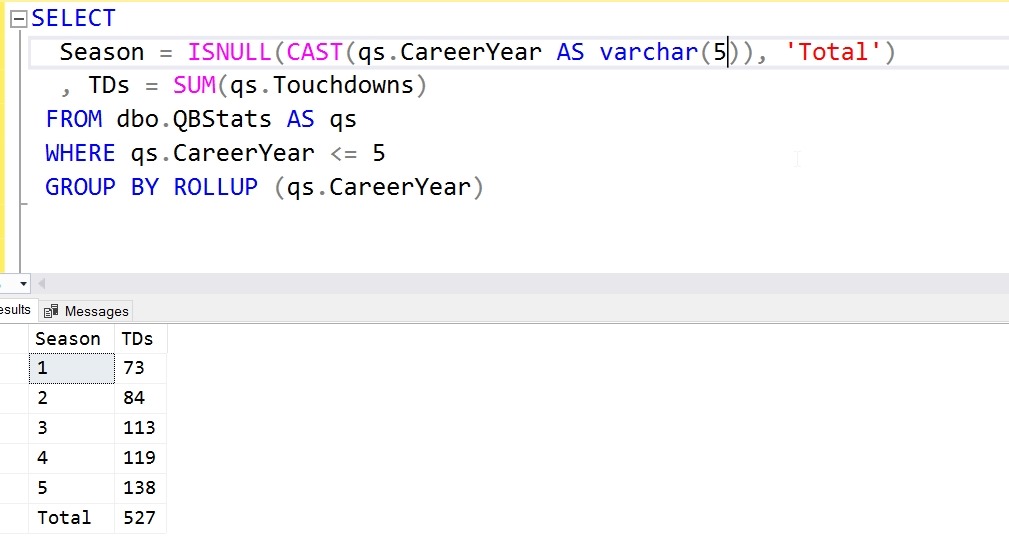
      GROUP BY ROLLUP (qs.CareerYear)

    This is OK, but the NULL isn’t great. What can I do here? I can add an ISNULL or COALESCE to my query and get this:

    2017-10-16 13_10_04-SQLQuery1.sql - (local)_SQL2016.NFLAnalysis (PLATO_Steve (74))_ - Microsoft SQL

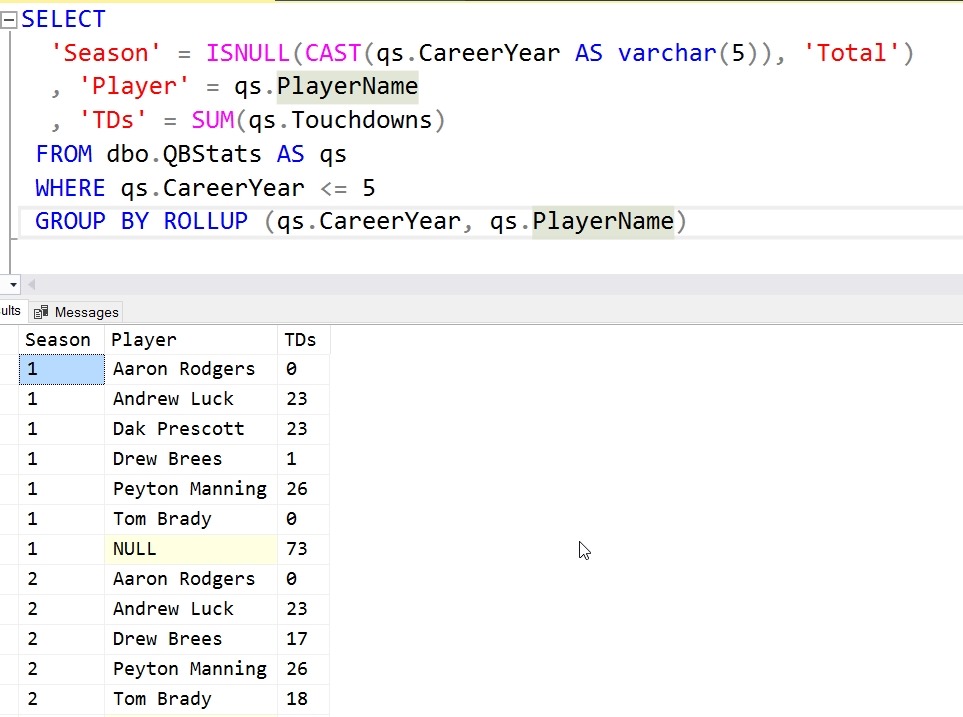
    Useful, but what about if I’m aggregating by individual players? I can add the player to the column list, but I also need to add the player to the ROLLUP (or GROUP BY) list as well. If I do that, I get this:

    2017-10-16 13_11_40-SQLQuery1.sql - (local)_SQL2016.NFLAnalysis (PLATO_Steve (74))_ - Microsoft SQL

    That’s quite a bit more data, and I now see NULL values in the Player name. What’s this?

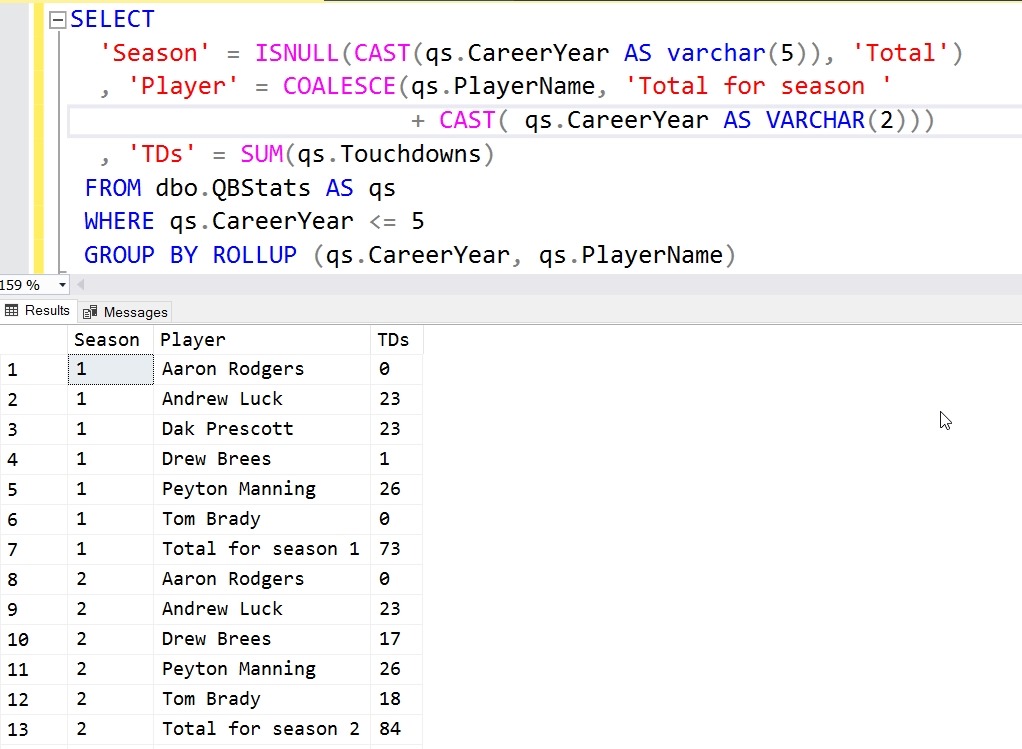
    These are the totals for that subgroup. In this case, the first NULL above, next to the 1, is the total for all players for season 1. I can use another trick to clean this up:

    2017-10-16 13_14_33-SQLQuery1.sql - (local)_SQL2016.NFLAnalysis (PLATO_Steve (74))_ - Microsoft SQL

    This now shows some data in an easier to understand fashion, with some totals. We can see for season 1 that 3 players really started their careers in a strong fashion and 3 didn’t.

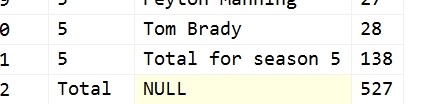
    At the end, however, we get a different result.

    2017-10-16 13_17_09-SQLQuery1.sql - (local)_SQL2016.NFLAnalysis (PLATO_Steve (74))_ - Microsoft SQL

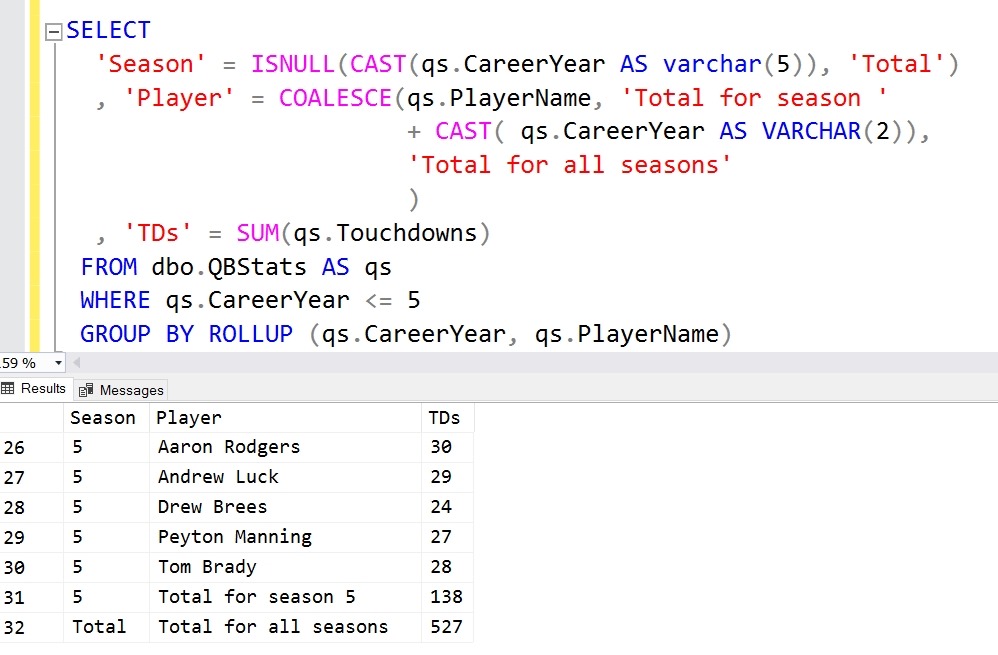
    This is because we have handled the player name as a NULL for the second column, but not the season as a NULL. For this last row, out “Total” text comes from an ISNULL of the first column. Here we’d want to do this:

    2017-10-16 13_18_30-SQLQuery1.sql - (local)_SQL2016.NFLAnalysis (PLATO_Steve (74))_ - Microsoft SQL

    This is where COALESCE  comes in handy, allowing us to account for multiple NULL values.

    ROLLUP is a nice way to get totals for each of your GROUP BY columns. This can make some of your reporting easier, and perhaps even faster by having the totals calculated in the result set.

    SQLNewBlogger

    This was a fairly easy piece to write. It took longer to get data together and find a set that had two grouping elements and was interesting than write the queries. I also had to play with ROLLUP a bit to clean up the NULLs, which always made this seem like a useless operator.

    I think I’d look to use this more if I had the chance for many reports, as summing totals in some client tools is a pain.

  • DevOps Basics – Ignoring Files in Git

    Another post for me that is simple and hopefully serves as an example for people trying to get blogging as #SQLNewBloggers. This is also a part of a basic series on git and how to use it.

    One of the things you’ll run into at times is the need to keep some scratch files, or extra files, in your Git repository, but not track them. One common type of file for me when working with SQL is a .zip file. I may zip up code to share or copy to a friend (without giving repo access).

    Ignoring files is easy in Git. We just add a .gitignore file. This is a list of files that the git repository will not track or show in status. Essentially, we see them in our file system, but git doesn’t.

    Creating .gitignore

    To create a .gitignore file, the easiest method for me is to just create a text file. I can do it like this:

    2017-10-09 16_36_08-cmd

    This gives me a new file. Certainly VS Code, Sublime, etc. will make this easy as well.  The format is simple, with a list of files and/or patterns to ignore. For example, I’ve got a .zip file in my repo.

    2017-10-09 16_34_24-GitTests

    I don’t want to see this, but I do right now:

    2017-10-09 16_37_31-cmd

    If I want to ignore this file, I’ll enter this in my .gitignore file:

    GitTests.zip

    If I want to ignore all zips, I’ll do this:

    2017-10-09 16_38_09-cmd

    This is a part of my repo, so I need to commit it.

    2017-10-09 16_38_32-cmd

    Now my status is clean.

    2017-10-09 16_39_14-cmd

    Generated .gitignore

    Some applications will generate a .gitignore. For example, my C# project gets this file from Visual Studio.

    2017-10-09 16_40_33-.gitignore — Visual Studio Code

    That’s a subset of files that are often in a VS project, but we don’t want to track in a VCS. Images, archives, executables, etc.

    You can customize this as you need, and it’s easy to just edit the text file and commit the changes.

    Hopefully this helps you understand how to best work with git and keep your repo clean. This also means your  git add –all is easy to use without adding unnecessary files.

  • Basic FORMATting– #SQLNewBlogger

    Another post for me that is simple and hopefully serves as an example for people trying to get blogging as #SQLNewBloggers.

    I saw the addition of FORMAT() to the T-SQL language, but didn’t play with it much. Recently it appeared in some code, and decided to experiment a bit. I had assumed this was mainly for dates, but it’s a general format/culture function that handles numbers as well.

    On the doc’s page, there are the basic description of the parameters, which are NVARCHAR(), so passing in VARCHAR() causes an implicit conversion. It shouldn’t be much, but there are already performance penalties (see Aaron Bertrand’s piece), so don’t add to the overhead.

    One good thing to note is that if you pass in invalid formats or cultures, a NULL is returned. Since the format and culture strings aren’t completely intuitive, this might be a source of issues in your code.

    This is a neat function, relying on CLR formatting rules. That means I can do fun things like:

    DECLARE @i int = 5000;
    
    SELECT FORMAT(@i, N'USD$#');

    Which returns:

    USD$5000

    Or even:

    DECLARE @i INT = 5000
    ;
    SELECT  FORMAT(@i, N'# dahlahs')
    ;
    GO

    Which gives me:

    5000 dahlahs

    There are lots of formats, and certainly lots of nuances to numeric formatting strings. It’s worth reading up if you plan to use this, but again, beware of performance. I’d avoid using this if the data size is large, maybe more than a few hundred rows.

    After all, the database server is a shared resource, and using this CPU to handle simple formatting may not be the best use of your system.