Tag: SQLNewBlogger

  • Rebooting Ubuntu Linux from the Command Line–#SQLNewBlogger

    Another post for me that is simple and hopefully serves as an example for people trying to get blogging as #SQLNewBloggers.

    Since SQL Server 2017 is now out, and Linux is an option, I thought I’d write a bit more about little Linux things that admins might want to know.

    After installing an update, I neede to reboot my Ubuntu install. Apparently there was a dialog, but it was hidden. Unlike on Windows, I didn’t see an easy way to click a button and restart. However, since I had a terminal shell open, I was sure there was an easy way to do this.

    I could have run a quick search, but I fell back to the old standby:

    man shutdown

    This showed that there is a shutdown, as on Windows, with the same –r parameter. This needs sudo to run, and by default it reboots after a minute. The command I ran was:

    shutdown -r

    Learned something, which I should have known. I almost typed shutdown, but I decided to double check.

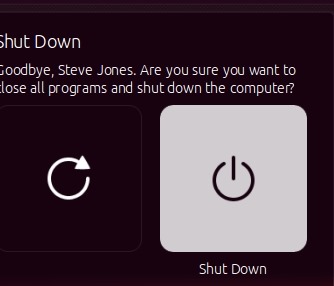
    Note: I realized later that there is a small menu in the upper right. I had the VM in a window and didn’t notice the icon. Clicking the gear gives a menu.

    2017-10-02 10_38_28-Ubuntu 64-bit SQL Server .210 - VMware Workstation

    This lets you then choose shutdown or restart.

    2017-10-02 10_38_36-Ubuntu 64-bit SQL Server .210 - VMware Workstation

  • WAITFOR isn’t a function–#SQLNewBlogger

    Another post for me that is simple and hopefully serves as an example for people trying to get blogging as #SQLNewBloggers.

    I needed to delay the execution of some code the other day. This was a test that was trying to simulate a few things happening, and one batch needed a random delay. I started typing and got something I didn’t expect.

    2017-09-27 08_41_53-CandidateList

    Where’s the TIME or DELAY? SQL Prompt didn’t like this, and since I expect SQL Prompt to save me from writing bad code, I knew I’d done something wrong. I backed up and removed the parenthesis and ‘R’ and then typed again, this time adding a space.

    2017-09-27 08_42_07-CandidateList

    That works. Now I can change this test to real code.

    WAITFOR is designed to delay execution, but it’s not a function. No parenthesis. Instead, it’s a control of flow statement, like CASE, so it just takes other expressions after.

    SQLNewBlogger

    This was one of those commands I haven’t used in a long time, but is a handy one. Hopefully this 5 minute writeup will help me remember this in the future.

  • Enabling Database Containment for an Instance – #SQLNewBlogger

    Another post for me that is simple and hopefully serves as an example for people trying to get blogging as #SQLNewBloggers. This is also a part of a basic series on git and how to use it.

    I wanted to test a contained database feature the other day and ran this:

    ALTER DATABASE [sandbox2] SET CONTAINMENT = PARTIAL WITH NO_WAIT
    GO

    However, this didn’t work. I ended up with an error:

    Msg 12824, Level 16, State 1, Line 3

    The sp_configure value 'contained database authentication' must be set to 1 in order to alter a contained database.  You may need to use RECONFIGURE to set the value_in_use.

    The issue is that the server instance needs to have contained authentication enabled in order to pass any authentication requests to the database

    EXEC sys.sp_configure N'contained database authentication', N'1'
    GO
    RECONFIGURE WITH OVERRIDE
    GO

    Now I can run the code again to alter the database for containment.

    SQLNewBlogger

    The issue was obvious to me since I’d dealt with it in the past, but this is something you could solve and write up in 10-15 minutes.

  • Getting a New R Package–#SQLNewBlogger

    Another post for me that is simple and hopefully serves as an example for people trying to get blogging as #SQLNewBloggers.

    I was trying to test an R script the other day and got this:

    > library(randomForest)
    Error in library(randomForest) : 
      there is no package called ‘randomForest’

    A common error if you have just a base R installation. In my case, I’d installed R Studio, but nothing else. I knew that many packages are installed at CRAN, but I’d never gotten one. So I did.

    The first step was a quick google for syntax. In this case, r-bloggers.com had a nice short piece. The install.packages() function is used.

    I decided to just try it. In may case, I was happy to use the defaults for now. I ran:

    > install.packages("randomForest")
    Installing package into ‘E:/Documents/R/win-library/3.3’
    (as ‘lib’ is unspecified)
    trying URL 'https://mran.revolutionanalytics.com/snapshot/2016-11-01/bin/windows/contrib/3.3/randomForest_4.6-12.zip'
    Content type 'application/zip' length 177208 bytes (173 KB)
    downloaded 173 KB
    
    package ‘randomForest’ successfully unpacked and MD5 sums checked
    
    The downloaded binary packages are in
    	C:\Users\Steve\AppData\Local\Temp\RtmpUl3h6d\downloaded_packages

    After that, my library() function ran fine.