Tag: SQLNewBlogger

  • Using the DAC

    Another post for me that is simple and hopefully serves as an example for people trying to get blogging as #SQLNewBloggers.

    The DAC is a really important tool for anyone managing a SQL Server. You might not use it often, but when you need it, you really need it. I’d suggest you connect to your instances one a month or so using the DAC, just to be sure you know how to do it.

    The most common reason to use the DAC is when a runaway query is consuming so many resources the user can’t connect. The DAC is guaranteed resources, so you can always connect.

    When you use SQLCMD, the -A switch lets the connection method know you want to use the DAC. The DAC only allows one connection, so only one admin can connect. This also means it’s important to disconnect quickly if you don’t need the DAC.

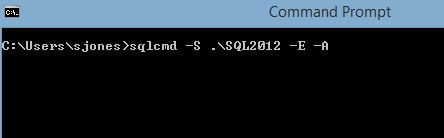
    To connect, I use a normal set of parameters, -S for my server and -E for Windows auth. However I then add the -A, which connects me through the DAC.

    2015-07-13 10_48_04-Command Prompt

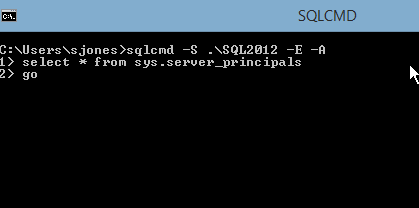
    Once I connect, I can run any of the normal commands, I need, like rebuilding master or killing a connection.

    2015-07-13 10_48_23-SQLCMD

    Keep this as a tool in your toolbox and practice regularly.

    SQLNewBlogger

    This was a quick post that follows on from starting SQL in single user mode as well as using the DAC in SSMS. I really just took some shots as I connected from SQLCMD.

    References

    The first link I saw was from my friend, Pinal Dave.

  • Azure SQL Database – Link User to Login

    I’m writing this post as a way to help motivate the #SQLNewBloggers out there. Read the bottom for a few notes on structuring a post.

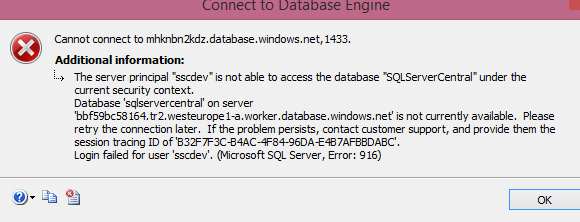
    I created a login for an Azure SQL Database, but couldn’t log in. I would get this message, which makes perfect sense.

    2015-06-23 14_52_41-Connect to Database Engine

    Just like an on-premises instance, I need to link a user to the login for access. However, unlike an on-premises SQL Server, I can’t willy-nilly change databases. If I do this:

    Use SQLServerCentral GO

    I’ll get this message.

    2015-06-23 15_00_31-SQLQuery3.sql - mhknbn2kdz.database.windows.net,1433.SQLServerCentral (jt (58))_

    I can’t switch, I need to reconnect. In this case, I use the same login (an admin level) and reconnect to a different database. This certainly can make scripts more cumbersome, and imply that your work, whether through T-SQL or PoSh, needs to include the connection strings for the correct database. In fact, I might recommend PoSh over SSMS for this reason.

    Once I’ve connected, I can use standard commands. In this case, I’ll use this code:

    add user to SQLServerCentral database connect to database CREATE USER sscdev FROM LOGIN sscdev; add a role for ddl admin EXEC sp_addrolemember db_ddladmin, sscdev;

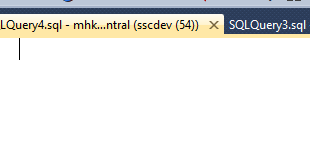
    Now when I click connect with my user, I see this:

    2015-06-23 15_02_22-SQLQuery4.sql - mhknbn2kdz.database.windows.net,1433.sqlservercentral (sscdev (5

    Just what I need.

    SQLNewBlogger

    This was a second post as part of the previous one. I was adding a user and login as part of a bit of work and when it didn’t work, I captured screen shots and split this part from the last one.

    Five minutes writing this one, probably no more than five minutes slower in running the code to capture the images.

    You can do this.

    References

  • Azure SQL Database – Adding a Login

    I’m writing this post as a way to help motivate the #SQLNewBloggers out there. Read the bottom for a few notes on structuring a post.

    I am trying to slowly do a little work in the Azure SQL Database world, building some skills that I can use, and I can teach you a bit more about. One of the things I needed to do lately was add a new login to my system, which isn’t intuitive in the portal.

    I did go to the Managing Databases and Logins in Azure SQL Database to get some help, but it wasn’t completely clear how to do this.

    I setup a database recently for a test project, but I wanted a different user for this database than others I have on this particular Azure SQL Server. I am using the new (2015) portal, and there didn’t seem to be a good way to add a new login, so I connected to do this in SQL. The reference below showed me the standard “CREATE LOGIN” statement I’d use with an on-premise instance, so I tried to run that.

    CREATE LOGIN sscqa WITH PASSWORD = mypwd; GO

    I got this:

    2015-06-23 14_45_19-SQLQuery3.sql - mhknbn2kdz.database.windows.net,1433.AdventureWorks2012 (sjones

    OK, no issues. I changed the connection to the use the master database. I used the options after clicking the “Change Connection” button and put in master.

    2015-06-23 14_47_06-SQLQuery3.sql - mhknbn2kdz.database.windows.net,1433.AdventureWorks2012 (sjones

    I connected and ran the code to get this:

    2015-06-23 14_47_30-SQLQuery3.sql - mhknbn2kdz.database.windows.net,1433.master (sjones (63))_ - Mic

    I needed to not only change my database user connection, but also use the admin user I have. In this case, it’s the jt user I inherited from Jamie Thomson as part of the Hosted AdventureWorks project he started.

    Once I did that, the login was created without an issue. Now I need to link it to a user.

    SQLNewBlogger

    This took about 5 minutes to write, and 5 minute to reshoot some screen shots. The rest was really the 20 minutes I spent mucking around, researching, and reading how to do this. Hopefully this is quicker for me, and you, if you have this need.

    Anyone could write this, and I’d encourage you to write your own stories about working with an Azure database if you want to learn about the topic.

    Reference

  • Get a comma separated list

    I’m writing this post as a way to help motivate the #SQLNewBloggers out there. Read the bottom for a few notes on structuring a post.

    I was working on a test of sorts and wanted to return multiple values as the output, but as a single variable. In other words, I couldn’t return a result set, I needed to return a string.

    I knew this was easy, and decided this would make a nice simple blog. Here we go.

    Let’s start with a simple table. Here’s one that has a few rows in it.

    CREATE TABLE MyTest
    ( id int);
    GO
    INSERT mytest values (1), (2), (3);
    go

    I want to return the values “1, 2, 3” as a string, in any order. Here’s how it works:

    DECLARE @i VARCHAR(MAX);
    SELECT @i = COALESCE(@i + ‘, ‘,”) + CAST( Id AS VARCHAR)
    FROM MyTest;
    SELECT @i;

    The COALESCE is important as the first time this runs, we have a NULL for the variable. In this case, we return an empty string. This is almost like the inverse of the operation that ends recursion. We add in the first row, and we end up with ‘1’ as the string.

    Note: it could be 2 or 3 in the string as I don’t have an ORDER BY. DO NOT depend on the order of insertion in the table. If you care about ordering, always include an ORDER BY.

    The next execution has a blank string (NOT NULL), so that is returned. In this case, we have ‘1’ + ‘, ‘ for the first part. The second part adds in the next row.

    This continues, and I get a nice set of output.

    2015-06-10 17_20_39-SQLQuery4.sql - ARISTOTLE.sandbox (ARISTOTLE_Steve (62))_ - Microsoft SQL Server

    SQLNewBlogger

    This one was short. It took me almost as much time to write the code and find a reference as it did to write the post. Five minutes.

    References

    This is basic T-SQL, but here’s another look at this.