Tag: syndicated

  • Using the T-SQL Error Functions–#SQLNewBlogger

    I was working with a customer that was doing some error handling in procs and helped them do some error tracking. As we were working through things, I realized that some of functions working with errors operated differently than I expected.

    Another post for me that is simple and hopefully serves as an example for people trying to get blogging as #SQLNewBloggers.

    The Error Functions

    There are a number of error functions available to you in modern SQL Server. We have:

    All of these functions have the same clause in their docs, which says, “ xxx returns NULL when called outside of the scope of a CATCH block.”

    That was something I didn’t realize. I’d assumed I could run this:

    SELECT 1/0
    SELECT ERROR_SEVERITY(), ERROR_MESSAGE(), ERROR_STATE()

    However, if I run this, I get the error, but my results are NULL, NULL, NULL.

    If I want the values, I need to do this:

    BEGIN TRY
       SELECT 1/0
     
    END TRY
    BEGIN CATCH
       SELECT ERROR_SEVERITY(), ERROR_MESSAGE(), ERROR_STATE()
    END CATCH;

    This will return my 16, Divide by zero error encountered., 1

    In general, you ought to be using TRY..CATCH blocks for error handling. We do want to ensure that we are doing our best to deal with problems in code and not just expect all errors will be managed by the application. As much as possible, we should try to gracefully fail and give the application or client something useful.

    Along with TRY..CATCH, learn to use THROW, and ensure you’re adding some error handling to older code. This is an easy refactoring add to existing code, and it’s simple to enhance future code to make it more maintainable.

    SQL New Blogger

    This is a quick look at the functions that capture error information, and noting a limitation I didn’t realize. It’s short, simple, and took me about 10 minutes.

    This is one of those topics that dev managers, especially front end based ones, appreciate. Doing a post on this topic on your blog might get someone to ask you about error handling, and with a little practice (and a few posts), you’ll be able to talk about this topic confidently.


  • The DevOps Airways Roadshow

    I love this logo.

    2024-01-31 14_25_43-Window

    Our marketing people were very creative. After the van tour last year, we decided to go with a plane this year. I wrote about the photoshoot last week, and you can compare which of these you think looks better.

    20230805_102836

    20240123_134308

    We have more photos and promos cmming soon and I’m interested to see what the artists come up with.

    Our tour is starting this month. We have quite a list of places, though I’m not doing too many. I’ve been trying to better manage travel, and since we have others that can share the load, I’m only doing a few dates.

    So far, I’m only in San Jose and Australia (not listed yet), but there are some other Redgate events I’m doing. It’s possible in Q2/Q3 I’ll do a few more, but not many.

    If you want to come talk DevOps, register today and either Grant, Ryan, or myself will see you somewhere.

  • Friday Flyway Tips–Navigating in Flyway Desktop

    Flyway Desktop changed the navigation and a few people were surprised. I was as well, so I decided to do a short tip on the changes.

    This is part of a series of posts on Flyway.

    The Old Flyway Desktop

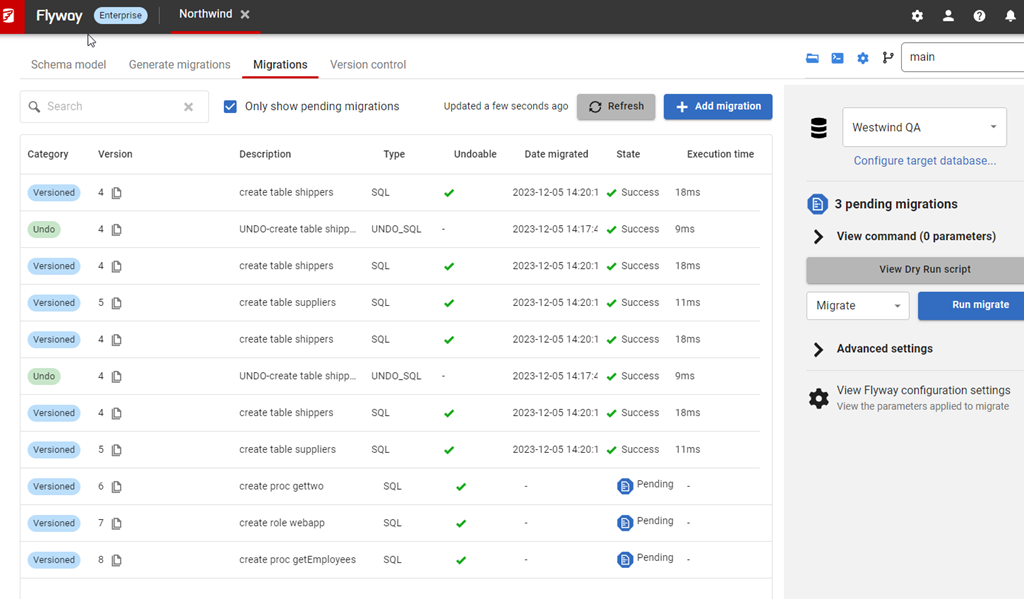
    If you’ve been following these tips, or worked with the Flyway Enterprise system, you’ve encountered Flyway Desktop, and you might have seen something that looked like this, with the navigation across the top of the screen. We see four “tabs”, called Schema model,
    Generate Migrations, Migrations, and Version Control:

    2023-12-05 15_07_27-Flyway Desktop

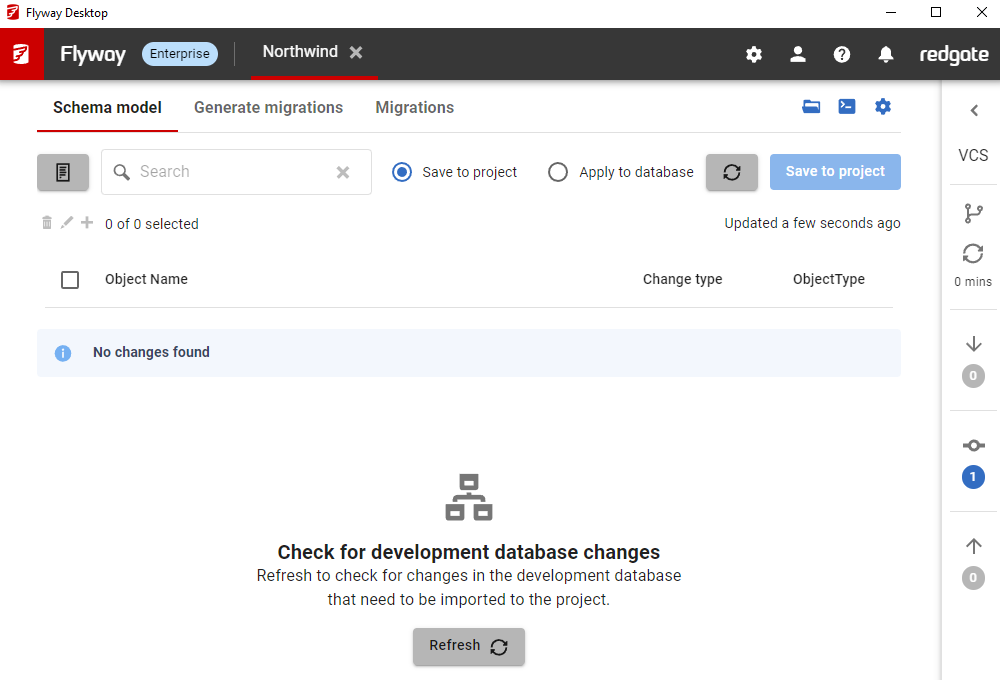
    As part of a design refresh, we moved the version control tab to the right side as a bar, which shrinks it, but also gives information while a developer is working. I covered this in a previous tip. You can see that design below.

    2024-01-05 16_41_53-Flyway Desktop

    We weren’t done and I was surprised how quickly we made another change.

    Flyway Desktop v7

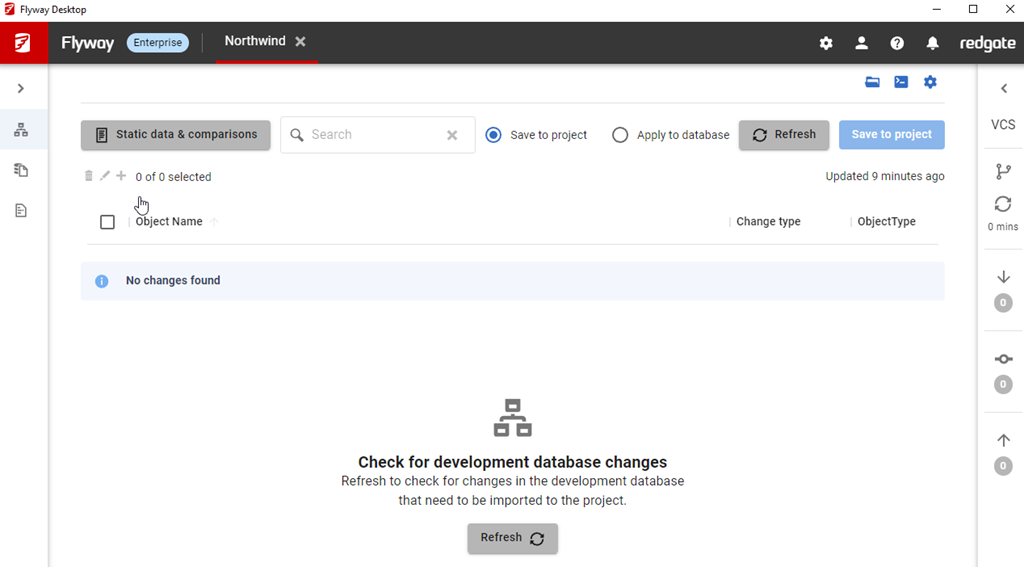
    This was actually in v7.0.5, which released Jan 11. We moved all the tabs to the side, though this time the first three moved to the left. As you can see below, I have the migrations tab selected and the nav is on the side panel.

    2024-02-01 16_08_17-Flyway Desktop

    The same three tabs are there, but now on the left, and what’s more, I can shrink this panel to a bar, which gives me more room in which to see code and work with my changes. The VCS tab is still on the right, with icons to let me know when I have changes to push, pull, or fetch.

    2024-02-01 16_09_48-Project Llama Assistant Window

    Summary

    This might not seem like much, but it’s a nice visual change and it gives us the ability to add more features in tabs, without running out of room or squeezing things at the top. Over time, a few more pieces of functionality will appear here as we continue to expand the capabilities of the tool.

    Try Flyway Desktop out today. If you haven’t worked with Flyway Desktop, download it today. There is a free version that organizes migrations and paid versions with many more features.

    Video Walkthrough

    I made a quick video showing this as well. You can watch it below, or check out all the Flyway videos I’ve added:

  • A New Word: Tarrion

    tarrion – n. an odd interval of blankness you feel after something big happens to you bt before you feel the resulting emotional reaction – stunned by a sudden loss, a stroke of luck, or an unexpected visitor – like those tension-filled seconds between a flash of lightning and the thunderclap that follows..

    I don’t have a lot of big things happening in my life. No great joys, but not great sorrows (usually). However, I know I’ve had this a few times. I had one last year, which I don’t want to disclose, but I got some news and I missed the next few sentences. I was stunned, and didn’t know how to react. A few seconds later the emotion hit me.

    This seems like a very common reaction to big news, and while I appreciate the excitement for some things, I’m glad I don’t feel tarrion too often with sad news.

    From the Dictionary of Obscure Sorrows