Tag: syndicated

  • Executing One Line in VSCode–#SQLNewBlogger

    I wrote about arrays in PowerShell last week, but I realized one of the things I did while experimenting was look up how to run code a line at a time. I’m sure you can Google for that, but I decided to write a post to help me remember this in the future.

    Another post for me that is simple and hopefully serves as an example for people trying to get blogging as #SQLNewBloggers.

    Running One Line

    Years ago I saw someone demonstrating either PoSh or Python in Visual Studio and they were walking through code a line at a time. I thought that was cool, like a debugger, but not being in the debugger.

    To do this in VS Code, we use F8. Here’s how it works. Create a new PoSh file in VS Code. You should see something like this:

    2023-12-01 14_01_11-● oneline.ps1 - Visual Studio Code_thumb[1]

    Now put the cursor on line 1, anywhere. I’ll put it after the = sign. If I press F8, I see this:

    2023-12-01 14_02_03-● oneline.ps1 - Visual Studio Code_thumb[1]

    Pretty cool. I just ran that line.

    One Hassle

    The one hassle is the focus is now in the terminal. However CTRL+Tab gets me back to the editor, though it would go to the Welcome tab here. However, supposedly CTRL+1 or 2 would work.

    My problem is those are mapped to ZoomIt, which is always running Sad smile

    I hit CTRL+Tab twice, however, and I was back in my editor. I could go down one line and hit F8 to run the second code.

    2023-12-01 14_02_52-● oneline.ps1 - Visual Studio Code_thumb[1]

    Try it for yourself.

    If you have a better method, let me know.

    SQL New Blogger

    After the last post, I spent less than 10 minutes setting up a new file and then capturing some code. A couple google searches helped me figure out the terminal/editor switching.

    This was fun, but it also showcased some learning and something that will help me in my work. You could easily do the same thing, with any tool you use at work. Show how you experiment and learn.
  • Friday Flyway Tips–Comparison Options

    Recently a customer asked how they could get index changes to be captured in Flyway Desktop. In their case, they wanted a different fill factor, but I decided to investigate a bit more how things work.

    This post looks at how to control the comparison options in Flyway Desktop (FWD).

    I’ve been working with Flyway Desktop for work more and more as we transition from older SSMS plugins to the standalone tool. This series looks at some tips I’ve gotten along the way.

    The Setup

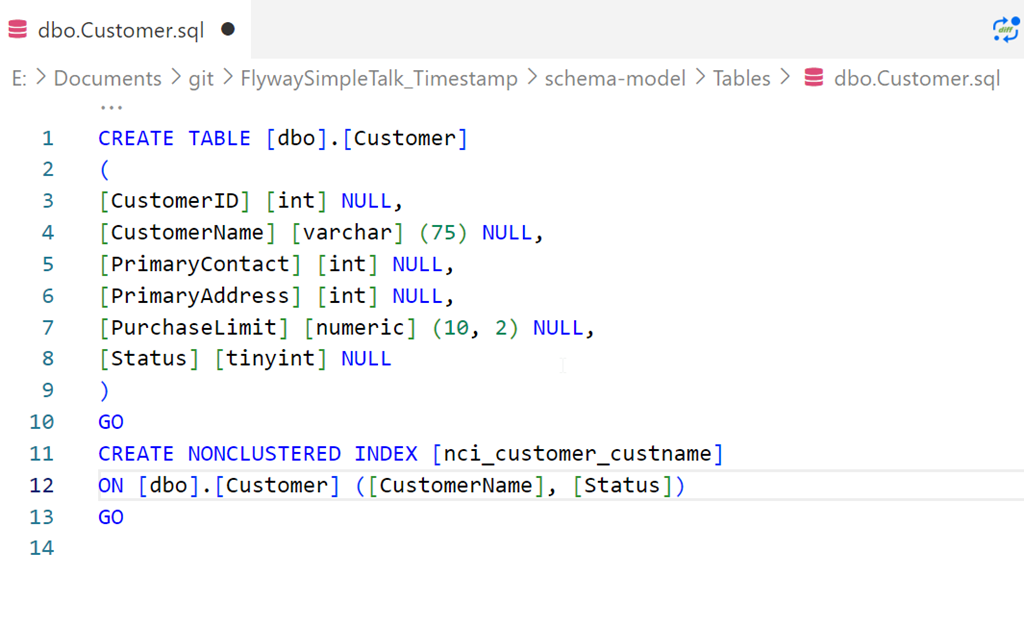
    I’ve got a table and an index, which I created with this script.

    CREATE TABLE [dbo].[Customer]
    (
    [CustomerID] [int] NULL,
    [CustomerName] [varchar] (75) NULL,
    [PrimaryContact] [int] NULL,
    [PrimaryAddress] [int] NULL,
    [PurchaseLimit] [numeric] (10, 2) NULL,
    [Status] [tinyint] NULL
    )
    GO
    CREATE NONCLUSTERED INDEX [nci_customer_custname] ON [dbo].[Customer] ([CustomerName], [Status])
    GO

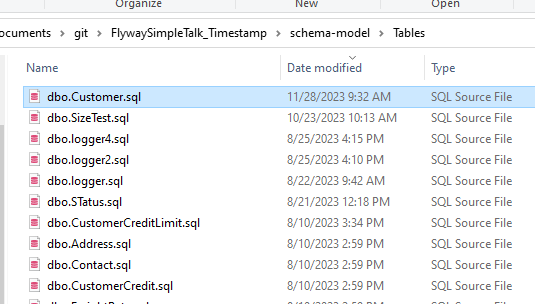
    I saved this in Flyway Desktop, which we can see here in the filesystem:

    2023-11-28 09_48_55-Window

    and here in VS Code.

    2023-11-28 09_52_32-Window

    If I refresh the schema model tab in FWD, there are no changes.

    Making Index Changes

    I’m going to alter this index. Specifically, I’m changing the pad index, fill factor, and statistics options. Here’s the script I’ll run.

    ALTER INDEX [nci_customer_custname] ON [dbo].[Customer] 
    REBUILD PARTITION = ALL 
    WITH (PAD_INDEX = ON, STATISTICS_NORECOMPUTE = ON, SORT_IN_TEMPDB = ON, ONLINE = OFF, 
           ALLOW_ROW_LOCKS = ON, ALLOW_PAGE_LOCKS = ON, FILLFACTOR = 80)
    

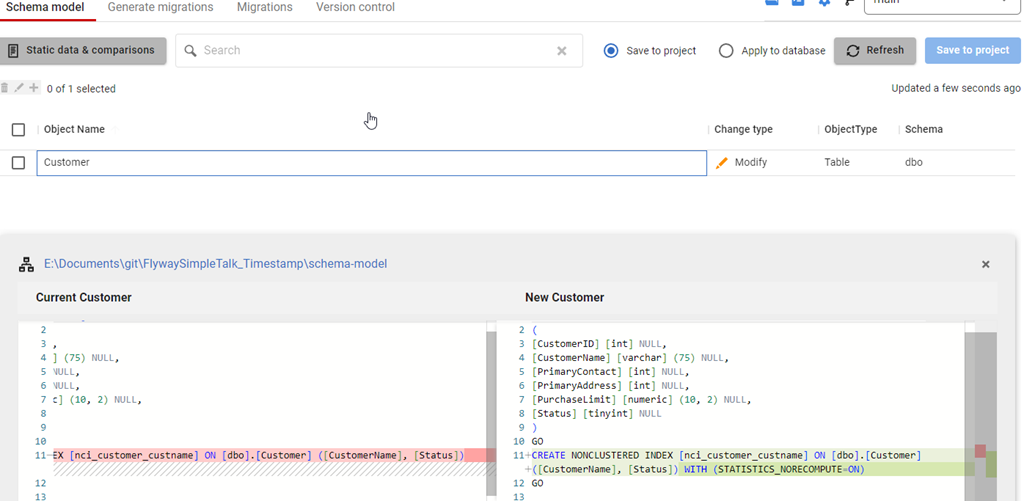
    Once this runs, I’ll refresh FWD and I see this. Note that I see an index change, but only one option is captured: STATISTICS_NORECOMPUTE.

    2023-11-28 09_54_21-Window

    What’s happening is that FWD is using the SQL Compare engine and the default options set in the engine. Among these are to ignore fill factor and pad index. However, I can change this.

    Changing Configuration

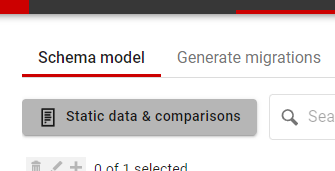
    In the past, I would need to edit a config file to make this change, but the team has enhanced FWD to add new options. In this case, notice the button near the top of the Schema model tab: Static data & comparisons. Not a great name, but it’s there:

    2023-11-28 09_56_31-Window

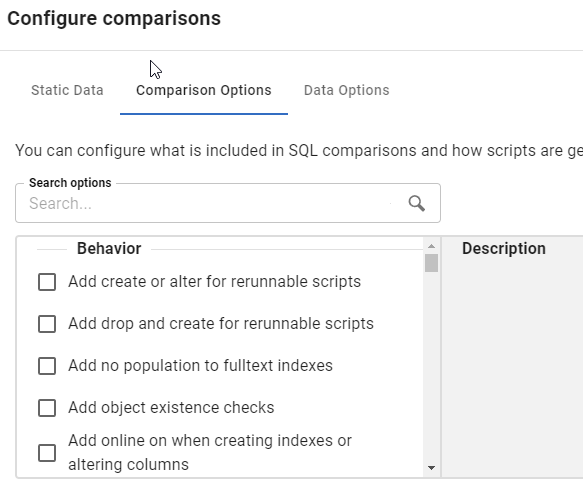
    Once I click that, I get a new dialog. This starts with static data, but I’ll click the second tab, which is Configure comparisons. This shows all the options available in the Compare engine

    2023-11-28 09_56_37-Window

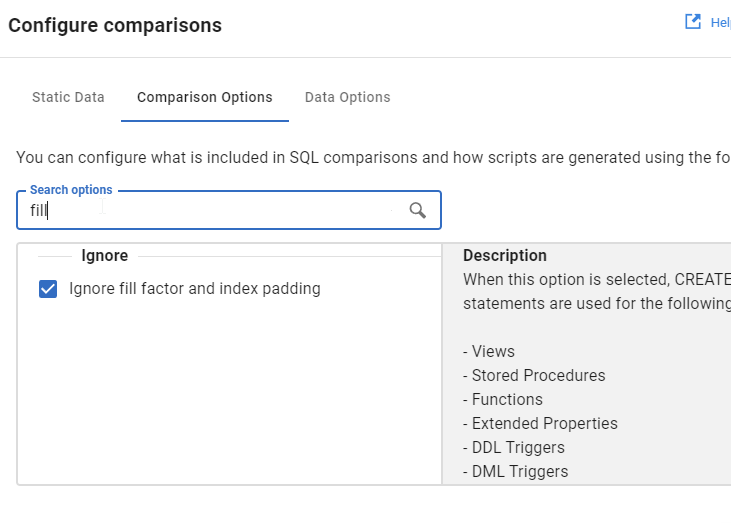
    Rather than scroll, I’ll type in the search box, and I see fill gets me the “Ignore fill factor and index padding” option.

    2023-11-28 09_56_42-Window

    I’ll uncheck this and click OK.

    Once I do that, I’ll refresh the comparison, and now I see my options.

    2023-11-28 09_58_46-Window

    Try it out today. If you haven’t worked with Flyway Desktop, download it today. There is a free version that organizes migrations and paid versions with many more features.

    Video Walkthrough

    I made a quick video showing this as well. You can watch it below, or check out all the Flyway videos I’ve added:

  • A New Word: Guiltwrights

    giltwrights  – n. the imaginary committee of elders that keeps a running log of your mistakes, steadily building their case that you’re secretly a fraud, a coward, a doofus, and a douche – who would’ve revoked your good fortune years ago had they not been hampered by their own bitter squabblings over proper grammar and spelling.

    I have anxiety at times about the mistakes I make. I tend not to dwell for too long, but I do sometimes find myself wondering if there are others who’d find me lacking, fire me, stop being a friend, etc. if they knew how many times I’ve made mistakes.

    Across my career, and across decades, I’ve learned to admit mistakes often and expect them. I’ve learned that I am frail and faulty, and I have to accept that. I also need to try to not make easily-preventable mistakes, or big ones, but accept that those might happen.

    I don’t think I’m often concerned about the guiltwrights at my age, but I did feel they were watching me often in my teens and 20s.

    From the Dictionary of Obscure Sorrows

  • TryHackMe Advent of Cyber

    I posted that I was thinking about the AdventOfCode this year, but wasn’t sure I’d spend the time. Someone then posted a link to the TryHackMe advent calendar.

    I decided to give it a try.

    There’s a fairly long (10min) video intro and then you sign up.

    Day 1

    One of the good things was that the video has some spoilers to help you solve the challenge. If you skipped the video, watch it now. Or try.

    There are three questions we need answered, and we then have to fool the AI/ML chatbot. The video shows how, but essentially you need an email address, a server room password and a project name.

    The interesting thing is this shows how a poorly secured and trained chatbot might disclose this information. For the email address, you just ask. For the password, you need to find an employee’s name and then tell the chatbot you’re that person and need the password. It seems silly, but I bet this works on some chatbots people have created with wizards or templates and not secured or limited the training data.

    The last one is interesting, you ask the machine to go into maintenance mode and you get the name of a project. Getting into the maintenance side of applications or mainframes used to be a way to attack them. Unfortunately, too many people didn’t secure many early systems and this was too easy.

    Day 2

    Day 2 is about using Jupyter notebooks. A good portion of the tutorial is helping you understand how notebooks work. Hopefully you’ve read my article on notebooks. If not, this helps you figure out how to use them. It also has a short tutorial on some python that you use to perform data analysis on a csv. While many of us might like to do this in SQL, the experience in python isn’t bad.

    This ends up helping you understand how to count, summarize, and group data in python.

    Day 3

    This day was interesting. Now we are learning about some security tools. In this case, we learn about hydra, which is a tool to brute force logins against a web page. This is a fantastic tutorial that should teach you that unlimited retries on a page without some timer is a bad idea. This should also help you understand that you need to track failed logins and do something about them, especially from weird IPs.

    Day 4

    Continuing on, we learn how to use cewl to create customized wordlists and then use those to brute force in a smarter way.

    Again, scary for a non-security person. These tools are likely good for security folks, but terrifying in that perhaps criminals use them every day.

    Summary

    The first few days of the challenge were interesting and it was neat to spend some time thinking about the world from a cybersecurity point of view.