Tag: syndicated

  • Removing a PowerShell Array Element–#SQLNewBlogger

    I saw an article on this and realized I had no idea how to do this, so I decided to practice a bit. I don’t work with PoSh arrays a lot, but with more and more DevOps work needing complex scripting, PoSh is a better environment for me than bash. At least for now.

    This post looks at the basics of creating an array and then removing elements.

    Another post for me that is simple and hopefully serves as an example for people trying to get blogging as #SQLNewBloggers.

    Creating a PoSh Array

    Creating an array in PowerShell is relatively easy. I use a variable and the @ sign, enclosing the elements inside parenthesis with comma separation. In code, that looks like this:

    $servers = @("server1", "server2", "server3")

    or this:

    $numbers = @(1,2,3,4,5,6,7,8,9,10)

    If I were to reference an array, I’d get results like this:

    PS E:\Documents\git\sqlsatwebsite> $servers
    server1
    server2
    server3

    PS E:\Documents\git\sqlsatwebsite> $numbers[2]
    3


    As you can see, I can get all elements or a single element with an index inside brackets. Note that the array is zero indexed as the index of 2 returns the third element.

    In code, I might use other variables to represent the index or maybe to store the results of an array. If I were trying to brute force the removal of an element, I might decide to copy items one at a time (iterating through the index and skipping the copy if I reached an item to skip.

    Removing an Element – Kind of

    The way to remove this is deceptively simple. The article referenced above shows the easy way, which is to set an element to $null. I’d have never thought of that, as I’d assume this would leave the element, but change the key.

    If I want to remove 5, I’d set $numbers[4]=$Null. Crazy, but let’s see this work. First, I’ll iterate the array, printing each index and the value with this code:

    for ($i = 0; $i -lt $numbers.Length; $i++) {

    Write-Host $i : $numbers[$i]


    }

    When I run this, I see these results:

    0 : 1
    1 : 2
    2 : 3
    3 : 4
    4 : 5
    5 : 6
    6 : 7
    7 : 8
    8 : 9
    9 : 10

    Now, I’ll run this:

    $numbers[4]=$null

    Now we re-run the iteration and see these results:

    0 : 1
    1 : 2
    2 : 3
    3 : 4
    4 :
    5 : 6
    6 : 7
    7 : 8
    8 : 9
    9 : 10

    Hmmm, the element is gone and isn’t. Nothing has moved, and in fact, the value of 6 remains in index 5. If I try to get element at index 4, I get this:

    2023-12-01 13_34_55-Window

    It’s not there, but the spot is held. That’s somewhat what I’d expect.

    Removing an Item – The Better Way

    PowerShell has a lot of flexibility in how variables work and how queries work. I found another blog that helped me understand a few things and experiment. Look at this code:

    $numbers = $numbers | Where-Object { $_ -ne 5}

    If I run my iterator on $numbers now I see:

    0 : 1
    1 : 2
    2 : 3
    3 : 4
    4 : 6
    5 : 7
    6 : 8
    7 : 9
    8 : 10

    That works much better, since I create a new array.

    Arrays in PowerShell are funny things, and the docs show some of the methods available don’t change the size of an array, they just operate on it. There isn’t a remove method, which is interesting. There is a Remove-Item cmdlet, but even the docs say assigning $null is faster. However, it doesn’t get the indexing right.

    If you have a better method, let me know.

    SQL New Blogger

    I spent about 10-15 minutes experimenting in PowerShell on various code elements trying to understand how different methods change the array. I read some docs, and ended up taking another 15 minutes to write this post and copy over some code.

    This was fun, but it also showcased some learning and methodology. You could easily do the same thing, with PowerShell, T-SQL, or any other coding or scripting you do at work. Show how you experiment and learn.

  • Using ThinOptics to Read Data

    As I’ve aged, I find myself struggling to read many things in my life. It started with difficulties seeing menus, but moved on to other areas. During the pandemic, I was coaching kids and taking stats. I realized at one point I couldn’t tell if I’d made 3 or 4 marks on the page to represent some action.

    Soon after, I got some reading glasses and started wearing them to do certain things. Over time, I’ve found that I needed these more and more for all sorts of computer work.

    I’ve actually ended up purchasing a few pairs and stashing them in various coats, bags, and cars. I’ve liked these slim ones with a hard case the best, but I still sometimes forget them, especially in the summer when I don’t wear a coat.

    Recently, I realized that I am struggling to read the labels in grocery stores, where I often run inside and forget my readers in the car. After we had a good laugh, my wife realized that I am a bit frustrated with my eyes and the inability to consume data in my daily life.

    ThinOptics

    My wife has taken pity on me, and decided to help me. She got me a pair of ThinOptics, which are in a case that sticks to my phone. You can see what I got in the mail below:

    These are flexible bodies that slip into a case that is always on my phone. I wasn’t sure this would work well, but I find I can still charge my phone wirelessly as well as pay with NFC despite the case being attached to the back of my phone.

    What’s more, they are always with me.

    I still prefer the slim REAVEE readers, and carry those in my bag, but I find the ThinOptics are very convenient. They do grab my nose a bit and feel like they are scratchy at times, but it’s not too bad.

    If you are struggling to read as you get older, you might check them out and see if they help you as much as they’ve helped me.

  • A New Word: Nighthawk

    nighthawk – n. a recurring thought that only seems to strike you late at night – an overdue task, a nagging guilt, a looming future – which you sometimes manage to forget for weeks, only to feel it land on your shoulder once again, quietly building a nest.

    I am typically not a night person. I tend to fall asleep early (avoiding late night movies or events) and I can often sleep through the night. I tend to awaken a bit more as I age, but in general I’m not plagued by any sort of insomnia and am not awake at night.

    Not often.

    However, I often to have various commitments coming, lots of travel, and a chaotic life. Often I find myself reviewing a mental to-do list, worrying that I’ve forgotten something or I didn’t complete a task. I do have a physical list, but often there are so many repeating items that I don’t always write them down.

    This usually comes before I speak at some event, and I find myself waking and worrying at night that I didn’t get something done before my presentation the next day.

    Interestingly, I almost never think about forgetting to schedule a newsletter. I do that sometimes, but rarely.

    From the Dictionary of Obscure Sorrows

  • SQL Prompt Tips–Using $surroundtext$ in a Snippet

    A user on the SQL Community Slack was asking about what the $surroundtext$ variable. This post looks at how this can be used in snippets.

    This is part of a series of posts on SQL Prompt. You can see all my posts on SQL Prompt under that tag.

    A Scenario

    I find that I want to convert some inline SQL to a stored procedure. We have a lot of code in an application that looks like this:

    SELECT 
         SUM(sod.OrderQty) OVER(ORDER BY sod.SalesOrderID, sod.ProductID) AS Total
      FROM Sales.SalesOrderDetail AS sod
      WHERE sod.ProductID = <somevalue>

    The application replaces <somevalue> with an actual value and runs this code. This potentially is a SQL Injection vector, but this also isn’t easily tuned on the server, and can get copied and pasted into different places in the code. It would be better to have this as a stored procedure.

    Make the Conversion Easy

    To make this a stored procedure, I would want this query to look like this:

    CREATE PROCEDURE dbo.GetGroupedSales
         @Id INT
    AS
    BEGIN
    SELECT 
         SUM(sod.OrderQty) OVER(ORDER BY sod.SalesOrderID, sod.ProductID) AS Total
      FROM Sales.SalesOrderDetail AS sod
      WHERE sod.ProductID = @id
    
    END

    I can create a snippet that looks like the skeleton of a stored procedure with this code:

    create procedure $procname$
    $param1$ $paramdt$
    as
    begin
    $SELECTEDTEXT$
    end
    go

    I’ve got a screenshot of this below, showing some default values for the various parameters. This makes it easy for me to build a proc. However, there is one variable that isn’t in the list: $SELECTEDTEXT$.

    This variable will take any text that is selected in SSMS (or VS) and put it inside of the snippet in that location specified.  That will help us wrap our query with the other code in the snippet.

    Here is my snippet:

    2023-11-10 14_17_05-SQL Prompt - Edit Snippet

    Using the Snippet

    Let’s see this in action. In SSMS, I have highlighted my query.Notice the little Prompt popup near the cursor.

    2023-11-10 14_23_22-SQLQuery2.sql - ARISTOTLE_SQL2022.AdventureWorks2017 (ARISTOTLE_Steve (71))_ - M

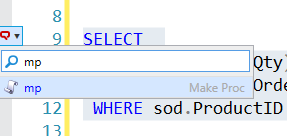
    When I see this, I can hit the CTRL key and I’ll get a drop down list. I will type “mp” which is my snippet code.

    2023-11-10 14_23_29-SQLQuery2.sql - ARISTOTLE_SQL2022.AdventureWorks2017 (ARISTOTLE_Steve (71))_ - M

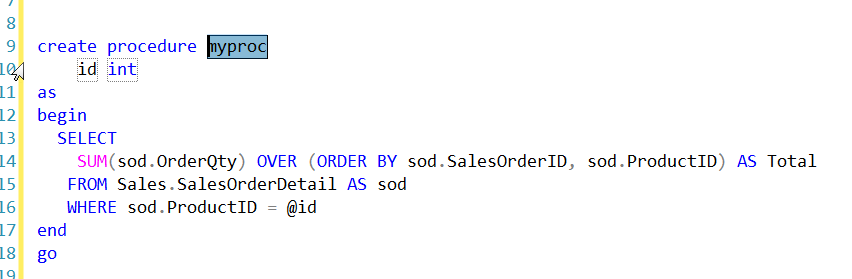
    This finds my snippet. I can hit Tab and my snippet is inserted, with my default variable values and also the text I selected in the place where $SELECTEDTEXT$ was in the snippet.

    2023-11-10 14_23_58-SQLQuery2.sql - ARISTOTLE_SQL2022.AdventureWorks2017 (ARISTOTLE_Steve (71))_ - M

    Now like any other snippet, I can tab between the variables and change them. When I’m done, I hit Enter and I have my code.

    Now I just need to save this in version control and deploy it to my production system.

    If you haven’t tried SQL Prompt, download the eval and give it a try. I think you’ll find this is one of the best tools to increase your productivity writing SQL.

    Video Walkthrough

    I made a video of using $surroundtext$ that you can watch. All my SQL Prompt tips are in this playlist.