Tag: syndicated

  • Creating a SQL Clone Image from a SQL Clone Database

    A customer asked if a new image could be created from a database that was itself a SQL Clone. It can, and I’ll show that in this post.

    This is part of a series of posts on SQL Clone, which is a virtualization product from Redgate Software.

    Creating a New Image

    To start with, I’ll look at the clones that I have deployed on a test server. As you can see below, I have a database, called “SimpleTalk”, on a local instance.

    2023-09-29 15_52_52-Zoomit Zoom Window

    I’m going to use this to create an image. First, I’ll click “Create Image” on the left. I’ll choose SQL Server, since I will use the existing cloned database as the source.

    2023-09-29 15_53_00-SQL Clone

    I pick the instance and database. As you can see, I’ve chosen the database that was listed above as a clone.

    2023-09-29 15_53_10-SQL Clone

    Next we skip the classification screen. This is a test db, so no data in there to worry about.

    2023-09-29 15_53_14-SQL Clone

    I’m not going to modify this, as this is a test.

    2023-09-29 15_53_17-SQL Clone

    Now I pick the destination, which is a local share.

    2023-09-29 15_53_21-SQL Clone

    I give this a name which differentiates from the original db and other images. I normally want to name all images as _new or _current for rotation purposes, but here I’m adding a test name since I’ll delete this right away.

    2023-09-29 15_53_32-SQL Clone

    You can see this start working.

    2023-09-29 15_53_36-SQL Clone

    And it completes in about the time for a restore. If I had added masking, this would run a little slower.

    2023-09-29 15_53_59-SQL Clone

    I have the image created, so it’s time to test this with a new database.

    Validating the Image with a Clone

    Click “Create clone” on the left menu and you get a dialog that asks for an image. I’ll pick the one I created above.

    2023-09-29 15_54_06-SQL Clone

    Once we chose the image, we can modify it. We won’t here.

    2023-09-29 15_54_11-SQL Clone

    Now we add an instance and a name. I’ve entered those below.

    2023-09-29 15_54_24-SQL Clone

    Once this completes, I can see this database, and my other clone in the SSMS Object Explorer.

    2023-09-29 15_54_37-SQLQuery14.sql - ARISTOTLE.sandbox (ARISTOTLE_Steve (75))_ - Microsoft SQL Serve

    If I query both databases, I get the same data, since I haven’t changed either one during this process. Note below that each one of these queries is from a cloned database.

    2023-09-29 15_55_23-SQLQuery1.sql - ARISTOTLE.SimpleTalk Cloned Clone (ARISTOTLE_Steve (54))_ - MicrThe SQL Clone cloned database is just a database. SQL Server sees it as any other database, as SQL Clone presents the mdf/ldf/ndf as any other database. You can back it up like any other one.

    If you are looking to save storage space for multiple copies of databases, or give each user a consistent copy in seconds, check out SQL Clone.
  • SQL Saturday Boston 2023 Slide Decks

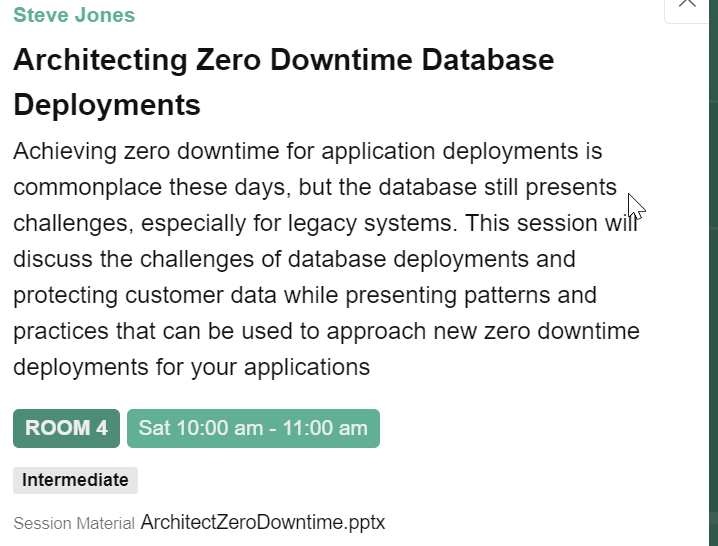
    Thanks to everyone who came to my sessions at SQL Saturday Boston 2023. I’ve added the decks to the schedule, so you can click my session and will see the download there. You can see this below, and all speakers can edit their sessions and upload the deck. See the download below:

    2023-10-14 13_43_08-SQL Saturday Boston 2023 (#1046)

    I’ve also copied the links here for slides:

    For the first session, Architecting Zero Downtime Database Deployments, there is also a GitHub repo here. Clone the repo down (or fork) and you can follow the sessions along. The repo is at: https://github.com/way0utwest/ZeroDowntime

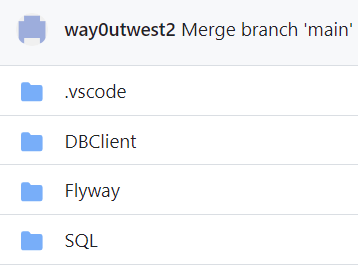
    In here, there are a few folders, as shown here:

    2023-10-14 13_45_44-way0utwest_ZeroDowntime_ Code for my zero downtime presentation

    The two items from the session are the DBClient, which is a Visual Studio 2019 project, and the SQL folder, which has all the setup (and teardown code). Each script is numbered, and you can run them in order. There are also some comments in each for when to flip feature flags.

    If you find issues, please submit an issue in the repo.

  • A New Word: Harmonoia

    harmonoia – n. an itchy sense of dread when life feels just a hint too peaceful – when everyone seems to get along suspiciously well, with an eerie stillness that makes you want to brace for the inevitable collapse, or burn it down yourself.

    I don’t want to burn things down, but I do like a little chaos in my life. I struggle to sit still and when things go too well, I worry about what will go wrong.

    It’s funny, but so much goes well in my life. I find great weather traveling, I get upgraded on flights or in hotels, events go smoothly, it’s somewhat amazing. I stop and think about this and appreciate the things that go well.

    However, sometimes life has gone a bit too well and I do think that something bad, or relatively bad, is likely to happen. I have no good reason, but I think harmonoia is something many people feel and it’s a good combination of harmony and paranoia.

    From the Dictionary of Obscure Sorrows

  • An Important Break

    I left home last Tuesday for work, heading to New Jersey for work. Over the weekend, I took a side trip to see my daughter play volleyball at university, which is something I’ve tried to do every year she’s been gone. Normally I’d be heading home now.

    However, I’m on the road for a few more days. I’m taking advantage of being on the East Coast to head back to my hometown, Virginia Beach, to see my Mom. I guess I’m also with my brother. I flew to the DC area and we’re driving down early today.

    I’ve made a few plans to come out, but things keep going sideways, so I decided this was the best time to come and extended my trip. I’ve let other commitments get in the way for the last couple years, but I am glad that I’m making this trip now.

    Now, I need to be sure I work to get back every year.