Tag: syndicated

  • Finding Analogies with AI

    I saw this article on using AI to help that included a few prompts. I decided to try one.

    This is part of a series of experiments with the ChatGPT and other AI systems. Lots of Copilot lately.

    The Prompt

    Here’s what I wrote, since I was reading piece on cloud migration and writing an editorial:

    I am currently learning about cloud migration. Convert the key lessons from this topic into engaging stories and metaphors to aid my memorization

    The Response

    1. The Cloud Island Adventure:

    Imagine your business as a group of settlers on a remote island. They’ve been working with outdated tools and limited resources, making progress slow and inefficient. One day, they hear about a magical cloud island that’s full of modern technology, abundant resources, and a vibrant community.

    The settlers decide to embark on a journey to this cloud island, symbolizing your migration to the cloud. As they arrive, they realize they can instantly access powerful tools, scalable resources, and connect with experts from various fields. Just like in cloud migration, your business gains flexibility and efficiency, leaving behind the struggles of managing on-premises infrastructure.

    Key Lesson: Cloud migration is like moving to a new land of opportunity, where you can harness advanced tools and resources to grow your business.

    2. The Cloud Highway Construction:

    Think of your business as a growing city with a bustling population. However, the existing roads and bridges are becoming congested and outdated, hindering growth and causing delays. To expand and flourish, the city planners decide to build a futuristic cloud highway.

    This cloud highway represents your migration to the cloud. Construction crews work tirelessly to build this highway, which is scalable, adaptable, and has lanes for various services. As businesses start using the highway, traffic flows smoothly, and they can easily scale up or down as needed. The old congested roads symbolize the limitations of on-premises systems, while the cloud highway signifies the ease of scalability and innovation in the cloud.

    Key Lesson: Cloud migration is like building a high-speed highway that allows your business to easily adapt, grow, and efficiently navigate the digital landscape.

    3. The Cloud Carnival:

    Envision your business as a traditional carnival that’s been running for years. The carnival’s attractions are fixed in place, and changing or upgrading them is difficult and time-consuming. Visitors are getting bored, and the carnival is losing its charm.

    Deciding to modernize, the carnival organizers pack up and move to a new location, which represents migrating to the cloud. In this new location, they can easily set up and tear down attractions, experiment with new games, and respond quickly to changing trends. The cloud becomes their dynamic playground, allowing them to create delightful experiences for visitors.

    Key Lesson: Cloud migration is like relocating a carnival to a space where you can easily innovate and provide fresh, exciting experiences to your customers.

    4. The Cloud Puzzle Factory:

    Imagine your business as a puzzle factory, creating intricate puzzles with limited resources and machinery. You’re tasked with making bigger and more complex puzzles, but the factory’s machinery is old and cannot keep up with the demand.

    To overcome this challenge, you decide to move the factory to a cloud-powered puzzle factory. Here, you have access to state-of-the-art machines that can quickly produce even the most complex puzzles. You can rent additional machines when needed and return them when the demand decreases. The cloud puzzle factory allows you to efficiently meet demand without being limited by physical constraints.

    Key Lesson: Cloud migration is like upgrading your puzzle factory to a cloud-powered version, where you can easily scale resources to meet demand and improve production efficiency.

    By associating these engaging stories and metaphors with the key lessons of cloud migration, you’ll find it easier to remember and apply these concepts in your learning journey.

    Thoughts

    I liked these analogies. They got me thinking about how to explain things to customers, though they are all positive and don’t represent the downsides. However, when I asked to alter this to show how this hinders progress, I got the result below.

    Very interesting. Not sure if I think this is that helpful, but it was thought provoking.

    1. The Stagnant Island Settlement:

    Picture a group of settlers who refuse to leave their old, resource-scarce island. They struggle with outdated tools and limited resources, but they’re unwilling to explore the nearby cloud island that offers modern technology and abundant resources.

    As time goes on, the settlers fall behind in their development. They can’t innovate or expand due to their lack of access to advanced tools and resources. The once-promising settlement becomes stagnant and isolated, symbolizing the limitations of staying on-premises instead of migrating to the cloud.

    Key Lesson: Choosing not to migrate to the cloud can lead to stagnation and missed opportunities, as your business remains bound by outdated tools and restricted growth.

    2. The Congested Road City:

    Imagine a bustling city that stubbornly refuses to build a modern cloud highway. The existing roads and bridges are constantly congested, causing delays, frustration, and hampering the city’s growth.

    As more businesses and people move in, the traffic situation worsens. Without the scalability and adaptability of a cloud highway, the city’s infrastructure can’t handle the increased demand. This congestion and lack of flexibility mirror the challenges of sticking with traditional on-premises systems.

    Key Lesson: Failing to migrate to the cloud can result in congestion and inefficiency, preventing your business from scaling and responding effectively to changing demands.

    3. The Stagnant Carnival Grounds:

    Consider a carnival that’s stuck in its old location, unable to adapt to changing times. The attractions become outdated, and visitors start losing interest. Despite the need for innovation, the organizers resist moving to a cloud-enabled carnival.

    As a result, the carnival fails to attract new visitors and struggles to create exciting experiences. The reluctance to embrace the cloud leads to a decline in customer satisfaction and revenue, as the competition adopts modern approaches.

    Key Lesson: Not migrating to the cloud can result in a decline in customer engagement and revenue, as your business fails to adapt to changing market demands and deliver innovative experiences.

    4. The Inefficient Puzzle Factory:

    Visualize a puzzle factory that clings to its old machines and refuses to transition to a cloud-powered system. The factory can’t keep up with the demand for larger and more complex puzzles, leading to delays and frustrated customers.

    Without the ability to scale resources on demand, the factory struggles to meet production goals. The reluctance to modernize impedes efficiency and profitability, as competitors who utilize cloud resources outpace them.

    Key Lesson: Neglecting cloud migration can lead to production inefficiencies and missed business opportunities, as your organization struggles to scale and respond to market needs.

    By exploring these scenarios that depict the hindrances of not moving to the cloud, you can gain a better understanding of the potential pitfalls and disadvantages of staying with traditional, on-premises systems.

  • Restore with Standby–#SQLNewBlogger

    A customer had a question about restoring with standby, so I wrote a quick post to explain how this works.

    Another post for me that is simple and hopefully serves as an example for people trying to get blogging as #SQLNewBloggers.

    The Scenario

    Sometimes you want to restore part of your data, but you still want the option to continue restores. A classic example of this is when you are restoring a number of transaction logs and want to check the data to find a place where certain values haven’t been changed.

    Suppose someone deletes a bunch of data between 10am and 11am from the supplier table. You know that they added “Acme” to this table before the delete. You might restore up to 10am and check the supplier table for the old data and look for Acme. If it’s not there, maybe you restore the 10:05am log backup and check again. If it’s not there, then the 10:10am log, etc.

    SQL Server lets you query a restored, but not recovered database with the STANDBY option. If you use NORECOERY, you can’t query the data. I won’t delve into the technical process in this blog, but for now, this is what we want to do: query a restored db, but not prevent future restores.

    Setup

    First, create a database and then take a backup. I created the “sandbox” database in my system and backed it up. I won’t cover that. Now, let’s set up a restore. I’ll choose a new name, since I’m looking for data. Here’s the statement I picked:

    USE [master]
    RESTORE DATABASE [sandbox4] FROM  DISK = N'D:\SQLBackup\New folder\sandbox_20210308.bak' WITH  FILE = 1,
       MOVE N'Sandbox' TO N'D:\SQLServerData\SQL2017\Sandbox4.mdf',
       MOVE N'Sandbox_log' TO N'D:\SQLServerData\SQL2017\Sandbox4_log.ldf',
       STANDBY = N'D:\SQLBackup\New folder\sandbox_RollbackUndo_2023-08-07_11-51-39.bak',  NOUNLOAD,  STATS = 5
    GO

    This is complex, and I haven’t memorized this syntax. Plus I don’t want to type all those paths. Instead, I use SSMS. I’ll set up the restore there. Here are the three screens. Note in the first, one I’ve pointed to the “Script button”, which is what I pushed to get this command.

    I’ve picked the device here and changed the restore to database name.

    2023-08-07 12_56_32-Zoomit Zoom Window

    File options. Make sure the filenames don’t conflict with existing ones.

    2023-08-07 12_56_53-Restore Database - sandbox4

    Set the standby option and remove the tail log backup if this is the same instance as the original database.

    2023-08-07 12_56_47-Restore Database - sandbox4

    Restoring and Querying

    When I run this command, I’ll get this type of output. I like getting stats, in case something sticks.

    2023-08-07 12_59_24-SQLQuery10.sql - ARISTOTLE_SQL2017.master (ARISTOTLE_Steve (63))_ - Microsoft SQ

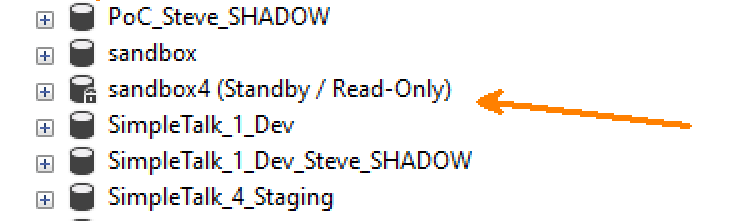
    In the object explorer, I’ll also see the database as standby/read-only.

    2023-08-07 12_59_47-Zoomit Zoom Window

    If I open a query window, I can get data from this database.

    2023-08-07 13_01_07-SQLQuery10.sql - ARISTOTLE_SQL2017.sandbox4 (ARISTOTLE_Steve (63))_ - Microsoft

    However, I can’t update tables.

    2023-08-07 13_01_34-SQLQuery10.sql - ARISTOTLE_SQL2017.sandbox4 (ARISTOTLE_Steve (63))_ - Microsoft

    Summary

    This is a quick look at how to get a database in standby. I covered one use case above, but not all the ways in which you use standby or what’s happening behind the scenes. If you need to query a database in the middle of the restoring state, use the standby option.

    SQLNewBlogger

    This post took me about 15 minutes to assemble. I set this up and tested it for a client, then I had to redo the work with screen shots and add the text. It’s not too long, but this is a good example of how I set up a post that leads to others. I need to create these posts:

    • what happens with the standby option
    • restoring more backups to this database with standby
    • restoring more backups to this database without standby
    • coming out of standby mode
    • automating this to look for a data change

    You could do this and showcase your knowledge of this feature and how you might use it

  • Chicago Database DevOps in a Day Workshop

    I’m heading to Chicago today for the Redgate Database DevOps in a Day workshops. This is the first of many on the US tour. I’ll be at 5 of them, but there will be another 5 where Ryan, Grant, or our Solutions Engineers will run the show.

    If you’ve registered, please say hi, introduce yourself, and ask lots of questions. Hopefully you’ll enjoy the day.

    Just a quick trip for me, coming back tomorrow, which is good. I head to the UK Roadshow Friday night..

  • Quickly Creating a tsqlt Test for a Query

    One of the things that I feel is important to building better software is testing your code. It should be easy and simple to test code and determine if a chance or enhancement has broken anything.

    This usually requires a testing framework. I like tsqlt, which a friend wrote and my employer supports. This framework is easy, I think, to use for tests, but some people feel differently. This post will show me creating a test in < 5 minutes, based on what someone else wrote to ask for help.

    The Scenario

    In this post, a user was asking about how to write a query that looks to create distinct results. They posted this code, which isn’t far from the type of thing I’ve had other developers send me inside a company asking for help:

    DROP TABLE IF EXISTS #BASKET;
    DROP TABLE IF EXISTS #ARRIVED;
    DROP TABLE IF EXISTS #PREPARED;
    DROP TABLE IF EXISTS #WantedResult;

    CREATE TABLE #BASKET
    (
    BASKET_ID nvarchar(15) PRIMARY KEY NOT NULL
    )
    ;
    CREATE TABLE #ARRIVED
    (
    BASKET_ID nvarchar(15) NOT NULL
    ,ITEM_ID nvarchar(15) NOT NULL
    )
    CREATE TABLE #PREPARED
    (
    BASKET_ID nvarchar(15) NOT NULL
    ,ITEM_ID nvarchar(15) NOT NULL
    )

    INSERT INTO #BASKET
    (BASKET_ID)
    SELECT 'A'
    UNION ALL SELECT 'B'
    UNION ALL SELECT 'C'
    UNION ALL SELECT 'D'
    ;

    INSERT INTO #ARRIVED
    (BASKET_ID, ITEM_ID)
    SELECT 'A','INO 1'
    UNION ALL SELECT 'A','INO 2'
    UNION ALL SELECT 'B','INO 3'
    UNION ALL SELECT 'D','INO 8'

    ;
    INSERT INTO #PREPARED
    (BASKET_ID, ITEM_ID)
    SELECT 'A','INO 111'
    UNION ALL SELECT 'B','INO 44'
    UNION ALL SELECT 'B','INO 55'
    UNION ALL SELECT 'B','INO 66'
    UNION ALL SELECT 'C','INO 170'
    ;
    /* Gives duplicates INO 111, INO 3 */
    SELECT
    BASKET.BASKET_ID
    ,ARRIVED.ITEM_ID IN_ID
    ,PREPARED.ITEM_ID OUT_ID
    FROM #BASKET BASKET
    LEFT JOIN #ARRIVED ARRIVED
    ON BASKET.BASKET_ID=ARRIVED.BASKET_ID
    LEFT JOIN #PREPARED PREPARED
    ON BASKET.BASKET_ID=PREPARED.BASKET_ID
    ORDER BY BASKET.BASKET_ID,ARRIVED.BASKET_ID,PREPARED.BASKET_ID
    ;


    CREATE TABLE #WantedResult
    (
    BASKET_ID nvarchar(15)
    ,IN_ID nvarchar(15)
    ,OUT_ID nvarchar(15)
    ,SORT_NBR int
    )
    INSERT INTO #WantedResult (BASKET_ID,IN_ID,OUT_ID,SORT_NBR)
    SELECT 'A' BASKET_ID,'INO 1' IN_ID,'INO 111' OUT_ID,1 SORT_NBR
    UNION ALL SELECT 'A' BASKET_ID,'INO 2' IN_ID,NULL OUT_ID,2 SORT_NBR
    UNION ALL SELECT 'B' BASKET_ID,NULL,'INO 55' OUT_ID,4 SORT_NBR
    UNION ALL SELECT 'B' BASKET_ID,NULL,'INO 66' OUT_ID,5 SORT_NBR
    UNION ALL SELECT 'B' BASKET_ID,'INO 3' IN_ID,'INO 44' OUT_ID,3 SORT_NBR
    UNION ALL SELECT 'C' BASKET_ID,NULL IN_ID,'INO 170' OUT_ID,6 SORT_NBR
    UNION ALL SELECT 'D' BASKET_ID,'INO 8' IN_ID,NULL OUT_ID,7 SORT_NBR
    ;
    SElECT BASKET_ID,IN_ID,OUT_ID,SORT_NBR
    FROM #WantedResult
    ORDER BY BASKET_ID,SORT_NBR

    Now if I run this, I see a query that doesn’t work, and I have results in a table. I could query #WantedResult and compare that with my query, but that’s not great, and it doesn’t persist this over time.

    Let’s make this better.

    Setup

    I’ll assume you have tsqlt installed. If you don’t, read this. If I paste that code into my SSMS, I can do a couple things. First, I’ll remove the temps, because I want to be able to test this over time. I’ll assume this is something I got from another developer, and I might need to check their tables. If these were tables in a dev database I used, I wouldn’t run this part. I wouldn’t run any, I’d keep my test data.

    CREATE TABLE BASKET
    (
    BASKET_ID nvarchar(15) PRIMARY KEY NOT NULL
    )
    ;
    CREATE TABLE ARRIVED
    (
    BASKET_ID nvarchar(15) NOT NULL
    ,ITEM_ID nvarchar(15) NOT NULL
    )
    CREATE TABLE PREPARED
    (
    BASKET_ID nvarchar(15) NOT NULL
    ,ITEM_ID nvarchar(15) NOT NULL
    )

    INSERT INTO BASKET
    (BASKET_ID)
    SELECT 'A'
    UNION ALL SELECT 'B'
    UNION ALL SELECT 'C'
    UNION ALL SELECT 'D'
    ;

    INSERT INTO ARRIVED
    (BASKET_ID, ITEM_ID)
    SELECT 'A','INO 1'
    UNION ALL SELECT 'A','INO 2'
    UNION ALL SELECT 'B','INO 3'
    UNION ALL SELECT 'D','INO 8'

    ;
    INSERT INTO PREPARED
    (BASKET_ID, ITEM_ID)
    SELECT 'A','INO 111'
    UNION ALL SELECT 'B','INO 44'
    UNION ALL SELECT 'B','INO 55'
    UNION ALL SELECT 'B','INO 66'
    UNION ALL SELECT 'C','INO 170'
    ;

    Once I have that, I’m ready to build a test.

    Building a Test

    The first thing you need is a test class. Over time, this class likely would exist in a project for my database. However, since this is a new one for me, I’ll create a class with this.

    EXEC tsqlt.NewTestClass @ClassName = N'QueryTests' -- nvarchar(max)
    GO

    Now I build the test, which is a stored procedure. The test class above is a schema, and inside my proc, I’ll paste the first script above. I will then alter a few things. First, I’ll change each CREATE TABLE to a call to tsqlt.faketable. You can see this edit below.

    2023-07-31 13_29_47-creating_a_test.sql - ARISTOTLE.sandbox (ARISTOTLE_Steve (64)) - Microsoft SQL S

    Below this I have inserts. In this case, I have the test data the other dev has, so I’ll just remove the # from each statement and insert into a real table.

    2023-07-31 13_30_21-creating_a_test.sql - ARISTOTLE.sandbox (ARISTOTLE_Steve (64)) - Microsoft SQL S

    Below this, I’ll leave the CREATE TABLE #WantedResult alone. This is a good place for me expected results. However, I’ll also copy this create statement and edit it to create a new table. You can see this below.

    2023-07-31 13_31_23-creating_a_test.sql - ARISTOTLE.sandbox (ARISTOTLE_Steve (64)) - Microsoft SQL S

    The format for a test is:

    • assemble
    • act
    • assert

    The assemble is above. Now let’s act. I’ll trop a fake stored procedure here for the query. I would prefer the devs use procs, but I can’t always get what I want. However, this does encourage them to start writing procs. Here’s the entire act:

    2023-07-31 13_33_18-creating_a_test.sql - ARISTOTLE.sandbox (ARISTOTLE_Steve (64)) - Microsoft SQL S

    This runs the procs and puts the results in my temp table.

    Now I need to check this. I have the expected results in #WantedResults and the query stuff in #QueryResult. We can assert these are equal with tsqot.AssertEqualsTable. Here’s that code. The message and failmsg are whatever I want.

    2023-07-31 13_34_26-creating_a_test.sql - ARISTOTLE.sandbox (ARISTOTLE_Steve (64)) - Microsoft SQL S

    Below the assert, you can see the end of the test procedure with GO and then the call to run this. Here is the entire code for the test:

    CREATE OR ALTER PROCEDURE QueryTests.[test basket query]
    as
    -- assemble
    EXEC tsqlt.FakeTable
       @TableName = N'BASKET'        -- nvarchar(max)
    , @SchemaName = N'dbo'       -- nvarchar(max)
    EXEC tsqlt.FakeTable
       @TableName = N'ARRIVED'        -- nvarchar(max)
    , @SchemaName = N'dbo'       -- nvarchar(max)
    EXEC tsqlt.FakeTable
       @TableName = N'PREPARED'        -- nvarchar(max)
    , @SchemaName = N'dbo'       -- nvarchar(max)

    INSERT INTO BASKET
    (BASKET_ID)
    SELECT 'A'
    UNION ALL SELECT 'B'
    UNION ALL SELECT 'C'
    UNION ALL SELECT 'D'
    ;

    INSERT INTO ARRIVED
    (BASKET_ID, ITEM_ID)
    SELECT 'A','INO 1'
    UNION ALL SELECT 'A','INO 2'
    UNION ALL SELECT 'B','INO 3'
    UNION ALL SELECT 'D','INO 8'

    ;
    INSERT INTO PREPARED
    (BASKET_ID, ITEM_ID)
    SELECT 'A','INO 111'
    UNION ALL SELECT 'B','INO 44'
    UNION ALL SELECT 'B','INO 55'
    UNION ALL SELECT 'B','INO 66'
    UNION ALL SELECT 'C','INO 170'
    ;

    CREATE TABLE #WantedResult
    (
    BASKET_ID nvarchar(15)
    ,IN_ID nvarchar(15)
    ,OUT_ID nvarchar(15)
    ,SORT_NBR int
    )
    INSERT INTO #WantedResult (BASKET_ID,IN_ID,OUT_ID,SORT_NBR)
    SELECT 'A' BASKET_ID,'INO 1' IN_ID,'INO 111' OUT_ID,1 SORT_NBR
    UNION ALL SELECT 'A' BASKET_ID,'INO 2' IN_ID,NULL OUT_ID,2 SORT_NBR
    UNION ALL SELECT 'B' BASKET_ID,NULL,'INO 55' OUT_ID,4 SORT_NBR
    UNION ALL SELECT 'B' BASKET_ID,NULL,'INO 66' OUT_ID,5 SORT_NBR
    UNION ALL SELECT 'B' BASKET_ID,'INO 3' IN_ID,'INO 44' OUT_ID,3 SORT_NBR
    UNION ALL SELECT 'C' BASKET_ID,NULL IN_ID,'INO 170' OUT_ID,6 SORT_NBR
    UNION ALL SELECT 'D' BASKET_ID,'INO 8' IN_ID,NULL OUT_ID,7 SORT_NBR
    ;

    CREATE TABLE #QueryResult
    (
    BASKET_ID nvarchar(15)
    ,IN_ID nvarchar(15)
    ,OUT_ID nvarchar(15)
    ,SORT_NBR int
    )


    -- act
    INSERT #QueryResult
       EXEC dbo.BasketQuery

    -- assert
    EXEC tsqlt.AssertEqualsTable
       @Expected = N'#WantedResult' -- nvarchar(max)
    , @Actual = N'#QueryResult'   -- nvarchar(max)
    , @Message = N'query result works'  -- nvarchar(max)
    , @FailMsg = N'bad query'  -- nvarchar(max)
    GO

    Before we run the test, we need a proc. I’m going to take the first solution from the thread linked and drop it inside a proc call like this:

    CREATE OR ALTER PROCEDURE dbo.BasketQuery
    AS
    ;WITH cte_results AS (
    SELECT
    BASKET.BASKET_ID
    ,ARRIVED.ITEM_ID IN_ID
    ,PREPARED.ITEM_ID OUT_ID
    ,ROW_NUMBER() OVER(ORDER BY BASKET.BASKET_ID,ARRIVED.BASKET_ID,PREPARED.BASKET_ID) AS row_num
    FROM BASKET BASKET
    LEFT JOIN ARRIVED ARRIVED
    ON BASKET.BASKET_ID=ARRIVED.BASKET_ID
    LEFT JOIN PREPARED PREPARED
    ON BASKET.BASKET_ID=PREPARED.BASKET_ID
    --ORDER BY BASKET.BASKET_ID,ARRIVED.BASKET_ID,PREPARED.BASKET_ID
    )
    SELECT
    c1.BASKET_ID,
    CASE WHEN EXISTS(SELECT 1 FROM cte_results c2 WHERE c2.BASKET_ID = c1.BASKET_ID AND c2.IN_ID = c1.IN_ID AND c2.row_num < c1.row_num) THEN NULL ELSE c1.IN_ID END,
    CASE WHEN EXISTS(SELECT 1 FROM cte_results c2 WHERE c2.BASKET_ID = c1.BASKET_ID AND c2.OUT_ID = c1.OUT_ID AND c2.row_num < c1.row_num) THEN NULL ELSE c1.OUT_ID END
    FROM cte_results c1
    ORDER BY c1.row_num
    GO

    When I call my proc, I see this:

    2023-07-31 13_36_53-creating_a_test.sql - ARISTOTLE.sandbox (ARISTOTLE_Steve (64))_ - Microsoft SQL

    My test failed. Why? The query doesn’t have the right number of columns for the result. Easy for a developer to miss. Easy to catch with a real testing framework.

    I can alter the proc by adding a 4th column to the results, returning the row number. When I do that, my code for the final select is:

    SELECT
    c1.BASKET_ID,
    CASE WHEN EXISTS(SELECT 1 FROM cte_results c2 WHERE c2.BASKET_ID = c1.BASKET_ID AND c2.IN_ID = c1.IN_ID AND c2.row_num < c1.row_num) THEN NULL ELSE c1.IN_ID END,
    CASE WHEN EXISTS(SELECT 1 FROM cte_results c2 WHERE c2.BASKET_ID = c1.BASKET_ID AND c2.OUT_ID = c1.OUT_ID AND c2.row_num < c1.row_num) THEN NULL ELSE c1.OUT_ID END
    , c1.row_num AS sort_nbr
    FROM cte_results c1
    ORDER BY c1.row_num

    Now if I run my test, I see this:

    2023-07-31 13_39_02-creating_a_test.sql - ARISTOTLE.sandbox (ARISTOTLE_Steve (64)) - Microsoft SQL S

    It worked. The query has the right results, at least according to the original developer. I might double check their sample data, but regardless of how I change my own dev database, or if the data changes, this test will continue to run with this set of data.

    Testing a Refactor

    In the thread, there was a second query. I can test that easily as well. All I’ll do is run this code:

    CREATE OR ALTER PROCEDURE dbo.BasketQuery
    AS
    SELECT b.BASKET_ID
      , CASE WHEN ROW_NUMBER() OVER(PARTITION BY b.BASKET_ID, a.ITEM_ID ORDER BY p.ITEM_ID) = 1 THEN a.ITEM_ID END AS IN_ID
      , CASE WHEN ROW_NUMBER() OVER(PARTITION BY b.BASKET_ID, p.ITEM_ID ORDER BY a.ITEM_ID) = 1 THEN p.ITEM_ID END AS OUT_ID
          , ROW_NUMBER() OVER(ORDER BY B.BASKET_ID, a.ITEM_ID, p.ITEM_ID) AS Sort_Nbr
    FROM BASKET AS b
    LEFT OUTER JOIN ARRIVED AS a
          ON b.BASKET_ID = a.BASKET_ID
    LEFT OUTER JOIN PREPARED AS p
         ON b.BASKET_ID = p.BASKET_ID
    GO

    This is Drew’s solution, where I just replaced one query in the proc with another. After I do that, I just run this again, no test code changes.

    EXEC tsqlt.run 'QueryTests.[test basket query]'
    GO

    I get the same result as the previous test: success.

    Adding Other Cases

    If I wanted to test other test cases, I could do one of two things here. First, I could also the test data that is assembled in the top of the test and then alter the inserts for the #WantedResult table.

    The other option is copy this entire test, give it a different name, and then add different test data that might test specific things. Like, what if I’m missing data in a column or even a table. Whatever crazy cases I get from customers in the live database, I can build tests for those.

    Performance

    I don’t have a good way to programmatically test performance, but if I were capturing this code in a VCS, I could easily see two versions of the proc. I’d do something like this:

    CREATE OR ALTER PROCEDURE dbo.BasketQuery
    AS
    ;WITH cte_results AS (
    SELECT
    BASKET.BASKET_ID
    ,ARRIVED.ITEM_ID IN_ID
    ,PREPARED.ITEM_ID OUT_ID
    ,ROW_NUMBER() OVER(ORDER BY BASKET.BASKET_ID,ARRIVED.BASKET_ID,PREPARED.BASKET_ID) AS row_num
    FROM BASKET BASKET
    LEFT JOIN ARRIVED ARRIVED
    ON BASKET.BASKET_ID=ARRIVED.BASKET_ID
    LEFT JOIN PREPARED PREPARED
    ON BASKET.BASKET_ID=PREPARED.BASKET_ID
    --ORDER BY BASKET.BASKET_ID,ARRIVED.BASKET_ID,PREPARED.BASKET_ID
    )
    SELECT
    c1.BASKET_ID,
    CASE WHEN EXISTS(SELECT 1 FROM cte_results c2 WHERE c2.BASKET_ID = c1.BASKET_ID AND c2.IN_ID = c1.IN_ID AND c2.row_num < c1.row_num) THEN NULL ELSE c1.IN_ID END,
    CASE WHEN EXISTS(SELECT 1 FROM cte_results c2 WHERE c2.BASKET_ID = c1.BASKET_ID AND c2.OUT_ID = c1.OUT_ID AND c2.row_num < c1.row_num) THEN NULL ELSE c1.OUT_ID END
    , c1.row_num AS sort_nbr
    FROM cte_results c1
    ORDER BY c1.row_num
    GO
    SET STATISTICS IO ON
    EXEC dbo.BasketQuery
    SET STATISTICS IO OFF
    GO
    CREATE OR ALTER PROCEDURE dbo.BasketQuery
    AS
    SELECT b.BASKET_ID
      , CASE WHEN ROW_NUMBER() OVER(PARTITION BY b.BASKET_ID, a.ITEM_ID ORDER BY p.ITEM_ID) = 1 THEN a.ITEM_ID END AS IN_ID
      , CASE WHEN ROW_NUMBER() OVER(PARTITION BY b.BASKET_ID, p.ITEM_ID ORDER BY a.ITEM_ID) = 1 THEN p.ITEM_ID END AS OUT_ID
          , ROW_NUMBER() OVER(ORDER BY B.BASKET_ID, a.ITEM_ID, p.ITEM_ID) AS Sort_Nbr
    FROM BASKET AS b
    LEFT OUTER JOIN ARRIVED AS a
          ON b.BASKET_ID = a.BASKET_ID
    LEFT OUTER JOIN PREPARED AS p
         ON b.BASKET_ID = p.BASKET_ID
    GO
    SET STATISTICS IO ON
    EXEC dbo.BasketQuery
    SET STATISTICS IO OFF

    When I run this, I see these results:

    2023-07-31 13_46_49-creating_a_test.sql - ARISTOTLE.sandbox (ARISTOTLE_Steve (64))_ - Microsoft SQL

    Clearly query 2 runs more efficiently than query 1. That’s the one that needs to be submitted to the VCS for deployment. Of course, I’d ensure I’d run the test to be sure my query works, and then the CI process would re-run the test because it can’t trust me.

    And it shouldn’t.

    Summary

    It took my much longer to write this post, especially with picking code formatting and shooting images, than it did to write the test. Literally within 5 minutes I’d pasted the code from the thread twice and use it to create real tables and the test as shown above. I verified both queries within 5 minutes.

    Using a known process to test is good. It helps your developers. Getting set up with test data, and then learning to re-use some of those Assemble structures will help your team get up to speed and spread the load of creating data. This also forces developers to think logically through what they’re testing and not just vaguely looking at results and thinking they’re correct.

    This also means as we discover holes we haven’t tested, or we want to refactor and enhance our code, we prevent regressions.

    Give tsqlt a try and see if it can help you.