UPDATE: This post originally priced Charlotte, NC, but the Summit is in Houston, TX. I have corrected costs and locations. The difference is about $300 less for a flight and about $20-30 more for hotels.
Recently I was chatting with someone about SQL Bits. It’s my favorite conference of the year, and unfortunately, I can’t attend again this year because of a schedule conflict.
Still, I think you should go if you can. I’ve had people over the years think it’s too expensive and too costly to go to England for a conference and my friend was speculating if that was the case. I decided to take a look.
Cost of Attending
The costs of attending the conference are (generally)
- Admission
- Travel
- Lodging
- (some) Food
- Pre-Conference Days (optional)
I’ve been fortunate to often not pay admission as I speak at events, but I do attend sometimes. Lodging is expensive, and certainly not all meals are covered by the event. If I’m traveling, I do like to do a pre-con, since it’s a good chance to get focused learning in an area.
With that in mind, let me price out what it costs for each event. I’m looking forward, so I’ll take a look at SQL Bits 2020 v going to the PASS Summit later this year.
SQL Bits 2020
SQL Bits takes place from Mar 31-Apr 4. I’m coaching on the 30th and the 4th, so I can’t actually get there and back. Well, I could get there Tuesday, but I’d have to leave on Friday. The event has pre-conference days on Tuesday and Wednesday (called Training Days), and the conference on Thursday/Friday/Saturday. Saturday is a free day, like a SQL Saturday, and I’ll assume two training days here. After all, if I’m flying to England, I want to make the most of the time.
Pricing is available, and right now I’d be paying £1199 = US$1600. I’m rounding a bit, but this is roughly my cost in the US. This also includes two training days, which are each around US$490. If I dally and don’t register until after 15 Feb, this is about US$2000.
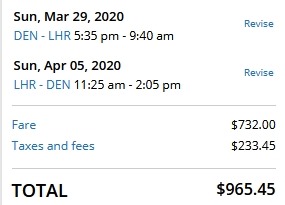
Flights for me (on United) would be US$966 from Denver. This is the direct, and traveling 29 Mar to 5 Apr. This is a good time of year to fly to the UK, and I’ve done it often. I’m giving myself a day to adjust. In reality, I’d likely make this a longer trip and take my wife. Let’s also factor in another $50 for the train to and from the airport.
Lodging is always pricey in London. I usually stay ion Hilton hotels, and the DoubleTree near the venue is £122, or £620 for the week. That’s about US$810-ish. Call it $900. I usually travel back to Heathrow that night, so another US$150 for a night there.
If I were to look for something else in a hotel, I see similar rates. As low as US$90 for a Holiday Inn to $160 for Aloft (where I’ve stayed). AirBnB in this areacan be as low as a room for $30-50 to a flat for about $100.
Food can be pricey in London. The lunches are covered by the conference, and two dinners at the Thur and Fri night events. Breakfast is provided all the days and there are lots of snacks. I’ve eaten really well at SQL Bits.
That means I’d be looking at these meals
- Breakfast – Sun
- Lunch – Mon
- Dinner – Mon, Tue, Wed, Sat
Let’s say $12 for breakfast (it’s a big city) and $50 for dinner. Lunch, call it $20. That’s a total of $242. I do like a few drinks, though you might be able to get sponsors to cover some of your costs here. I’ve roughly included a drink with dinner. I’m guessing that I’d spend another $150 in drinks.
Total for attending, in round numbers: US$4,062
- Flight $1020
- Lodging: $1050
- Conference: $1600
- Food: $392
You could do better by shopping around a bit, but these would roughly be the costs I’d need to go to my boss to cover. Or split the cost with them.
If I spoke, this would be closer to $2000. Maybe more of you ought to try and speak 
The PASS Summit in 2020
Let’s look forward to the Summit. Their pricing is more staggered, and if you can register really early (like now), it’s cheaper. US$2599 now, but I’ll assume I won’t be able to get this until summer. At that time, the cost of attendance is US$3299. This includes two pre-con sessions as well.
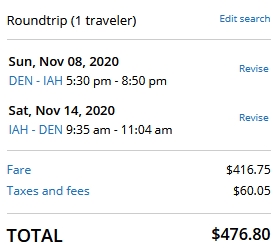
This year the event is in Houston, TX. For me, this is a nonstop flight from Denver, but not that cheap. I can get a $350 flight if I want to travel early, but I don’t. There are flights around $400 as well. The convenient flights for my schedule are around US$475. The exact pricing for me is $476.80, call it $480 after I tip the car guy. You’ll need a couple Uber/Lyft items, so say $50 here.
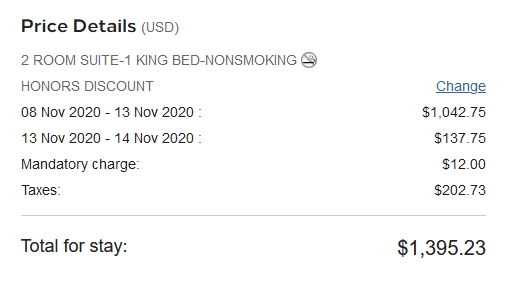
Lodging is better in Houston than Seattle, where the event usually is held. It’s still pricey. A hotel for me is around US$200 a night or more. I want to be close, so I’ll split the difference with a Garden Inn. This givers me a cost of $1,395.23. Call it $1400 ish with a few tips, as I’ll go over this.
Other hotels are similar, as low as $125 and well into the $300 range. AirBnbs are like London. I see lots of $50-60 a night for rooms or small 1 bedroom places. Closer to downtown we’re more into the $120 range and up.
Food will be similar. Charlotte has cheap and expensive places. The conference does cover breakfast and lunch. Dinner is two nights, the opening and the next night in the exhibition hall. I’d need these:
- Breakfast: Saturday
- Lunch: Sun
- Dinner: Sun, Mon, Thur, Fri
If I go with similar costs, I’d be with a similar $242 + $150 for drinks.
Total to attend PASS: $5,6921
- Conference $3299
- Flight: $480 + $50
- Lodging: $1,400
- Food: $392
The big difference here is the cost of the conference, which overwhelms the small flight difference.
Conclusion
It’s cheaper to attend SQL Bits from the US than the PASS Summit. I think so, and while you can do it cheaper than I’ve outlined, you can still likely make SQL Bits cheaper. What’s more, you get to experience another country and culture, along with many, many more people from even other, different cultures. That means a lot to me.
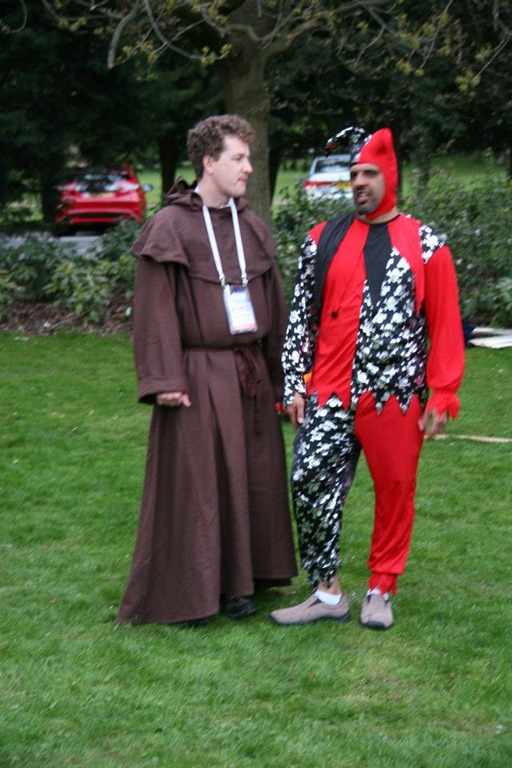
I also find that SQL Bits is a more casual conference, with less security and hassles. People have been able to bring their wives and kids to the event, or at least the party. Dressing up on Friday night at SQL Bits is a blast.
The PASS Summit is an iconic event. I’ve been very lucky to attend most of them, and it’s a huge gathering place for SQL professionals. I enjoy going, learning, and seeing lots of friends. However, it has grown to be an expensive event.
No matter what you choose, you’ll see some amazing speakers, meet lots of experts and get the chance for incredible networking. If you’ve been to one, consider the other.
What I would say is that SQL Bits is my favorite, and if you’re in the US, it’s not that expensive to go, even to London. When they move the event to other locations, the transport cost will rise, but hotels will be cheaper. I’d expect I’d save another $300-400 on the trip in Liverpool or Nottingham.
You do need a passport, so factor in $100 and 4-6 weeks, but you should have one anyway. Traveling is a great way to enjoy and experience more of life.


 Voice of the DBA