Tag: syndicated

  • A Smooth Laptop Setup

    A little over a week ago, I got a new laptop. This was late on a Sunday afternoon, and I went home to spend time with me wife. After dinner, we relaxed with a little TV time. While trying to decide what to watch, I opened the laptop and started the Windows setup process. This post talked about how smoother and simple things were for me, though certainly not seemless as I’ve had on OSX machines. Still, it went well.

    Windows

    The first part of getting a new Windows machine going is usually the account. I have a Microsoft account I use for a few things. It’s actually an old Hotmail account, but it’s worked well for me.I entered this, and it linked to a few things I already had set up, including my OneDrive. This bootstrapped quite a bit of the process.

    I then checked Windows Update (nothing to apply) and upgraded to Windows 10 Pro. Once this was done, I opened the Windows Store and applied a few updates from there. While this was running, I did two things.

    Chrome

    I prefer Chrome as a browser, and I keep some settings linked to this browser, like bookmarks, some throwaway user/pwds, and settings. I usually start by opening Edge on a new install and going to Chrome and installing it. I could to this separately, but it’s usually my first step.

    Chocolatey

    This is my go-to install system. It’s yum or apt-get for Windows and I’ve used it for close to a decade now. I go to the website, and grab the script. Since I usually don’t have DropBox yet, and that’s where I have lots of stuff, I start here. Run this in an admin command prompt that’s got PowerShell running:

    Set-ExecutionPolicy AllSigned or Set-ExecutionPolicy Bypass -Scope Process
    Set-ExecutionPolicy Bypass -Scope Process -Force; iex ((New-Object System.Net.WebClient).DownloadString('https://chocolatey.org/install.ps1'))

    Those two things get the package manager running. Once this is done, I usually start grabbing stuff I know I need. I used to have a long list of things to install, but since my needs change over time, I usually go with this:

    choco install dropbox -y
    choco install evernote -y
    choco install greenshot –y
    choco install spotify –y

    These are the main things I want, and really need. While these are running, I usually go get the o365 portal from work and start that install, because it’s long.

    With every laptop, I somewhat change the things I install. I posted I was doing this and Aaron Nelson dropped me a link to his gist of database pro software: https://gist.github.com/SQLvariant/d29ffd1e9905992318b4585c83399328.

    This is a great list, and I immediately added some of these items. I don’t use all of these, but I use many.

    • SSMS
    • ADS
    • Git
    • VSCode
    • PowerBi
    • VS
    • Python
    • Sublime Text
    • Slack
    • Teams
    • Docker Desktop

    I do need SQL Server, but I held off since I wasn’t sure if I want to install it or just run containers. I’m debating this as I write this. I’m really tempted to skip an install and set up folders for holding db/log files at specific versions.

    Once these tools were installed, I added the Redgate Toolbelt, missing that in Aaron’s list. I saw Kendra tried this and it worked, but I was half paying attention and just running choco commands while watching a movie.

    Just in glancing at the machine on a dresser a few times and typing a few commands had most of the machine set up in the space of a 2 hour movie. It was Holiday in the Wild, if you’re wondering. An enjoyable movie.

    More to do, but really typing a few commands, I had most software installed that I need.

    Now I just need to decide what to do about SQL Server.
  • Prompt in ADS

    Ever since VS Code and Azure Data Studio came out, people have been asking for SQL Prompt to port over. I’ve been right there with you, though unsure of the value, given how UI dependent Prompt is for users.

    Things have changed.

    sql-prompt_early-access_social-graphic_1200x630

    There’s an EAP program, with an early look at the formatting part of Prompt in ADS.

    I’ve been using this for a few weeks, and it’s different, but it works well. All my styles from SSMS are ported and linked, and it’s a quick set of keystrokes, albeit different ones, to format code.

    I’m curious to see what others think, so join the program if you want formatting in ADS and are willing to give some feedback.

  • T-SQL Tuesday Gifts (#121)

    tsqltuesday

    It’s that time of month. I missed last month while traveling, but I wanted to get back in the party. This month, Mala has invited us to talk about the gifts we’ve gotten this year. An easy one for me in 2019.

    Down Under

    The gift for me this year was getting to travel to Australia and New Zealand. I’ve always wanted to go and haven’t been quite able to make it a priority. Last year when I heard we had a Redgate office opening in Australia, I knew this was my chance. We decided to run a few SQL in the City Summit events in 2019 down under and I got to go.

    I was lucky enough to go, and not only attend a few events, but I spent nearly a month in Australia/New Zealand. I spoke at 3 SQL in the City Summits and three SQL Saturdays, which were very enjoyable for me.

    I brought my family along for part of the trip and ended up traveling a little in the middle and taking some holiday. I managed to visit Brisbane, Melbourne, Christchurch, Dunedin, and Queenstown.

    Things went well, and I actually went back to Sydney in September, but just for a couple days. Still, I made the most of it.

    20190926_133919_Burst01

    This was truly a gift for me.

  • Upgrading Windows 10 Home to Pro

    I use Hyper-V and a few other things that require Windows 10 Pro. When I got my new laptop, it had Windows 10 home on it. Not a big deal, as I’ve run into this a few times over the years when buying consumer laptops. I have a Pro key, so I usually just wipe and reinstall the OS.

    That’s not necessary anymore. Certainly there are unwanted programs that I can remove, but I don’t need an OS reinstall. I found a few articles on the Internet that explain this, but it was simple.

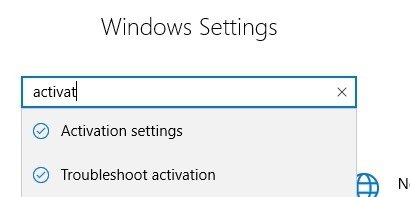
    I first booted the laptop and went through initial Windows setup. I made sure Windows Update didn’t have any pending items. Then I hoped the Control Panel with Win+I. If you’ve never used this, the Windows key with various other items is handy. Win+I gives me settings. I typed in activation.

    2019-12-02 11_53_37-Settings

    You’ll see the activation settings, which you can then click.

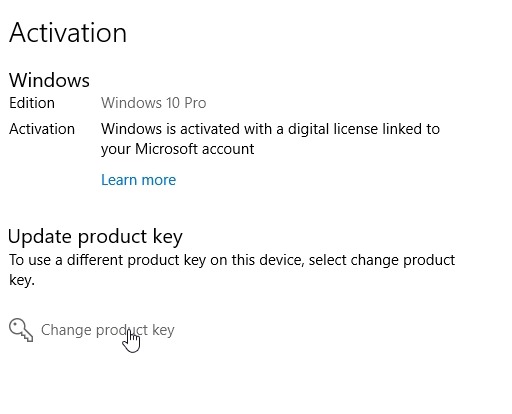
    I already did this, but on my laptop, I saw Windows 10 Home already listed and licensed. I then saw Upgrade options below it, where you see Update Product Key here. There were two links. One was for the MS store, to purchase an upgrade. The second was the Change product key option listed.

    2019-12-02 11_53_45-Settings

    I chose that one and then it prompted me to enter a key. I did and clicked OK. This immediately set my laptop to Windows 10 Pro and I could enable and activate Hyper-V.

    Windows has greatly smoothed this process over time and I’m looking forward to the ease of the setup system for this machine.