Tag: syndicated

  • What’s the Mashup Engine?

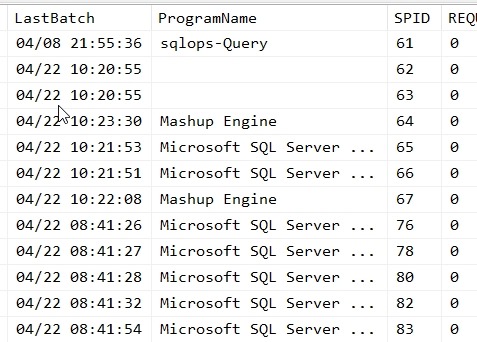
    I was testing something the other day and ran sp_who2 on a test instance. I saw this in the program listing:

    2019-04-22 10_52_34-SQLQuery13.sql - Plato_SQL2017.sandbox (PLATO_Steve (57))_ - Microsoft SQL Serve

    I had never seen the Mashup Engine listed in a program list, and I certainly don’t have any program installed by that name.

    Or do I?

    I actually do. It’s embedded in Excel 2016, as part of Power Query. Fellow MVP, Reza Rad, has a good introduction to what this actually is. Apparently it’s the engine that makes it easy for data movement and transformation. Kind of an SSIS light, that’s a part of Power BI as well.

    If you see this on your instance, you’ll know that someone is connecting with another tool. As to which one it is, that might be harder to determine.

  • Enable a Named Instance to Connect on 1433

    My default setup for a few years is to only use named instances, usually with a standard SQL2014 or SQL 2016 as the name of the instance. Recently, I set up a new instance and needed to connect from another machine. I’ve done this lots of times, but in this case, I wanted to both enable TCP/IP as well as move the port.

    This post explains how to get your named instance to listen on 1433.

    First, run the Configuration Manager and check your protocols for the server. You likely see something like this, where TCP/IP is disabled.

    2019-04-15 20_15_55-WS2016 SQL2016 Packt c - VMware Workstation

    Right click TCP/IP and enabled it from the menu.

    2019-04-15 20_16_06-WS2016 SQL2016 Packt c - VMware Workstation

    You’ll have to restart the instance, but wait. Cancel the message that appears. Now open the properties for the TCP/IP service.

    2019-04-15 20_16_29-WS2016 SQL2016 Packt c - VMware Workstation

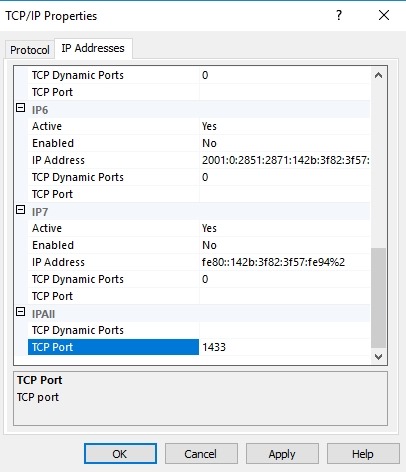
    At the bottom, there’s an IPAll item. This is likely set for Dynamic ports for your named instance. Remove the 0 and enter 1433 for the TCP Port line. You should get something like this:

    2019-04-15 20_16_52-WS2016 SQL2016 Packt c - VMware Workstation

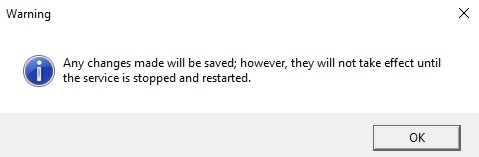
    When you click OK or Apply, you’ll see this message.

    2019-04-15 20_16_13-WS2016 SQL2016 Packt c - VMware Workstation

    Now restart your database engine service and you should be able to connect over 1433.

  • SQLServerCentral Design–QotD

    This is part of a series of posts that look at the changes to the SQLServerCentral design, bringing us to v3 of the site. You can see the other posts with the SQLServerCentral tag.

    We’re a few weeks in and the site is stabilizing a bit, but a lot of work still to go. This week, I wanted to write about the changes to our Question of the Day section, which are likely more backend than front end, but still an important part of the site.

    When we started the question of the day, it was a whim from Brian Knight, one that annoyed me because I ended up being responsible for most questions. Over time we allowed users to submit questions and enhanced the way the testing worked, but it took a bit of a step backward in v2 of the site. We had more restrictive forms for loading the questions, not supporting images in the explanation or even any HTML at first. We enhanced this over time, but the marking of multiple choice questions, scoring, awarding back points, and more were somewhat broken for a long time.

    I got quite familiar with running direct “fix-em-up” queries against the database to correct issues.

    When we talked with the developers about the new system, I wanted a more flexible way to get questions written, scheduled, scored, and even fix when we corrected issues. There are a number of plugins for WordPress that allow quizzes, but none that really fit our paradigm.

    A custom plugin was written which allows a more flexible editing system for the question and explanation, similar to what most users are familiar with for writing posts in WordPress. This is more visually appealing, and easier to author a question.

    On the front end, things are very similar, though we have reformatted a few things in the last couple weeks to show more information:

    • We let you know if you were right or wrong
    • We give you the correct answer, or if you were wrong, we tell you what you picked
    • We give you the percentage and count of people answering each choice.

    Many of these changes were simple, and some added back functionality that was lost when we launched the new site, but the changes were quicker and easier than in the past.

    That’s a good sign because in the process of building this out, there are a few things missing. We still need to award back points for poor questions. Right now I’d be reduced to making a database query, but I need a “award everyone points regardless of answer” button built.

    We also want to start collecting items into a test that might quiz a user in some particular area. In other words, rather than a question a day, we want to put questions more into a group like a certification test. Since the items are all linked in a more normalized fashion, and this would in some sense mirror what we’ve done with the Stairway series, I’m hopeful we can add this.
  • Lengthen a Primary Key–#SQLNewBlogger

    Another post for me that is simple and hopefully serves as an example for people trying to get blogging as #SQLNewBloggers.

    I saw a post recently where someone needed to increase the size of a PK and was getting a table rebuild message in SSMS. This is short post to show that isn’t required.

    First, let’s create a table and give it some data. Note that the PK is set to a specific size.

    CREATE TABLE dbo.Document
    (DocumentKey NVARCHAR(5) NOT NULL CONSTRAINT DocumentPK PRIMARY KEY
    , DocumentName NVARCHAR(200)
    , DocumentDate DATETIME2
    )
    GO
    INSERT dbo.Document
         (
             DocumentKey
           , DocumentName
           , DocumentDate
         )
    VALUES
         (N'ABC23', N'Something very interesting', '2019-01-02'),
         (N'QNI43', N'An adventure you admire', '2019-02-02'),
         (N'MNT33', N'Magnets describing life', '2019-03-04'),
         (N'DEF25', N'Time for nothing', '2019-03-12'),
         (N'HIJ54', N'Dreams of the dark', '2019-04-17')
    GO
    SELECT top 10
      *
      FROM dbo.Document AS d
    GO

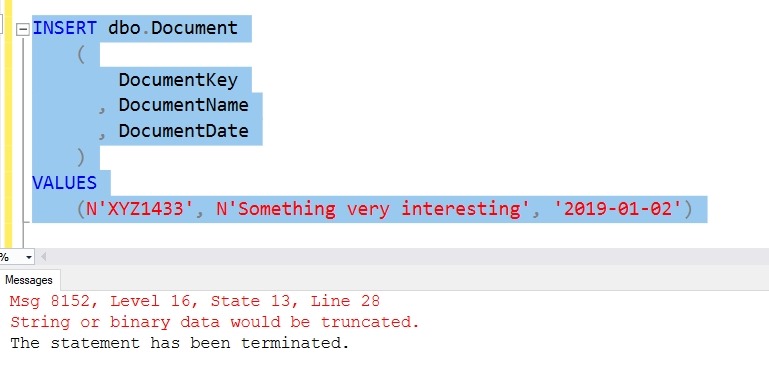
    If I try to insert data that’s larger, I’ll get this message:

    2019-04-16 08_58_43-SQLQuery10.sql - Plato_SQL2017.sandbox (PLATO_Steve (53))_ - Microsoft SQL Serve

    In SQL 2019, I’ll get a better error, but for now, this shows me a limitation of my key.

    Now I’ll increase the size of the key. I use the ALTER TABLE … ALTER COLUMN statement.

    ALTER TABLE dbo.Document ALTER COLUMN DocumentKey NVARCHAR(7) NOT NULL
    GO

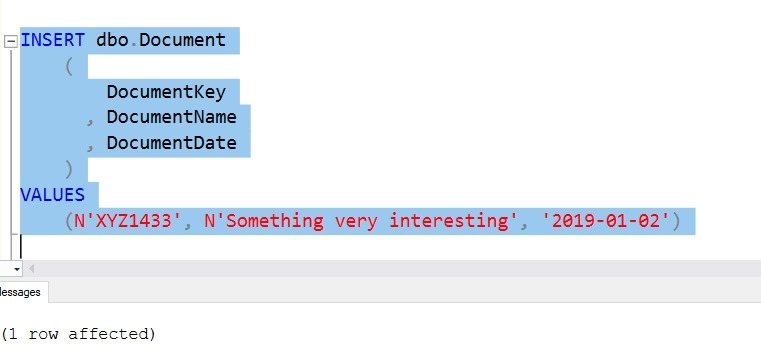
    Now, I’ll run my failed insert again:

    2019-04-16 09_00_00-SQLQuery10.sql - Plato_SQL2017.sandbox (PLATO_Steve (53))_ - Microsoft SQL Serve

    As you can see, I can increase the size of the PK without rebuilding the table. Making it smaller is a post for another day.

    SQLNewBlogger

    This was a quick repro I set up to answer the question for myself and others. I thought I could do this and spent five minutes proving it.

    The longest part of this post was the test data. You could do the same thing, maybe showing how this relates to a child table as well. In fact, start today and you might beat me to creating that post.