Tag: syndicated

  • Generating an SSH key on Windows

    I needed an SSH key. First I needed to the WSL subsystem, and once I had that working, I could do the work I needed to do: get an SSH key.

    There is a utility to help with this on Linux, called ssh-keygen. You run this at the command line and get two files output. These are the public and private keys. I knew how to do most of this, but what I wanted to do was get a custom filename. There are two ways to do this.

    First, you can just enter ssh-keygen at the command line. The system will then prompt you for the filename, with id_rsa as the default.

    2019-03-27 12_27_17-sjones@Plato_ _mnt_c_Users_Steve_.ssh

    The other way is with the –f parameter. In this case, I use this because I want to specify this as an RSA key as well as set the bit size.

    2019-03-27 12_26_16-sjones@Plato_ _mnt_c_Users_Steve_.ssh

    In both cases, I now have new ssh keys I can use to connect to servers, once I add them to the server itself.

    2019-03-27 12_28_19-.ssh

  • SQLServerCentral Design Decisions–Forum Threads

    It’s been a long couple of weeks. Almost two weeks ago we cut over from our older, v2 version of the site to the new (and current) v3. Lots of bugs, lots of disruption, and lots of unexpected items.

    As a bit of trying to help me understand as well as a catharsis, I wanted to jot a few thoughts on things that I’ve had to make decisions on or work within our framework. This post looks at one small item, the display of forum posts.

    The New Look

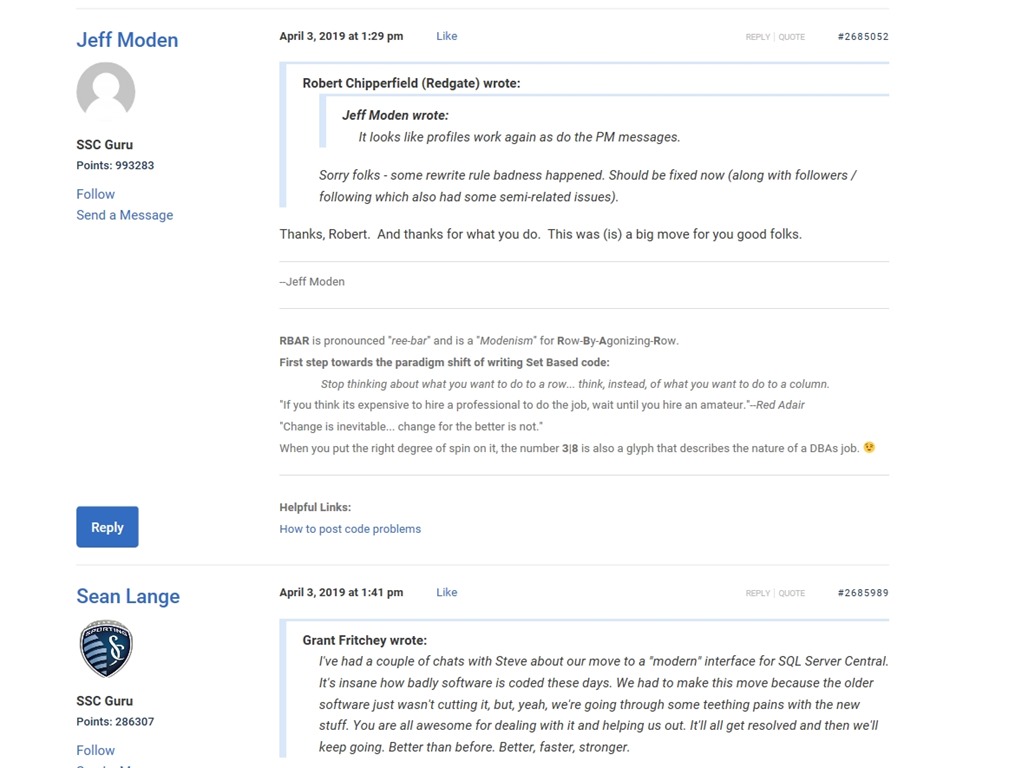
    Here’s the top of a thread in the current site.
    2019-04-08 11_38_35-Window

    A post and two responses, and I think it’s easy to see who’s posted, their avatar, the text and content, I can follow a user or send a message, I can reply or quote a post. My signature is small and a different font from the text.

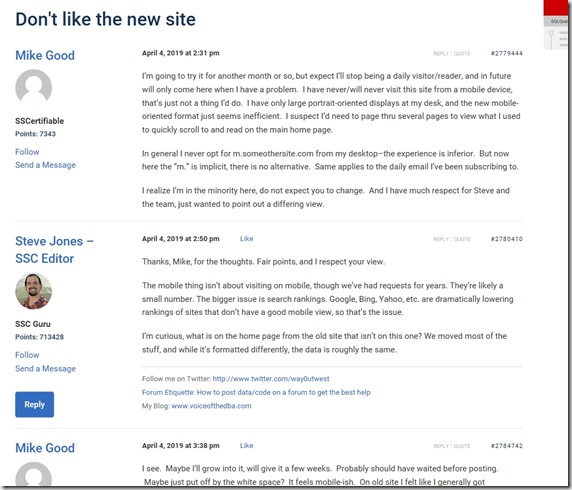
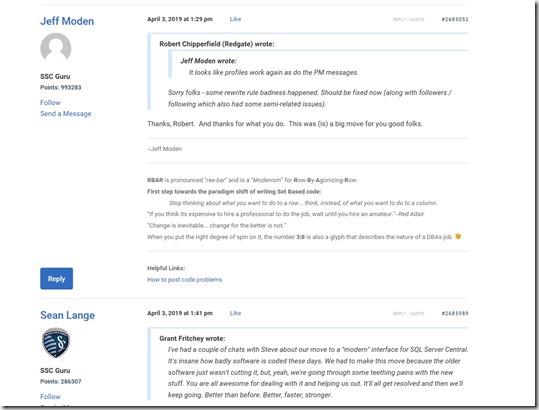
    Here’s another couple posts, which I think are harder to read:
    2019-04-08 11_45_19-Window

    These are older signatures, which don’t format as well, and some of the quoting is a little broken and causing issues.

    I don’t think the new format is necessarily more visually appealing to me, but it is less elements and a cleaner look in a more modern style. For everyone that liked the old format, we have people that didn’t.

    And vice versa.

    In this new format, we took the default bbPress items and tried to aim for less extraneous information. We styled this to have less color and contrast that is distracting while presenting the information that users need to see. We limited the options, of which we had too many and confused people in the older forums.

    This also gives us a good codebase on which we can make future changes. While many of those aren’t visible here, the pace and breadth of changes we’ve made in the last two weeks to tweak things is way above anything we went through the last time we touched the forums. I’m amazed at how well we’ve adapted to new areas and requirements as we go along.

    That being said, I know there are lots more changes to make and look for more to be coming in the next few months. We’ll change the styles slightly and perhaps redo some of the layout to make things easier.

    One thing this project has taught me is that what I think is a simple decision for software isn’t so simple for my users. We have thousands, really hundreds of thousands of users and some days it feels like none of them are pleased. I couldn’t imagine how hard it is when your software or site has 10x or 100x that size.

  • Testing as another user–#SQLNewBlogger

    Another post for me that is simple and hopefully serves as an example for people trying to get blogging as #SQLNewBloggers.

    This is one of those things I do often and thought I should write a short blog on the topic. Often I want to check how another user can interact with some object. I could certainly open a new window or change my connection string, but that can be disruptive. Not to mention I sometimes get confused about which user is in which window in SSMS or ADS.

    There’s a better way. I can use the EXECUTE AS USER statement.

    Testing Access

    Here’s a quick example. I create a new table with Dynamic Data Masking. I want to see if another user sees masked content. Here’s my table:

    CREATE TABLE dbo.Subscriptions (
        UserID int,
        SubscriptionName VARCHAR(200),
        SubscriptionValue MONEY MASKED WITH (FUNCTION ='random(100,1000)')
    );
    GO
    INSERT dbo.Subscriptions
         (
             UserID
           , SubscriptionName
           , SubscriptionValue
         )
    VALUES
         (1, 'My first sub', 50.99),
         (1, 'Time', 24.99),
         (1, 'ESPN Mag', 19.99),
         (1, 'Popular Mechanics', 19.99),
         (1, 'The Guardian', 24.99)
    GO

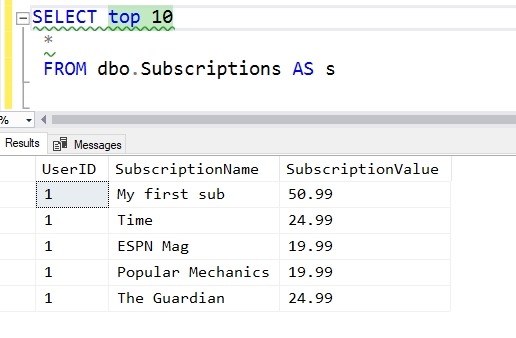
    When I access this, I see this data:

    2019-04-08 11_23_41-Window

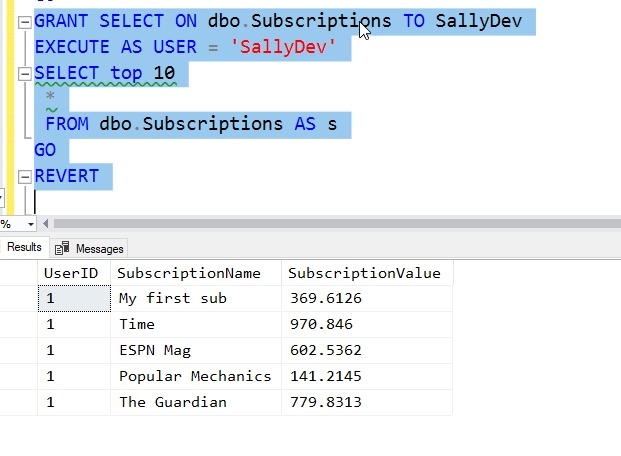
    What does SallyDev see? I could log in as this user, but this is easier:

    GRANT SELECT ON dbo.Subscriptions TO SallyDev
    EXECUTE AS USER = 'SallyDev'
    SELECT top 10
      *
      FROM dbo.Subscriptions AS s
    GO
    REVERT

    Now I see this:

    2019-04-08 11_24_49-Window

    The EXECUTE AS USER allows me to simulate another user. The REVERT brings me back to my context.

    Use this to make testing easier.

    SQLNewBlogger

    I was using this technique recently and realized the I hadn’t blogged about it. I spent about 5 minutes creating a scenario and 5 minutes putting this together. You could do this, show some knowledge, and explain how this helps your scenario.

  • T-SQL Tuesday #113–Personal Databases

    This month we have a really interesting question for the T-SQL Tuesday invitation. Todd Kleinhans is the host and asks about personal databases. Do we use them for anything? Quite a create question for a professional.

    My Personal Database

    I don’t really have a lot of databases that are for personal use. I do a lot of testing and I have lots of sample databases from various sources. I have samples from Microsoft, various stats from sports leagues, even one with lots of SQL Saturday stuff (I need to make that one public). However, when I’m away from work, I’m usually away and don’t manage stuff in a database

    Except.

    I started to build one a few years ago to track some aspects of my life. It’ s a work in progress and like many of the databases out there, it’s a mish mosh of various unrelated items. For example, I’ve so far built some entities to track these items:

    • speaking events
    • places I’ve traveled or want to travel
    • a bucket list

    That’s it so far, and there’s no GUI. It’s not even accessible outside my desktop (though I do make backups). I need to move this into the cloud and be able to enter new data in there from any place. My intention is to get this back up in a website about life, maybe with links to pictures I want posted, maybe a visualization of travel, maybe just as a central list of things I’d like to do in life.

    I’m really not sure, but that’s it for now. I may add in exercise or other things in my life where I track data. In fact, that might be the next thing, perhaps sucking data from MapMyrun.com or Garmin Connect, where I’ve stored lots of data. Perhaps an ETL project is in the works here in the future.