Tag: syndicated

  • Puzzles–T-SQL Tuesday #114

    This month we have a very interesting topic from Matthew McGiffen. He gets back to the roots of the party with code by asking a question on puzzles. It’s a good question, and one that makes me think. I’m not a big puzzler, but I think I’ve solved a few.

    Interesting Challenges

    One of the things we’ve tried to do at SQLServerCental is come up with some ways to inspire you. We have articles, numerous questions to be answered, our Question of the Day, Crosswords, and more. I’d like to do more, but one thing I’ve found is that puzzles take a lot of time.

    I have enjoyed some of the puzzles from the Advent of Code and Project Euler, which are good programming exercises. I’ve used Python and PowerShell to solve some of these, mostly to practice skills in building algorithms and implementing them.

    Solving a Puzzle

    One of the puzzles that I enjoyed solving was from the Advent of Code 2015, Day 2. This was a surface area problem, and one that reminded me of math class in high school. I always did enjoy that subject.

    In any case, I solved the issue by loading some data into a table and then digging in with a  few CTEs to

    Might not be the best solution, but it was one I enjoyed working out:

    ---- create table

    --create table Day2_WrappingPresents

    --(

    -- dimensions varchar(100)

    --)

    --go

    ---- load data

    --bulk insert Day2_WrappingPresents

    -- from 'C:\Users\Steve\Documents\GitHub\AdventofCode\Day 2 - Wrapping\input.txt'

    --go

    ---- check

    ---- select * from Day2_WrappingPresents

    --go

    -- break this down to get the dimensions

    with cteSplit (d, el, sw, sh)

    as

    (

    select

    dimensions

    , endlength = charindex('x', dimensions) - 1

    , startwidth = charindex('x', substring(dimensions, charindex('x', dimensions),20)) + charindex('x', dimensions)

    , startheight = len(dimensions) - charindex('x', reverse(dimensions)) + 2

    -- , c1 = charindex('x', dimensions)

    -- , c2 = charindex('x', dimensions, charindex('x', dimensions)+1) -

    from day2_wrappingpresents d

    )

    , cteDimensions

    as

    (select

    d

    , l = cast(substring(d, 1, el) as int)

    , w = cast(substring(d, sw, sh-sw-1) as int)

    , h = cast(substring(d, sh, len(d)) as int)

    from cteSplit d

    )

    , cteOrder

    as

    ( select

    d

    , small = case

    when l <= w and l <= h then l

    when w <= l and w <= h then w

    when h <= l and h <= w then h

    end

    , middle = case

    when (l >= w and l <= h) or (l <= w and l >= h) then l

    when (w >= l and w <= h) or (w <= l and w >= h) then w

    when (h >= l and h <= w) or (h <= l and h >= w) then h

    end

    , large = case

    when l >= w and l >= h then l

    when w >= l and w >= h then w

    when h >= l and h >= w then h

    end

    from cteDimensions

    )

    , cteFinal

    as

    (

    select

    d

    , area = (2 * small * middle) +

    (2 * small * large) +

         (2 * middle * large)

    , slack = (small * middle)

    from cteOrder

    )

    select

    sum(area + slack)

    from cteFinal

    -- drop table Day2_WrappingPresents

  • A Clean Values Clause with SQL Prompt

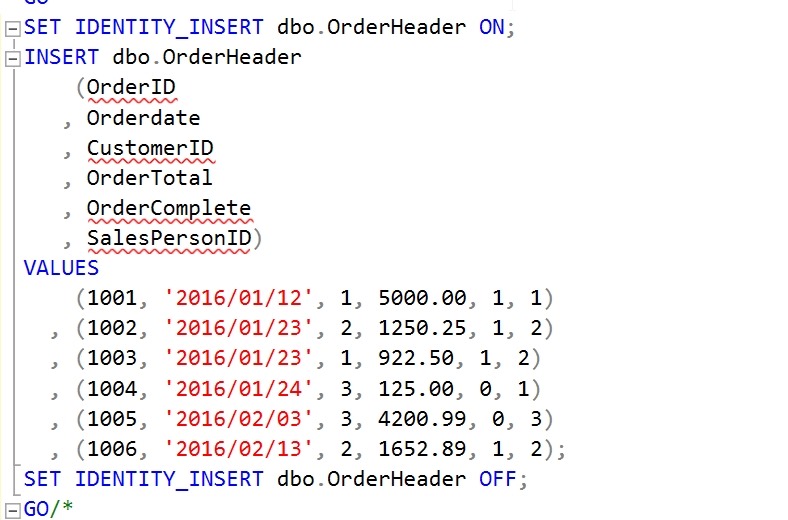
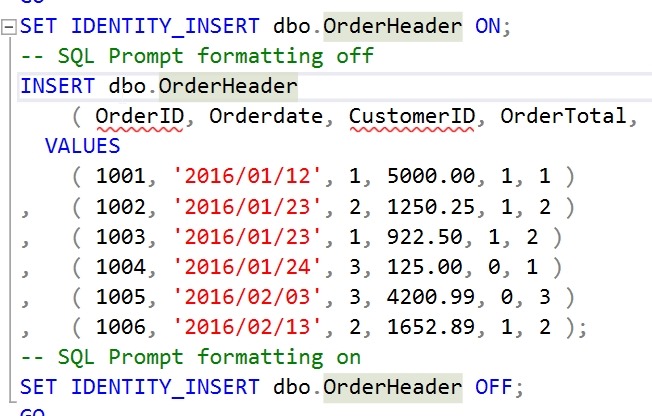
    I’ve had this code in a snippet for a long time:

    2019-04-25 12_33_20-00_endtoend_initialsetup.sql - 192.168.1.35.sandbox (sa (60))_ - Microsoft SQL S

    I appreciate the markup to prevent SQL Prompt from doing this, which used to always happen.

    2019-04-25 12_34_33-00_endtoend_initialsetup.sql - 192.168.1.35.sandbox (sa (60))_ - Microsoft SQL S

    I can’t tell you how many times I’ve used CTRL+Z to undo that format, add the markup, and format again.

    A few months back. I was talking with someone and noticed this:

    2019-04-25 12_35_32-SQL Prompt - Formatting styles

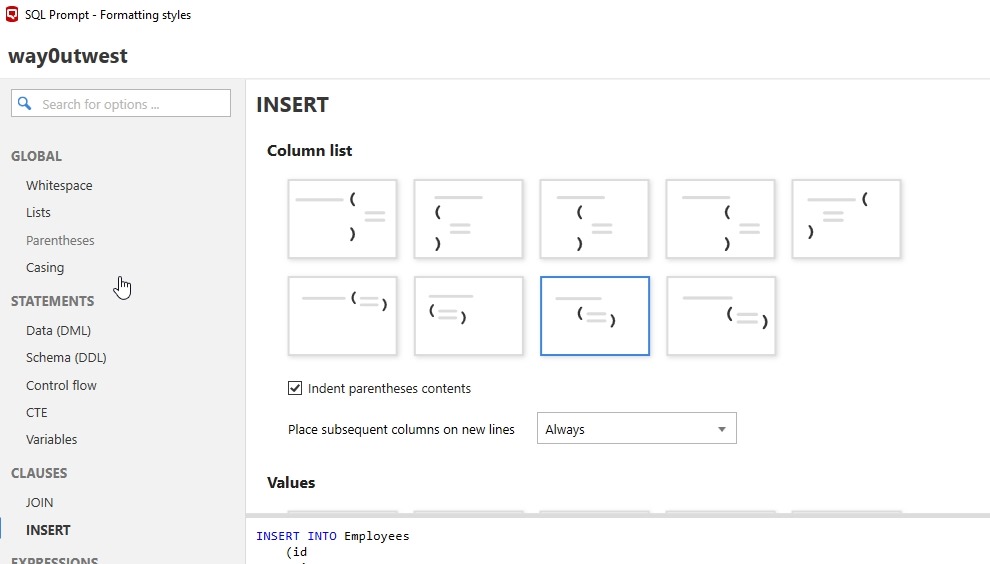
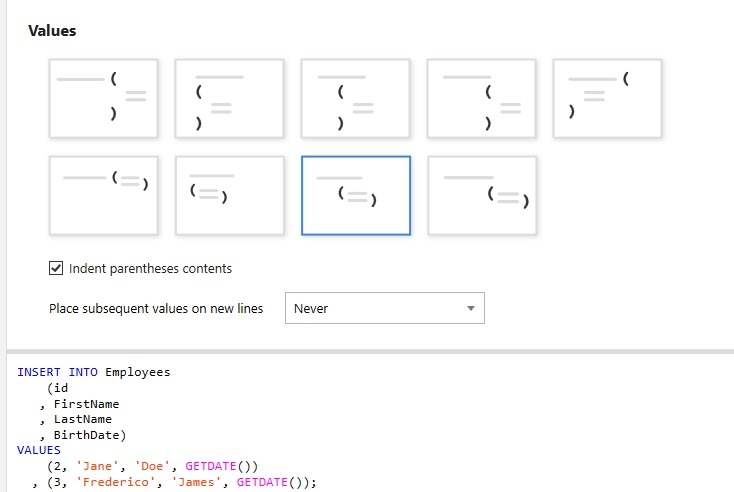
    A new option for formatting called “INSERT”. This allows you to specify how you want to insert column list to appear. What’s even better, is at the bottom it says “Values”. Scroll down and you see options for separately formatting the VALUES clause, which I use all the time.

    2019-04-25 12_35_39-SQL Prompt - Formatting styles

    Now I can format easily without worrying my VALUES clause will get spread all over the page.

    2019-04-25 12_37_14-00_endtoend_initialsetup.sql - 192.168.1.35.sandbox (sa (60))_ - Microsoft SQL S

    SQL Prompt is amazing. If you haven’t given it a try, download an eval today. If you have the Toolbelt, you ought to be using this every day.

  • Always Use Roles–#SQLNewBlogger

    Another post for me that is simple and hopefully serves as an example for people trying to get blogging as #SQLNewBloggers.

    Which of these is more complex?

    GRANT SELECT ON dbo.Customer TO JoeDev

    or

    CREATE ROLE Sales
    GRANT SELECT ON dbo.Customer to Sales
    ALTER ROLE Sales ADD MEMBER JoeDev

    The second one, right? What if I change this slightly. I have this code:

    GRANT SELECT, INSERT, UPDATE ON dbo.Customer TO JoeDev
    GRANT SELECT, INSERT, UPDATE ON dbo.Customer TO SallyDev
    GRANT SELECT, INSERT, UPDATE ON dbo.Customer TO SaraDBA

    or

    GRANT SELECT, INSERT, UPDATE ON dbo.Customer TO Sales
    ALTER ROLE Sales ADD MEMBER JoeDev
    ALTER ROLE Sales ADD MEMBER SallyDev
    ALTER ROLE Sales ADD MEMBER SaraDBA

    What if I changed this slighly and told you that between the GRANTs to users, a few months of time had passed and you had to go figure out which rights JoeDev had because the request was “give Sally the same access as Joe.”

    That’s the type of thing I’ve done often as a DBA. I’ve often had to move permissions between users, duplicate the access, or quickly remove lots of access from multiple users.
    While it seems like there are just two extra statements using roles, there is often lots of time tracking down security and building statements to duplicate rights.

    Always use roles and your life will be easier.

    Plus you can script the permissions for objects once, log them, and forget about them. From that point forward you’re just adding/dropping users from roles.

  • Launching ADS from SSMS

    If you haven’t heard, SSMS v18 went GA (Generally Availability) recently. You can download it from Microsoft, though if you have a preview version, you do need to uninstall that. You also have to reboot after install Sad smile

    There is one cool feature that’s easy to miss, and I wanted to point it out.

    Azure Data Studio

    I am warming to Azure Data Studio (ADS) as an editor. I like notebooks, and I’m hopeful SQL Prompt will come soon, but it’s a nice, lightweight editor. It’s based on Visual Studio Code, and I like some things, like version control.

    Others I find annoying, like the connection dialogs, the results display, trying to use the Object Explorer, and more. That means I am often still using SSMS as a primary tool to work with SQL Server.

    Switching between tools is sometimes a pain, but things got easier.

    SSMS Integration

    With SSMS v18, there’s a small item that you may easily miss. If I right click a database, I see this:

    2019-04-25 09_51_17-SQLQuery12.sql - 192.168.1.35.sandbox (sa (58))_ - Microsoft SQL Server Manageme

    I have the option to launch ADS with a new query or notebook. The connection context passes along, which is nice. I hate the connection dialog in ADS.

    If I click “New Query”, I see this:

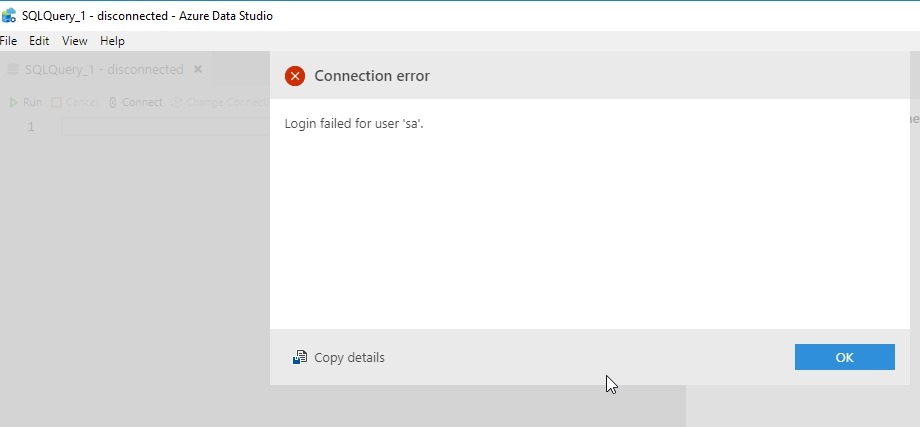
    2019-04-25 09_54_29-SQLQuery_1 - disconnected - Azure Data Studio

    Hmm, an error? No, this is actually good. The connection was SQL Auth to a Linux instance. I haven’t saved the password, so the current context can’t be passed. This is a new connection, and needs to authenticate. This is what I’d expect. When I click OK, I drop into the password box.

    2019-04-25 09_54_36-SQLQuery_1 - disconnected - Azure Data Studio

    Even if I’ve got a connection, if I go back to SSMS an open either a new query or notebook, I get the same result.

    If I have a Windows Auth connection, and I right click and choose New Query, I get this:

    2019-04-25 09_59_58-SQLQuery_1 - Plato_SQL2017.MLDemo (Integrated) - Azure Data Studio

    In this case, I was connected to Plato\SQL2017 as the instance and right clicked the MLDemo database. I also had ADS closed, with the notebook tab open when it closed. ADS restored my tab and then connected to the new database.

    A little thing, but a handy one that I expect more people will use over time.