Tag: syndicated

  • The Prompt Actions Menu

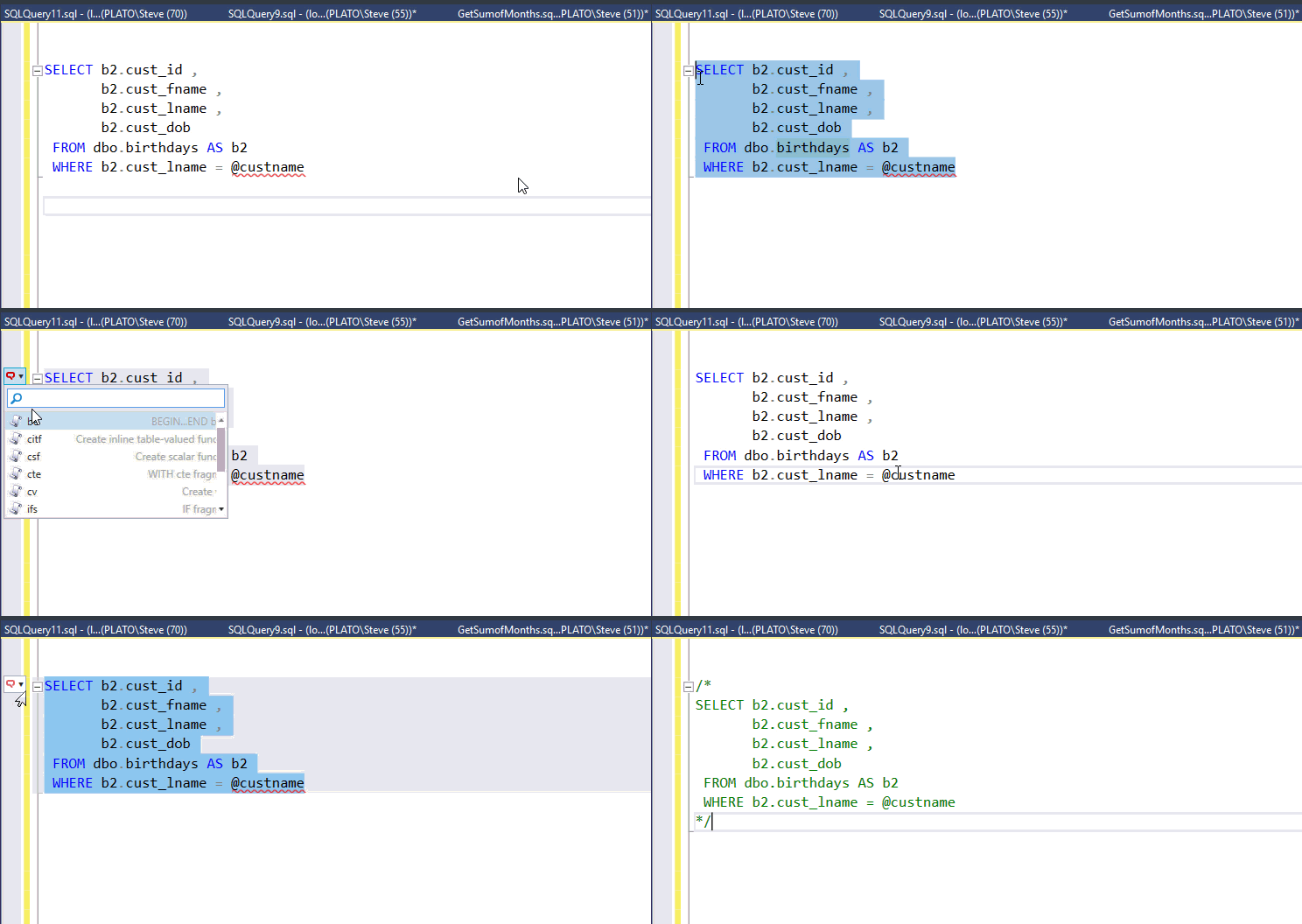
    A quick post on SQL Prompt here. Someone is asking about the Prompt Actions menu. This is the menu that appears when you highlight code. I’ve got a quick animation of this working.

    promptactions

    In the gif, I highlight code, click the Actions icon, and then I can add a BEGIN..END around my code. I also have a snippet that I use to surround code with comments.

    Any snippet that has the $SELECTEDTEXT$ token in it is eligible for the Actions list.

    Carly also has her own video on this on the Redgate Videos channel.

    SQL Prompt is amazing, so give it a try today.

  • Python Jupyter Notebooks in Azure

    There’s a new feature in Azure, and I stumbled on it when someone posted a link on Twitter. Apologies, I can’t remember who, but I did click on the Azure Notebooks link and was intrigued. I’ve gotten Jupyter notebooks running on my local laptop, but these are often just on one machine. Having a place to share a notebook in the cloud is cool.

    Once I clicked on the link, I found these are both R and Python notebooks, as well as F#. These allow you to essentially build a page of code and share it. It’s kind of like a REPL, kind of like a story. It’s a neat way of working through a problem. I clicked the Get Started link to get going and was prompted for a User ID.

    2018-03-29 10_23_24-Custom Selection

    Once I had my moniker setup, the next step was to edit my profile. That’s more important than a library, right?

    2018-03-29 10_23_32-Custom Selection

    Of course, I needed to fill out the profile with my avatar and some information.

    2018-03-29 10_24_30-Microsoft Azure Notebooks

    Next I need to create a library, which I’m guessing is a collection of notebooks. I clicked the link and had to enter a name. I decided on the classic HelloWorld name. I decided to keep this public, as I might want to share this with others.

    2018-03-29 10_25_01-way0utwest - Microsoft Azure Notebooks

    I’ve got a library, now let’s add something. I clicked the Readme.md, but it didn’t load. There was nothing there, as this is a blank file.

    2018-03-29 10_25_34-HelloWorld_README.md (way0utwest) - Microsoft Azure Notebooks

    I discovered I could right click the file in the list. This lets me edit it. Strange UX, but whatever. The file uses markdown as editing, which is fairly simple, but consists of a few characters to designate titles, lists, etc.

    2018-03-29 10_27_08-HelloWorld (way0utwest) - Microsoft Azure Notebooks

    I entered some text, and then my readme appeared below my notebook list, much like it goes on Github. My screenshot got taken after I’d experimented a bit, so you see a couple python notebooks as well.

    2018-04-10 11_48_58-HelloWorld (way0utwest) - Microsoft Azure Notebooks

    From there, I could add a notebook. I have choices. I started with Python, since that’s one of my learning goals.

    2018-03-29 10_26_05-HelloWorld (way0utwest) - Microsoft Azure Notebooks

    I give the notebook a name and create it.

    2018-03-29 10_26_20-HelloWorld (way0utwest) - Microsoft Azure Notebooks

    Once this is created, it appears as a Jupyter notebook. Essentially I have a repl-like command area, and once I enter code, I can click “Run” to execute it. You can see that my Hello, World program ran.

    2018-03-29 10_26_45-Python Experiments

    I can enter other code, and I’ve done a few things, just to practice some basics in Python. I’m working through some courses, and I’ll enter code in here to practice concepts.

    2018-04-10 11_52_27-HelloWorld_Python Experiments.ipynb (way0utwest) - Microsoft Azure Notebooks

    Jupyter notebooks are a good way of working through a problem and showing flow. They’re especially useful for sharing information with others and letting them follow your thought process.

  • An Open Letter to PASS and John Q Martin

    Dear Mr. Martin and the PASS Organization,

    In the spirit of advocating for change in a public way, I’m writing this letter to ask you to revisit your policies and processes and embrace the transparency that we, members of the PASS organization, deserve with regards to the SQL Saturday events.

    I am directing this to you, Mr. Martin, after seeing your tweet, with the hope that you will follow through and not only provide feedback, but conduct a root cause analysis that updates future decisions. I also am hoping these are not merely words, but also the beginning of some action that you take and about which you publicly disclose the results.

    A change was recently made to the SQL Saturday site that requires speakers to register for an event before their submissions can be approved. I realized this when a fellow speaker posted a note on Twitter.  While there are potential implications here that are disruptive for event organizers and speakers, those are worthy of a separate debate. In fact, they are worthy of debate.

    Today, I examined the PASS blog to look for an announcement. This what I saw.

    2018-04-18 08_17_13-PASS Blog _ Community _ PASS - the Professional Association for SQL Server

    The last update is from Mr. Fritchey, noting how much PASS wishes to express their affection for SQL Saturday. I appreciate the Board of Directors, most of whom are fellow speakers, may feel that way, but I’m not sure the organization believes this. Again, a separate discussion.

    Early on in the life of SQL Saturday, a few people had to make decisions, but those decisions were publicized, with conversations with organizers and speakers. When fundamental changes were made, we announced changes publicly to ensure that others were informed. We setup a board of advisors to help ensure that change was made in a more open way, and to solicit feedback. Andy continued to provide updates later, even as PASS has declined to do so.

    That doesn’t seem to have been done any longer. As I scan through the blog, I see no announcements of changes to SQL Saturday. The last posts were from 2016, when the 600 mile radius was announced and then a subsequent post explaining the reasoning.

    Once again, almost two years later, PASS lacks transparency and vision. There are no discussions on slack that I find, NDA or otherwise, no emails I’ve received, no list of changes or updates.

    What I would request is that you use this as an opportunity to improve governance at PASS. Examine the timeline of when this decision was made, the timeline, and look for opportunities to engage, or at least inform, the membership of PASS of changes. There should be milestones that require

    • an announcement of potential changes, NDA or public
    • a roadmap – is there a public one? Even one without dates.
    • a roadmap update
    • an announcement of an upcoming change
    • an announcement of the change, publicly
    • an update to the FAQ

    I appreciate that there may not be funds for future changes, though there are obviously some still in progress. However, this is separate from funding. This is a process and governance issue that should be addressed.

    It’s also simple common courtesy.

    Sincerely,

    Steve Jones

    PASS member since 1999
  • Webinar: 6 Principles of the GDPR and SQL Provision

    On April 24, I’ll be hosting a webinar that talks about the GDPR and how you can help ensure compliance in your development environments. I’ll talk about some of the issues and show how SQL Provision can help.

    6-principals-of-gdpr-webinar

    The GDPR is complex, but it certainly does ask us to protect and prevent issues with data from development environments. There are many ways you can try and ensure you don’t have any issues, and I’ll show one with Redgate tools.

    Register today and I look forward to talking with you next week.