Tag: syndicated

  • Exploring the Caves of Code Analysis in #SQLPrompt

    I enjoy themes, and when I ran across the SQL Prompt Treasure Island, I had to take a few minutes and go through it. I wrote about a few of the items, and this post continues on with a feature that was added last year to SQL Prompt, Code Analysis.

    Code Analysis

    One of the big leaps forward for computer science, in my opinion, was the development of various static code analysis (SCA) tools. These are automated programs that examine the structure of source code and look for potential issues with the way the algorithms are implemented. This was originally the job of a fellow programmer, and still is in many cases, but humans make mistakes, and reviewing someone else’s code is a tedious, somewhat boring task. Over time, many humans become worse at it as we look for certain issues, but may ignore others.

    Over time, SCA tools have included scanning for potential security issues, such as buffer overruns, which can easily permeate many systems if the developers do not follow coding practices designed to avoid issues. I wish we had such advances in SQL tools, but they’re not here yet.

    In SQL Prompt v9, Redgate added some SCA features. These were a set of rules that are used to scan your T-SQL code for potential issues. such as casting data types without specifying a length, or as the Caves of Code Analysis post shows, forgetting to qualify an object. In my example below, the green squiggly line below the code represents an SCA finding, and as I’ve hovered over the line, I see the warning about an old style join.

    2018-04-06 08_39_06-SQLQuery1.sql - DKRSPECTRE_SQL2014.SimpleTalk_1_Dev (DKRSPECTRE_way0u (55))_ - M

    Each of the rules is designed to highlight some issue that is known to be a potential problem. For the most part, these are useful tools and you should use these to examine your code. Some, however, aren’t useful and can be annoying.

    There is a dialog that allows you to enable or disable any of the rules, which are divided into different types. I often disable ST002, which deals with aliases. I prefer the old style equal sign as opposed to the AS syntax. This isn’t a code issue, so I don’t need the warning.

    2018-04-06 08_45_50-Sql Prompt - Code analysis rules

    This is a basic set of SCA tooling for T-SQL code, but it does serve to educate newer developers about the dangers of using certain patterns in their code. It also reminds experienced people if they’ve done something like used COUNT() in a test instead of EXISTS(). Those types of changes can often improve the overall quality of your code.

    Give SQL Prompt a try today and I’m sure you’ll be pleased with just how quicker you can write code and learn about the potential issues you’ve been including in your code.

  • Remove-DbaBackup with dbatools

    I really like the dbatools project. This is a series of PowerShell cmdlets that are built by the community and incredibly useful for migrations between SQL Servers, but also for various administrative actions. I have a short series on these items.

    One important item for any system administrator to manage is the removal of old files that aren’t useful. I know most of us hate to delete data, but there are log files, backups, and more that will clog up a drive over time if they’re not managed. I’ve had SQL Servers stop because old copies backups filled the disk and I’ve had IIS servers start throwing errors because 2 years worth of logs were on stored on the C drive.

    Maintenance plans had a way to remove files and we have xp_delete_file, but there are limitations to ensure that only backup files are deleted. I think those are silly, but it wasn’t my decision to include restrictions, and I don’t get a vote on future changes.

    In any case, dbatools has a cmdlet that can help: Remove-DbaBackup. I was interested to see if this worked on it’s own or had restrictions, but it seems to work wonderfully for me.

    Required Parameters

    Most cmdlets will allow quite a few parameters to be optional. In this case, however, there are some requirements. First, you need a path for the backup files. That makes sense and no big deal.

    However, you also need a retention period. You can’t skip this, as if you do, you get a prompt.

    2018-04-10 17_29_56-cmd - powershell

    The retention periods aren’t obvious, but not that hard to remember. There’s a numeric counter and a one character time period item. They are:

    • h for hours
    • d for days
    • w for weeks
    • m for months

    That’s it and not a big deal, though for testing I need to play with my system clock a bit.

    In any case, after this parameter, you need a backup extension. This is the file extension, without the period. You can put in anything, which is cool.

    There are some other params, but not required.

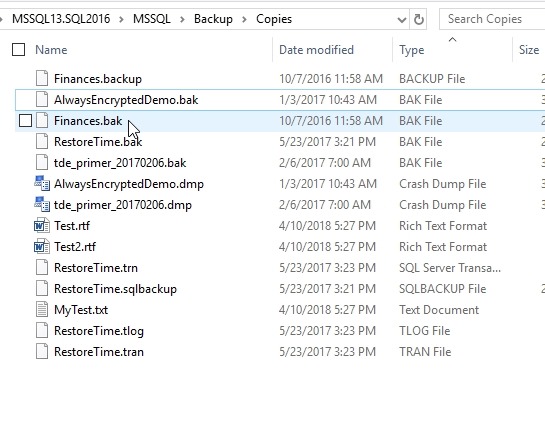
    For testing, I copied some backups and then changed some extensions. As you can see, my test folder has SQL backups with various extensions I’ve encountered as well as a few text documents.

    2018-04-10 17_27_38-Copies

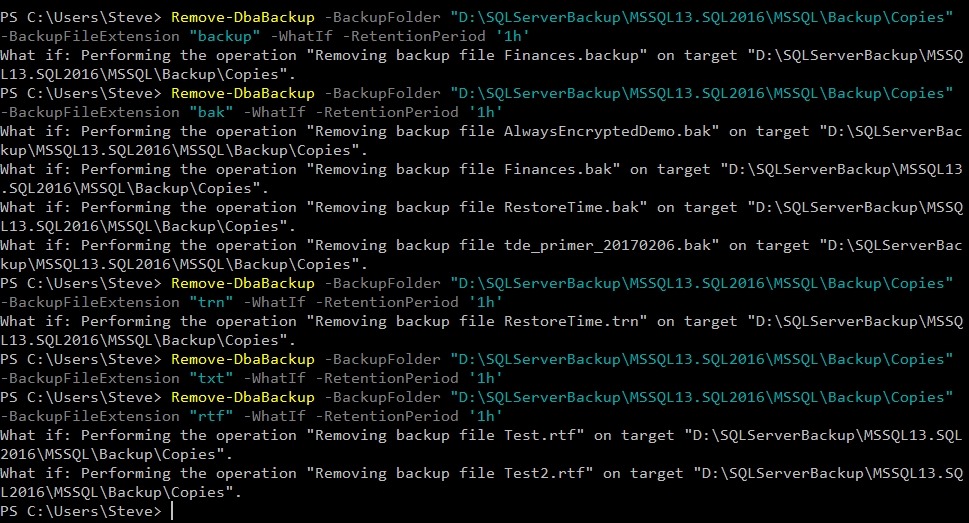
    If I run Remove-DbaBackup with some options, I’ll see what will happen with the –WhatIf parameter. I see plenty of files being marked for deletion as long as I have the right extension.

    2018-04-10 19_37_32-cmd - powershell

    This is handy, and it makes perfect sense when you read it. This is exactly the type of maintenance job that you want to set up on a server to remove old files. I don’t know that I’d use this for general cleaning of files that I might need soon for a backup, since I always want to be sure that I have a good backup before I remove old files, but for managing very old files, this is helpful.

    And, a little scripting logic would show you how to find the date of the most recent full backup and then remove files older than that. Or maybe older than the last two fulls.

  • Adding the KeyMap Extension in SQL Operations Studio

    I’m playing with SQL Operations Studio a bit to get a feel for what works and what doesn’t. So far, I don’t love it over SSMS, but one of the main reasons is that many of my common keyboard shortcuts don’t work.

    Then I saw this:

    2018-04-11 15_42_23-Kevin Cunnane on Twitter_ _Any interest in contributing to an extension providin

    You can download the extension from here, but you can’t click it to install. You need to follow this process.

    First, click the File menu and select “Install Extension from VSIX Package”.

    2018-04-11 15_36_30-● SQLQuery1 - SQL Operations Studio

    Then find your download.

    2018-04-11 15_36_42-Install from VSIX

    In a few seconds, you should see the message at the top of SOS.

    2018-04-11 15_36_50-● SQLQuery1 - SQL Operations Studio

    Restart, and it should load.

    As of when I installed it, only a few of the mappings were added. If you click the Extensions icon on the left (lowest box looking one) and then the extension, details pop in the pane. Click the Contributions link to see the commands.

    2018-04-11 15_44_46-Extension_ SSMS Keymap - SQL Operations Studio

    So far things seem to work, but I need to add a couple more for myself.

    Of course, until SQL Prompt gets ported, not sure I want to spend a lot of time in this tool.

  • Trekking Through Formatting Forest on the #SQLPrompt Treasure Map

    I enjoy themes, and when I ran across the SQL Prompt Treasure Island, I had to take a few minutes and go through it. I wrote about Code Snippet Cove recently, and this post continues to move across the map.

    Formatting Forest

    Walking through a forest can be daunting. Living in Colorado, I’ve had the chance to hike and explore the mountains of the state. If you’re near the top and can view landmarks, it seems easy. Walking through some forests, when you can’t see a peak, you get a little worried about which direction to go without a trail. It’s serious, as people die every year in my state because they get lost in the woods.

    Writing T-SQL isn’t a life or death endeavor, but it can be frustrating when we see code that’s formatted in a way that we don’t expect. I’ve seen truly ugly T-SQL code (from my perspective) in the SQLServerCentral forums, and I often need to copy and paste it into SSMS to get a sense of what’s happening. I used to reformat by hand, but CTRL+K,Y is an ingrained SQL Prompt habit that lets me get code into a style that I can work with.

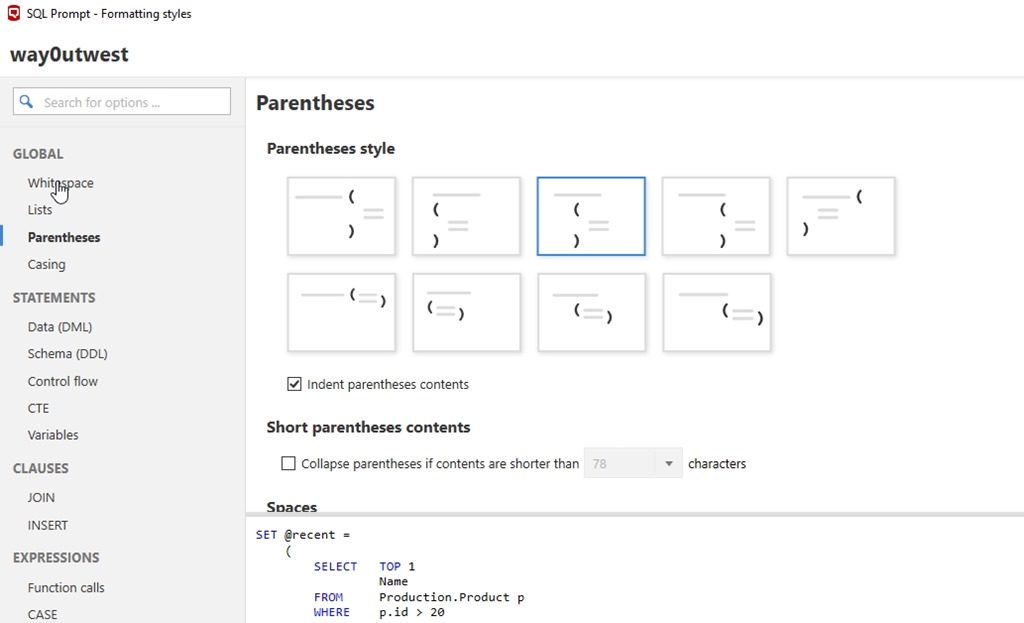
    The part of the treasure map that talks about formatting is long and detailed, and there are lots of resources that can help you format the code better.  Likely, however, you’ll want to open the formatting dialog (shown below) and play with settings to get what you want.

    2018-04-04 10_40_25-SQL Prompt - Formatting styles

    One of the best features, at least for me, is that I can quickly switch styles from my own to any other, such as a corporate standard. With a right click, I can choose another style, CTRL+K,Y to get to some other format, and then reverse that later.

    2018-04-04 10_41_22-

    I do this before committing to Version Control, as you should. If you haven’t tried SQL Prompt formatting, get an eval and give it a try. It’s amazing. This alone saves me a ton of time when writing code.

    In the next post, I’ll continue on to the Caves of Code Analysis.