Tag: syndicated

  • Finding #dbatools #PowerShell commands

    I really like the dbatools project. This is a series of PowerShell cmdlets that are built by the community and incredibly useful for migrations between SQL Servers, but also for various administrative actions. I have a short series on these items.

    I was reading about Pester from Rob Sewell and saw he talked about a new command I hadn’t seen in dbatools: Find-DBACommand. This is a fantastic idea, and I think it’s my new favorite dbatools command, err, cmdlet.

    This is the search cmdlet for dbatools. With this, I can pass in a parameter of something I’m looking at and get results. For example, if I run this with “attach”, I get:
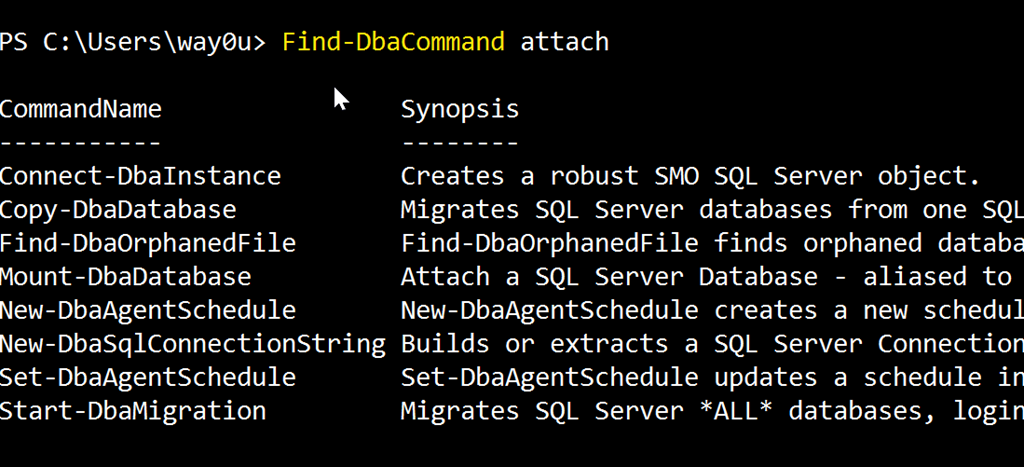
    2017-11-16 08_58_34-cmd - powershell (Admin)

    If I use “security” I get:

    2017-11-16 09_00_15-cmd - powershell (Admin)

    These are the ways that I’d most often use the command, but I can certainly do other things. There are tags on some cmdlets, so I can do this: Find-DbaCommand –Tag job

    2017-11-16 09_03_31-cmd - powershell (Admin)

    This gets me less results than just a search for the string “job”, and these are items focused on jobs themselves.

    I can loo for specific authors with the –Author parameter. I can also look for minimum or maximum versions of SQL Server, though I haven’t found anything that returns here in quick testing. In looking through some help and source code for other commands, I don’t see version tags, but hopefully that comes over time (Submit your PRs here).

    This is a fantastic addition, and certainly better than trying to search all of PoSh help for something like Backup. I might get way more commands I don’t care about there.

    If you haven’t tried dbatools, do it today. It’s a fantastic administration tool for your toolbelt.

  • One More Trip and Down for the Count

    The last month has been a rough one for me, with lots of travel. I was on trips for 4 out of the last 5 weeks, and the week I was home I had a remote presentation to do. Travel can be hard enough, but add in the need to continue to manage the day job as well as prepare and practice for presentations, and it’s a long stretch.

    Fortunately, I have a month off. Or nearly so. I have one last trip in December, and then I’m done for the foreseeable future. I have nothing scheduled in Q1 for travel, and I’d like to keep it that way. Apart from trip to visit the Redgate offices and a few customers, I’ll likely take quite a bit of 208 off from speaking at conferences. I’ve done a lot the last couple years and I need a break.

    Plus there are other projects with Redgate and SQLServerCentral I’d like to tackle, not the least of which is upgrading our infrastructure from SQL 2008/WS2003.

    I’ll still aim to get to a few new events next year, and I do appreciate the invitations. You’re always welcome to ask, but understand I’ll do less. I’d like to visit some new places, and Pittsburgh is tops on my list for now.

    It’s been a pleasure seeing and meeting so many of you the last few years. I hope you’ve enjoyed my talks, and I’ll certainly continue to do more in the future, just at a slower pace.

  • Adding a Format SQL Button to the Redgate Toolbar

    I’ve gotten used to CTRL+K,Y to format SQL with SQL Prompt, but a customer wanted a button on the toolbar. It’s fairly easy to do, but I thought I should document the process for others.

    First, if you click the small area on the right of a toolbar in SSMS, you’ll get an “Add or Remove Buttons” menu, as shown here.

    2017-11-14 16_29_31-~vs7FB.sql - DKRSPECTRE_SQL2016.sandbox (DKRSPECTRE_way0u (52))_ - Microsoft SQL

    If you click that, you’ll see this dialog.

    2017-11-14 16_29_39-~vs7FB.sql - DKRSPECTRE_SQL2016.sandbox (DKRSPECTRE_way0u (52))_ - Microsoft SQL

    In  this case, I’m happy with the buttons, I want to customize my toolbar. Click that option. This opens up the dialog below, and I’ll want to click the “add Command” to add a menu item as a button.

    2017-11-14 16_29_50-Customize

    From here, I get a list of all SSMS menus. In this case, I’ve clicked the Dimension item, and I can see all the possible menu items on the right.

    2017-11-14 16_30_02-Add Command

    However, I want a SQL Prompt item, so I need to scroll down the left to SQL Prompt. Once I click that, I see the commands on the right,

    2017-11-14 16_30_11-Add Command

    Now scroll the right to find Format SQL.

    2017-11-14 16_30_23-Add Command

    Click OK and then your new button appears in the list.

    2017-11-14 16_30_32-Customize

    And on the toolbar.

    2017-11-14 16_30_41-~vs7FB.sql - DKRSPECTRE_SQL2016.sandbox (DKRSPECTRE_way0u (52))_ - Microsoft SQL

    Now you GUI clickers can reformat SQL quickly.

  • In a basement, a long, long time ago… #tsql2sday

    It’s T-SQL Tuesday time and this is a good one. Read the invitation and proceed.

    Who Influenced Me?

    I’ve been working SQL Server for a long time. Since 1991, in fact, and had held 4 jobs as a DBA or developer by 1999. I was comfortable with the platform, and had actually published some articles in early 1999 for a small UK journal. My career was going well and I felt very comfortable with the platform (v6.5 in my company) at that time.

    As a developer, I knew T-SQL well, and was still learning things from reading articles, but there weren’t many SQL problems I couldn’t come up with some solution for. As a DBA, I knew the tricks to keeping a large, busy instance running, including the DR tricks to ensure my restores worked well on new hardware.

    I was lucky enough to get my company to fund a trip to the initial PASS Summit. I went, along with my wife and infant son, to visit Chicago. We went to Comiskey Park on the last ,day of the baseball season, braving chilly weather along with about 1,500 people to watch the White Sox. I’m not sure my wife has been to a game since…

    In any case, my main memory of that event was being the basement of some hotel in downtown Chicago. There were a few rooms in use, and we packed into see sessions on various topics. One was delivered by Kalen Delaney, @sqlqueen, who was perhaps the person I saw as an amazing speaker and teacher. I’d read her Inside SQL Server 7.0 book, anticipating an upgrade. I was delighted to see her speak, and perhaps more thrilled to shake her hand and get an answer to a question.

    That was quite a highlight in my career.

    Since then I’ve seen Kalen speak many time, and we’ve become friends. I’m always glad to get a hug and a few words with her, but each time, I remember that early, semi-awestruck time when I met her.

    She’s inspired me, both as a data professional and a teacher.

    If you ever get the chance to meet Kalen, take a moment or two with her. You won’t regret making the effort to introduce yourself and ask a question. I know I haven’t.