Tag: syndicated

  • Thoughts on PASS Summit Speaker Selection Changes

    Recently the PASS Blog released some changes to the speaker selection process that have generated some commentary and thoughts from various people. I read Joey D’Antoni’s thoughts, Andy Leonard’s thoughts as well as various tweets and comments. I talked with a few people, and wanted to put out a few comments for discussion. I’ll also give a few comments at the end about my experiences.

    If you want to join a PASS Board town gall, there are two on April 13.

    Pronouncements

    My biggest complaint with this, and really with most PASS changes, are the pronouncements. While I’m sure PASS spoke to some in the community, there is no general time for comments before a decision is pronounced.

    Please, stop doing this. Propose changes, give us a few days or a week to comment, and then make decisions. Don’t debate this in board meetings in a vacuum. Just propose, get comments, and then move on.

    More later.

    First Time Summit Speakers

    The pronouncement from PASS doesn’t mention first timers. I think this is a mistake, as my feelings are that it’s important and healthy for the organization to regularly grow beyond the pool of speakers available. We always have new people attempting to speak and some of them are really good presenters.

    On the flip side, we have experienced speakers that will get busy, get tired, and mail in their presentation. By that I mean they don’t prep well or polish their talks, or put in much effort to ensure the audience gets a good talk.

    Last year I was on the call when PASS noted that we had about 20% first time Summit speakers. I think that’s great, though perhaps a bit high. I wish they had published and pointed to these numbers. In fact, I’d like to see this as a category in review after the schedule is announced. Give me year over year first time Summit speaker percentages.

    Ideally I’d like to see PASS have a goal of some percentage of new speakers to the Summit. I think 10% is a good number, though this should vary year to year based on submissions. If it’s +/- a few percent that’s fine. Just list some reasons.

    Note that this is new to the Summit speakers, not new speakers. I am against anyone, including Microsoft speakers, giving their first outside-the-company talk at the PASS Summit. Anyone speaking at the Summit should have experience at multiple presentations. I’d say they ought to have at least 2 user group and 1 SQL Saturday (or equivalent) talks on their CV.

    Pre-Con Speakers

    Pre-conference slots are lucrative. Both for PASS as revenue, and for speakers as a way of funding their journey to PASS. This is one reason we often see the independent consultants delivering similar content they might provide in a training class to customers or paid attendees.

    Three things here. First, the content is often re-used and condensed from a multi-day class. I’m fine with that as long as the content is well structured and most attendees find it worth their $500. Training is training, and that’s what this is.

    Second, we need quality talks here, and like first time Summit speakers, I think anyone chosen here should have a record of multiple one (or more) day training classes delivered. In fact, I might say they ought to have delivered a full day of training at least five times, maybe ten,.

    Third, like speaking slots, we need growth. Some of the expert, very well known speakers have skipped delivering Summit pre-cons in the past. That means we should have at least one or two new pre-con speakers every year. If we lost the three or four most popular speakers in a year, revenue might precipitously decline.

    However, as in years past, I’d like to see a list of qualifications. Publish some bar of what you expect. Don’t make it really high, but publish something. Also, incorporate my next comments.

    Inviting Speakers

    There was a meeting at the last Summit (2016) between the program committee and a number of speakers. I was invited to attend and enjoyed the discussion. I gave feedback and one of the items I supported was inviting speakers. I think there are certain speakers, such as Mr. Ben-Gan, that should always be invited to speak and don’t need to submit a variety of talks in a general call.

    Even though PASS is a not for profit organization, the Summit is a commercial venture. The event needs to make money and support the rest of PASS. This is a fundraiser, and as such, it needs to be very profitable. That means that a certain amount of attention should be paid towards attracting lots of attendees. Content matters more than anything, but there are a few people can move the needle and grow registrations. I’m fine with extending a certain number of invitations.

    Again, be transparent and give us a percentage of invited sessions. I might limit this to 10-15%, understanding that the percentage may vary slightly year to year.

    Inviting Sessions

    On par with choosing people, I think there should be some effort to choose content. Ultimately the content matters, and given the nature of submissions, it is entirely possible that there are some areas that don’t get sessions, or perhaps there are areas we’d like to have more content.

    Rather than encourage everyone to submit 4, 5, 6 talks, I’d rather limit the talks, but have the program committee be allowed to go back to presenters and ask them to alter their sessions if need be.

    For example, if Mr. Hirt submits a range of FCI/AlwaysOn sessions for on-premise work, but the program committee would like to see an AG in Azure, I would hope they could approach Mr. Hirt and ask that he alter his session, or submit a new one, that meets some need.

    I don’t expect this to happen often, but I’d like some flexibility here. I would also expect transparency here so that we don’t have friends just picking and inviting friends to talk. Let’s just be open that we want a session on X and chose person Y. I don’t need a percentage of talks, just disclosure. We can debate in the future if this should be amended.

    Community Sessions

    There are always a few people or sessions that don’t get picked, but a number of people find interesting. A few years back there was a chance to vote in a few sessions. I’d like to see this again. Save 4, 5, 10, whatever number of slots for community talks. Pick from the list of sessions that were submitted and met speaker guidelines and take a vote. Give people 3 or 4 days and then put those into the program.

    It’s fun, and it’s a #sqlfamily community thing to do.

    Summary

    Here’s what I’d like PASS to do.

    • No pronouncements like this. Submit ideas, then take feedback, then decide.
    • List speaker statistics after the schedule is announced. Include the last 4-5 years for comparison.
    • Include percentage of invited speakers, community sessions, first time speakers.
    • Issue minimal guidelines for speakers, varying by type of session.

    This isn’t perfect or the best system, but it’s a start, and I think an improvment on what we’ve done.

  • Looking Back at the SQL Clone Launch(es)

    Yesterday was the SQL Clone launch livestream from the Redgate office in Cambridge, UK. I flew over on Monday, along with Grant Fritchey, to help broadcast a few sessions about the product. I’ve been excited to see SQL Clone for a few years now, ever since I saw a POC in 2015.

    Having only one day to prep was tough, but family commitments meant I couldn’t arrive until Tuesday morning. A long night on a flight across the water, but I made it and landed in time to get to Cambridge before lunch.

    IMG_1363

    The event was actually a three-peat, broadcasting the same sessions three times to cover various time zones around the world. A long day, arriving at the office around 6:30am and not leaving until after 8pm. It’s not that bad, as my sessions were spread throughout the day.

    We had some fun as well getting ready. Grant and I did a short commercial, which made me chuckle when I saw it.

    The sessions were based on some demos and testing we’ve done over time, and I think they showed some of the power of the SQL Clone product. We’ve got some intro videos, one of which is below, to help you understand how the product works. We’ve also been publishing lots of short pieces on specific SQL Clone use cases on the Redgate blog.

    The behind the scenes was fun, with prep and rehearsals occupying a very long day for me on Tuesday. However, after our SQL in the City Streamed last year, everyone involved at Redgate has had some practice in how to setup and run a live event.

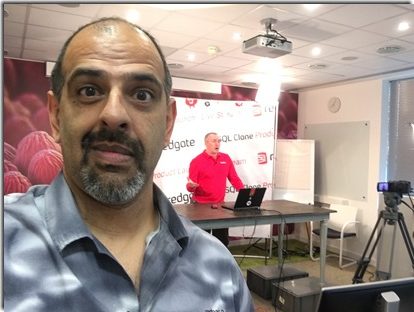
    There’s a dedicated double conference room that we’ve turned into a broadcast studio, with lots of equipment and a small set. I’m especially glad we had four microphones for all the presenters. Switching mics with limited time is a challenge.

    IMG_1378

    Last year we used a podium, but I’ve found that trying to work with demos on a small platform is hard. In various conferences around the world, I’ve found there isn’t enough space to easily type or maneuver a mouse in the typical space that a speaking podium offers. I asked for a desk, and sure enough, our engineers found one, raising it up to accommodate a standing height.

    IMG_1367

    SQL Clone is sheep-themed, after the scientific work with Dolly the sheep. Our product marketing manager, Karis, was a good sport, donning a costume for a short promo video. I grabbed a short video and a few pix.

    SQL Clone short promo segment

    IMG_1370

    Early Wednesday, we started the event, to a small audience in Asia and a few early birds in Europe.

    IMG_1384

    The flow is similar to a television broadcast. Our engineer will give us a few countdowns (30s, 10s), and an audible 5, 4, 3, then a thumbs up to start presenting. It’s slightly odd to present to a screen, and it does take some getting used to remembering the camera and not the people in the room are the ones that need your focus.

    We also have multiple clocks and timers on various screens. Below you can see the view from the table. There is a monitor in the upper left that shows what the laptop is outputting. Since some people like PowerPoint’s presenter mode, we have to switch between extend and duplicate on the laptop. Seeing the output in front of you is handy.

    IMG_1369

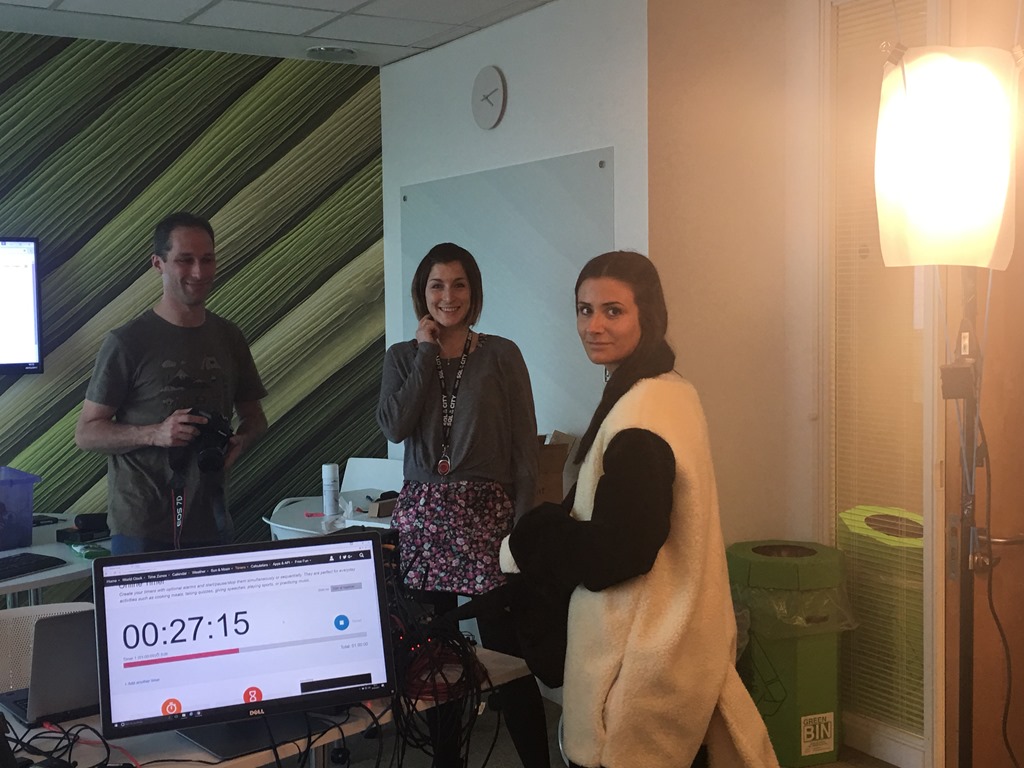
    To the lower right we have a monitor that has a countdown timer for this particular session. This is handy in keeping an eye on how much time is remaining in the presentation. I wish there were a scheduled end time as sometimes our start times are off, but I try to keep an eye on the start time and guess how much over I might go. In our case, the intro and Grant’s piece were short, so I could go over a bit. The one thing that would be nice is a negative count up once we hit zero. Right now the timer stops.

    At the rear of the room we have a large clock on one screen that shows the local time. Since I know roughly when I’m supposed to start and end, that’s helps. On the upper right screen, showing the Windows background we put up a large Word document where someone can type questions from Twitter/YouTube/Slack, etc. They use  a large font so we can read them from the stage area.

    We have a series of buffer videos, ads, and transitions that are setup between live talks. Watching the engineers switch between audio and video, moving between different inputs is fascinating. Mechanical, and perhaps not so exciting if it were happening all day, but for a a few events a year, it’s neat. I’m looking forward to seeing how we can improve the process in the future.

    The Event

    The day started with Grant talking about the challenges of database provisioning. I’ve dealt with all he noted, regulatory issues, space, time, repeated work, etc. Until I started working with the SQL Clone team, I hadn’t realized quite how much of a hassle the copying and provisioning of databases can be. I’ve fought with storage admins for space, and with developers over the time it takes to copy and restore. SQL Clone makes this easier, and if you want to move faster, then you might find the space and time savings worth the cost of the product.

    Or you might just keep dealing with the time and space issues. Your choice, and there are plenty of companies that are happy to spend your time and effort on copy/restore tasks.

    Once Grant finished, it was my turn to show how SQL Clone solves some of these issues. I got to demo the GUI, self-service implementation and then discuss the code solutions with Richard McCaskill, our product manager. Hopefully I didn’t distract Grant, but it’s a bit boring to watch the same presentation 3 times when you aren’t involved and are just sitting in the room.

    The PowerShell cmdlets for SQL Clone are the real power of this tool, allowing you to easily provision new images and clones for developers. I’ll have to write more on this, but we demoed a similar setup to one of our customers where they create a new set of databases on developer instances for new branches. That is very cool.

    We had growing audiences throughout the day as we moved across the globe. If you watched, let us know if the time and length worked for you, as well as where you are. I think we’ll do more of these, and with the number of products that Redgate has, I bet we end up with some sort of broadcast every couple months.

  • Watch Your DataTypes in Aggregates–#SQLNewBlogger

    Another post for me that is simple and hopefully serves as an example for people trying to get blogging as #SQLNewBloggers.

    I’ve got a database of NBA statistics with data like this for players. I downloaded a CSV and loaded it into SQL Server.

    2017-03-22 10_32_00-SQLQuery1.sql - (local)_SQL2016.NBA (PLATO_Steve (102))_ - Microsoft SQL Server

    I decided to play with the data a bit and at one point wanted to see who scored the most points for a team and year. So I ran this query:

    SELECT
        year,
        team,
        MAX(pts)
    FROM dbo.player_regular_season
    WHERE
        year = ‘1972’
        AND team = ‘LAL’
    GROUP BY
        year,
        team;

    The result was 705. That’s a decent number of points, and if I weren’t careful, this might seem fine. 1972 was a long time ago, and they didn’t score as many points as they do today in games.

    In fact, if I were putting this in a summary report with lots of data, it might be the case that someone glancing at this would make a poor decision based on the data.

    Why?

    Let’s look at the data.

    2017-03-22 10_46_16-SQLQuery1.sql - (local)_SQL2016.NBA (PLATO_Steve (102))_ - Microsoft SQL Server

    Even a quick glance would let me know this seems funny. There are values of 1575 and 1084 in there, but the MAX() I returned was 705. If I look deeper at the import, I can see why.

    2017-03-22 10_47_25-SQLQuery1.sql - (local)_SQL2016.NBA (PLATO_Steve (102))_ - Microsoft SQL Server

    Anything stand out there? If you look, pts is a varchar, not a numerical value. In the character world, 705 beats 1575. I really need this query:

    2017-03-22 10_48_30-SQLQuery1.sql - (local)_SQL2016.NBA (PLATO_Steve (102))_ - Microsoft SQL Server

    Always be aware of the datatypes you work with and manipulate. Knowing a little bit about the meaning and use of the data can help you spot anomalies like this. As much as I like random test data, I’d also be sure you have some real data cases when you have users check your work. It’s easy for them to miss problems like this without good reference cases.

    Or use good test data that you’ve setup and unit tests.

  • Getting a VHD into Azure with PoSh

    Another post for me that is simple and hopefully serves as an example for people trying to get blogging as #SQLNewBloggers.

    I thought this would make a nice SQLNewBlogger post, an easy get started one. I used the docs from Microsoft as a guide, so here’s how it went.

    Login to my account. I used Add-AzureRMAccount here to get the login dialog. I’m not repeating this for now, so this is just an interactive test.

    2017-03-23 14_09_25-Sign in to your Microsoft account

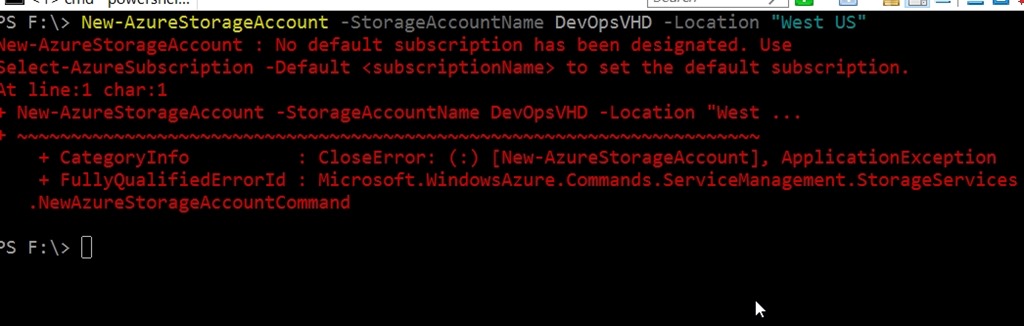
    Now I tried to create a storage account, but I hadn’t assigned a subscription. I didn’t think I needed to  since I only have one,but hey, I guess I do.

    2017-03-23 14_11_36-cmd - powershell

    I started typing Select-AzureSubscription, but realized I didn’t know what it was. I can’t remember naming this and under my name in the portal, I didn’t see a place to find it.

    2017-03-23 14_13_22-Getting a VHD into Azure - Open Live Writer

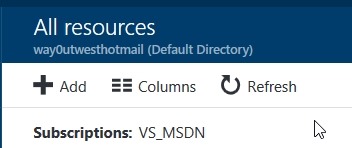
    Ah, under All Resources I see something, so I’ll try this.

    2017-03-23 14_12_26-All resources - Microsoft Azure

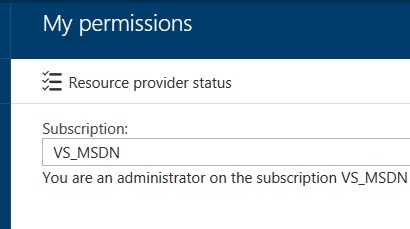
    On second thought, under My Permissions, I see it there.

    2017-03-23 14_14_17-My permissions - Microsoft Azure

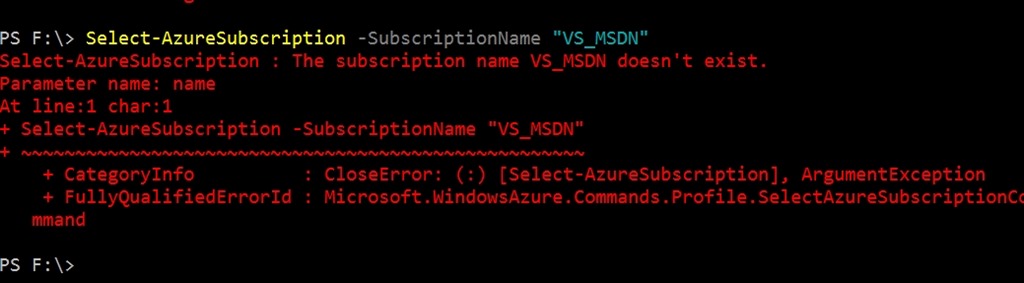
    Or not

    2017-03-23 14_14_41-cmd - powershell

    Get-AzureSubscription doesn’t quite work.

    2017-03-23 14_17_54-cmd - powershell

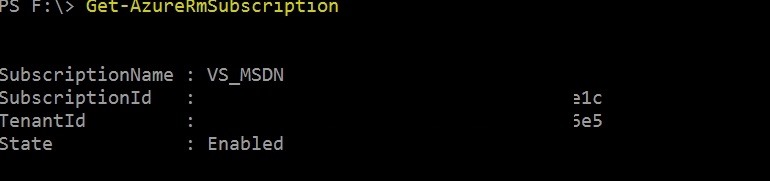
    It’s Get-AzureRMSubscription

    2017-03-23 14_19_02-cmd - powershell

    So, why doesn’t my creation of the storage account work? I should really read error messages. The issue is Select-AzureSubscription fails because I need Select-AzureRMSubscription.

    Sometimes the rev’ing of the cloud is hard.

    Actually, maybe neither work.

    2017-03-23 14_22_02-cmd - powershell

    I retreat.

    2017-03-23 14_23_59-cmd - powershell

    I’m still annoyed. “US West” isn’t valid. FFS, Microsoft. Whether I type any of these, just ask me or process them.

    • “US West”
    • “West US”
    • “USWest”
    • “US_West”

    OK, I decided to go exercise for a bit.

    I’m back (30 minutes later), and I try Get-AzureLocation. I can guess some cmdlets. I get a lot of stuff back and see “West US” is valid. I try a few other valid names of regions, but get errors. It’s not that parameter.

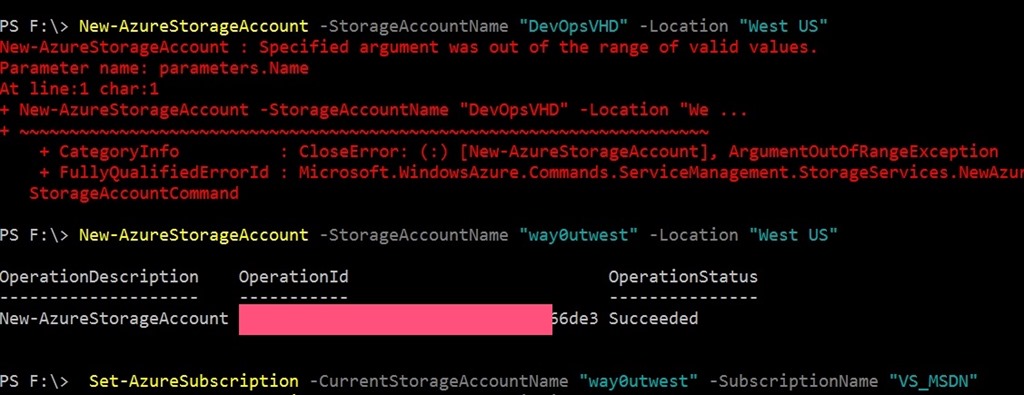
    Let’s try a new name.

    2017-03-23 14_30_22-cmd - powershell

    #$%#@#@# engineers and developers. That’s a valid error message? Not, this is a duplicate or something that makes sense. Glad I left.

    Maybe not. At least this is an error that makes sense.

    2017-03-23 14_31_27-cmd - powershell

    Finally. Let’s upload the VHD.

    2017-03-23 14_33_25-{0%} cmd - powershell

    And it’s off.

    2017-03-23 14_33_41-{0%} cmd - powershell

    Hopefully this will work. I haven’t tried this with PoSh before, and it was somewhat frustrating, though it really didn’t take that long.

    SQLNewBlogger

    This was a bit of a live blog. Do something, take a screenshot, write some text. It was a bit of a learning experience.