Tag: syndicated

  • #ReadyRoll at #SQLintheCity

    When Redgate purchased ReadyRoll a few years ago, I wasn’t sure this was a great idea. After all, SQL Source Control and DLM Automation work really well to bundle up changes in a VCS and easily deploy them.

    However, as I worked with Daniel Nolan, the creator, and learned more about the tool, the more I liked it. After all, I’ve worked for a number of companies that used a migration strategy to make changes to our applications. I also like Visual Studio, so this was a great fit for me.

    At SQL in the City streamed last year, I presented a short talk on using ReadyRoll to deploy changes. I’ll write more about individual parts of this in 2017, but take a look at this video and see if ReadyRoll works for you.

  • Finding Sysadmins with dba tools–GetDbaRoleMember

    I really like the dbatools project. This is a series of PowerShell cmdlets that are built by the community and incredibly useful for migrations between SQL Servers, but also for various administrative actions. I have a short series on these items.

    I’ve been wandering through the dbatools set of cmdlets, trying to see where various cmdlets are useful, and also practicing some PoSh skills.

    Recently I noticed there was a Get-DbaRoleMember cmdlet to use. Of course, when I tried to check it, I found an issue. I didn’t have the cmdlet in my system. Autocomplete didn’t find it and running the cmdlet returned an error. I assumed that there had been a dbatools update, and I hadn’t gotten it.

    I run into this before, and a quick query to @sqlvariant helped me realize I needed to run update-module, not re-run import-module. I did that and it worked smoothly (I did need to be an administrator to update this).

    2017-01-20 09_09_12-cmd - powershell (Admin)

    One I did this, I could run the cmdlet and get data.

    2017-01-20 09_09_55-cmd - powershell (Admin)

    Interesting, but this doesn’t seem incredibly useful. After all, I can easily query this in T-SQL, and my monitoring software will check to see if roles change.

    However, perhaps I am actually going to write something that checks to see if we have consistent sysadmins on all instances. Or perhaps we’re looking to add a sysadmin to an instance where he/she doesn’t exist. In any case, PoSh is a way to easily connect to multiple instances on many machines in a way that’s more cumbersome in T-SQL or SQLCMD.

    I can get the server level roles with –IncludeServerLevel parameter. When I do that, I see my roles and members.

    2017-01-20 09_51_34-Atlas Home Lab .201 - VMware Workstation

    I can also connect to remote servers and get this:

    2017-01-20 09_52_25-Atlas Home Lab .201 - VMware Workstation

    How can I do this in bulk? Well, I can certainly run this multiple times with a list of instances. Let’s make a quick list. I’ll make a quick array:

    $instances=”.\SQL2016″,”Atlas”,”Atlas\SQL2016″

    Now I’ll use that in a foreach loop, sending the server name to the cmdlet and looking for sysadmins.
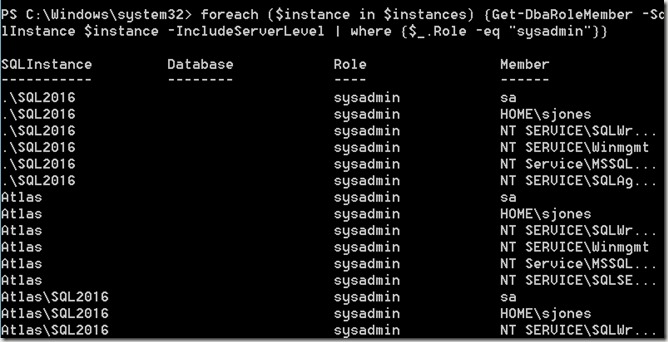
    2017-01-20 09_56_36-Atlas Home Lab .201 - VMware Workstation

    And I have the sysadmins on all of my instances. Certainly this isn’t terribly useful by itself, but I can easily add more programming that looks for a user, maybe checks for which machines have a sysadmin, maybe add (or remove) a sysadmin from instances that are out of sync with what I need.

    This isn’t one of the cmdlets I’d use the most often, but I can see it being handy when trying to automate some of the permissions checks across multiple machines that I need to keep in sync. At the very least, this could be helpful in comparing permissions between primary and secondary (or DR) nodes.

    Note: I haven’t tried it, but I suspect that the migration cmdlets at dbatools would be better for keeping primary and secondaries in sync.

  • What’s a Database Encryption Key (DEK) in TDE

    The encryption mechanisms in SQL Server are interesting, and they work well, but they are somewhat poorly named. I ran across a few people struggling to understand, so I decided to cover the concepts in a series of posts. This one looks at the Database Encryption Key (DEK).

    The Purpose of the DEK

    The DEK is designed to actually encrypt and decrypt the data in your mdf/ldf/ndf/backup files when you use TDE. This key is passed to the AES algorithm and allows SQL Server read a block of encrypted text from disk and decrypt it before placing it in memory. This same process is reversed, with data from memory being encrypted before being written to disk.

    The DEK is created in a database, specifically for use with TDE and isn’t used in any other encryption process. The DEK also cannot be backed up, or restored, except with a database restore.

    Protecting the DEK

    The DEK is protected with a certificate. This can be a purchased or self-signed certificate, but in either case, the certificate must reside in the master database of the instance hosting the TDE encrypted database.

    When a DEK is created, the DDL requires that either a certificate or asymmetric key is specified as protecting the DEK. SQL Server will use this certificate (or asymmetric key) to decrypt the DEK when the database is first opened and then uses the DEK to encrypt and decrypt all data.

    Without the certificate that has encrypted the DEK, the SQL Server instance cannot access any data encrypted by the DEK.

    That’s about it. The DEK simply provides encryption for TDE, and exists only inside of a particular database that will use TDE.

  • Querying My Named Instance in PoSh–#SQLNewBlogger

    Another post for me that is simple and hopefully serves as an example for people trying to get blogging as #SQLNewBloggers.

    I was looking at some sample code the other day and it looked like this.

    cd sqlserver:\sql\localhost\default\databases

    This allows you to browse the list of databases on your local instance. However, this is for a default instance, which I don’t have on this host. How can I get to a named instance? Usually I connect as .\SQL2016, so where does that fit in PowerShell?

    The format you see above is for the SQLServer provider, which is provided as part of the SQLServer PoSh module (or SQLPS if you haven’t adopted the new cmdlets).

    If I start at the SQLServer:\ node, I see this:

    2017-01-03 15_31_37-powershell

    Let’s drop into the SQL node and see that.

    2017-01-03 15_32_32-powershell

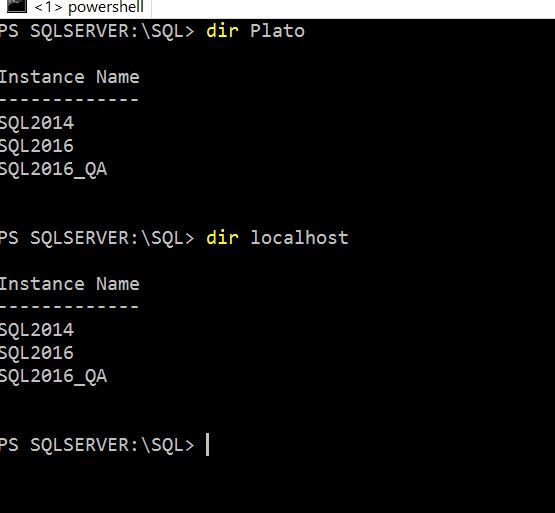
    At this point, I see my localhost and my local computer name. These are really the same thing. We can see that by querying each of them.

    2017-01-03 15_33_12-powershell

    In my case, I like to type fewer characters, so I’ll look at the Plato node. If I change here, I can also change to an instance, as shown here.

    2017-01-03 15_34_21-powershell

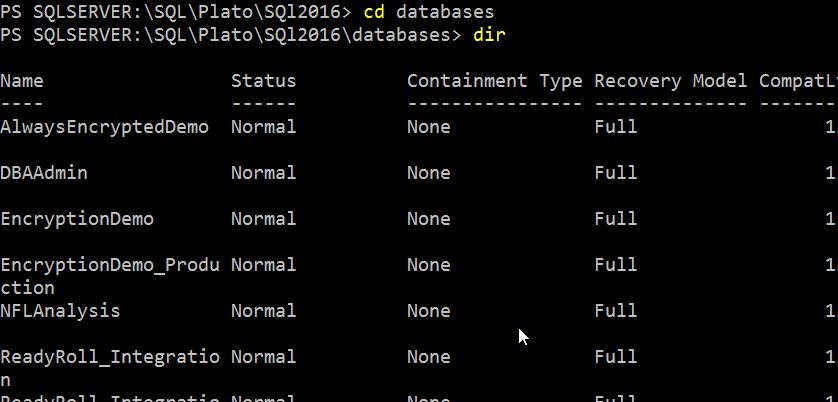
    Now I can see the databases by changing to that path and getting the directory.

    2017-01-03 15_34_31-powershell

    Thus, we can see that to query an instance, we use this path:

    SQLServer:\SQL\Host\instance

    If you want to use the default instance, then use “default”.

    A simple query path, but one that some people might wonder about, substituting the named instance for localhost, and not realizing that “Default” means just the default instance.