Tag: syndicated

  • Get Your SQL Server Product Key with Powershell #dbatools

    I really like the dbatools project. This is a series of PowerShell cmdlets that are built by the community and incredibly useful for migrations between SQL Servers, but also for various administrative actions. I have a short series on these items.

    There are lots of tasks that are easily accomplished with both PowerShell and T-SQL.

    UPDATE: The cmdlet was renamed to Get-DbaProductKey

    Get-SqlServerKey is a command that will find your product keys. It’s not often you might need this, but it’s a pain to track them down from the registry and be sure you get them for all your instances.

    Here’s the view from one of my development machines:

    2017-01-27 15_31_08-powershell

    There is a limitation here that appears to have issues with SQL Server 2016, but it’s still helpful for other versions. You can also specify a list of servers in a file for this to use, as well as using credentials to connect.

    A quick, handy item, and one that should make auditing (pre-2016) SQL Servers easy.
  • Using a DMK in TDE

    When you setup TDE, you need to create a DMK (Database Master Key) in the master database if one doesn’t exist. This key forms the basis of a chain of protection for your data inside of the SQL Server instance. The hierarchy is:

    • The DMK exists in the master database. This protects a certificate or asymmetric key by encrypting it.
    • The certificate in turn encrypts the DEK in a database using TDE. This certificate is required to open the DEK in the database, or open the DEK during a restore operation.
    • The DEK encrypts the data.

    There is only one DMK in each database, so the DMK in master for TDE could be used to protect multiple certificates, asymmetric keys, or symmetric keys that exist in master for use by TDE or any other encryption mechanism.

    A particular DMK is not needed to restore a TDE database on another instance. Rather the new instance of SQL Server should have a DMK created in the master database. Then the backup of the certificate is restored on the other instance, protected by the DMK there. Once this is complete, the TDE database can be restored.

    If you’d like to know more about what a DMK is, I’ve written about it in a previous post.

  • Speaking at SQL Konferenz 2017

    I’m heading back across the Atlantic this February for SQL Konferenz. This is an intimate SQL Server event in Darmstadt (near Frankfurt). I was fortunate to be picked to speak in 2015, but skipped 2016 as the timing wasn’t good. This year, things lined up for me, and I’ll be attending the conference after a short visit to the Redgate offices.

    I will be presenting a talk on Database Devops, updated from last year, and looking at ways in which you can get your database into a better software development process.

    There are a number of other great sessions on all aspects of SQL Server, both the core engine and BI topics. There are also a good selection of presentations in both English and German. Just for fun, I might go to a German one to see if I can follow along. Perhaps I’ll go see the Cloud Service in Azure one.

    You can register today for SQL Konferenz and come enjoy the event with me. See you in February.

  • Disabling #sqlprompt Formatting

    I love SQL Prompt, especially the new formatting engine. However, it’s not perfect, and there are times I don’t want code reformatted. One great example is when I write INSERT statements. Here’s what I might write:

    INSERT dbo.Payments_A
      ( [Month], SerialNumber, DateBegin, DateEnd, paid)
    VALUES
      ( 'Mar-15', '0000000000001', '3/16/2015 0:00', '4/10/2015 0:00', 5000.01),
      ( 'Apr-15', '0000000000001', '4/7/2015 0:00' , '4/13/2015 0:00', 0),
      ( 'Apr-15', '0000000000001', '4/10/2015 0:00', '4/30/2015 0:00', 15000.00);

    I often build a single row, then I might copy/paste to add the other rows and then manually change the data. When I use my reformat command (CTRL+K, Y), I get this:

    INSERT dbo.Payments_A
    (
        [Month],
        SerialNumber,
        DateBegin,
        DateEnd,
        paid
    )
    VALUES
    (
        'Mar-15', '0000000000001', '3/16/2015 0:00', '4/10/2015 0:00', 5000.01
    ),
    (
        'Apr-15', '0000000000001', '4/7/2015 0:00', '4/13/2015 0:00', 0
    ),
    (
        'Apr-15', '0000000000001', '4/10/2015 0:00', '4/30/2015 0:00', 15000.00
    );

    That’s not bad, but it’s hard to read and ends up eating up a bunch of screen space when I try to look at code. What I really want is for that INSERT statement to not be reformatted, even though  I may want the spacing and line feeds in other code.

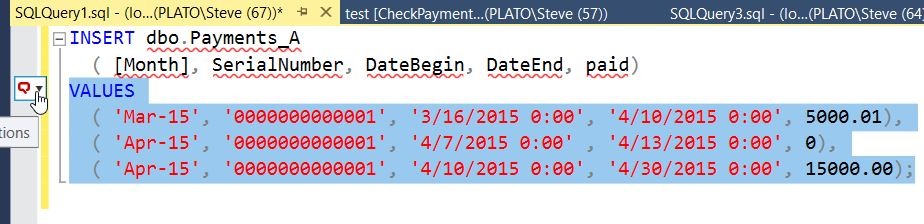
    Fortunately, SQL prompt allows me some control. If I highlight my code, I get a little box to the left of the code. There’s a hand with a finger pointing at it in the image below.

    2017-01-03 12_35_05-SQLQuery1.sql - (local)_SQL2016.sandbox (PLATO_Steve (67))_ - Microsoft SQL ServIf I hit CTRL, I get a drop down (or I can click). In this box, I can type snippets, or words. Note I’ve typed “dis” below, and I see that one of my options is to disable formatting for the selection.

    2017-01-03 12_35_14-SQLQuery1.sql - (local)_SQL2016.sandbox (PLATO_Steve (67))_ - Microsoft SQL Serv

    If I select this, I’ll get comments added to my code that SQL Prompt can read.

    2017-01-03 12_35_30-SQLQuery1.sql - (local)_SQL2016.sandbox (PLATO_Steve (67))_ - Microsoft SQL Serv

    Now I can hit CTRL_K, Y, and I’ll get all my code formatted, except what’s inside of the comments.

    2017-01-03 12_35_36-SQLQuery1.sql - (local)_SQL2016.sandbox (PLATO_Steve (67))_ - Microsoft SQL Serv

    Watch this and a few more SQL Prompt tips from a short video shown at last year’s SQL in the City: