Tag: syndicated

  • Be Careful of Your Create Stored Procedure Batch

    I was rehearsing a demo with someone recently and we had some stored procedure code that looked like this:

    CREATE PROCEDURE UpdateEmpID @empid INT
     AS
     BEGIN
     UPDATE  dbo.Employees
     SET empid = 3
     WHERE  empid = @empid
     ;
     END
    

    However, this was part of a batch that had all of this code (proc code repeated).

    CREATE PROCEDURE UpdateEmpID @empid INT
     AS
     BEGIN
     UPDATE  dbo.Employees
     SET empid = 3
     WHERE  empid = @empid
     ;
     END
    
    -- test the procedure execution
     -- exec UpdateEmpID 2
    
    SELECT empid
     FROM dbo.Employees
     WHERE empid = 3

    When I execute this, I see a simple message. If I’m not paying attention, this seems to make sense.

    2016-12-15 16_02_48-SQLQuery2.sql - WAY0UTWESTVAIO_SQL2016.sandbox (WAY0UTWESTVAIO_way0u (54))_ - Mi

    What happens if I execute this procedure? I’ll see something like this:

    2016-12-15 16_04_24-SQLQuery2.sql - WAY0UTWESTVAIO_SQL2016.sandbox (WAY0UTWESTVAIO_way0u (54))_ - Mi

    At first glance, you’d think this makes sense. However, what has happened here? The procedure executed, which has an update, and I have a result set at the end. If I look at the proc code, this makes more sense. I’ll right click the procedure and select modify.

    2016-12-15 16_05_37-

    Once I do that, a new query window opens. This is the code in there.

    2016-12-15 16_07_24-SQLQuery5.sql - WAY0UTWESTVAIO_SQL2016.sandbox (WAY0UTWESTVAIO_way0u (62)) - Mic

    Why is my select code in there? That was designed to be a piece of test code. Shouldn’t the BEGIN..END after the AS define my procedure?

    Actually it doesn’t. the procedure doesn’t end until the CREATE PROCEDURE statement is terminated. That termination comes by ending the batch. The CREATE PROCEDURE documentation has this limitation:

    The CREATE PROCEDURE statement cannot be combined with other Transact-SQL statements in a single batch.

    This means that anything else you have in that batch will be considered as part of the procedure, regardless of BEGIN..END.

    I hadn’t noticed, or seen this before. Perhaps because I’m in the habit of including a GO between all my code, it hasn’t been an issue.

    I would hope most people would catch this before any code is deployed with testing, but perhaps not Be aware that stored procedures should be compiled in their own batches, always.
  • Starting with Chocolatey

    I ran across Chocolatey years ago when Scott Hanselman wrote about it in his power tool list. At the time, I wasn’t in need of the tool, but I thought it was cool and tried it. I was hooked.

    In fact, the next year I got two different laptops, and using chocolatey, I was up and running in an hour, being productive. As I found software I needed, I just grabbed a package from Chocolatey and continued working while it installed. This was way, way easier than anything I’ve done outside of a Linux environment.

    Getting Started

    The first thing to do in order to use Chocolatey is go to the install page and run the PowerShell command in an administrative command prompt. That’s easy to do.

    NOTE: This is a security change, so I’d do this on dev and client machines, not production boxes.

    Once you’ve installed and enabled Chocolatey, the next step is to use it. When I have a new machine, the first thing I do is get Dropbox. The reason is that Dropbox has my passwords and my Chocolatey script. This is as simple as opening your command window and typing

    choco install dropbox

    This installs and I log in and start downloading my Dropbox to the local machine. While this is working, I may open a second command window and do this

    choco install googlechrome

    Since this is a staple for me on any machine. I do usually add FireFox as well, but Chrome is the first browser for me.

    There are lots of packages available, and you can search for them. Once you get used to the tool, you’ll find yourself guessing at names to install things.

    That’s it.

    Just in Time Installs

    I have a batch file with a lot of “choco install xx” statements, but I don’t worry about making it too complete. In fact, I try to keep this to a minimal number of software applications because I do change my habits over time.

    I get the software I need, as I need it. When I built my last machine, I was still using cmd.exe. However, I decided to move to ConEmu on one machine and used “choco install conemu” to get the software on one machine. I liked the tool and a few months later I needed it on another machine, so I used chocolatey to just get it. While working, ConEmu installed in the background, and I could use it a few minutes later.

    The same thing with most other software. Greenshot, Visual Studio Code, many things I need are just easier to install now. If I need something, I call a package and it installs.

    Exceptions

    There are some exceptions. Notably for me, Redgate products aren’t up there, so I have to download those separately. We also use O365 for Office, and that’s a separate install. In fact, if you use media, you’ll have to uninstall and reinstall from the o365 site. SQL Server also requires a separate download and install.

    Convenience

    The main reason I use chocolatey is that is saves time. I don’t hunt through Google and websites for download links, I don’t next…next…next for installs. I have ConEmu running, so a CTRL+~, pick my ConEmu window and choco install what I need, letting this run in the background while I task switch to something else.

    This might not be for everyone, but I’ve found it very convenient and easy to use. Moving to chocolatey allows me to start treating laptops and desktops like cattle (with Evernote, Dropbox, OneDrive, etc.) and not be too concerned about the effort to rebuild or restore a system.

    My next thought is to get some of the tools I need, like test SQL instances, into containers, and perhaps being able to back these up and restore them even quicker than I can today.

  • Checking Permissions for Keys–#SQLNewBlogger

    Another post for me that is simple and hopefully serves as an example for people trying to get blogging as #SQLNewBloggers.

    I got a call from someone wanted to check how permissions were stored for encryption objects. I ran a quick double check for them and decided to write this short post.

    Let’s say that you create a few encryption keys. In my case, I’ll use this code to create a symmetric key, an asymmetric key, and a certificate.

    CREATE SYMMETRIC KEY MySalaryProtector
    WITH ALGORITHM = AES_256,
        IDENTITY_VALUE = 'Salary Protection Key',
        KEY_SOURCE = N'Keep this phrase a secr#t'
    ENCRYPTION BY PASSWORD='Us#aStrongP2ssword';
    GO
    
    CREATE ASYMMETRIC KEY HRProtection
    WITH ALGORITHM = RSA_2048
    ENCRYPTION BY PASSWORD = 'Use4SomeStr0ngP@ssword%^';
    
    GO
    
    CREATE CERTIFICATE MySalaryCert
    ENCRYPTION BY PASSWORD = N'UCan!tBreakThis1'
    WITH SUBJECT = 'Sammamish Shipping Records',
        EXPIRY_DATE = '20161231';
    GO

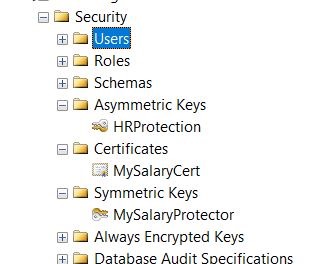
    I do this, I have these objects.

    2016-11-29 14_21_19-SQLQuery11.sql - 192.168.1.204_SQL2016.EncryptionDemo (sa (57))_ - Microsoft SQL

    Let’s now grant rights to these objects. I’ll use this code to grant CONTROL to a user.

    GRANT CONTROL ON SYMMETRIC KEY::MySalaryProtector TO JoeDBA
    
    GRANT CONTROL ON ASYMMETRIC KEY::hrprotection TO JoeDBA
    
    GRANT CONTROL ON CERTIFICATE::MySalaryCert TO JoeDBA

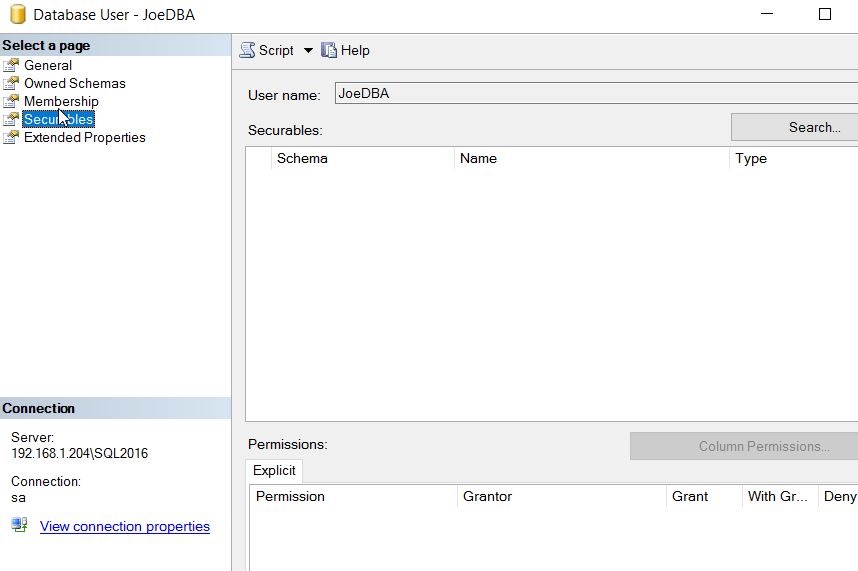
    Once I do this, I should see permissions, right? Let’s check.

    2016-11-29 14_25_30-Database User - JoeDBA

    I don’t see any permissions in the dialog above. That’s not exactly what I’d want to see. After all, if I’m trying to determine why a user can’t access a certificate, I’d want to know if they had rights here.

    Instead of this, I need to use T-SQL, and check for specific classes in sys.database_permissions. Here’s the query looking for class 24 (symmetric keys), 25 (certificates) and 26 (asymmetric keys).

    2016-11-29 14_27_57-SQLQuery11.sql - 192.168.1.204_SQL2016.EncryptionDemo (sa (57))_ - Microsoft SQL

    You can see that I have permissions in here, and if I check the principal_id, I’ll find these are for my user. I could also join to database_principals and get specific information for my user.

    2016-11-29 14_30_41-SQLQuery11.sql - 192.168.1.204_SQL2016.EncryptionDemo (sa (57))_ - Microsoft SQL

    #SQLNewBlogger

    This took a bit longer as someone asked me a question and I didn’t know the answer. I had to dig and read some documentation, but I found some answers and documented things myself.

    Learned something, showed it, and hopefully will remember it from now on.

  • Post TDE–Getting Unencrypted Backups

    I saw a question posted recently about someone that had disabled TDE and was still having issues restoring a backup. This doesn’t seem like that should be an issue, but it can be. A little testing shows how.

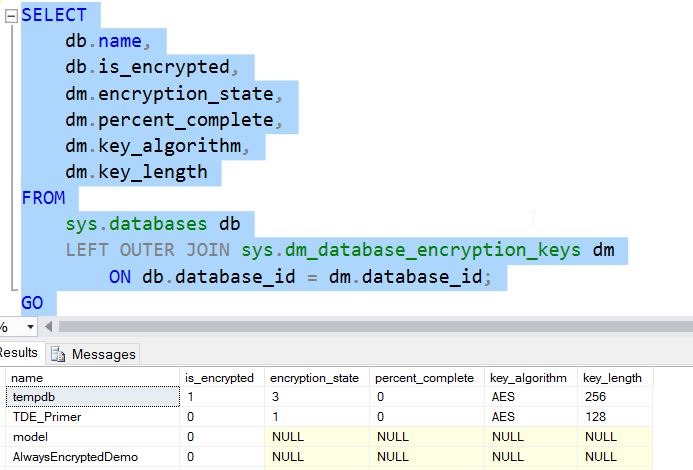
    Let’s assume I have an encrypted TDE database. If I run a query, I can see the status as 3, which is encrypted.

    2016-11-23 11_16_07-11_TDE_Demo.sql - localhost_SQL2016.TDE_Primer (PLATO_Steve (64))_ - Microsoft S

    If I take a backup at this point, the backup will be encrypted, and to restore this on another instance, I’d need to first restore the certificate. I don’t want to do that, so let’s remove encryption. This is a simple command

    ALTER DATABASE TDE_Primer

      SET ENCRYPTION OFF;

    This runs quickly.

    2016-11-23 11_18_08-11_TDE_Demo.sql - localhost_SQL2016.TDE_Primer (PLATO_Steve (64))_ - Microsoft S

    If I now query for encryption, I see this.

    2016-11-23 11_19_00-11_TDE_Demo.sql - localhost_SQL2016.TDE_Primer (PLATO_Steve (64))_ - Microsoft S

    A one means that this is an unencrypted database, but a DEK (Database Encryption Key) exists. If I were to detach and examine this database file with a hex editor, the pages would be decrypted.

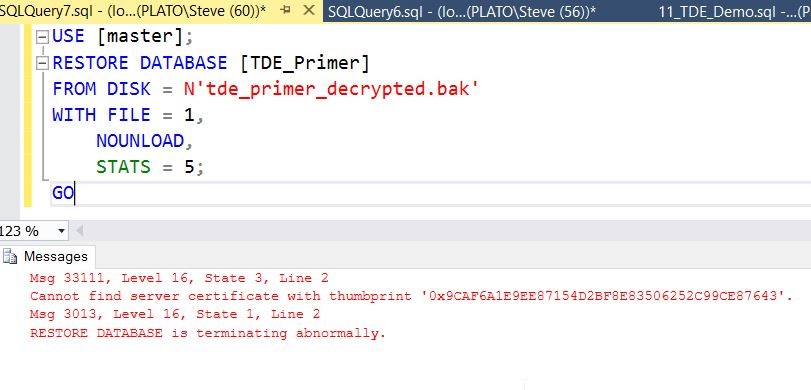
    I’ll now take a backup and move that to another instance. Once I’ve copied that over, I’ll try to restore the backup. In T-SQL, I’ll see this:

    2016-11-23 11_21_43-SQLQuery7.sql - (local)_SQL2016_qa.master (PLATO_Steve (60))_ - Microsoft SQL Se

    Why is this? The database was decrypted, as was the backup. In fact, if I open my backup file in a hex editor, I can see row data.

    2016-11-23 11_23_12-XVI32 - tde_primer_decrypted.bak

    The Problem

    When SQL Server goes to restore the file, it reads part of the header. In here, the process must detect the DEK and try to decrypt that key. However, since this new instance does not have the certificate, this doesn’t work and an error is thrown, despite not needing the key since the data isn’t encrypted.

    The issue here is the DEK still exists in the source database.

    The Solution

    Let’s fix this. I’ll return to my first instance and the original database that was TDE encrypted and now is not. I can issue this:

    DROP DATABASE ENCRYPTION KEY

    Once I do this, it completes quickly. This is a standard DDL command, but one that’s not often used.

    Once I do this, I’ll take another backup and return to the second instance. Now when I try the restore, I see this:

    2016-11-23 11_27_28-SQLQuery8.sql - (local)_SQL2016_qa.master (PLATO_Steve (58))_ - Microsoft SQL Se

    If you’re having issues restoring a database that used to be TDE encrypted, try removing the DEK and then backing it up.