Tag: syndicated

  • Technology Advances – mSATA external case

    I had an SSD die last year. It was one of my traveling SSDs, where I keep spare copies of my VMs and presentations. Fortunately I didn’t need the backup that trip, and when I got home, I switched out to the second drive and carried that along.

    I wasn’t planning on replacing the SSD too quickly, but when I saw a sale from Crucial over Christmas, I ordered a new mSATA drive. I hadn’t really paid attention to the format, thinking this would be similar to my other small SATA drives, but it wasn’t. It’s a card, as in a small SD card sized device.

    I can’t believe how small a 512GB drive has become.

    I also ordered an external case for is, a Sabrent one that was highly rated on Amazon. Here is the collection of the case and drive. For scale, my Bluetooth headset is in the picture.

    Photo Jan 09, 10 20 04 AM

    When I opened the case, it’s essentially a card that slides out. The mSATA card clips in there, much like a memory stick.

    Photo Jan 09, 10 20 20 AM

    Once I clipped it in, I slipped the insert back in the case and used two tiny screws (almost eyeglass size) to lock things together.

    Photo Jan 09, 10 21 02 AM

    The connection to a computer is with a USB3->SATA cable, the same format as my previous drives. That cable might be the bulkiest part of this ensemble as the drive could really be seen as 1/4 the size of my iPhone 6.

    My desktop recognized it right away and things look good. I didn’t do anything with that as I’m planning on sliding it into my new laptop and then using that 128GB drive as my backup on the road for talks and the main VM I need.

    I’m still considering grabbing a small PC like a Gigabyte BRIX as a spare device for me to present from. I’d love a tablet like the Surface Pro 3, but until I find an ultrabook or convertible with 16GB, I’m limited on choices.

  • Execute the Current Statement–SQL Prompt

    I work for Redgate and write about products. I’ve got a series of SQL Prompt posts here on little things I like. SQL Prompt might be my favorite tool.  SQL Prompt will be yours as well if you give it a try.

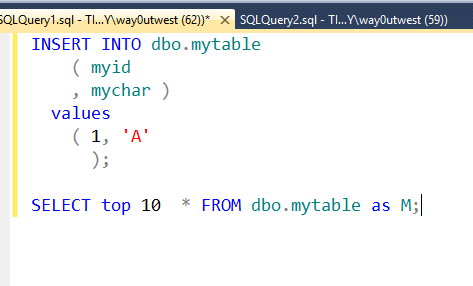
    This is a great little feature in SQL Prompt that I wrote about at SQLServerCentral. It’s Current statement Execution, which comes about from pressing Shift+F5. Whatever statement the cursor is on, whether it’s a single line or multi-line, the statement will execute.

    It can be on the first line:

    currentstatemnt_e

    the last line

    currentstatemnt_f

    the end of the line

    currentstatemnt_g

    It doesn’t matter. When I press Shift+F5 in all of these cases, I get this:

    currentstatemnt_c

    Only the second statement executed (the SELECT), the first statement is ignored (and all other statements) and the code executed is highlighted.

    As mentioned at SQLServerCentral, there’s a caveat. This isn’t really highlighting, it’s just coloring. Read the article to understand the difference.

    I also have a video version of my tip.

    You can see a complete list of SQL Prompt tips at Redgate.

  • T-SQL Tuesday #62 – Healthy SQL

    tsqltuesdayThe invitation for T-SQL Tuesday this month comes from Robert Pearl. It’s called HealthySQL and it’s a topic I like. I’ve spent a lot of time in my career being proactive with SQL Server databases, and keeping them healthy is important.

    If you’d like to participate in the party, just write a blog post and publish it on the second Tuesday of the month.

    However, if you’d just like to participate, take the topic anytime and write your post.

    Healthy SQL Server

    I would guess most of us would prefer to be healthy over being sick. While it’s hard to be extremely strict in taking care of ourselves, many of us do make efforts to eat better, exercise, etc. to maintain our physical health. If we don’t, then we get sick and are usually miserable.

    The same thing can happen to our SQL Server instances, and if they get sick, many of us are miserable as well. Mostly because we might be working late, working overnight, or being yelled at by managers.

    I learned a long time ago that no matter how well I take care of myself, I’ll get sick at some point. And no matter what I do for my SQL Servers, at some point they’ll have issues. However if the issues could have been easily prevented, it’s embarrassing and it calls into question my capabilities as a DBA.

    I’ve got lots of stories of how I’ve prevented issues by keeping my servers healthy, but there are really a few simple things I’ve set up and worked on. I included these in my Avoiding a DBA’s Worst Days with Monitoring talk. I need to blog about these in more detail, but here they are with a few notes.

    Backups

    The core of any data system is the backup. If you have the data in a backup (and the backup is good), then you can recover from any other issues. As a result, I’ve tried to be sure that I have backups setup, monitoring on the backup jobs, and a process to make a copy of the backup somewhere else.

    Space

    Running out of disk space is one of the simplest things to avoid and one of the most embarrassing to deal with. I’ve written about placeholders, but you should be monitoring space, have placeholders available, and proactively look for more space as you get low.

    Security

    Security is important, and we read about issues all the time. However apart from hackers, loose security often means that users, developers, or anyone else can cause issues in your database. Tight security can be a pain, but it really prevents a lot of issues.

    Resources

    Resources refer to the hardware and software that allow your systems to function. If you don’t have enough resources for your workload, no one is happy and you are listening to complaints. Being proactive, looking to tune queries, reduce fragmentation, add indexes, reindex, update stats, and more are important here.

    Deployment

    Face it, we’ll always be changing our systems with new patches, code, etc. Building a decent test routine is important as we want to prevent deployments that will make our servers unhealthy. However having a plan to deal with issues (because you will have issues) means thinking about rollbacks or other methods of undoing problems.

  • It’s a Problem When a SysAdmin Can’t Log In

    I showcased a demo recently that looked at a potential issue with an application where a user used a simple update statement to gain privileged access to a system. That’s scary, and it’s a potential issue for many applications that handle their own authentication.

    The problem with this type of attack is that it can be hard to detect. A system administrator might not log in with their account for some length of time, during which the attacker has free reign in the system. However even if the administrator logs in, they might not detect the attack.

    How often have you entered your credentials for a system and it informs you that something was typed wrong. How many times have you locked out your account accidentally with too many bad password entries?

    Have you ever thought that your account was under attack?

    I know some people will have their account unlocked and retry their password, but I know plenty of administrators that would just reset their password.

    That’s bad.

    You should always check the login times for your privileged accounts. In fact, I’d like to be sure that you are using your privileged accounts regularly so that if someone were to gain access, you’d know it. Or if someone changed your password, you’d be aware.

    Treat your sysadmin account for what it is: a privilege, and a target for attack. We are seeing more and more attacks on our systems, and I expect the problems to only grow, not shrink.