Tag: syndicated

  • Do We Care?

    Today’s editorial at SQLServerCental is entitled: We Don’t Care about Data and IT Security. It’s by Brian Kelley (author, blog, twitter), and I think it’s worth a few minutes of your time to read.

    It’s aimed more at executives, and certainly talks about the disconnect between actions and words. People talk about security being important, but rarely seem to make fundamental changes that might improve things.

    I tend to agree, though I also think it’s not as cut and dried, and often we have a disconnect in what we really want or need from security. Do we need chip-and-pin cards v our signature ones? It’s arguable that the former are more secure, but there have been incidents, and without a doubt the large scale of the US credit card market would mean more and more attacks. There is an argument that the devil we know is better than the one we don’t.

    However there certainly are not great coding practices in many organizations. I think we far, far too often do not train or show new developers how to code more securely. We also don’t require older developers to change their habits to implement new techniques that limit issues. We also don’t bother to review code that consultants write and require security. It’s far too easy to “just get it into production” for many people.

    Overall, I tend to agree with Schneier and Brian in that we need to rethink security in our languages, but also fundamentally in how computer systems work. We also need a culture of security, something that won’t take place until we mature as a digital civilization.
  • Quick Tips–SQL Prompt Custom Aliases

    I love SQL Prompt, and think it’s a great productivity tool. Even before I worked at Red Gate, I love the tool and had a copy before Red Gate bought the technology from the original developer. Recently I’ve run into a few people that weren’t aware of some of the ways in which it can help you. This is a quick look at one of the ways I use SQL Prompt.

    Custom Aliases

    SQL Prompt can automatically create aliases for tables. However, as I’ve worked on different systems, I’ve often found that development teams like to use specific aliases consistently to ensure that everyone can easily read the code and understand which tables are being queried.

    Suppose I decide that I have these tables:

    • Product
    • Product Details
    • Orders
    • OrderDetails

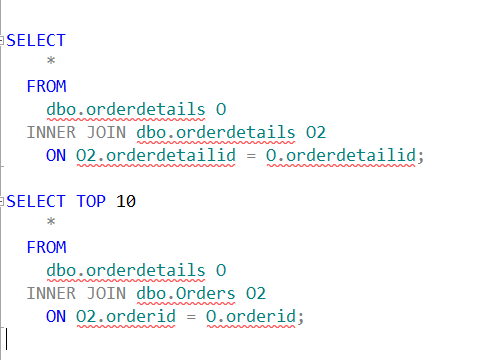
    I often use these tables in queries in my system, and I want to have consistent aliases. Right now, I could have these two queries with the default SQL Prompt alias settings:

    aliases20

    Note that the Orders table has “O” as an alias in the first query, but “O2” as an alias in the second query. This isn’t an issue when I’m writing a query, but when I revisit this code in a month or two and add an enhancement, it can be tricky.

    What I’d like to do is ensure I had consistent aliases for my tables, so that every developer always knows that “o” is Orders and “od” is OrderDetails. I want these aliases

    • Product – P
    • Product Details – PD
    • Orders – O
    • OrderDetails – OD

    I can do that in SQL Prompt with custom aliases. Let me go back to the Options dialog and select Aliases.

    aliases_21

    I’ve already added an item in the Custom aliases section for the product table. However I can click New (highlighted above) and I’ll get a little dialog.

    aliases22

    I repeat this process for each table, and soon I have all four entered.

    aliases_23

    Now I can rewrite my query. I start typing each table, and once it’s highlighted, click “tab”. When I get done, I have:

    aliases_24

    A quick way to ensure that all of your tables are consistently aliased, no matter in which order you type things.

    aliases_25

    You can see a complete list of SQL Prompt tips at Redgate.

  • T-SQL–Converting Seconds to Time

    I was working on a small piece of code the other day that was calculating the seconds for an event. I had a function that returned me the seconds as an integer. That’s good, but I wanted to get that value back in minutes and seconds. The scale wasn’t so large as to worry about hours, or days (I hope).

    In any case, I could certainly do some math. Takes seconds, divide by 60 to get minutes, and then take the remainder and add that as seconds, concatenate, convert to time. Crazy.

    There’s an easier way using CONVERT.

    DECLARE @s INT
    SELECT
        @s = 325
    SELECT
        @s
      , CONVERT(TIME, DATEADD(SECOND, @s, 0));

    I can just add the seconds to the 0 time, which is midnight, and I’ll get the time back in the right datatype.

    This code gives me 5:25, which is correct. Five minutes and 25 seconds.

    If I increase the numbers, say into hours, I can take 4325 like this:

    DECLARE @s INT
    SELECT
        @s = 4325
    SELECT
        @s
      , CONVERT(TIME, DATEADD(SECOND, @s, 0));

    And get this;

    time

  • Powershell Tips–Showwindow

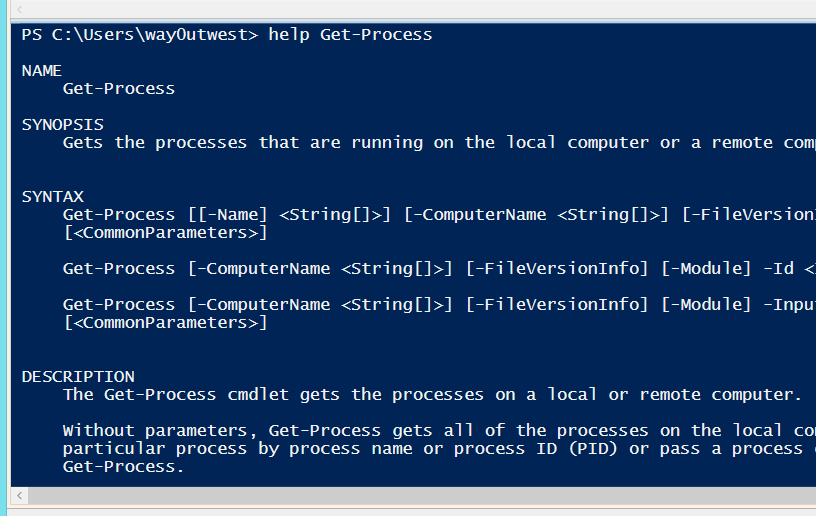
    Looking for help is a pain in Powershell. I type something like

    help get-process

    execute this and I’m scrolling up and down. Things scroll off the screen and I have to muddle through, meanwhile, my code is at the bottom of the window.

    posh_help

    Even when things stop at the end of the page, like the old man pages in Unix, it’s a cumbersome way to work through something. However there’s a better way.

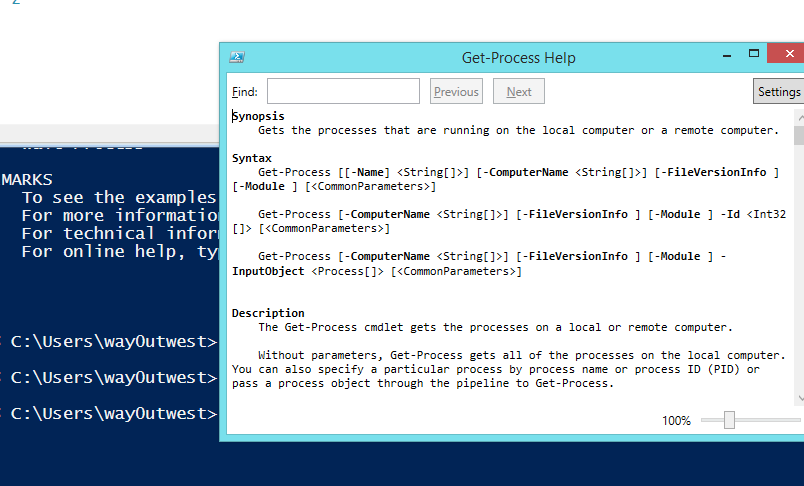
    help get-process –showwindow

    If I type this, all of a sudden I get a window of help.

    posh_help_b

    I can resize the window, move it, keep it handy on the section that’s relevant when I’m trying to write a piece of code.

    A very handy tip I got from one of the TechEd 2014 sessions.