Tag: syndicated

  • Slimming down The Voice of the DBA Podcasts

    I announced in the Christmas editorial that I was discontinuing the video podcasts. Needless to say I heard a complaint from my Mom that afternoon. She enjoys the podcasts, even though she doesn’t understand all the technology. I did get a couple other notes from people and thought I should explain things better. I’ll also put an announcement in the Jan 2 newsletter.

    The podcasts have been enjoyable, but also a lot of work. Mostly because they require me to record video, have a location, quiet, etc. to get the recordings done and then there’s editing. If you look at the bloopers, I have quite a few mistakes during the recordings, so there’s no shortage of fix-up to perform in post-production.

    Last year one of the senior management at Red Gate questioned whether it was worth continuing the podcasts. I decided to look at some numbers, ask people, and then decide. I also wanted to get to 1000 of them.

    I hit 1000 last week, and end the year with 1004 podcasts, which is quite a run. It’s been a few years and it feels like I gave it a good chance to grow. However, it didn’t grow much. As I look at the numbers, the MP3 and MP4 (iPod) podcasts have the best numbers for downloads, with WMV not really even mattering. I suspect that the automatic nature of iTunes means that people download them automatically without any issues. As I’ve talked with people, I’ve also realized that most people prefer the written word for this type of information. It’s faster and easier to consume.

    Having met my goal of 1000, and not seeing wide scale adoption, I’ve decided to stop the video podcasts, at least as a regular production. I might do the occasional one.

    The audio (MP3) podcasts as much easier to record and produce, and since I know some people enjoy them, I’ll continue those for the time being. I’ll upload those to the iTunes location and see how that goes.

    What Else Will I Do?

    That’s a good question. I’ve had more speaking engagements in the last couple years, which has definitely impacting the podcasts at times. I missed a few days, which was very annoying to me. I suspect I’ll be doing more speaking and presenting in the next year. I’ve also got no shortage of other projects to tackle.

    One of those is the idea of a radio show instead of a podcast. In technical terms the only difference is that the show will be live most of the time with some interaction with an audience. My initial idea is a weekly show, one that won’t take too much time, but will give me a chance to continue to experiment with how to best reach an audience. I’ve proposed something to my boss, so we’ll see what else happens.

    As for other items, we’ll see what happens as the future progresses.
  • The Effective Cell Phone

    I’ve written a bit about phones recently as I’ve experienced the switch back to iOS from Android. There are a few other posts in this series:

    I wanted to stop and take a moment and think about design of cell phones for a minute. I think that Android, iOS, Windows Phone 8, and other systems have their own strengths and weaknesses. Even though I prefer iOS, I wouldn’t want that to be the only choice for everyone.

    However why should the choice stop there? I think Apple has done a great job with their App Store, and while I don’t like their censorship of applications, I do appreciate their certifying and curating apps. I just wish they’re allow more applications, and more importantly, more defaults.

    What does a smartphone do?

    If I think about what a smartphone, I am looking for it to have these functions:

    • Make and receive phone calls
    • Manage voice mails
    • Manage contacts
    • Handle text messages
    • Browse the web
    • Get email
    • Work with my calendars
    • handle navigation
    • provide keyboard for input
    • provide voice to text services

    I’m sure there are other things. For example, being able to connect with various other platforms (twitter/facebook, etc) from within any application. Maybe I am concerned about text to speech capabilities, or more. When I look back at Android, I appreciated the variety of keyboards that were available. Like most people, I quickly settled on one (Swype), but I did try out the Swiftkey and KeyPal keyboards.

    Why doesn’t that make sense for all of the functions above? Perhaps I want a different dialer that somehow presents data differently, or makes phone calls in a different way. I’m imaging that I might want to route some calls through a service like Skype or Google Voice and some through cellular. I would love the ability to replace the default dialer with some other dialer, just as I could replace keyboards on Swype.

    Many of us have a favorite browser, but it’s not the default on your platform, you may find some links opening in another browser. I should be able to set the core default programs for functions on my platform, as I choose them. I don’t expect that any dialer, or calendar, or other service is allowed. There are core functions that need to be met, and I’d accept that the platform provider, or maybe store, would certify applications as working on the OS, but after that, I ought to be able to replace the default programs that can be run.

    Android is much more open about this than iOS or WP8 in many ways, and I’m not sure if everything above can be replaced. I know I could replace the dialer with Skype instead of cellular, but I’m not sure if all these functions can be replaced. If they can, then kudos to Android.

    I also know that some applications are available for all of these functions, or most of them, but I thought there were places I couldn’t set something as the default. I’m not ready to go back to Android and experiment now, but for sure I wish I had the ability to get automatic, default functionality from the phone in the way I want it.

    Ultimately Apple isn’t making money, or loyalty, on their dialer, or calendar. They make money on the platform, so build the amazing platform, but let other people provide more customizations, as you do now in app stores. Just allow consumers to make those defaults if they choose to.

  • Quick Tips – SQL Prompt with SSF

    I love SQL Prompt, and think it’s a great productivity tool. Even before I worked at Red Gate, I love the tool and had a copy before Red Gate bought the technology from the original developer. Recently I’ve run into a few people that weren’t aware of some of the ways in which it can help you. This is a quick look at one of the ways I use SQL Prompt.

    SSF

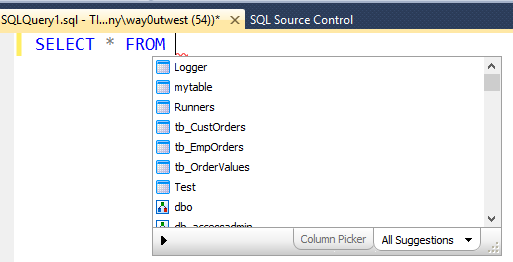
    I probably type SSF more than any other character combination in SMSS. With SQL Prompt installed, I usually quickly type “SSF” and hit “tab” and get this:

    ssf1


    SQL Prompt has expanded my “SSF” into “Select * From” and then popped up a list of tables in this database. I could down arrow to select one, or use the cursor, or start typing.

    This is a quick way to get data from a table back to your SSMS client without worrying about the columns or rows you need from a table. I use this constantly, though I’ve edited this command to return the top 10 rows only. Here’s how I do that:

    Snippet Manager

    There’s a dialog for managing these snippets of code, called the Snippet Manager. You can access that from the SQL Prompt menu

    ssf2

    Once you select this, you get a dialog that shows all the snippets installed on your system. I scrolled down to the “SSF” snippet that I often use.


    ssf3

    If I click the Edit button, then I get a small editor where I can paste in code or edit what’s there. In this case, I add the “TOP 10” keywords, and I also reformat the code slightly. I like my code formatted, so I ensure it’s formatted here.


    ssf4

    Once that’s done, I click “Save” and then “close” for the Snippet Manager. Then the next time I type “SSF” and tab, I get this:


    ssf5


    Note that there is an st100 snippet that does the same thing I edited with 100 rows, but I find ssf easier to type, so I just edit this snippet.

    I’d encourage you to play around with snippets, and also adopt this in your daily work. If you don’t have a copy of SQL Prompt, download the evaluation and I’m sure you’ll realize it’s worth the cost of the tool in time savings quickly.

  • Android is better than iOS

    Not in many ways, and certainly not in enough for me to stick with Android over iOS, but here are a few things I do think.

    If you’re slightly lost, I’ve written on Android v iOS after moving to a G4, my move back to iOS, and why I left. The other posts in this series are:

    It’s been a couple weeks that I’ve been back on iOS. It’s an adjustment, partially because it’s iOS7, and partially that things work differently. I made a few notes of the places where I find myself wishing that iOS had adopted a few things from Android.

    Keyboard

    The number one complaint I’ve had with iOS is the keyboard. Actually, I bet my wife would consider iOS again if the keyboard was replaceable. The iOS keyboard isn’t a great format, it isn’t customizable, and there’s no Swype. I could forgive the former, but the latter is handy, especially when you’re working one-handed, which I often am. I’m not sure if Apple will get Swype/SwiftKey/etc ever, but that ought to be a priority.

    I will say that as I’ve moved to Chrome on iOS, I do appreciate the app showing the “:”, “.”, “-“, “.com” buttons above the keyboard. I wish that more apps might consider adding the “@” and “#” buttons to their keyboards. I use those often.

    Update: I noticed the Echofon Twitter app does this.

    Back

    The back button, which was annoying and inconsistent at times in Android, was still useful. Often I find that I need to change a setting, or I click a link over to some other app and want to return to the previous application.

    For example, I hit maps, enter an address, and it tells me I don’t have Location Services on (because that kills my battery). I click settings to turn on LS, and then I need to double click home and pick the previous application. I find myself looking for a back button. The same thing occurs if an email opens a browser link.

    As much as the soft back button was a pain in Android, not having one is slightly a pain in iOS. Not a huge one, but it feels like an ommission.

    GPS

    I don’t use the GPS or Location Services often, mostly because it seems that iOS 7 has a battery drain issue with this. I have to say that having the ability in Android to turn this on/off from the notification window was really, really handy. While I have wi-fi, bluetooth, etc. in iOS, I don’t have GPS.

    Android wins here.

    Screen

    I had a new Android, the Galaxy S4. The screen was amazing, and large. After a day with the S4, I thought the device was big. After a month, I never noticed it. In fact, when I looked at other phones, their screens were small. Going back to the iPhone 4S I was surprised, and still am, by how small the screen is. I’ve looked at a few other old phones I have and the iPhone has a larger screen, but after having the S4, I miss the larger screen. If the iPhone 6 does a wider screen, even if it’s the same height as the 5 series, I’ll upgrade ASAP. I would like a larger screen.

    There are so many Android choices here with my kids having LG and HTC devices, that I feel a little left behind. Even my daughter’s 8X with WP8 is larger and nicer.

    I know this isn’t an Android OS thing, but the choice and variety of the platform make it a reason I like Android more.

    Networking

    I don’t know if this is an iPhone issue, an iOS7 issue, or Android is better, but networking seems flakier. Both wi-fi and cellular find some gaps/pauses in how the device works. Coverage was better on Android for me, but that was newer hardware and the cellular radios are always improving. It isn’t horrible, but a few times a week it’s noticeable. I wish I hadn’t upgraded from iOS 6 to 7 as I’d like to know what the issue here is.

    That’s It

    I haven’t anything else that stands out. I wrote about a few of the reasons I switched and they’re still valid. Music is world class (including iTunes), the camera just works quicker and better. App quality is better overall, and I don’t have crashes. The lock screen runs fast, and I can search the phone instantly.

    I have learned in iOS 7 I need to kill some apps at times, and that means the Task Manager and booting a few to protect my battery life at times, but I had to do that on Android.

    Overall, I’m glad I switched back, though I do wish I had newer/faster/larger hardware running the OS.