Tag: syndicated

  • Accidently Kicking a Database into the Restoring State

    I learn new things all the time. This was one that actually stunned me. Huge props to Gail Shaw for posting a note about this in a thread.

    Run this code:

    CREATE DATABASE MyRestoreTest ; GO USE MyRestoreTest go BACKUP DATABASE MyRestoreTest TO DISK ='myrestoretest.bak'; GO CREATE TABLE mytable( id INT) ; GO USE master go BACKUP LOG myrestoretest TO DISK = 'myrestoretest_log.trn' WITH norecovery

    You’ll see this in your Object Explorer

    backuplog

    Ugh.

    I haven’t started a restore. I’ve run a backup. Apparently this causes problems, as noted by Gail in the thread. Sure enough, it’s documented in the BACKUP command, in the Log-specific Options.

    I had never scheduled backups with this type of option, but you might have a job that does this if you were preparing for a failover. Having a script ready it a good idea, but if it executes unexpectedly, this could happen.

    The lesson: make sure you know the options when you run a command. Always test, and if something strange happens, search or ask what might have happened.

  • Powershell in a Month – Day 3 – Commands

    This is part of my Powershell Challenge, to learn more about Powerhsell (PoSh) using the Learn Windows Powershell 3 in a Month of Lunches book by Don Jones.

    Day 3, chapter 4.

    This one is about commands, and getting familiar with what a cmdlet is, the naming convention, and how to call things. Again, simple stuff, but knowing that most everything is a Get-xx, or Set-xxx, or New-xxx, etc. is handy. I think the hyphen separation actually makes things easy, though the completion in the ISE and with tab is very handy.

    The big thing here is the parameter naming and cmd.exe execution. I wasn’t always clear on how parameters work, but this chapter helped. In this case, unless there’s punctuation or spaces, you don’t need quotes. That’s handy. I also like that the shell is explained in reference to cmd.exe, which is the command prompt that so many of us use.

    This was a short chapter, a quick skim, and I made sure that as the authors talked about commands, aliases, etc, I ran all the code. When I got to the end of the chapter, I was able to actually solve all the exercises without using any references. I used help to look up commands (like Get-NetFirewallRule), but otherwise, I was able to solve all the exercises in about 5 minutes.

    I felt successful and more empowered today. It’s getting a little exciting, and I can see where this will be very helpful over time.

  • Backups and Consistency

    I wrote about transactional consistency recently. Why do we need this?

    Imagine that I have an orders table and an ordersdetail table in my database. The orders table has the order header (date, customer, etc) and the detail table includes information about the items purchased (product, qty, price). Let’s say my orders table has 10 orders and my detail table has 5 items for each order for a total of 50 rows in the detail table.

    If I want a backup that is consistent, I need to have all of the orders and details included in the backup. I don’t want partial orders, so all my inserts for orders and details are included in a transaction. That means my backup needs to contain a complete, new order, or no new order at all. Anything else wouldn’t be consistent.

    The backup process you choose needs to account for this. It cannot include partial orders from a transaction inside of it. Could that happen?

    Sure, and let’s see how. Backups proceed linearly and it takes time for them to complete. Imagine that I have a process that starts backing up my Orders table. It reads orders 1 and 2.

    While this is happening, someone inserts a new order, #6, into the system. If my backup system is reading pages, it might continue through orders 3-6 and then start on details. Imagine now the user rolls back the new order. When my backup completes, it will include (and restore) an order #6. That could be a problem.

    The other problem could be that the backup process gets to the details table and starts backing up the first 5 details from order#1. While this is happening, a user inserts a new order and order details in a transaction (order #7), and it completes. The backup process moves through the details table and gets all the details, including the new detail records inserted during the backup. However the orders table has already been backed up. The restore will include details for order #7, but not the header (Orders table).

    That’s bad.

    Don’t use file backups, no open file managers, no exports, no BACPACs as backups for your data. You might have serious data issues on restore, which get worse as your workload is busier on the system.

    Make sure that your backups are transactionally consistent. Don’t export, don’t use open file managers, don’t use anything that doesn’t respect transactions. The native SQL Server backup process does this. If you want a few other features, my employer makes SQL Backup Pro, which also respects transactions.

  • Powershell in a Month – Day 2, Help

    This is part of my Powershell Challenge, to learn more about Powerhsell (PoSh) using the Learn Windows Powershell 3 in a Month of Lunches book by Don Jones.

    Today was Chapter 3, Using the Help System. Another not-so-exciting topic, but one that does matter. There are a ton of commands to learn and use in PoSh and being able to get help on them is important if you are to develop code with any level of speed. Note I said code. This is scripting, it’s interactive, but it’s code. Whether you run it once or save it and schedule executions every minute, it’s code.

    The first point in the chapter is to RTFM, or “read the friendly manual”. The authors emphasize that using Google instead of help means you’re copying code, not learning about the code, and potentially stunting your development or even wrecking your production system with commands you don’t understand. As much as I love Google, I can understand the point here.

    One of the first things the chapter does is ask you to update help. However that didn’t work for me:

    Posh_006

    The book doesn’t talk about the CLI v the ISE, which is the problem. I found a post on MSDN that noted this works from Powershell, but not the Powershell ISE.  Once I went to the CLI, it worked.
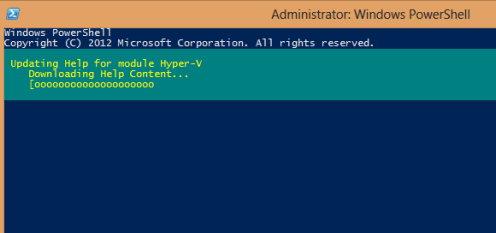
    Posh_005

    I used to do UNIX work, and was forever typing “Man xxx” to learn about xxx. MAN is a wrapper here, as is “help” for the get-help command. I played around with some get-help stuff, using wildcards and tab completion. Both of which are handy. I can definitely see that learning to use help and tab is important.

    The rest of the chapter brings out various ways in which you can use help, including getting more details, getting examples, and going to the online pages, which are more up to date than your local copy might be. All good tricks to getting going with PoSh. Lots of example commands showing how to get help, and I ran most of these.

    The chapter was boring, but at the end when I got to the lab, I was surprised how little I know. As I tried to go through the lab questions, I wasn’t sure what was working and what wasn’t. I didn’t know if I was actually running the right commands, since things like “help *array*” worked. There are answers you can download from the morelunches.com site, and once I did that, I was able to check my results, and get help on a few items I wasn’t sure about. 

    I was surprised that I learned a few things, and I can definitely see that working with help is both important, and cumbersome. For example, the scrolling isn’t smooth in the ISE and the MORE piping from the HELP wrapper doesn’t work. Definitely something to practice on as I move through the book.