You can cause yourself problems if you don’t know where your backups are stored, and how they are being made. It also helps to understand the defaults of how your backups are created in files.
Here’s a short story to illustrate an issue you might encounter as a beginner if you are not clear about the backup process.
Let’s say you’re a junior DBA, and you create a database.
CREATE DATABASE BackupRestoreTest
go
CREATE TABLE MyTable( mychar CHAR(1), mytest VARCHAR(200))
go
You know that backups are important, so you setup a basic command like the first one below, schedule it in SQL Agent, and you have backups being performed. In between the backups, work is being done. Probably more than one INSERT, but this is just to show something is happening in the database.
-- schedule backup
BACKUP DATABASE BackupRestoreTest
  TO DISK = 'MyBackup.bak'
GO

-- do work
insert dbo.mytable SELECT 'a', 'b'
GO

-- backup database
BACKUP DATABASE BackupRestoreTest
  TO DISK = 'MyBackup.bak'
GO
This continues on, day after day. Work gets done, you run your nightly backups.
-- do work
insert dbo.mytable SELECT 'c', 'd'
GO

-- nightly backup
BACKUP DATABASE BackupRestoreTest
  TO DISK = 'MyBackup.bak'
GO

-- do work
insert dbo.mytable SELECT 'e', 'f'
-- mistake is made
DELETE dbo.mytable
-- more work
insert dbo.mytable SELECT 'g', 'h'
GO

-- nightly backup
BACKUP DATABASE BackupRestoreTest
  TO DISK = 'MyBackup.bak'
GO
Then one day, someone runs this and calls you:
-- mistake noticed
SELECT MyChar FROM dbo.mytable
GO
Only the row with “g” is returned from this. The user asks about all the other data. Where are the rows with “a”, “c”, and “e”?
You decide to restore.
-- restore, use good habits. NORECOVERY always.
USE master
GO
RESTORE DATABASE BackupRestoreTest
  FROM DISK = 'MyBackup.bak'
  WITH NORECOVERY
  , REPLACE
GO

-- bring online
RESTORE DATABASE BackupRestoreTest
  WITH recovery
go
You check the data and you get this:
-- check data
USE BackupRestoreTest
GO
SELECT MyChar FROM dbo.mytable
GO
The results?
MyChar
———–
Nothing. No data. Why not? If you look, you’re last insert (row “g”) occurs after the delete and before the backup. Why isn’t it in the restore?
The answer comes from a few sources. If we read the BACKUP page in Books Online (BOL), we find that if we don’t include the INIT option for a disk file, the backup is appended to the current file. The phrase in BOL is:
“If the physical device exists and the INIT option is not specified in the BACKUP statement, the backup is appended to the device. ”
If we look at the INIT argument, we see that the default is NOINIT
“NOINTI – Indicates that the backup set is appended to the specified media set, preserving existing backup sets. If a media password is defined for the media set, the password must be supplied. NOINIT is the default.”
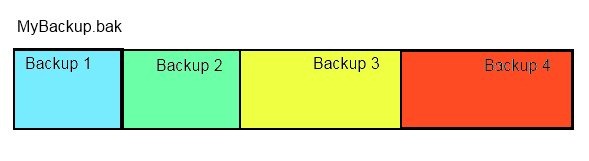
This means that we’ve essentially done this:
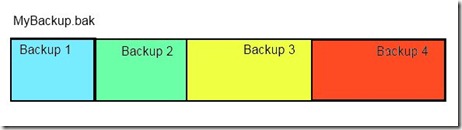
Our one file, MyBackup.bak, contains 4 full backup files. This file is larger than it needs to be, and also it poses a risk. If I lose this file, I don’t lose one backup, but I lose 4.
Can I check this? Sure. Run this:
RESTORE HEADERONLY FROM DISK = 'MyBackup.bak'
I get these results:

You can see there are four files, with a “position” that differs.
Now, on the restore, why didn’t I get one row back in my table? The insert for row “g” occurred before the last full backup (backup 4), so why wasn’t it restored?
If we read the RESTORE Arguments page in BOL, we find out that for the FILE arguement
“When not specified, the default is 1, except for RESTORE HEADERONLY in which case all backup sets in the media set are processed. For more information, see "Specifying a Backup Set," later in this topic.”
The backup that was restored was our first backup, made before we did any work (inserted any rows).
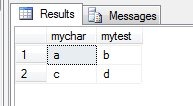
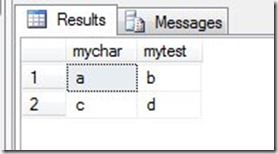
What do we do? Well, we have a few choices. The last (fourth) backup would only get us the one row. If we restore the third backup, we lose the data in rows “e” and “g”. That’s usually what we want to do, so let’s restore that backup:
-- restore file 3
USE master
GO
RESTORE DATABASE BackupRestoreTest
  FROM DISK = 'MyBackup.bak'
  WITH NORECOVERY
  , FILE = 3
  , REPLACE
GO
-- bring online
RESTORE DATABASE BackupRestoreTest
  WITH recovery
go
-- test data
USE BackupRestoreTest
go
SELECT TOP 10
   mychar, mytest
 FROM mytable
That gives me two rows back. I’ve lost some work, but I potentially have recovered more in many situations.
Ideally I could recover more if I had transaction log backups, but that’s another blog.
The main thing to be aware of here is to use the INIT command, write your backups to separate files, preferably with the timestamp in the file name. If you’re not sure how to do it, a maintenance plan can do it, or there’s a great script on SQLServerCentral that can help.
Lastly, the default recovery models mean you need log backups. Make sure you know how to manage your transaction logs.
 On the corner of my rather messy desk is little recognition item in the image to the right. It’s a 5 year marker, representing my 5 years as a Microsoft MVP. I’m honored that they think I’m doing enough for the community to be recognized.