Tag: T-SQL Tuesday

  • T-SQL Tuesday #26 – Second Changes with Date/Time

    TSQL2sDay150x150

    I missed the very first T-SQL Tuesday, so when this month’s topic of second chances came up, I decided to write that one.

    If you are unsure of what T-SQL Tuesday is, follow the link to this month’s topic to get the rules and description and then write a blog post.

    Date/Time Challenges

    I picked an easy one, but one that I continue to see asked in the forums by people new to SQL Server. I suspect we’ll see less questions over time as more people take advantage of the new DATE and TIME datatypes in SQL Server 2008 and later, but maybe not. Lots of people are still sure that they need to keep those items together.

    In any case, have you ever seen sales data like this:

    OrderID     OrderDate               CustomerID  OrderAmount
    ———– ———————– ———– ————
    1           1982-05-19 06:31:48.950 1           579040.5070
    2           1994-11-27 17:14:41.790 2           348808.5860
    3           1972-11-08 17:40:01.170 3           758992.3650
    4           1972-05-31 01:19:05.530 4           779853.1990
    5           1994-12-22 10:40:57.410 5           666173.8040
    6           1974-04-03 01:42:29.490 6           134218.2330
    7           1976-06-22 15:21:18.910 7           322938.6950
    8           1953-08-05 23:00:34.620 8           14169.7580
    9           1971-08-16 22:33:28.970 9           586057.3820
    10          2002-03-28 13:08:00.420 10          632785.0760

    Here’s some DDL, you can create your own data, but here are a few rows:

    CREATE TABLE SalesOrders
    ( OrderID INT IDENTITY(1,1) , OrderDate DATETIME , CustomerID INT , OrderAmount NUMERIC(10, 4) ) INSERT SalesOrders (OrderDate, CustomerID, OrderAmount) VALUES ( '1982-05-19 06:31:48.950', 1, 579040.5070), ( '1994-11-27 17:14:41.790', 2, 348808.5860), ( '1972-11-08 17:40:01.170', 3, 758992.3650), ( '1972-05-31 01:19:05.530', 4, 779853.1990), ( '1994-12-22 10:40:57.410', 5, 666173.8040) 

    If I want to get all the sales in May of 1972, I get query them all like this:

    SELECT OrderDate
    , OrderAmount
     FROM SalesOrders
     WHERE OrderDate > '1972/5/1' AND OrderDate <= '1972/5/31' 

    I get 4 rows back. That’s something people often write when they get input from a user. A user has a start and end edit box, they enter “1972/5/1’” in the start box (or use a calendar picker) and then enter “1972/5/31” in the other. I’m using ISO dates to make this clear, though in the US it would normally display like “5/1/1972” and in the UK as “1/5/1972”.

    However, that isn’t quite correct. If I run this query:

    SELECT OrderDate
    , OrderAmount
     FROM SalesOrders
     WHERE MONTH(OrderDate) = 5
      AND YEAR(OrderDate) = 1972

    I actually get 6 rows. The data rows for May 1972 are:

    OrderDate               OrderAmount

    ———————– —————————-

    1972-05-31 01:19:05.530 779853.1990

    1972-05-13 09:26:52.590 676848.9700

    1972-05-28 21:05:28.840 923425.0510

    1972-05-07 10:59:09.930 266079.6480

    1972-05-01 04:21:01.250 464241.6480

    1972-05-31 01:19:05.530 779853.1990

    What’s happening?

    If you look at the OrderDates for May 31, you see two values that have a time of 1:19:05am. Those are excluded from the query, which has an end date of “1972/5/31”. Why? This query:

    SELECT CAST( '1972/5/31' AS DATETIME) 

    shows why. It returns:

    1972-05-31 00:00:00.000

    That’s midnight between the 30th and 31st, which is before 1:19:05am. When a datetime value is converted in SQL Server, without a time component, it defaults to the beginning of the day. That works great for the start date, not so good for the end date.

    Fixing this

    There are two real fixes here. Well, maybe more. You can query on the month and year, but those functions can disrupt indexes, so I don’t recommend them. The two main fixes are:

    • add a time component
    • add a day

    The first fix is the addition of the last time of the day to your query.

    SELECT OrderDate
    , OrderAmount
     FROM SalesOrders
     WHERE OrderDate > '1972/5/1' AND OrderDate <= '1972/5/31 23:59:59.997PM' 

    In some type of code, it looks more like this:

    DECLARE @end DATETIME SELECT @end = '1972/5/31' SELECT @end = @end + '23:59:59.997' SELECT OrderDate
    , OrderAmount
     FROM SalesOrders
     WHERE OrderDate > '1972/5/1' AND OrderDate <= @end

    Assume the first select is actually coming from the user.

    The second fix is to add a day, and actually query like this, which is what I’d recommend:

     SELECT OrderDate
    , OrderAmount
     FROM SalesOrders
     WHERE OrderDate > '1972/5/1' AND OrderDate < '1972/6/1' 

    In this case, instead of querying for May 31, we move to June 1 (the next day) and then change the <= to a < only. This gets all orders occurring up until the end of May 31, but before June 1.

    Easy fixes, but so often there’s code that doesn’t allow for the time component. Take a minute and check your reports, and be sure you aren’t underreporting any data to your clients or customers.

    Also be sure to check out the new datatypes in SQL Server 2008 and later:

  • T-SQL Tuesday #25 – T-SQL Tricks

    TSQL2sDay150x150It’s time for T-SQL Tuesday again, and this time Allen White (@SQLRunr | blog) is asking for your tricks. If you want to participate, read Allen’s post and learn how.

    The question this month is: What T-SQL tricks do you use today to make your job easier?

    My Tricks

    I don’t have any great whiz bang tricks in T-SQL, and I’m sure there are more than a few people that can out-code me with their. However I do like to make my job easier, and so I have a couple of administrative tricks for use with your T-SQL environments. These are the ways that I save time, and work more efficiently.

    The thing that has helped me most often in my career is to keep little snippets of code handy to that I make few mistakes and save time. These days I do that quite often with SQL Prompt, a third party tool from my employer. It basically implements intellisense for SSMS, but more importantly, it gives me shortcuts.
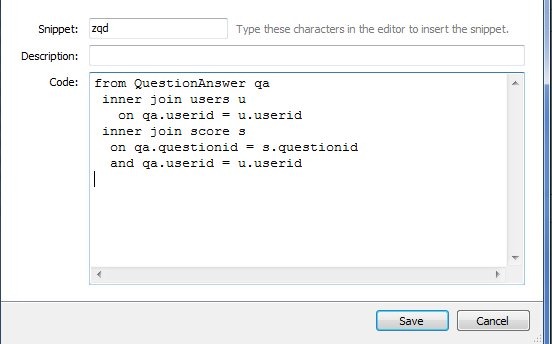
    However the biggest advantage to me is the Snippets in Prompt. There’s a feature that allows you to type a shortcut and then press “Tab” and have that shortcut replaced with a longer section of text. For example. I have this shortcut:

    prompt1

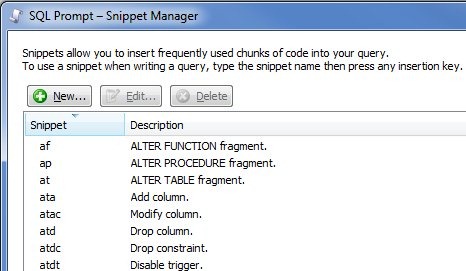
    If I type “zqd” in SSMS, and then hit tab, the T-SQL in the “code” box above appears. There are a few very frequently used slices of code that I can insert like this, without taking my hands off the keyboard, which is very handy. There’s even a whole snippet manager in Prompt that has pre-defined, and custom, snippets.

    prompt2

    The most often one I use is “ssf”, which inserts this:

    SELECT TOP 10 * FROM 

    So do you need to buy SQL Prompt? No, but if you do, tell them I recommended it so my boss with be happy and maybe send me a nice bonus next Christmas.

    A very similar functionality is in SSMS. I actually used to heavily use templates in the old Query Analyzer days of SQL Server 7/2000 and this has continued in Management Studio with the Template Explorer

    template1

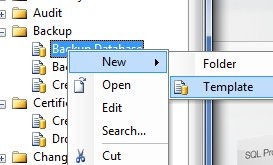
    I can drag a template from the explorer on the right into the code window and the code appears. I’ve pulled in the backup template. You can even add your own:

    template2

    It’s easy to do, and you can read more about Template Explorer in BOL.

    However if you’re like me, you move around, you use VMs for coding, and you want to be sure that your tools are on all these machines. There are a few ways to do this:

    • portable drives
    • cloud sevices

    I guess these are both the same thing, just implemented differently. I’ve used both ways, and while I do carry some flash drives, and hard drives, with various items on there, I find that I can never quite keep these up to date, and they’re really emergency drives for me in the event I don’t have connectivity.

    The primary way that I manage mode snippets, templates, etc. is by putting all my code in centralized places. For Prompt and SSMS, these locations are known, and while configurable, I stick with the defaults. For me this means I have three folders to track:

    • SQL Prompt default snippet folder
    • SSMS Templates folder
    • \SQL in my Documents folder in Windows

    All three of these folders are the same on all my machines, and I use a cloud service to keep them in sync. For me, I have two difference services in play, mostly for testing, and I see little difference between them. I have Live Mesh, a Microsoft service, for some folders, and DropBox for others. From what I’ve seen, they both work essentially the same, though DropBox is a little smoother for me with the Apple integration of some apps. That probably doesn’t matter for most of you, but it’s a difference. Live Mesh works on my Macbook, but not on the iPhone.

    There are other cloud services, and you can choose the one that works well for you, but I highly recommend you have a script library, as well as a snippet/template library, and you use a cloud service to be sure you can access those files if you are away from your primary machine. You might be surprised how handy this is when working on a server or remote machine.

    That’s my T-SQL Tuesday trick for T-SQL, better script management to make your work easier.

  • Basic Inner Joins – Basic Skill #4

    This post is part of a series based on my presentation The Top Ten Skills You Need for SQL Server. This post is part of Skill #4 – Joins.

    T-SQL Tuesday #23

    This post is also serving as my T-SQL Tuesday post for the month. This month the party is brought to you by Stuart Ainsworth. If you want to know more about what T-SQL Tuesday is about, read Stuart’s post as well as Adam Machanic’s original post and then join in next month.

    An inner join is essentially an intersection of two sets. If you go back to grade school, and think about sets, you can have two items like this:

    set1

    If you look at these two sets, you see that there are various elements in each set. If we were to show the intersection, it would be this set: (B). This is shown below (excuse my horrible artwork):

    set2

    In SQL, we deal with tables, but we can model this as follows:

    CREATE TABLE SET1
    ( mychar varchar(1) ) GO CREATE TABLE SET2
    ( mychar varchar(1) ) GO INSERT SET1 SELECT 'A' INSERT SET1 SELECT 'B' GO INSERT SET2 VALUES ('B'), ('C'), ('D') GO SELECT a.mychar
      , b.mychar
     FROM SET1 a
       INNER JOIN set2 b
         ON a.mychar = b.mychar
    mychar mychar
    ------ ------
    B      B

    The results are the matching values in each table. In this case each table is a single column, modeling the images above where there is a single letter in each item of the set. The matching columns are the join columns, and in database work, these would be the data items that we are storing in both tables.

    However to expand this, in a database table, we usually have multiple items, so each letter could be a series of data elements, or could have a series of other fields attached to it. Suppose I change these “sets” a little:

    DROP TABLE set1
    DROP TABLE dbo.SET2
    go CREATE TABLE SET1
    ( mychar varchar(1) , Customer VARCHAR(50) , ActiveDate datetime ) GO CREATE TABLE SET2
    ( mychar varchar(1) , Customer VARCHAR(50) , ActiveDate datetime ) GO INSERT SET1 SELECT 'A', 'Bob', '1/1/2011' INSERT SET1 SELECT 'B', 'Bill', '2/1/2011' GO INSERT SET2 VALUES ('B', 'Steve', '1/2/2011'), ('C', 'Andy', '3/1/2011'), ('D', 'Brian', '3/3/2011') GO SELECT a.mychar
      , b.mychar
     FROM SET1 a
       INNER JOIN set2 b
         ON a.mychar = b.mychar

    I still only have one matching row, but there are other data points. If I alter my diagram, they look like this:

    set3

    The matching rows, in this case the rows with a “B” in them, have different data, which seems to be an issue. However suppose set 1 was a list of customers along with their first order date and set 2 was a list of salespeople and the dates they started. Then the join might be on sales, with the letter (A, B, C, D) representing the order.

    That’s the basic of a join. It gets complicated as you look to join three, four, or more tables, but this is the basic idea of an inner join in SQL.

  • Data Presentation – T-SQL Tuesday #22

    TSQL2sDay150x150It’s T-SQL Tuesday again, with our host this month being Robert Pearl, of Pearl Knowledge Solutions. He chose the topic of Data Presentation for September.

    If you haven’t participated in a T-SQL Tuesday, it’s easy. Read the rules in Robert’s post and read the basic idea in Adam Machanic’s original invittation. Then write a blog post with the logo to the right in it and link it back to Robert’s post.

    That’s it.

    Formatting Data

    One of the things that DBAs and data professionals should learn is that formatting typically doesn’t belong in the database. The client, front end, or the tools used to extract the data should handle formatting, presenting the data as the client wants to see it.

    When you store numbers, you don’t want to store things like currency symbols. So in SQL Server I should see this:

    datapresent1

    and not this:

    datapresent2

    The former gives more flexibility, and the latter limits what you display (and requires character storage).

    The same thing goes for other data, for example, phone numbers. We don’t want to store our phone numbers like this:

    datapresent3

    If someone wants to see just the number, or they add in another format of number (say European), then you have inconsistencies. Also, it becomes harder to separate out issues. When you do separate out the number from the area code, how do you handle things if you have this:

    datapresent4

    That’s hard to handle. If all the phone numbers were numbers, it’s easier to handle. This allows one easy CASE statement based on length.

    datapresent5

    Or better yet, use better design and let the front end handle data presentation.

    datapresent6

    Doing It Right

    I guess I haven’t talked data presentation so much as how not to handle data presentation. I know that SQL Server can do things like ordering, formatting, combining or splitting strings, or more, but ultimately I think that’s not the right way to handle things.

    I’ve always viewed the database as the single bottleneck. It’s incredibly hard, and expensive, to scale a database server, while it’s easier to scale web servers, app servers, and client tools, and much less expensive. It’s even easier to scale developers and have them write more code to handle presentation on the front end instead of using SQL Server to do the work. I’d try to always push any presentation work to the client instead of the database server, just because of the workload and bottleneck on the server.

    It might seem like more work up front, and it will be, but it will be infinitely better than trying to re-write code or upgrade your database server later when the load becomes larger.