Tag: T-SQL Tuesday

  • T-SQL Tuesday #19 – Disaster Recovery

    TSQL2sDay150x150This month Allen Kinsel hosts T-SQL Tuesday #19 with a disaster recovery theme. This is the blog party idea started by Adam Machanic where everyone that participates writes on a single theme.

    If you want to host, contact Adam. If you want to participate, read Allen’s post and write your own post and link it in.

    What’s a Disaster

    It’s interesting that this is the theme since I already had two posts on DR scheduled this week and am working on modifying my “Preparation for Disaster” presentation for SQL in the City.

    It’s hurricane season for Allen on the Gulf, and while hurricanes give you advance notice when they are coming, you have to be prepared. I’ve lived on the East coast, and we always were worried about getting hit in Virginia Beach. We never did get hit, but that didn’t stop us from being prepared and sometimes even initiating some of our disaster protocols.

    As a side note, we had an office in High Point, NC, and it actually got hit by a hurricane, or the remnants of one and lost power. I was in a downtown hotel at the time and woke up without power.

    The thing is large disasters are rare. You have very little chance of your data center getting hit by a hurricane, a tsunami as Japan recently had, a tornado such as the Northeast have experienced this year,  They happen regularly, but the chance of them hitting your data center is low. The chance of you “losing” a data center is low. It just doesn’t happen that often, and the complete loss of a data center might mean you have bigger things to worry about.

    However there are plenty of disasters that you are likely to experience. It’s possible that you could have a fire in your data center that affects the database server. Not likely, but it could happen. It’s more likely that you could have one of these:

    • an operator spill coffee on your server
    • someone trips over a power cord or fiber cable and brings down your system
    • a memory chip go bad and get in memory corruption.
    • it’s possible power goes out for some reason, even with a UPS.
    • It’s highly likely that a drive will fail that contains data you need.

    These are the types of disasters that you really have to prepare for, since they are possible, and even likely.

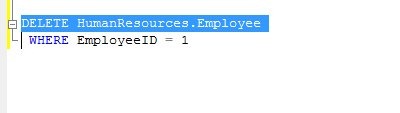
    What’s more likely are the “Whoops” disasters as I like to call them. It’s very likely that someone will import the wrong file, update all prices instead of one, or even more likely, a developer or DBA will run the wrong code on the wrong server. The most likely disaster is probably this one:

    drwhoops


    If the DBA hits “Execute” here, it’s a disaster. Not a big one, but if this is a critical table in a critical system, you might have an even bigger reaction from manangement than if a hurricane hit.

    You have to prepare for disasters, but don’t get caught up in worrying about the data center being destroyed. Those disasters are rare. Most of your preparation, your practice, your checks, have to be focused on the more likely disasters, which are often smaller in scale and focused on your database.

  • T-SQL Tuesday #18 – My CTE

    It’s time for T-SQL Tuesday again, and it’s number 18. Hard to believe it’s been a year and a half since Adam Machanic (blog | @AdamMachanic) thought of the idea. I’ve participated in most and it’s something I look forward to each month. This month Bob Pusateri hosts the party with the theme of CTEs. No, it’s not thermal unit of expansion, and I hated chemistry.

    My CTE

    When CTEs were introduced, I thought they were a great idea. They made it much easier to write complicated queries that might need derived tables. In the past, writing something like this was hard to read.

    SELECT p.Class, p.Color, p.DaysToManufacture, p.ListPrice
    FROM Production.Product p
    INNER JOIN ( SELECT ph.ProductID, ph.StandardCost, pri.Quantity
    FROM Production.ProductCostHistory ph
    INNER JOIN Production.ProductInventory pri
    ON ph.ProductID = pri.ProductID
    WHERE StandardCost > 10
    ) b
    ON p.ProductID = b.ProductID
    INNER JOIN Production.ProductInventory pi ON p.ProductID = pi.ProductID
    WHERE p.Color IS NULL AND p.DiscontinuedDate IS NULL

    A CTE can make this much easier to keep track of, especially in places where you don’t want to create a view instead.

    WITH ProductCTE
    AS ( SELECT ph.ProductID, ph.StandardCost, pri.Quantity
    FROM Production.ProductCostHistory ph
    INNER JOIN Production.ProductInventory pri
    ON ph.ProductID = pri.ProductID
    WHERE StandardCost > 10
    ) SELECT p.Class, p.Color, p.DaysToManufacture, p.ListPrice
    FROM Production.Product p
    INNER JOIN ProductCTE b
    ON p.ProductID = b.ProductID
    INNER JOIN Production.ProductInventory pi ON p.ProductID = pi.ProductID
    WHERE p.Color IS NULL AND p.DiscontinuedDate IS NULL

    I know this isn’t a great example, but by moving subqueries to a CTE structure, the end query is easier to debug and read.

    Top X of a Group

    Suppose you have a small result set of something like this.

    CREATE TABLE Books
    ( BookID INT IDENTITY(1,1) , BookName VARCHAR(200) , Genre VARCHAR(50) , reads INT ) go INSERT Books SELECT 'Old Man''s War', 'Sci-Fi', 200
    INSERT Books SELECT 'Ender''s Game', 'Sci-Fi', 345
    INSERT Books SELECT 'Red Thunder', 'Sci-Fi', 143
    INSERT Books SELECT 'Quarter Share', 'Sci-Fi', 25
    INSERT books SELECT 'The Enemy', 'Thriller', 67
    INSERT books SELECT 'The Hunt for Red October', 'Thriller', 678
    INSERT books SELECT 'Bad Luck and Trouble', 'Thriller', 545
    INSERT books SELECT 'Game of Lions', 'History', 644
    INSERT books SELECT 'The Rise of Theodore Roosevelt ', 'History', 67
    INSERT books SELECT 'An American Life: The Autobiography', 'History', 267

    Suppose I wanted to top two books from each genre, ranked by reads. A TOP 2 won’t work because that doesn’t allow you to specify groups. However using ROW_NUMBER and an OVER clause in a CTE, this becomes an easy query.

    WITH BookRanks AS ( SELECT b.BookID
    , b.BookName
    , b.Genre
    , b.reads
    , ROW_NUMBER() OVER (PARTITION BY b.genre ORDER BY reads DESC) AS Counter FROM Books b
    ) SELECT bookID
    , Genre
    , reads
    , bookname
    from BookRanks
    WHERE counter <= 2

    That gives me an easy to read result set:

    bookID  Genre    reads bookname

    ——- ——– —– ———————————————————-

    8       History  644   Game of Lions

    10      History  267   An American Life: The Autobiography

    2       Sci-Fi   345   Ender’s Game

    1       Sci-Fi   200   Old Man’s War

    6       Thriller 678   The Hunt for Red October

    7       Thriller 545   Bad Luck and Trouble

    Older T-SQL Tuesday Topics

    Just a quick list of the past topics and the roundups.

  • T-SQL Tuesday #18 Coming Next Week

    Other than the week I hosted it, I’ve been caught off guard by T-SQL Tuesday most months. This time I caught Bob’s Twitter announcement about #18. The topic this month is CTEs, so you have a week to get things ready.

  • T-SQL Tuesday #17 – APPLYing Yourself to T-SQL

    TSQL2sDay150x150It’s T-SQL Tuesday again, and this month Matt Velic is the host. His topic this month is the APPLY operator, after a challenge from Adam Machanic that you are not that proficient in T-SQL if you don’t know how to use this operator. I agree with Adam, and I think APPLY was an amazing addition to the T-SQL language.

    If you’re not sure what T-SQL Tuesday is all about, check out Adam’s initial T-SQL idea and post on the monthly blog party. T-SQL Tuesday is the second Tuesday of every month and the host rotates.

    You can also follow T-SQL Tuesday on Twitter with the #tsql2sday hashtag.

    APPLY

    The APPLY operator is one that I wished had been available in SQL 7/2000. There were many times when you were trying to apply a result set to a function and there was no easy way to do this. Most of the time this resulted in some type of cursor/temp table solution to make things work.

    One classic example was in trying to determine the SQL that someone had executed when they were blocking another user. The old sp_who2 gave limited information and often we were query a blocking tree and then start sending SPIDs through dbcc inputbuffer to get an idea of what SQL queries were being run.

    APPLY doesn’t help with DBCC, but it does help in other ways. In a modern twist to this problem, you can take a plan handle and run it through sys.dm_exec_sql_text to get the SQL that was executed

    If I did that for one of the connections I have locally, I could get something like this:

    SELECT *
     FROM sys.dm_exec_sql_text(0x010005003E60AD1C901E7D81000000000000000000000000)

    Which will give you this:

    tsqltues_code2

    Now, if you have a whole list of data, say perhaps a list of everyone connected from sys.dm_exec_connections, you can combine these two together.

    SELECT a.session_id
        , a.num_reads
        , a.num_writes
        , b.text
     FROM sys.dm_exec_connections a
       CROSS APPLY sys.dm_exec_sql_text(a.most_recent_sql_handle) b

    From this, you’ll get some result similar to this one:

    tsqltues_code1

    Note that you can’t join these two items together because this doesn’t work:

    SELECT *
     FROM sys.dm_exec_sql_text

    It returns an error:

    Msg 216, Level 16, State 1, Line 3

    Parameters were not supplied for the function ‘sys.dm_exec_sql_text’.

    You have to pass in a parameter, which means that either you create some cursor or loop to do this, or use the power of APPLY.