Other than the week I hosted it, I’ve been caught off guard by T-SQL Tuesday most months. This time I caught Bob’s Twitter announcement about #18. The topic this month is CTEs, so you have a week to get things ready.
Tag: T-SQL Tuesday
-
T-SQL Tuesday #17 – APPLYing Yourself to T-SQL
 It’s T-SQL Tuesday again, and this month Matt Velic is the host. His topic this month is the APPLY operator, after a challenge from Adam Machanic that you are not that proficient in T-SQL if you don’t know how to use this operator. I agree with Adam, and I think APPLY was an amazing addition to the T-SQL language.
If you’re not sure what T-SQL Tuesday is all about, check out Adam’s initial T-SQL idea and post on the monthly blog party. T-SQL Tuesday is the second Tuesday of every month and the host rotates.
You can also follow T-SQL Tuesday on Twitter with the #tsql2sday hashtag.
APPLY
The APPLY operator is one that I wished had been available in SQL 7/2000. There were many times when you were trying to apply a result set to a function and there was no easy way to do this. Most of the time this resulted in some type of cursor/temp table solution to make things work.
One classic example was in trying to determine the SQL that someone had executed when they were blocking another user. The old sp_who2 gave limited information and often we were query a blocking tree and then start sending SPIDs through dbcc inputbuffer to get an idea of what SQL queries were being run.
APPLY doesn’t help with DBCC, but it does help in other ways. In a modern twist to this problem, you can take a plan handle and run it through sys.dm_exec_sql_text to get the SQL that was executed
If I did that for one of the connections I have locally, I could get something like this:
SELECT *
 FROM sys.dm_exec_sql_text(0x010005003E60AD1C901E7D81000000000000000000000000)
Which will give you this:

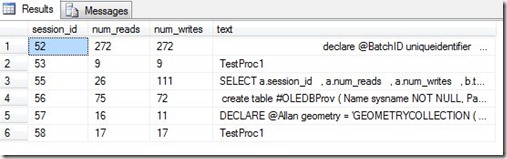
Now, if you have a whole list of data, say perhaps a list of everyone connected from sys.dm_exec_connections, you can combine these two together.
SELECT a.session_id
    , a.num_reads
    , a.num_writes
    , b.text
 FROM sys.dm_exec_connections a
   CROSS APPLY sys.dm_exec_sql_text(a.most_recent_sql_handle) b
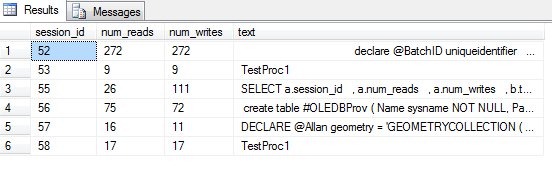
From this, you’ll get some result similar to this one:
Note that you can’t join these two items together because this doesn’t work:
SELECT *
 FROM sys.dm_exec_sql_text
It returns an error:
Msg 216, Level 16, State 1, Line 3
Parameters were not supplied for the function ‘sys.dm_exec_sql_text’.
You have to pass in a parameter, which means that either you create some cursor or loop to do this, or use the power of APPLY.
-
T-SQL Tuesday Reminder – Coming next week
Matt Velic is hosting T-SQL Tuesday this month. You have a week to get a post ready on the apply operator.
To help you out, here’s the BOL page on Using the Apply operator. It’s an operator that essentially lets you invoke a table valued function for each row of a result set. Not necessarily the most efficient way to get some things done, but it can be a powerful way of combining complex data that requires a function to interpret.
-
T-SQL Tuesday #016 – Aggregation
It’s that time of month again, time for Adam Machanic’s (Twitter | Blog) T-SQL Tuesday blog party. This month the party is hosted by Jes Borland (blog | @grrl_geek) and the topic is Aggregation.
And I’m late.
I planned on doing this yesterday, I really did, but I got busy and had to let it slide. A quick story, just to participate in the party.
The Ordering Report
Years ago I worked for a company that imported products from overseas. We imported wood products, and it was an interesting business. Mostly because the products we imported were not uniform. A sheet of 4’ x 8’ plywood, made of an Oak that is imported from South America, might not be the same as one imported from Africa. Even if it’s the same species, we had many customers that would only want one or the other.
We even had customers that would want wood from one mill, but not another. Add to that the fact that your inventory is often sold in advance, while it’s being milled or shipped (literally on ships) from overseas. That meant that there were times when our any supply chain issues would cause our inventory to vary dramatically, with “available” dates sliding all over the place.
Needless to say, it was a complicated process, but my boss wanted an ordering report to help the supply department decide how much of each product to order. It was a somewhat important process since the trees sometimes were not cut until a purchase order was sent from the US.
I built the report, which used a rolling average of usage from the previous 3 months, along with factors from the previous few years to account for the seasonal nature of our customers and aggregated SUMs and AVGs across our product line. The report was deployed, and sure enough, I had my boss and the lead supply manager in my office complaining the next day.
Apparently my report was “broken” since they both had run the same report, same parameters, and had gotten different numbers. I spent days checking the aggregations, sure that somewhere I had a calculation error that would come up with certain parameters. Eventually I realized that the constant inventory shifts were actually affecting the reporting. A simple explanation, but not a good reason for my boss.
My solution? I decided that the daily inventory shifts, which were sometimes reversed by salesman just as quickly as they were made, weren’t helping matters. Instead I built a job that ran every night and pre-populated a table with all the aggregations needed for all products. Essentially simulating a simple cube, with limited measures for aggregation. The report ran against this table, and was the same for each day, all throughout the day, for all people that used it.
After a few months of using the report, and comparing it’s recommendations to the previous guesses made by the supply department, they decided that it was good enough for them and the daily aggregation was close enough for them to use.
Two added benefits to my overnight aggregation? First, the report would run quicker since all the aggregations were done overnight and not on the fly. Second? We could allow the people in the department to add an “adjustment” to the recommended order, raising or lowering the amount, and then store that value. Essentially making an interactive report that everyone in the department could see.