Tag: T-SQL

  • Adding a Computed Column–#SQLNewBlogger

    Recently I needed to add a computed column to a table and realized that I didn’t remember the syntax. This short post show how to do this.

    Another post for me that is simple and hopefully serves as an example for people trying to get blogging as #SQLNewBloggers.

    Adding the Column

    I had a table, OrderHeader, and wanted to add a new column, OrderedByDate. I can do this with a simple ALTER statement and an ADD. The inserting part is the computation. You use as AS clause with the computation instead of a datatype. For example, my code was:

    ALTER TABLE dbo.OrderHeader 
       ADD OrderedBy AS OrderDate;
    GO

    This added a copy of my OrderDate column with a new name. This is useful for zero downtime deployments in some cases, and in this case, I wanted to just have a copy. However, if I wanted some calculation, I could easily do that by specifying this as I would in a SELECT statement. For example, if I wanted the computed column to be a week later, I could do this:

    ALTER TABLE dbo.OrderHeader 
       ADD OrderedBy AS DATEADDD(DAY, 7, OrderDate);
    GO

    This would add a week to the original value and return that. I can likewise do any sort of string or numeric manipulation I want. A common one is adding or multiplying two columns together for a new value. For example, adding various charges for a total in an order.

    When you do this as a computed column that is not persisted, no space is taken in the actual table rows. If you persist this, then space is used.

    More information on Microsoft Learn.

    SQL New Blogger

    I realized that I needed to double check the syntax in the docs, and when I did, I took this as an opportunity to write a short blog post. I grabbed a link, wrote some code, and then spent 10 minues knocking out this post.

    If some employer does this a lot, they might search your blog to see if you can do this. A nice few posts on how to do this, what persisted does, how you index this, etc. Take a few minutes and start blogging on topics like this throughout your week.

  • The Growth of T-SQL

    I saw this tweet recently, where Richie Rump asked what has changed in T-SQL since the SQL Server 2012 version. A few people from Microsoft responded that there were changes in all versions, and while I think some versions have few changes, I decided to look.

    SQL Server 2012 introduced the window functions with the OVER() clause to SQL Server. This was a huge change in that many aggregate queries were much easier to write without needing complex GROUP BY lists and subqueries or unions to join together different data. While I’m not an expert by any means, I find lots of queries for reporting easier to write with the window functions, and I’ve grown to enjoy using these in code.

    Looking across other versions, I’ve seen these changes:

    SQL Server 2014

    • UTF-8 for Bulk insert
    • SELECT..INTO works in parallel
    • In-Memory OLTP language enhancements

    SQL Server 2016

    • temporal tables
    • JSON support
    • more In-Memory T-SQL changes
    • Security – DDM, RLS, AE T-SQL changes
    • R services

    SQL Server 2017

    • graph query
    • CONCAT_WS, TRANSLATE, TRIM, WITHIN GROUP
    • BULK INSERT options
    • Memory-optimized enhancements (CASE, TOP, JSON, computed columns
    • Python language services

    SQL Server 2019

    • Graph enhancements
    • UTF-8
    • Java and other language enhancements

    Some of these were to support other features, so perhaps these aren’t really T-SQL changes per se. If I look at PostgreSQL release notes, I see enhancements and changes, but relatively few new language changes. Certainly, there are some additions, but lots of improvements, which I think reflect the nature of a mature product. Not a lot of new things, but regular improvements and refinements to existing items.

    I’ve been working with SQL Server since 1991, and it feels like T-SQL has grown a lot in that time. Back then it felt like there were relatively few keywords and functions, requiring complex coding for tough problems. Now, with the way the language changed a lot in 2005, 2012, and 2016, it feels like we have a lot of tools at our disposal. We could always use more, and we got some neat ones in SQL Server 2022. I hope to see more useful changes in future versions to come.

    Steve Jones

    Listen to the podcast at Libsyn, Stitcher, Spotify, or iTunes.

  • Context Info Across Databases–#SQLNewBlogger

    Does Context Info work across databases? This post shows it does.

    Another post for me that is simple and hopefully serves as an example for people trying to get blogging as #SQLNewBloggers. Here are some hints to get started.

    The Demo

    Someone asked the question, would a trigger in another database see context info from a different database. I thought it should work, but decided to test it.

    Here I’m going to create a table and trigger in database compare2. This is looking for a context value.

    USE compare2
    GO
    CREATE TABLE TriggerTest (myid INT, mychar CHAR(1))
    GO
    CREATE TRIGGER tri_triggertest ON  dbo.TriggerTest FOR INSERT
    AS
    BEGIN
         IF CONTEXT_INFO() = 0x1256698456
             PRINT 'caught'
         ELSE
             UPDATE dbo.TriggerTest
              SET mychar = 'X'
              FROM inserted i
              WHERE i.myid = dbo.TriggerTest.myid
    END
    GO

    Now, back in DB 1, I’m going to set CONTEXT_INFO and insert a value into the database. This should give me a result where the trigger updates the table. A “normal” action.

    USE compare1
    GO
    SET CONTEXT_INFO 0x000
    GO
    INSERT compare2.dbo.TriggerTest (myid, mychar) VALUES (1, NULL)
    GO

    This does, as the table contains a 1 and X.

    Now, same connection, let’s set the magic value for context and insert a row. Now the trigger should avoid the update, letting my bypass the normal action. This is what someone was trying to do.

    SET CONTEXT_INFO 0x1256698456;  
    GO 
    SELECT CONTEXT_INFO(); 
    GO 
    INSERT compare2.dbo.TriggerTest (myid, mychar) VALUES (2, NULL)
    GO

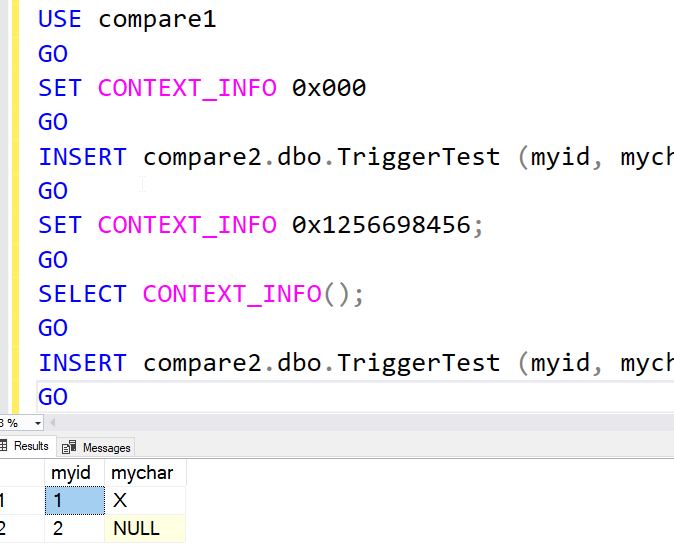
    When I look at the results, I have the “caught” message. The final results from the table are shown here:

    2023-01-27 15_05_55-SQLQuery5.sql - ARISTOTLE_SQL2022.compare1 (ARISTOTLE_Steve (53))_ - Microsoft S

    As you can see here, the context is with the connection, not the database. The database doesn’t matter for this value, it’s whether or not the connection that sets the context (the session really) is still alive when it accesses the other database.

    SQL New Blogger

    This was a quick test for me to answer a question and prove this to someone (and myself). I thought this would work, but I spent 5 minutes devising a test. It took me less than 10 minutes to put this post together.

    This shows volunteerism (helping someone), testing ability, and diligence to prove something I suspected was true. I didn’t assume, I tested. Lots of employers love that.

    You can raise your brand and be a SQL New Blogger like this, showing your knowledge.

  • T-SQL Tuesday #156–Ready for Production

    tsqltuesdayIt’s a busy time for me, but it’s also T-SQL Tuesday blog party day. I’m rushing a bit as I forgot about this (thanks for the reminder, Deb) and had to help on the ranch this morning.

    In any case, a moment of Zen.

    20221108_082454

    Now, for the T-SQL Tuesday post to answer Tom’s invitation.

    The Quality Bar

    Lots of code gets through to production. I suspect many of us agree that not all of this is production quality. Often we find issues with code that doesn’t perform well or even meet the specs of what we required.

    I haven’t had to put much code in production in the last decade, but I do remember doing so, and I remember supporting code. To me, the code quality that defines production is this:

    Does it make my phone ring?

    If the answer is no, it’s production quality. If it does, then it’s not. That’s how I’ve worked on things in the past, and it’s served me well.

    You might argue, Steve, that doesn’t help. How do I know what code will meet that metric? There’s no easy answer there. You need to know the system, the requirements, the clients, and the workload. There is a lot that goes into deciding how to build code and what commands, structures, architecture, etc. is suitable.

    A few examples. In SQL Server, we avoid cursors because they are not efficient. However, if I have very rare processes, or sometimes on-offs, a cursor might work fine. If it doesn’t overload the server, runs fast enough, and gets the job done, why not?

    Another example is using CTEs to pre-aggregate some totals so that I can write a simpler query for a report with related data that isn’t aggregated. This might not be very efficient, and might create a lot of logical reads. However, if the report isn’t a problem with the server workload, is it production quality? I think it is.

    The caveat to this is you also need to know data growth. What is production quality today might not be in a year. Potentially we need to refactor code later. That’s fine for me if the situation changes, but it’s not fine if I can forecast this being a problem and I have a better technique, perhaps with some WINDOW functions and less CTEs. I don’t want to defer work unless I don’t have a choice. If I can write better code today, I should.

    This also means I ought to be learning more about how to produce better code from others on a regular basis.