Tag: T-SQL

  • An Update to Skipping the Leading Digit in T-SQL–#SQLNewBlogger

    There was an interesting question in a forum, which I wrote about before. How do you skip the leading digit in a numeric value. I had looked at a UNION, but someone had a better suggestion, so I’m adding to the post.

    Another post for me that is simple and hopefully serves as an example for people trying to get blogging as #SQLNewBloggers. Here are some hints to get started.

    Another Predicate

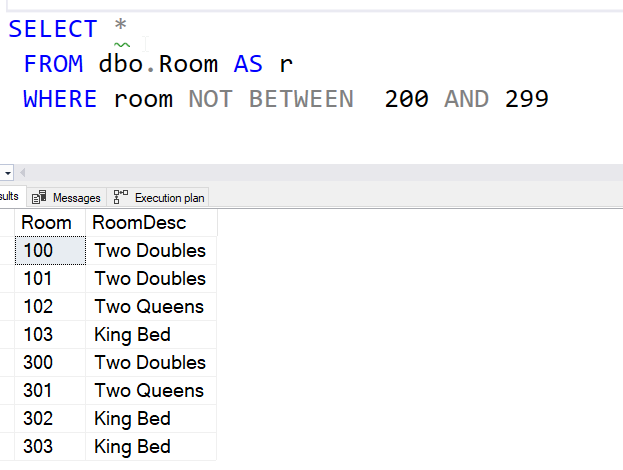
    In the previous post, I used a <> and then a > and < with a UNION. Howver, someone noted that NOT BETWEEN is an option. I could rewrite the query this way:

    SELECT *
     FROM dbo.Room AS r
     WHERE room NOT BETWEEN  200 AND 299
    

    This gives me the same result:

    2022-10-05 14_32_43-SQLQuery6.sql - ARISTOTLE.sandbox (ARISTOTLE_Steve (61))_ - Microsoft SQL Server

    This also results in a seek.

    2022-10-05 14_33_30-SQLQuery6.sql - ARISTOTLE.sandbox (ARISTOTLE_Steve (61))_ - Microsoft SQL Server

    The BETWEEN or NOT BETWEN is sargable, meaning we can use an index to find those values that fall into this ordering and exclude them.

    Worth remembering BETWEEN when writing queries for ranges.

    SQL New Blogger

    An update to my post, showing a better way, showing I am happy to take advice from others, and I can improve code. This is a skill that employers need, especially when teams need to become more consistent with coding when working together. Showing you can adapt and grow is a good skill.

    You could write a simple blog like this that shows how you might change some code you wrote in the past. I bet it takes less than 30 minutes.

  • T-SQL Tuesday #155–Using Dynamic SQL for SQLCMD

    It’s that time of month, and I’m the host this month. I wrote the invitation last week and now its’ time to answer. I’m actually using an example from the past that I was reminded of. That was the basis for the invitation as well.

    SQL Slammer

    I don’t know how many of you remember SQL Slammer, but it hit my company, JD Edwards, over a weekend. I was away on holiday, coming home Sunday night and got called into the office that night.

    One of the challenges with JD Edwards was that we used MSDE extensively. It was a part of some of our products, and developers had it on various machines, lots of multi-instances, and in all sorts of development servers. The worm crippled our network.

    We also had non-standard installs, so when we got a patch from Microsoft, it didn’t work because we weren’t in the c:\Program Files\… that they expected.

    I had to some some fancy dynamic stuff to get the patch to work. First, we used some queries in SMS (Systems Management Server) to find all the places where we had MSDE and SQL Server services. This wasn’t too hard, and I had a list of hosts and instances from here. Now the hard part.

    I needed to query all these instances and find out where things were installed, as well as get some patch information back. The SQL itself wasn’t too hard, but connecting to and querying all these machines wasn’t simple. This was the pre-PowerShell  era. and VBScript wasn’t as easy, or bulletproof, to write.

    Excel to the Rescue

    I’d used Excel to help with this type of thing in the past. I would  put in some data in a column in this case, the hosts and instances. Then I’d add the same value in other columns, like SQLCMD. Then I would concat these together to make a string I could run. I also included T-SQL code in here, as I’d be querying various tables inside the engine.

    I also had an output part of the command, so that when I copied the contents of my final column, I had hundreds of SQLCMD command calls that would query all our instances and return data in a way that we could use to run the patch.

    Double dynamic code!

    I put these in a batch file, ran them, and then we had results that could be used in a similar process with the MS patch to patch all machines.

    A long 2-3 day of getting systems patched and slowly turning our network back on.

  • Replacing NULLs in a Left Join–#SQLNewBlogger

    I saw someone ask a question on how to replace NULL in a left join and decided to write a post. I realized this is one of those simple things that people new to SQL might not get.

    Another post for me that is simple and hopefully serves as an example for people trying to get blogging as #SQLNewBloggers. Here are some hints to get started.

    A Left Join Example

    Let’s create a table of customers and orders with a few values in each. This is common, where we have customers that we might add as prospects in some CRM type system. Then we link orders to customers.

    Use this code:

    DROP TABLE IF EXISTS dbo.Customer
    GO
    CREATE TABLE dbo.Customer
    ( CustomerID INT NOT NULL IDENTITY(1,1) CONSTRAINT CustomerPK PRIMARY KEY
    , CustomerName VARCHAR(20)
    )
    GO
    INSERT dbo.Customer (CustomerName)
    VALUES
       ('Joe'),
       ('Bob'),
       ('Sally'),
       ('Amy')
    GO
    DROP TABLE IF EXISTS dbo.OrderHeader
    GO
    CREATE TABLE dbo.OrderHeader
    ( OrderID INT NOT NULL IDENTITY(1,1) CONSTRAINT OrderHeaderPK PRIMARY KEY
    , CustomerID INT
    , OrderNote VARCHAR(100)
    )
    GO
    INSERT dbo.OrderHeader (CustomerID, OrderNote)
    VALUES
       (1, 'Initial Order'),
       (1, 'Re-order'),
       (3, 'Initial Order')
    GO

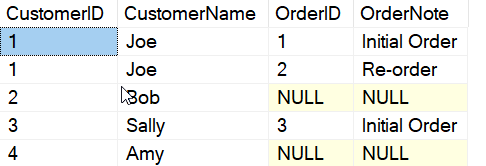
    Potentially, we have customers without orders. If we use an inner join, we only see customers with orders. Using the left join below, we see all customers with their corresponding orders.

    SELECT
       c.CustomerID
    , c.CustomerName
    , oh.OrderID
    , oh.OrderNote
    FROM
       dbo.Customer AS c
       LEFT JOIN dbo.OrderHeader AS oh
         ON oh.CustomerID = c.CustomerID;
    GO

    I see these results:

    2022-09-02 14_00_08-SQLQuery6.sql - ARISTOTLE.sandbox (ARISTOTLE_Steve (58))_ - Microsoft SQL Server

    This works, but really, I’d like to clean up the results to show something better.

    Looking for NULLs

    I can use a couple of functions to look for a NULL value in my results. Both ISNULL and COALESCE can help here. ISNULL is for a single expression and replaces NULL with value, while COALESCE works by returning the first non-NULL expression. I’ll use ISNULL here and in another post look at COALESCE.

    Here’s a better query that replaces one value with a NA and another with a blank.

    SELECT
       c.CustomerID
    , c.CustomerName
    , ISNULL(oh.OrderID, 0) AS OrderID
    , ISNULL(oh.OrderNote, 'No orders placed') AS OrderNote
    FROM
       dbo.Customer AS c
       LEFT JOIN dbo.OrderHeader AS oh
         ON oh.CustomerID = c.CustomerID;
    GO

    Here are the results. Note that I return a 0 for the OrderID. This is because the result set is a numeric, and I need these types to match.

    2022-09-02 14_04_37-SQLQuery6.sql - ARISTOTLE.sandbox (ARISTOTLE_Steve (58))_ - Microsoft SQL Server

    I could also return a string if I cast all OrderIDs to strings, as shown below.

    SELECT
       c.CustomerID
    , c.CustomerName
    , ISNULL(CAST(oh.OrderID AS VARCHAR(20)), 'N/A') AS OrderID
    , ISNULL(oh.OrderNote, 'No orders placed') AS OrderNote
    FROM
       dbo.Customer AS c
       LEFT JOIN dbo.OrderHeader AS oh
         ON oh.CustomerID = c.CustomerID;
    GO

    This produces these results.

    2022-09-02 14_05_29-SQLQuery6.sql - ARISTOTLE.sandbox (ARISTOTLE_Steve (58))_ - Microsoft SQL Server

    Both cases clean up the NULL values with something that makes more sense to a person looking at the data in a report.

    SQLNewBlogger

    This was a post inspired by a question I saw. This is how I’d solve the issue, and decided to share that knowledge more widely, both to help others and also provide an example of where I might have a hiring manager ask me about this from noticing my blog.

    This post took about 15 minutes to write. You could easily do this on your blog.

  • New in SQL Server 2022 – Generate_Series

    One of the new language features added in SQL Server 2022 is the GENERATE_SERIES function. This allows you to generate a

    SELECT * FROM GENERATE_SERIES(start=1, stop=7)

    This gives me a simple sequence of numbers in a result set, with the column header, value.

    2022-03-31 14_57_20-SQLQuery3.sql - ., 51433.sandbox (sa (80))_ - Microsoft SQL Server Management St

    Let’s take this code from Dwain Camps article, Tally Tables in T-SQL:

    DECLARE @S VARCHAR(8000) = 'Aarrrgggh!';
    SELECT value, s
    FROM
    (
         -- Always choose the first element
         SELECT value=1, s=LEFT(@S, 1) UNION ALL
         -- Include each successive next element as long as it’s different than the prior
         SELECT value, CASE
             WHEN SUBSTRING(@S, value-1, 1) <> SUBSTRING(@S, value, 1)
             THEN SUBSTRING(@S, value, 1)
             -- Repeated characters are assigned NULL by the CASE
             END
         FROM GENERATE_SERIES(start=1, stop=100)
         WHERE value BETWEEN 2 AND LEN(@S)
    ) a
    -- Now we filter out the repeated elements
    WHERE s IS NOT NULL;

    Now the original code has a CTE that generates the series, or tally table. I’ve replaced that with GENERATE_SERIES. The code works as expected, which in this case is to remove repeating characters.

    2022-03-31 14_58_21-SQLQuery3.sql - ., 51433.sandbox (sa (80))_ - Microsoft SQL Server Management St

    SQL Server 2022 is now out in preview and I’d urge you to give it a try. This is a neat new feature, and it does provide more standard code than the variety of ways I see people building tally tables.

    I haven’t tested performance, but I am hoping it does as well as cross joining system tables or using a CTE.