Tag: T-SQL

  • A Monthly Running Total–#SQLNewBlogger

    Another post for me that is simple and hopefully serves as an example for people trying to get blogging as #SQLNewBloggers.

    Recently I was looking at some data and wanted to analyze it by month. I have a goal that is set for each day and then an actual value. I wanted to know how I was tracking against the goal, as a running total. If my goal is 10 a day, then I ought to actually get to 10 the first day, 20 for the second day (10 + 10), etc.

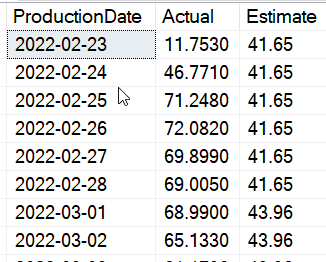
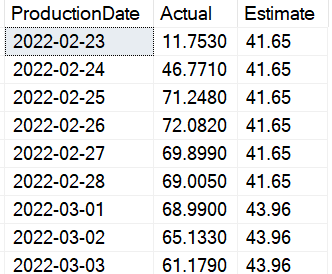
    Here is some data that I am using, showing the date, the actual, and the estimate:

    2022-04-18 08_54_02-SQLQuery1.sql - ARISTOTLE_SQL2017.way0utwest (ARISTOTLE_Steve (53))_ - Microsoft

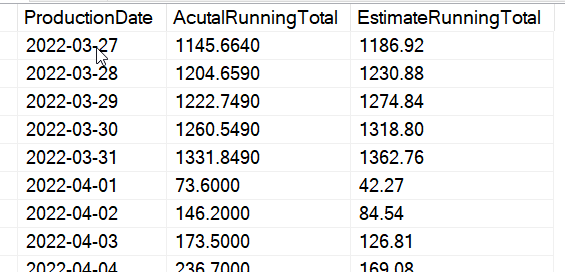
    The estimate is constant, so a running total is just the sum of all previous rows. The actual is similar, though in both cases, I want to reset this for each month. If I did a straight sum of all previous rows, I’d see something like this:

    2022-04-18 08_56_31-SQLQuery1.sql - ARISTOTLE_SQL2017.way0utwest (ARISTOTLE_Steve (53))_ - Microsoft

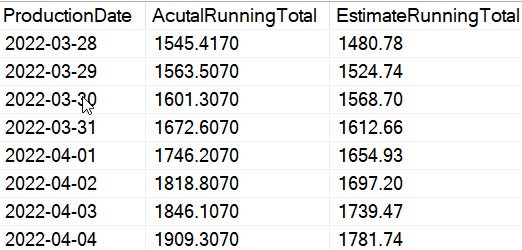
    I don’t want this. Instead, I want something that’s like this:

    2022-04-18 08_57_25-SQLQuery1.sql - ARISTOTLE_SQL2017.way0utwest (ARISTOTLE_Steve (53))_ - Microsoft

    This is fairly easy to do with window functions in T-SQL. I use a SUM() for each column with an OVER() clause. In this case, I partition by the year and month, which means that when those items change, we reset a new set of values. Here is the query that produces the correct data above:

    SELECT
       spt.ProductionDate
    , SUM (spt.Actual) OVER (PARTITION BY
                                YEAR (spt.ProductionDate)
                              , MONTH (spt.ProductionDate)
                              ORDER BY spt.ProductionDate
                     ROWS BETWEEN UNBOUNDED PRECEDING AND CURRENT ROW) AS AcutalRunningTotal
    , SUM (spt.Estimate) OVER (PARTITION BY
                                  YEAR (spt.ProductionDate)
                                , MONTH (spt.ProductionDate)
                                ORDER BY spt.ProductionDate
                     ROWS BETWEEN UNBOUNDED PRECEDING AND CURRENT ROW) AS EstimateRunningTotal
    FROM dbo.SolarPowerTracker AS spt;

    This creates a window for each month (based on year and month) and groups all the data with the same values together. Then I get the sum as a running total. I also want a rows clause to be sure this works as intended.

    Update: Someone noted this might not be clear how this works, so I’ll do another post on more details of the query itself. FWIW, another good way to get moving with SQLNewBlogger and add new posts to add detail.

    I’ve added the CREATE and INSERT statements here:

    CREATE TABLE [dbo].[SolarPowerTracker]
    ( ProductionDate DATE CONSTRAINT SolarPowerTrackerPK PRIMARY KEY
    , Actual NUMERIC(10, 2)
    , Estimate NUMERIC(10, 2));
    GO
    
    INSERT INTO dbo.SolarPowerTracker
    (ProductionDate, Actual, Estimate)
    VALUES
    ( N'2022-02-23', 11.7530, 41.65 ), 
    ( N'2022-02-24', 46.7710, 41.65 ), 
    ( N'2022-02-25', 71.2480, 41.65 ), 
    ( N'2022-02-26', 72.0820, 41.65 ), 
    ( N'2022-02-27', 69.8990, 41.65 ), 
    ( N'2022-02-28', 69.0050, 41.65 ), 
    ( N'2022-03-01', 68.9900, 43.96 ), 
    ( N'2022-03-02', 65.1330, 43.96 ), 
    ( N'2022-03-03', 61.1790, 43.96 ), 
    ( N'2022-03-04', 33.2930, 43.96 ), 
    ( N'2022-03-05', 10.1330, 43.96 ), 
    ( N'2022-03-06', 0.6170, 43.96 ), 
    ( N'2022-03-07', 4.2670, 43.96 ), 
    ( N'2022-03-08', 47.7440, 43.96 ), 
    ( N'2022-03-09', 11.5580, 43.96 ), 
    ( N'2022-03-10', 0.6470, 43.96 ), 
    ( N'2022-03-11', 15.4400, 43.96 ), 
    ( N'2022-03-12', 70.3260, 43.96 ), 
    ( N'2022-03-13', 61.3710, 43.96 ), 
    ( N'2022-03-14', 74.5110, 43.96 )


    SQL New Blogger

    As I was working on this query, I realized it wasn’t complex, but it was something unusual. Often I’ve done totals for a time period that a user supplies, not a set one like a month with a reset each month. I thought this was a good way to showcase how to solve this relatively simple problem.

    I spent about 15 minutes taking my code and then writing this post to show how I solved a a problem. This is something you could add on your blog to showcase your knowledge on solving a specific problem, not a general one.

  • Using T-SQL over PoSh

    Why would you use SSMS/T-SQL over PowerShell (PoSh)? When is T-SQL directly a better option than PoSh? That’s a question I ask myself regularly as I see articles and blogs that discuss how to accomplish a particular task using one tool or the other. There is plenty of overlap in the capabilities for each language when it comes to working with SQL Server, so this is a decision I think about regularly. This is especially true if you use dbatools.

    There also appears to be a bias towards one tool or the other for each individual. Many people traditionally have used T-SQL to accomplish most database tasks, and they tend to always look for a solution with a script in SSMS. Others are excited by PoSh and I have seen plenty of questions on the SQL Server Central forums asking how to structure their code in that language. In both cases, there is no shortage of people that argue that you should use T-SQL instead of PoSh or vice versa.

    Personally, I think that there are lots of development items where I’d use T-SQL. For any sort of schema change, most data changes, and a lot of database administrative tasks, I would use T-SQL first. Trying to alter a table in PoSh vs. T-SQL doesn’t make sense to me. Now the deployment of these changes is something where I’d use PoSh to run the T-SQL, which is what we do in the Redgate Deploy tools.

    I was with a panel recently and all the individuals on the panel said they wouldn’t use PoSh over SSMS for much of anything. The exception is where a task involved working with files or folders in the file system. PoSh excels here, and for work that might delete old files or move files from one folder to another, PoSh is preferred.

    I think the defining line for me is whether I need to accomplish a task inside of SQL Server or outside of it. When I cross instances or work with the file system, then PoSh is my preferred method. I can use xp_cmdshell or a linked server as well as anyone, but I prefer not to. Anything inside SQL Server, usually has me reaching for SSMS instead of VS Code.

    Steve Jones

    Listen to the podcast at Libsyn, Stitcher, Spotify, or iTunes.

  • T-SQL Tuesday #149–Advice about T-SQL to a Younger Me

    It’s that time of the month again, when we have the T-SQL Tuesday blog party. This month we have a new host, Camilia Henrique with an invitation on advice you would give to your younger self, but in the area of T-SQL. That’s a good one, and it focuses on a technical skill that many data professionals need.

    Participating in T-SQL Tuesday is a good way to practice your writing, your skills, and show your thoughts on some aspect of your job. Even if you miss the party one month, feel free to write a post later and link it to the main post on the T-SQL Tuesday site.

    Practice, Practice, Practice

    I learned SQL first as someone working with dBase, FoxPro, and Clipper. I moved to SQL Server and T-SQL later, with a basic grounding on how to query for simple sets of data, but I quickly learned performance can matter a lot.

    As I’ve tried to keep up with the language, one of the things that has struck me is that T-SQL can be complex to structure because it’s relatively simple with few keywords. You can unintentionally create cross joins or row-by-row (RBAR) structures that perform poorly and waste resources on your system.

    I’ve found that practicing with programming exercises and solving problems to be the best way to improve my skills. I don’t do it enough these days, and when I answer questions on SQLServerCentral, invariably one of the experts there will post a solution that performs better and I learn something new.

    If I were talking to myself, I’d say to look more deeply into APPLY and the OVER() clause right now. Make sure you understand tally tables and their uses, and work through exercises like the Advent of Code, Exorcism, Project Euler, or something similar. Heck, just answer questions in a forum for yourself, with your own solution.

    Learn how to create queries that can efficiently gather together, filter, and aggregate your data in ways that are helpful for clients without taxing server hardware. In the era of cloud computing and pay for data moved or data processed somehow, this is an invaluable skill.

  • Checking if a database has a master key–#SQLNewBlogger

    Another post for me that is simple and hopefully serves as an example for people trying to get blogging as #SQLNewBloggers.

    I’ve been working with encryption in SQL Server for a long time, and have delivered quite a few presentations on the topic. Recently I was updating some code and wanted to check if a database had a master key created in it. This post shows how to do that.

    The DMK (Database Master Key) is a construct that lives inside a database and provides the basis for encrypting other keys. It is a symmetric key, but created with the CREATE MASTER KEY DDL.

    Information about this key is stored in a couple of places. First, it appears in sys.symmetric_keys, with the name “##MS_DatabaseMasterKey##”. You hsould see this with the AES_256 algorithm.

    You can also query the sys.databases DMV for the is_master_key_encrypted_by_server c0lumn, if you keep the defaults. If you run this

    ALTER MASTER KEY DROP ENCRYPTION BY SERVICE MASTER KEY

    then the sys.databases DMV will show 0, even though you still have a master key, as shown below.

    2022-01-25 12_08_37-SQLQuery2.sql - ARISTOTLE.EncryptionPrimer (ARISTOTLE_Steve (55))_ - Microsoft S

    SQLNewBlogger

    A quick post. I was updating code to make it cleaner and realized I needed to add a check for the key. In the past, I’ve just ignored the error, but I took the chance here to refactor things and also produce a quick post.