Tag: T-SQL

  • STRING_SPLIT Has Ordinals

    I noticed the docs for STRING_SPLIT now show that there is a third parameter. This brings us an ordinal for the positioning of the data. The format is now:

    STRING_SPLIT( string, separator [, enable_ordinal])

    This is a bit or int that determines if a positional value is added to the result set. Here’s a quick demo.

    No third parameter shows this:

    2021-11-16 13_32_11-SQLQuery2.sql - dkranchapps.database.windows.net.SimpleTalk (sjones (89))_ - Mic

    If I add a 1 for the third parameter, I see this:

    2021-11-16 13_32_37-SQLQuery2.sql - dkranchapps.database.windows.net.SimpleTalk (sjones (89))_ - Mic

    Right now this is only in Azure. I assume we’ll see this in SQL Server 2022, but we’ll have to wait and see.

  • STRING_SPLIT Basics–#SQLNewBlogger

    Another post for me that is simple and hopefully serves as an example for people trying to get blogging as #SQLNewBloggers.

    I saw a post on using STRING_SPLIT() with cross apply recently, and as I was reading, I realized that I hadn’t adopted this very often in code. Mostly it’s not something I need to deal with, but recently my wife did give me some data and asked to reformat it, and I used STRING_SPLIT(). I thought it was a nice easy problem, so I decided to write about it.

    Conflated Data

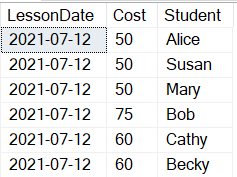
    The dataset that she gave me was formatted something like this:

    2021-09-17 15_32_22-string_split_experiemnt.sql - WAY0UTWESTHP_SQL2019.sandbox (WAY0UTWESTHP_way0u (

    What she wanted was a report that provided data more like this:

    2021-09-17 15_37_20-string_split_experiemnt.sql - WAY0UTWESTHP_SQL2019.sandbox (WAY0UTWESTHP_way0u (

    This was more complex in the past, and hard in T-SQL as string manipulation isn’t great. However, STRING_SPLIT makes this easier. Not great, but easier.

    STRING_SPLIT

    While STRING_SPLIT is a function, it is a table-valued function, meaning that it is used as the source for a data set. Rather than being in the SELECT column list, we would use this in the FROM clause as another table. Or anyplace a table can be used.

    The basics of this would be:

    SELECT ss.value
      FROM dbo.ClassSchedule AS cs
       CROSS APPLY STRING_SPLIT(students, ',') AS ss

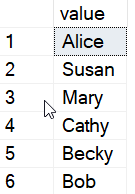
    Using this code, I would get a list of students.

    2021-10-18 08_58_00-SQLQuery2.sql - ARISTOTLE.sandbox (ARISTOTLE_Steve (70))_ - Microsoft SQL Server

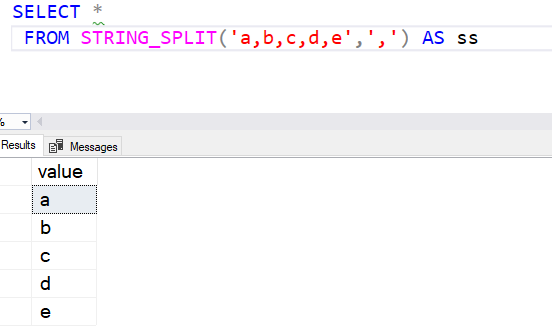
    The STRING_SPLIT returns this single column, value, which is the string passed in split by the separator. I could see this more simply with this code:

    SELECT * 
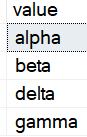
      FROM STRING_SPLIT('alpha,beta,delta,gamma',',') AS ss

    This returns these items:

    2021-10-18 09_06_24-SQLQuery2.sql - ARISTOTLE.sandbox (ARISTOTLE_Steve (70))_ - Microsoft SQL Server

    A few more examples:

    2021-10-18 09_07_23-SQLQuery2.sql - ARISTOTLE.sandbox (ARISTOTLE_Steve (70))_ - Microsoft SQL Server

    2021-10-18 09_08_21-SQLQuery2.sql - ARISTOTLE.sandbox (ARISTOTLE_Steve (70))_ - Microsoft SQL Server

    The important thing to note here is that this is a simple substring based on the separator, with no other processing. Spaces or any other character outside the separator is left in the result.

    There also is no ordering of the results. While this appears to be in the same order in these simple examples, this is not guaranteed, meaning the ordering of the substrings might not match the original order.

    This is a good way to easily split up data that you have stuffed into a large character field, but it has limitations, so use it carefully.

    SQLNewBlogger

    This post took me about 15 minutes to write after spending 5 minutes setting up some test data. I was using string_split to clean up some data and decided to make a few notes, then built a new table with some strings in it to help me explain how it works.

    A good example of a post you could write, perhaps noting when this was released or comparing this to a way of splitting these strings with a more complex T-SQL query.

  • T-SQL Tuesday #143 – Short Code

    T-SQL-Tuesday-LogoI’m late, but I wanted to get this out. I started the post, then got distracted with travel to Europe late last week.

    In any case, this month the host for T-SQL Tuesday is John McCormack, with his invite to write about short code examples. It’s a good technical invite, and one that immediately got me thinking about things I do often.

    If you haven’t ever tried a T-SQL Tuesday, set up a blog and put out a post on the topic, this week or whenever you read this.

    Snippets

    I work for Redgate Software, though I’d likely be using SQL Prompt no matter what. I was never thrilled with native intellisense, but SQL Prompt has been great. One of the things I like most about Prompt are the snippets, which let me insert code with a few keystrokes.

    Here’s a quick example. If I type “” in SSMS, I see this:

    2021-10-13 10_52_32-CandidateList

    Prompt detects this as a snippet first, then has other matches. I can hit Tab, and I’ll get this:

    2021-10-13 10_52_46-CandidateList

    I get a quick “top 10” from a table. Often I use SELET * for a quick look at the shape of data.

    However, I can add custom snippets, and one I use often is this:

    WITH myTally(n)
    AS
    (SELECT n = ROW_NUMBER() OVER (ORDER BY (SELECT null))
      FROM (VALUES (1), (2), (3), (4), (5), (6), (7), (8), (9), (10)) a(n)
       CROSS JOIN (VALUES (1), (2), (3), (4), (5), (6), (7), (8), (9), (10)) b(n)
    )
    SELECT *
    FROM myTally

    This is my “tt” snippet, so I can type “tt<Tab> and get this code for a tally table. This s handy in many string manipulation and problem solving situations.

    If I need more than 100 rows, I can easily copy the cross join line, add a new alias, and I have 1000 rows with this:

    WITH myTally(n)
    AS
    (SELECT n = ROW_NUMBER() OVER (ORDER BY (SELECT null))
      FROM (VALUES (1), (2), (3), (4), (5), (6), (7), (8), (9), (10)) a(n)
       CROSS JOIN (VALUES (1), (2), (3), (4), (5), (6), (7), (8), (9), (10)) b(n)
       CROSS JOIN (VALUES (1), (2), (3), (4), (5), (6), (7), (8), (9), (10)) c(n)
    )
    SELECT *
    FROM myTally

    Short, but effective code.

  • Using NULLIF–#SQLNewBlogger

    Another post for me that is simple and hopefully serves as an example for people trying to get blogging as #SQLNewBloggers.

    I ran across the NULLIF() function recently, and I realized I’d never used it in code. It’s an interesting function, one that I didn’t think would be useful, but I found a couple places.

    NULLIF Behavior

    This function is essentially short for “return a null if these two values are equal.” There are two parameters you pass in and if they are equal, you get a NULL back. Somewhat strange function, but here are a few examples:

    2021-09-20 15_42_19-SQLQuery2.sql - ARISTOTLE_SQL2017.sandbox (ARISTOTLE_Steve (62))_ - Microsoft SQ

    The interesting one is that 1 and NULL come back with the first value. We can’t determine if NULL is equal to 1, so we assume not.

    Using This Function

    When would you use this? As I said, I have never thought to use this, but I did find a couple interesting items. A mixture of NULL and a certain value is one place, if you can use the NULL. For example, let’s say I have some data in a table:

    2021-09-20 15_44_46-SQLQuery2.sql - ARISTOTLE_SQL2017.sandbox (ARISTOTLE_Steve (62))_ - Microsoft SQ

    I have some blanks and some NULL values. Suppose I want to query and show the category, but if that is a NULL or blank string, show the SubCat instead. I can do this with a CASE, but that get’s ugly. NULLIF makes this easy to read.

    2021-09-20 15_45_56-SQLQuery2.sql - ARISTOTLE_SQL2017.sandbox (ARISTOTLE_Steve (62))_ - Microsoft SQ

    The other interesting place I thought of here was with aggregates and potentially filtering out some values. Aggregates tend to ignore NULL, so what if I have this data:

    2021-09-20 15_48_24-SQLQuery2.sql - ARISTOTLE_SQL2017.sandbox (ARISTOTLE_Steve (62))_ - Microsoft SQ

    Suppose I want the average sale, but not with the zero values. Those might be returns, and we don’t want to skew our average. I could use NULLIF to make this easy to code. Notice the short code below and the difference from the straight average:

    2021-09-20 15_49_03-SQLQuery2.sql - ARISTOTLE_SQL2017.sandbox (ARISTOTLE_Steve (62))_ - Microsoft SQ

    I could use CASE, but which is easier to read?

    2021-09-20 15_50_20-SQLQuery2.sql - ARISTOTLE_SQL2017.sandbox (ARISTOTLE_Steve (62))_ - Microsoft SQ

    I think NULLIF is, if you know how the function works.

    SQLNewBlogger

    This was a function I stumbled on and wasn’t sure how to read. I spent about 10-15 minutes searching around the Internet looking for a reason to use this code. I saved the link for them and added it into the post. I spent about 10 minutes creating a little code example and then running it.

    I then wrote this post, which was about 10 minutes, mostly because I used screen shots for code, which were quick to grab and paste in.

    This is a nice example of learning something, understanding how it works, and then thinking where it could be useful.