

Another post for me that is simple and hopefully serves as an example for people trying to get blogging as #SQLNewBloggers.
Dynamic Data Masking is a feature that provides some pseudo-security features. This lets you return a portion of data while hiding other portions for unauthorized users. The classic example is preventing someone from seeing PII data if they are a customer service rep or other non-privileged user.
Note: THIS IS NOT A SECURITY function, though it is somewhat marketed and talked about it this way. I say pseudo-security, but be careful here. I have a larger article on why.
A Scenario
I have a simple table here. I’ll give you some DDL and DML.
create table DDMEmailTest
( MyID int not null identity(1,1) constraint DDMEmailTestPK primary Key
, MyName varchar(100)
, Email varchar(100)
, Salary int)
go
insert DDMEmailTest select 'Steve Jones', 'steve.jones@sqlservercentral.com', 200
insert DDMEmailTest select 'Bob Jones', 'bob.jones@acme.com', 300
Now, if I query this as a normal user, I see something like the image below. Note I can read the email address.

Limiting Access
I can prevent this from occurring by adding Dynamic Data Masking to the column. This is a column level feature, which doesn’t need activating. It’s in SQL Server 2016+ databases. You add masking with an ALTER COLUMN like shown below. The email() function is built into SQL Server.
alter table DDMEmailTest ALTER COLUMN Email ADD MASKED WITH (FUNCTION = 'email()')
When I now query the data, I see this:
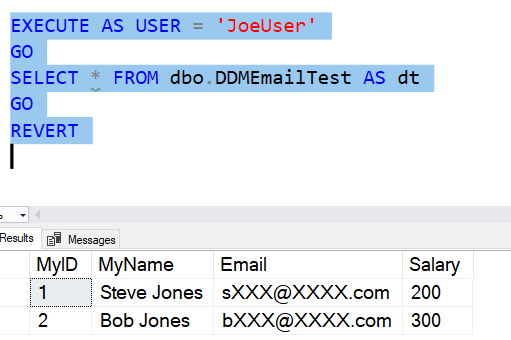
Users that are not admins, or have been granted the UNMASK permission will get masked data. This mask specifically is the first character and then the XXX@XXXX.com value.
Use it if this fits your scenario.
SQLNewBlogger
I was working with DDM to show something to another person and decided to throw this post together. I’d set up the scenario, so I just had to write. This was about 15 minutes of my day.
You could do the same thing, but explain how you might use this in your organization.


