Tag: T-SQL

  • Creating a new User-Defined Data Type–#SQLNewBlogger

    Another post for me that is simple and hopefully serves as an example for people trying to get blogging as #SQLNewBloggers.

    I ran across a question on user-defined data types, which I hadn’t worked with in a long time, so I took a minute to investigate. I wrote this post about an interesting language item.

    User-defined table types let you add a new type that can be used anywhere you would use a base, or normal, data type. This means if I want to have a type of US zip codes, perhaps limiting the base zip to 5 numbers, I can create a type that is limited to 5 digits.

    If I want to create a new user-defined table type, I’d have thought I did something like this:

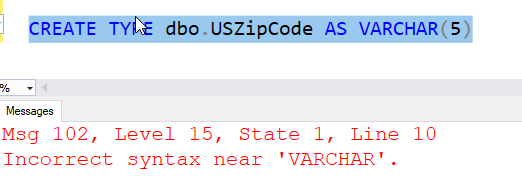
    CREATE TYPE dbo.USZipCode AS VARCHAR(5)

    However that doesn’t work.

    2022-01-06 10_20_55-SQLQuery1.sql - ARISTOTLE.sandbox (ARISTOTLE_Steve (58))_ - Microsoft SQL Server

    The AS structure is used in many places, but not here. Instead, we use a FROM structure. This means I’d do this:

    CREATE TYPE dbo.USZipCode FROM VARCHAR(5)

    This gives me a type I can use in CREATE TABLE statements, stored procedures, and more. Anywhere I’d use the varchar(5), I could do this instead:

    CREATE TABLE dbo.AddressTable
    ( AddressID INT NOT NULL
    , AddressValue VARCHAR(100)
    , AddressZip USZipCode
    )

    This let’s me use a type that is more intuitive, I guess. I don’t find these that useful in most places. In fact, it’s a little confusing. If I were a new developer, is this a 5 or 9 (or 10) digit field? Is it numeric or string? It’s not easy to determine this. I don’t find these that useful.

    SQL New Blogger

    I was doing other work, but I saved a bit of code and then spent about 10-15 minutes to write up this post. This one shows less about what I learned, and more about what I think.

    Always good to show to a prospective interviewer.

  • Finding the First Day of the Year–#SQLNewBlogger

    Another post for me that is simple and hopefully serves as an example for people trying to get blogging as #SQLNewBloggers.

    While working on the question from Monday, I had to do a bit of date math. I remember this blog post from Lynn Pettis, and every new year I think of it.

    I decided to decode the question a bit and work through the T-SQL myself as a good exercise for explaining what happens.

    Here’s the code (setup and query):

    CREATE TABLE dbo.Resolution
    ( ResolutionDate DATETIME
    , ResolutionText VARCHAR(200)
    )
    GO
    INSERT dbo.Resolution
    (
         ResolutionDate,
         ResolutionText
    )
    VALUES
       ('2020-01-01 0:00', 'Do not travel by airplane this year'),
       ('2021-01-01 0:00', 'Go on vacation on a plane'),
       ('2022-01-01 0:00', 'Visit a new country')
    GO
    SELECT ResolutionText FROM  dbo.Resolution
    WHERE ResolutionDate = DATEADD(YEAR, DATEDIFF(YEAR, 0, GETDATE()) , 0)

    In this code, the final query is designed to find the first day of the current year. Here are a few examples:

    2021-12-01 09_45_54-SQLQuery3.sql - ARISTOTLE_SQL2017.sandbox (ARISTOTLE_Steve (56))_ - Microsoft SQ

    How does this work? Let’s decode things.

    Digging Into the Algorithm

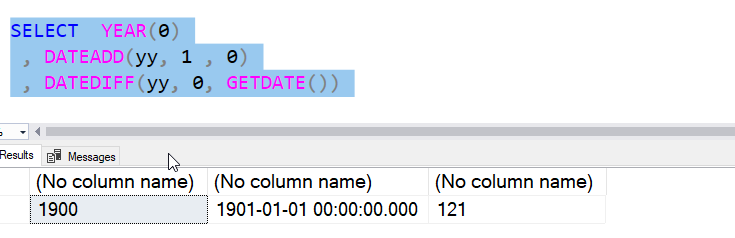
    Let’s start with a simple thing. I use a 0 for a parameter in the DATEADD and DATEDIFF. What does that mean? Well, let’s go with the YEAR() function. If I use a 0 there, I see the base year in SQL Server, which is 1900.

    2021-12-01 09_47_42-SQLQuery3.sql - ARISTOTLE_SQL2017.sandbox (ARISTOTLE_Steve (56))_ - Microsoft SQ

    This doesn’t mean I can’t use other years, but this is the basis for calculations. What if I add to this? I can add one, and I see a different date.

    2021-12-01 09_48_45-SQLQuery3.sql - ARISTOTLE_SQL2017.sandbox (ARISTOTLE_Steve (56))_ - Microsoft SQ

    This is the key. I’ve gone from 0 to 1901-01-01-00:00:00. Let’s see the difference from this year, well last year when I wrote this, to 0.

    2021-12-01 09_49_44-SQLQuery3.sql - ARISTOTLE_SQL2017.sandbox (ARISTOTLE_Steve (56))_ - Microsoft SQ

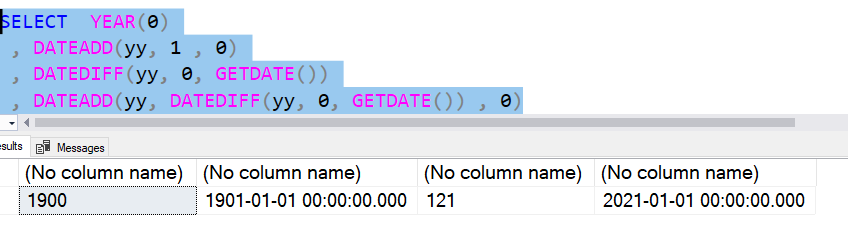
    The result above shows me 121. Which makes sense. 1900 to 2021 is 121 years. Now, when I use the dateadd, and add 121 to 0, I get the first day, actually the first DATETIME moment, of the current year.

    2021-12-01 09_50_41-SQLQuery3.sql - ARISTOTLE_SQL2017.sandbox (ARISTOTLE_Steve (56))_ - Microsoft SQ

    I get 2021-01-01 00:00:00.

    I can change the GETDATE() to any date time of any year, and this code returns the first moment of that year, essentially stripping off the other parts.

    SQLNewBlogger

    I was working on something and used a trick I learned from someone else. I decided to write this post, which only took about 15 minutes to write. The demo was simple, and I just broke apart the code, slowly putting each section in its own SELECT and then explaining it.

    This is a good example of how to structure a blog post based on some knowledge you have and use in other work. You should try this.

  • 2021 Advent of Code–#SQLNewBlogger

    Another post for me that is simple and hopefully serves as an example for people trying to get blogging as #SQLNewBloggers.

    I’ll do a post on how to easily get started here as a new blogger, but following the Advent of Code, even some random problems, is a good way to show off some T-SQL skills.

    This won’t be a goal for me, but I did start working on the 2021 Advent of Code, taking a few minutes across some days to break from other work and solve a programming problem.

    My aim this time is not to get stuck on a problem. If I can’t solve it, or don’t see a way, I leave it and move on. This post has a few thoughts on the first few days.

    Day 1

    The first problem dealt with loading a set of data and then counting how many times the number increases from the previous number.

    Since numbers in a SQL table don’t have a guaranteed order, this was a bit of a hack from me. I created a table and added a clustered index, and then bulk inserted the data. I then moved this in the same order (I hope) to a table with an identity column. From here, simple LEAD to find the differences between consecutive rows and counting these.

    The second part changed the calculation slightly to use groups of three rows. I copied my LEAD formula to include 3 rows instead of just 1 in each side of the calculation.

    Day 2

    We’re in a submarine, moving forward or up/down. The input was something I needed to evaluate in order again, so I repeated a similar load. Then I used SUBSTRING and CASE to decide what type of instruction was needed and sum the results.

    Part 2 was tricky. I bailed initially, as I couldn’t quite get the math down in my head. I eventually set up a small test data set using the values on the site and then used that to calculate things. I had a series of CTEs that I used to extract the values, then get changes, then perform the math.

    Letting part 2 sit for a day in my head helped me focus better.

    Day 3

    Day 3 was fairly easy binary counting. The test data doesn’t depend on order, so I just loaded it up. Then I need to extract the values into the bits, so SUBSTRING each of these out in a CTE. Not dynamic, but it was easy to extract all 12 bits, then count up the number of 1s and 0s, deciding which was more prevalent.

    From there, a simple calc to assemble back the counts into a binary number and convert to decimal.

    Part 2 is really about counting the 1s and 0s in each position, then creating a final binary number from this and converting back to decimal. I had to read carefully here, as you need to reduce your input set each time. I ended up looping here, as I couldn’t find an easy way to do this otherwise. I could have added some flag to ignore rows, but ended up with a temp table and deletes to get this done.

    So far, easy, harder, then easier.

  • Hiding Email with a Dynamic Data Masking Function–#SQLNewBlogger

    Another post for me that is simple and hopefully serves as an example for people trying to get blogging as #SQLNewBloggers.

    Dynamic Data Masking is a feature that provides some pseudo-security features. This lets you return a portion of data while hiding other portions for unauthorized users. The classic example is preventing someone from seeing PII data if they are a customer service rep or other non-privileged user.

    Note: THIS IS NOT A SECURITY function, though it is somewhat marketed and talked about it this way. I say pseudo-security, but be careful here. I have a larger article on why.

    A Scenario

    I have a simple table here. I’ll give you some DDL and DML.

    create table DDMEmailTest
    ( MyID int not null identity(1,1) constraint DDMEmailTestPK primary Key
    , MyName varchar(100)
    , Email varchar(100)
    , Salary int)
    go
    insert DDMEmailTest select 'Steve Jones', 'steve.jones@sqlservercentral.com', 200
    insert DDMEmailTest select 'Bob Jones', 'bob.jones@acme.com', 300

    Now, if I query this as a normal user, I see something like the image below. Note I can read the email address.

    2021-11-18 12_05_41-SQLQuery2.sql - ARISTOTLE_SQL2017.sandbox (ARISTOTLE_Steve (57))_ - Microsoft SQ

    Limiting Access

    I can prevent this from occurring by adding Dynamic Data Masking to the column. This is a column level feature, which doesn’t need activating. It’s in SQL Server 2016+ databases. You add masking with an  ALTER COLUMN like shown below. The email() function is built into SQL Server.

    alter table DDMEmailTest ALTER COLUMN Email ADD MASKED WITH (FUNCTION = 'email()')

    When I now query the data, I see this:

    2021-11-18 12_08_18-SQLQuery2.sql - ARISTOTLE_SQL2017.sandbox (ARISTOTLE_Steve (57))_ - Microsoft SQ

    Users that are not admins, or have been granted the UNMASK permission will get masked data. This mask specifically is the first character and then the XXX@XXXX.com value.

    Use it if this fits your scenario.

    SQLNewBlogger

    I was working with DDM to show something to another person and decided to throw this post together. I’d set up the scenario, so I just had to write. This was about 15 minutes of my day.

    You could do the same thing, but explain how you might use this in your organization.