Tag: T-SQL

  • Versions of Stored Procedures

    I never knew this, but stored procedures have versions.

    I was browsing the CREATE PROCEDURE doc page, and stumbled upon this item. In the beginning part of a stored procedure definition, after the name, there is a section that starts with

    ; number

    Hmmm, I read the entry and it says the number is an integer that is used to group procedures of the same name. There is a note this is a deprecated feature that may be dropped, should not be used for new work, and old work ought to be modified, but it was interesting, so I tried it.

    First, create a proc:

    CREATE PROCEDURE dbo.GetOne
    AS
    SELECT 1
    GO

    Once this is done, we can execute it and it works. Now, let’s modify this. I’ll use this code:

    CREATE PROCEDURE GetOne;2
    AS
    SELECT 'One'
    GO

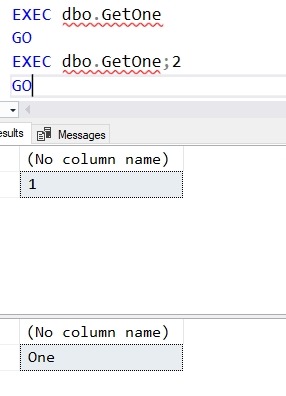
    You can see these will have different results. If I execute them, I do so with the name, including the optional integer.

     2019-01-24 17_58_15-SQLQuery8.sql - Plato_SQL2017.Tsql (PLATO_Steve (60))_ - Microsoft SQL Server Ma

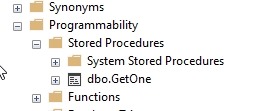
    In SSMS, there is only one object listed.

    2019-01-24 17_59_44-SQLQuery8.sql - Plato_SQL2017.Tsql (PLATO_Steve (60))_ - Microsoft SQL Server Ma

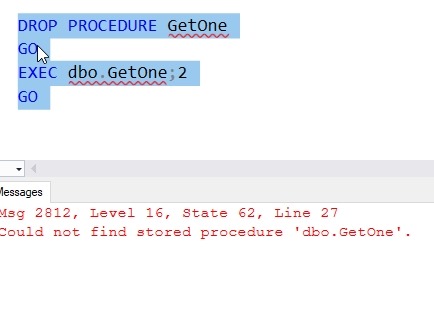
    If I drop the procedure, both are gone.

    2019-01-24 18_00_18-SQLQuery8.sql - Plato_SQL2017.Tsql (PLATO_Steve (60))_ - Microsoft SQL Server Ma

    I’m not completely sure where I’d use this feature, and I can see not investing in it, but I found this fascinating. All these years of writing stored procedures and I learned something new this week.

  • Careful with Session_Context()–#SQLNewBlogger

    Another post for me that is simple and hopefully serves as an example for people trying to get blogging as #SQLNewBloggers.

    A quick note, which is more of a reminder to myself. I find writing things down helps me remember, and I need to remember this.

    I was working with session context, specifically the SESSION_CONTEXT() function. When using this function, you give it a key that contains a value, like this:

    2019-01-15 13_45_34-RLS_Testing.sql - Plato_SQL2016.WideWorldImporters (PLATO_Steve (61))_ - Microso

    I get a value back that I can use. Everything is great.  I was using this to allow one process to set a value and another to get it, and I was happy.

    Until things stopped working. While trying to debug this, I ran this code:

    2019-01-15 13_46_46-RLS_Testing.sql - Plato_SQL2016.WideWorldImporters (PLATO_Steve (61))_ - Microso

    Notice a difference? In the first query, I have SupplierID, but the second is SupplierId, with a lower case “d”. These keys are determined when you use sp_set_session_context, which takes a sysname value for the key. These are going to be case sensitive, as each one is a different identifier.

    It’s not likely that this will cause lots of problems, but when you are setting keys, be careful and ensure you use the same value for writing and reading.

    SQLNewBlogger

    This was a quick mistake I made and it took me 5 minutes to write up. It’s helpful to get me to remember to avoid this, but this also shows I can fix my mistakes.

    What’s a simple thing you learned that makes you write better code? Write your own SQLNewBlogger post today.

  • Getting Parameters Out From a Stored Procedure–#SQLNewBlogger

    Another post for me that is simple and hopefully serves as an example for people trying to get blogging as #SQLNewBloggers.

    One of the lesser used and known features of T-SQL are the output parameters from a stored procedure. I used one of these recently, so I wanted to blog about it.

    Getting a String

    I was working on part of the 2018 Advent of Code, which is a great set of programming exercises for anyone. I typically build a procedure to solve each puzzle, since that’s a common way of capturing code. If there’s a single numeric result, a RETURN code works fine.

    In one puzzle, I needed to return a string. If you try this in a procedure, it won’t work.

    2018-12-27 10_04_01-SQLQuery6.sql - Plato_SQL2016.sandbox (PLATO_Steve (58))_ - Microsoft SQL Server

    Instead, I need another solution. I could certainly SELECT back my string, but in this case, I wanted to have this assigned to a variable. I could do that in a few ways, but decided the easiest was an OUTPUT parameter.

    To add an output parameter to my procedure, I first add my variable as a regular parameter.

    CREATE OR ALTER PROCEDURE dbo.StringTest
       @s VARCHAR(10)
    AS
    BEGIN
         SELECT @s = 'Some Code'
    END
    GO

    Next, I add the OUTPUT keyword after the type.

    CREATE OR ALTER PROCEDURE dbo.StringTest
       @s VARCHAR(10) = '' OUTPUT
    AS
    BEGIN
         SELECT @s = 'Some Code'
    END
    GO

    My call to the procedure should also include the OUTPUT keyword.

    DECLARE @result VARCHAR(10);
    EXEC dbo.StringTest @s = @result OUTPUT;
    SELECT @result;

    This works fine, allowing me to pass some value back to the caller.

    2018-12-27 10_08_40-SQLQuery6.sql - Plato_SQL2016.sandbox (PLATO_Steve (58))_ - Microsoft SQL Server

    Not something I use often, but if I need to get some singular value back, this works.

    SQLNewBlogger

    This post was started at 10:00am one morning. I got back to this sentence at 10:09. That was the entire setup of the code, capturing screen shots, and writing the post. Easy for you to do as well.

    Give this a try. How would you use an OUTPUT parameter?

  • Sorting Values in a Column

    Another post for me that is simple and hopefully serves as an example for people trying to get blogging as #SQLNewBloggers.

    This was a post that caught my eye, since I’d just written a piece on STRING_SPLIT(). Someone had this data:

    DECLARE @Names VARCHAR(8000) = 'Steve, Grant, Kathi, Kendra';

    They wanted this returned as a string that was sorted, so that the values would be:

    Grant, Kathi, Kendra, Steve

    String manipulation isn’t the strength of SQL Server, but we can do this with STRING_SPLIT(). If we use STRING_SPLIT(), we get a list of values. We want to remove the spaces after the comma, so we use REPLACE to remove that.

    SELECT *
    FROM STRING_SPLIT(REPLACE(@Names, ' ', ''), ',')
    ORDER BY value;

    We can then aggregate these back together in a variable assignment, adding the comma for each row.

    SELECT @newtext = @newtext + Value + ', '
    FROM STRING_SPLIT(REPLACE(@Names, ' ', ''), ',')
    ORDER BY value;

    This gives us:

    2018-12-21 15_05_08-SQLQuery1.sql - Plato_SQL2017.sandbox (PLATO_Steve (55))_ - Microsoft SQL Server

    SQLNewBlogger

    A quick T-SQL application of some skills I learned. Can you do something similar? Maybe order dates or numbers that are in a string in the wrong order?

    That should be a 10-15 minute post.