Tag: T-SQL

  • Quick Prompt Tips–Custom Procedure Templates

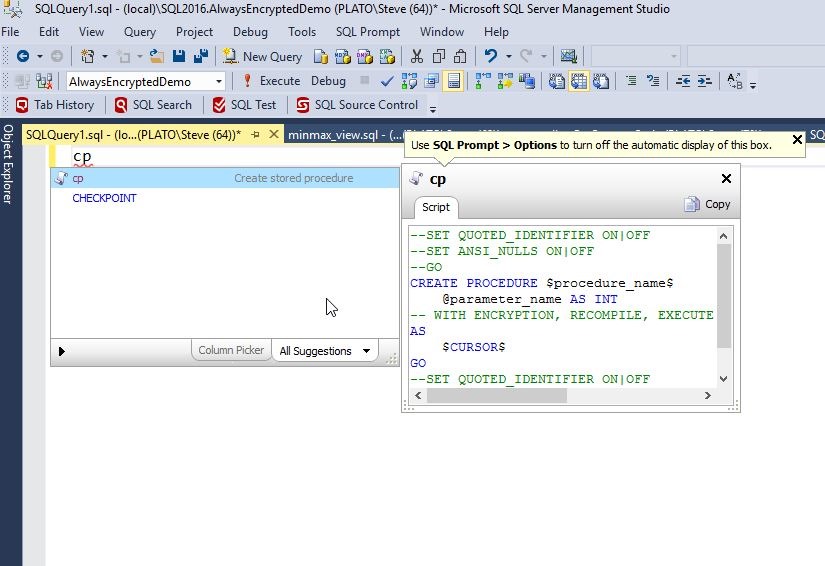
    One of the things that I often do is create stored procedures. The syntax for doing so is simple, but it has a number of items that need to be included. SQL Prompt makes this much quicker with the “cp” snippet. When I type “cp”, I get this:

    2016-09-13 13_01_43-SQLQuery1.sql - (local)_SQL2016.AlwaysEncryptedDemo (PLATO_Steve (64))_ - Micros

    I can hit Tab and I have a snippet, but it has a lot of things I don’t like in it. Plus, I want to save time coding, not have to remove some commented out items.

    2016-09-13 13_06_17-SQLQuery1.sql - (local)_SQL2016.AlwaysEncryptedDemo (PLATO_Steve (64))_ - Micros

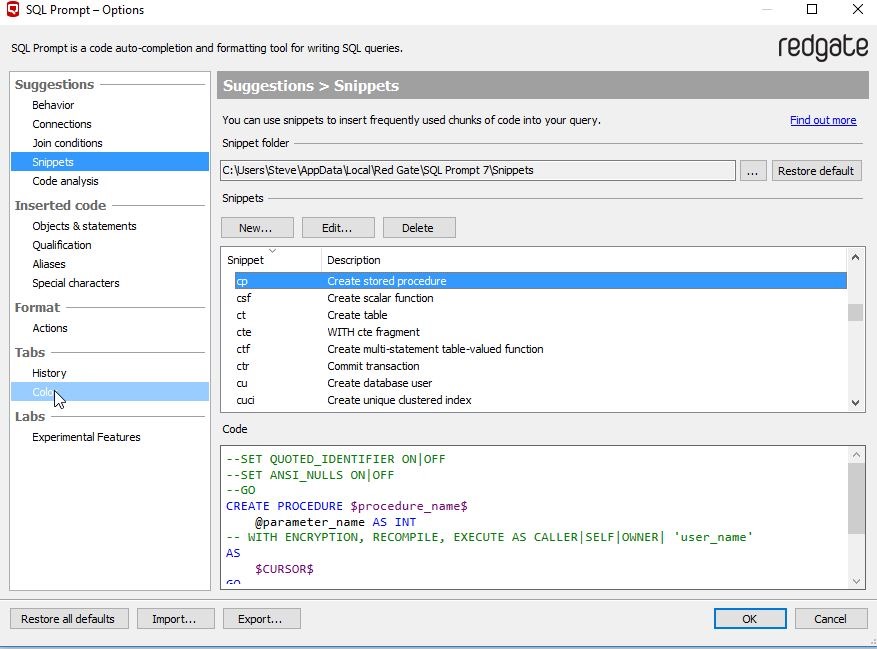
    Let’s make this more efficient. I can go to the Snippet Manager under the SQL Prompt menu and select it. When it opens, the snippets are highlighted, so I type “cp” to get to the Create Procedure snippet.

    2016-09-13 13_36_11-SQLQuery1.sql - (local)_SQL2016.EncryptionDemo (PLATO_Steve (64))_ - Microsoft S

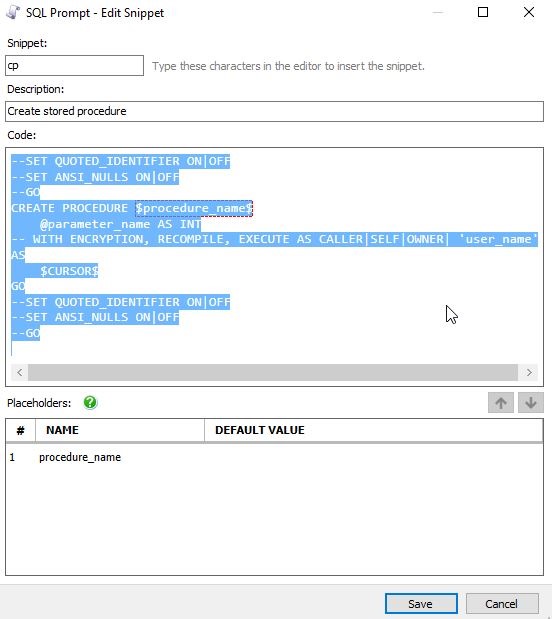
    I click edit and see the code, which I highlight before deleting this.

    2016-09-13 13_36_45-SQL Prompt - Edit Snippet

    Then I paste in the code that makes more sense to me. Notice that in my case, I have two placeholders, not one (as shown above).

    2016-09-13 13_37_03-SQL Prompt - Edit Snippet

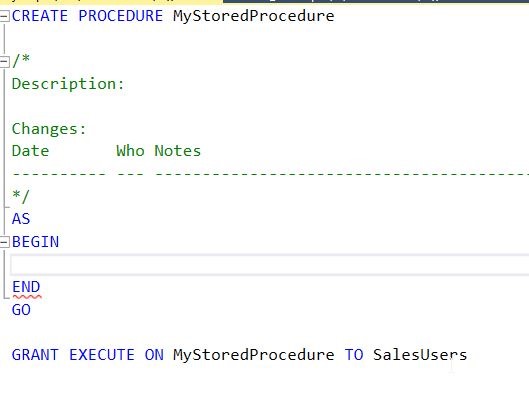
    The code I use has a header in the procedure, and the procedure name is used both for the definition and a GRANT EXECUTE. I include the begin..end structure for the procedure with the cursor starting in the spot where I’d put code. I also have a placeholder for a role name. It looks like this.

    CREATE PROCEDURE $procedure_name$

    /*
    Description:

    Changes:
    Date       Who Notes
    ———- — —————————————————
    */
    AS
    BEGIN
    $CURSOR$
    END
    GO

    GRANT EXECUTE ON $procedure_name$ TO $role_name$

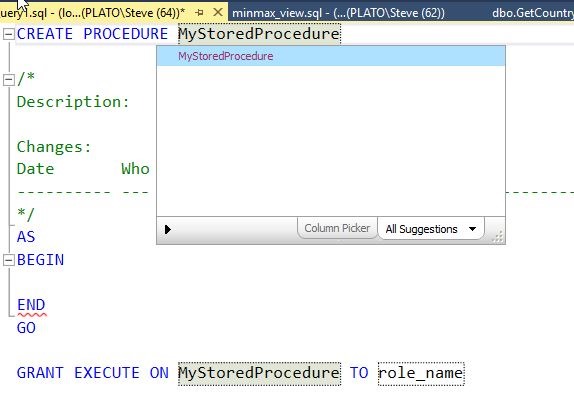
    In practice, when I type “cp” and hit Tab, I get the code with the procedure highlighted. I can enter a name here. Note what I typed is also placed in the GRANT statement at the bottom.

    2016-09-13 13_40_02-SQLQuery1.sql - (local)_SQL2016.EncryptionDemo (PLATO_Steve (64))_ - Microsoft S

    Once I am done and hit Tab, my cursor jumps to the next placeholder, in this case, the role name. Notice that SQL Prompt knows this is a role and gives me a list of roles and users to choose from.

    2016-09-13 13_40_44-SQLQuery1.sql - (local)_SQL2016.EncryptionDemo (PLATO_Steve (64))_ - Microsoft S

    When I finish and hit Tab again, the cursor jumps to the point between the BEGIN and End where I will enter my code. Now my job begins.

    2016-09-13 13_42_26-SQLQuery1.sql - (local)_SQL2016.EncryptionDemo (PLATO_Steve (64))_ - Microsoft S

    This little customization gives all my procedures some standard look as well as ensuring that I can quickly build procedures without a lot of mundane, tedious typing.

    Try out this quick SQL Prompt tip and see how much smoother your coding goes. And if you’re not a SQL Prompt user, download an evaluation today and see how much more efficient you can be when writing T-SQL code.

    You can see a complete list of SQL Prompt tips at Redgate.

  • Be Careful of Your Create Stored Procedure Batch

    I was rehearsing a demo with someone recently and we had some stored procedure code that looked like this:

    CREATE PROCEDURE UpdateEmpID @empid INT
     AS
     BEGIN
     UPDATE  dbo.Employees
     SET empid = 3
     WHERE  empid = @empid
     ;
     END
    

    However, this was part of a batch that had all of this code (proc code repeated).

    CREATE PROCEDURE UpdateEmpID @empid INT
     AS
     BEGIN
     UPDATE  dbo.Employees
     SET empid = 3
     WHERE  empid = @empid
     ;
     END
    
    -- test the procedure execution
     -- exec UpdateEmpID 2
    
    SELECT empid
     FROM dbo.Employees
     WHERE empid = 3

    When I execute this, I see a simple message. If I’m not paying attention, this seems to make sense.

    2016-12-15 16_02_48-SQLQuery2.sql - WAY0UTWESTVAIO_SQL2016.sandbox (WAY0UTWESTVAIO_way0u (54))_ - Mi

    What happens if I execute this procedure? I’ll see something like this:

    2016-12-15 16_04_24-SQLQuery2.sql - WAY0UTWESTVAIO_SQL2016.sandbox (WAY0UTWESTVAIO_way0u (54))_ - Mi

    At first glance, you’d think this makes sense. However, what has happened here? The procedure executed, which has an update, and I have a result set at the end. If I look at the proc code, this makes more sense. I’ll right click the procedure and select modify.

    2016-12-15 16_05_37-

    Once I do that, a new query window opens. This is the code in there.

    2016-12-15 16_07_24-SQLQuery5.sql - WAY0UTWESTVAIO_SQL2016.sandbox (WAY0UTWESTVAIO_way0u (62)) - Mic

    Why is my select code in there? That was designed to be a piece of test code. Shouldn’t the BEGIN..END after the AS define my procedure?

    Actually it doesn’t. the procedure doesn’t end until the CREATE PROCEDURE statement is terminated. That termination comes by ending the batch. The CREATE PROCEDURE documentation has this limitation:

    The CREATE PROCEDURE statement cannot be combined with other Transact-SQL statements in a single batch.

    This means that anything else you have in that batch will be considered as part of the procedure, regardless of BEGIN..END.

    I hadn’t noticed, or seen this before. Perhaps because I’m in the habit of including a GO between all my code, it hasn’t been an issue.

    I would hope most people would catch this before any code is deployed with testing, but perhaps not Be aware that stored procedures should be compiled in their own batches, always.

  • Finally, Create or Alter

    There are lots of reasons to upgrade to SQL Server 2016, but this is the one for me. We finally get a CREATE OR ALTER statement in T-SQL. This not only makes lots of code easier to write, it means that the ways in which you might script and schedule your future deployments will be cleaner. This is an exciting change for implementing a simpler and easier Continuous Integration/Continuous Deployment system in your organization.

    It’s not perfect news for a few reasons. First, this is a SQL Server 2016 addition to T-SQL only. That means until you have most of your applications have moved to SQL Server 2016 SP1+, you won’t be able to use this construct. That’s OK, because it will mean that at some point most of our instances will be on SQL Server 2016 SP1 or later, and much of our code will be cleaner. We won’t resort to including IF statements in our deployment scripts. We won’t need to create stubs of procedures and functions so our code is embedded in an ALTER script. In essence, you won’t need to maintain two separate code constructs to make a change.

    This isn’t perfect, nor is it complete. We still don’t have CREATE OR ALTER for tables. That’s the place where I’d really like to get a consistent way of coding items. What I really want is a complete view of the table each time I change it. By this I mean that if I create a table like this:

    CREATE TABLE Students
    (
        studentname VARCHAR( 200),
        status TINYINT
    );

    Then I want to be able to add a column like this:

    ALTER TABLE Students
    (
        studentname VARCHAR( 200),
        status TINYINT,
        DOB DATE
    );

    Or alter a column like this:

    ALTER TABLE Students
    (
        studentname VARCHAR( 200),
        status BIT,
        DOB DATE
    );

    Or better yet, have a CREATE OR ALTER for tables.

    I know this might be asking for a lot, but I really think that we ought to get a consistent way of coding databases so that we can reduce the mistakes and make our systems easier to understand. I’m sure this may require substantial engineering, not to mention a great deal of understanding of how this would actually affect our systems when run, but it would certainly make our code cleaner.

    I doubt we’ll see these kinds of changes, at least not until we have an ANSI standard that encompasses them, but I would hope that as an industry we would mature and improve the way we work with databases, not remain bound by tradition and history.

    Steve Jones


  • #SQLNewBlogger – T-SQL ESCAPE for Wildcards

    Another post for me that is simple and hopefully serves as an example for people trying to get blogging as #SQLNewBloggers.

    I ran into a really interesting issue recently. I was working with a table and wanted to determine if the first character of a string was a left bracket. However, I discovered searching for a bracket isn’t as simple as I expected.

    Setup

    Here’s a mock table and some data.

    CREATE TABLE MyData
    ( myid INT IDENTITY(1,1),
    mychar VARCHAR(50)
    );
    GO

    INSERT dbo.MyData
    (mychar)
    VALUES
    (‘This is a string’),
    (‘”A Quoted String”‘),
    (”’Single quoted string”’),
    (”’more single quotes”’),
    (‘[My bracketed string]’),
    (‘[I like brackets]’),
    (‘Can I find [this] string?’)
    ;
    GO

    I wanted to return only rows 5 and 6 (based on identity) and not the others. My first thought was that I could just make a simple query.

    SELECT myid, mychar FROM mydata WHERE mychar LIKE ‘[%’

    The results:

    2016-11-11 18_20_37-SQLQuery5.sql - localhost_SQL2016.sandbox (PLATO_Steve (63))_ - Microsoft SQL Se

    That didn’t work. As soon as I got zero rows, I remembered that brackets allow me to wildcard part of a query. I need to escape the bracket, so I decided to try and do that with a repeating character, as we do with quotes.

    2016-11-11 18_21_41-SQLQuery5.sql - localhost_SQL2016.sandbox (PLATO_Steve (63))_ - Microsoft SQL Se

    Still not working. I searched, and there is an escape character of a backslash as well, but that didn’t help.

    2016-11-11 18_25_01-SQLQuery5.sql - localhost_SQL2016.sandbox (PLATO_Steve (63))_ - Microsoft SQL Se

    Now I was really curious. I checked the page for LIKE, and saw there was an ESCAPE option. I never knew this existed. I read the entry, but then when I looked at the samples, I was slightly confused. Why were they using an exclamation point?

    I read further and realized I hadn’t paid close attention. The escape character is the one I want to match up before the character I’m escaping. So I need to escape the trigger I’m going to use in front of the bracket.

    This is easier to show than explain. Here’s what I first did.

    2016-11-11 18_24_42-SQLQuery5.sql - localhost_SQL2016.sandbox (PLATO_Steve (63))_ - Microsoft SQL Se

    It looks like I’m escaping the bracket, but then why do I need two of them? If I remove one bracket, this doesn’t work (shown here).

    2016-11-11 18_26_32-SQLQuery5.sql - localhost_SQL2016.sandbox (PLATO_Steve (63))_ - Microsoft SQL Se

    What happens is the first left bracket is a trigger for the compiler to evaluate the next bracket as a literal, not a wildcard. If I replace the first bracket and the parameter with the exclamation point, this makes sense.

    2016-11-11 18_26_50-SQLQuery5.sql - localhost_SQL2016.sandbox (PLATO_Steve (63))_ - Microsoft SQL Se

    It’s not often I’ve had to search for brackets, but checking for percent signs has been common, and this is handy. I can’t believe I’ve never had to do this.

    #SQLNewBlogger

    Once I played with this in my code, I realized this was a neat function. I mocked up the table and it took longer to just type the words around the code than actually figure things out.

    This would be a nice short type of post for those of you that want to show you’ve learned a small thing.

    References

    LIKE – https://msdn.microsoft.com/en-us/library/ms179859.aspx