Tag: T-SQL

  • Hashing Collisions

    One of the problems with hashing is that you can have collisions from values that are not very similar. This means that if you are using hashing as a way to identify similar values, you need to make further checks with the original data after the hash matches are gathered.

    This post will show a few examples of the collisions that can occur if you use the CHECKSUM() or BINARY_CHECKSUM() functions.

    If we examine this code:

    -- Checksum
    declare 
      @i varchar(200)
    , @j varchar(200);
    
    select @i = 'LE';
    select @j = 'AAAAAAAAAAAAAAAALE';
    
    select 
      Plaintext = @i
    , checksum = CHECKSUM(@i)
    UNION ALL 
    SELECT
      Plaintext = @j
    , checksum = CHECKSUM(@j);
    GO
    

    This returns a result like this:

    hashing2

    Note that these two values are the same as far as the checksum hash goes.

    If we switch to BINARY_CHECKSUM(), we can get similar results.

    -- binary_checksum is no better
    declare 
      @i varchar(200)
    , @j varchar(200)
    , @k varchar(200);
    
    
    select @i = 'LE'
    select @j = 'Ou'
    select @k = 'MU'
    
    select 
      Plaintext = @i
    , BINARY_CHECKSUM(@i)
    UNION ALL 
    SELECT
      Plaintext = @j
    , BINARY_CHECKSUM(@j)
    UNION ALL 
    SELECT
      Plaintext = @k
    , BINARY_CHECKSUM(@k)
    GO


    hashing3

    While these two functions can be useful, you do have to be careful with the results. A matching hash from these functions does not mean that the source data is the same.

  • Using 2008 Features in a 2000 Compatibility Database

    I saw a note recently from someone asking if they could use CROSS APPLY on a SQL Server 2008 instance with an older database in SQL 2000 compatibility mode. You can.

    CREATE DATABASE sql2kCompat
    ;
    go
    ALTER DATABASE SQL2KCompat 
      SET COMPATIBILITY_LEVEL = 80
    ;
    go

    Once I have a database, I can access any of the newer views and DMVs. For example:

    USE SQL2KCompat
    ;
    go
    SELECT 
     * 
      FROM sys.dm_database_encryption_keys
    ;
    go
    

    This doesn’t return anything because I don’t have keys, but I do get the headers. Now let’s add some data.

    CREATE TABLE [Department](
       [DepartmentID] [int] NOT NULL PRIMARY KEY,
       [Name] VARCHAR(250) NOT NULL,
    )
    ;
    GO
    INSERT [Department] ([DepartmentID], [Name]) 
     VALUES (1, N'Engineering')
    ;
    INSERT [Department] ([DepartmentID], [Name]) 
     VALUES (2, N'Administration')
    ;
    INSERT [Department] ([DepartmentID], [Name]) 
     VALUES (3, N'Sales')
    , (4, N'Marketing')
    , (5, N'Finance')
    ;
    GO
    CREATE TABLE [Employee](
       [EmployeeID] [int] NOT NULL PRIMARY KEY,
       [FirstName] VARCHAR(250) NOT NULL,
       [LastName] VARCHAR(250) NOT NULL,
       [DepartmentID] [int] NOT NULL REFERENCES [Department](DepartmentID),
    )
    ;
    GO
    INSERT [Employee] ([EmployeeID], [FirstName], [LastName], [DepartmentID])
     VALUES (1, N'Orlando', N'Gee', 1 )
    ;
    INSERT [Employee] ([EmployeeID], [FirstName], [LastName], [DepartmentID])
     VALUES (2, N'Keith', N'Harris', 2 )
    ;
    INSERT [Employee] ([EmployeeID], [FirstName], [LastName], [DepartmentID])
     VALUES (3, N'Donna', N'Carreras', 3 )
    ;
    INSERT [Employee] ([EmployeeID], [FirstName], [LastName], [DepartmentID])
     VALUES (4, N'Janet', N'Gates', 3 ) 
    ;
    go

    I create a few objects, which are standard, but notice the third insert statement for the Department table. It uses the new insert syntax for multiple rows in one statement. That’s not legal in SQL Server 2000, but it works here.

    Now I can use CROSS APPLY

    SELECT * FROM Department D
     CROSS APPLY
       (
       SELECT * FROM Employee E
       WHERE E.DepartmentID = D.DepartmentID
       ) A
    ;
    GO

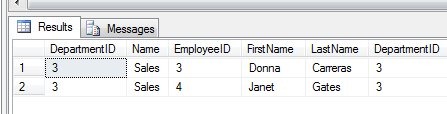
    This returns me results, just as it does in a SQL Server 2008 database.

    compat1

    It appears that SQL 2008 functions work, which is what I’d hope would happen. However for the purposes of backwards compatibility, the functions that are from SQL Server 2000, should work as expected in SQL Server 2000.

    The thing to be aware of is something that wasn’t legal in SQL Server 2000

    SELECT
      q.sql_handle 
    , t.text 
     FROM sys.dm_exec_query_stats AS q
      CROSS APPLY sys.dm_exec_sql_text(qs.sql_handle) AS t

    you get an error. Passing a column into a function wasn’t allowed in SQL Server 2000, so this is a problem.

    And a little cleanup

    USE MASTER
    ;
    GO
    DROP DATABASE SQL2KCompat
    ;
    go
  • Which product was purchased the most? T-SQL

    Suppose you had a list of product sales and were curious about which one was sold the most? It’s a simple query, and one that I used to ask people in interviews so I thought it would make a nice easy blog post.

    If I look at AdventureWorks2008, I have a Sales.SalesOrderDetail table that roughly looks like this:

    sales1

    There’s a productID in there, and if I want to see how products were sold, I can do this:

    SELECT 
       COUNT(DISTINCT ProductID)
     FROM Sales.SalesOrderDetail
     

    However that doesn’t help me with the actual products. I could instead do this:

    SELECT 
        productid
      , COUNT(*)
     FROM Sales.SalesOrderDetail
     GROUP BY ProductID
     

    That isn’t ordered, so I can easily add an ORDER BY to see the products sold and the counts.

    SELECT 
        productid
      , COUNT(*)
     FROM Sales.SalesOrderDetail
     GROUP BY ProductID
     ORDER BY COUNT(*) DESC

    That gives me a list, but I really want to just get the top seller. That’s easy as well.

    SELECT TOP 1
        productid
      , COUNT(*)
     FROM Sales.SalesOrderDetail
     GROUP BY ProductID
     ORDER BY COUNT(*) DESC

    Which returns:

    productid  
    ———– ———–

    870         4688

    However I don’t know which product this is, so I’d really want a join here.

    SELECT TOP 1
        p.Name
      , COUNT(*) 
     FROM Sales.SalesOrderDetail sod
       INNER JOIN Production.Product p
         ON sod.ProductID = p.ProductID
     GROUP BY p.Name
     ORDER BY COUNT(*) DESC


    Which lets me know that a water bottle was the most sold item.

    Name                                              
    ————————————————– ———–

    Water Bottle – 30 oz.                              4688

    However I wasn’t asked for the count of sales, just the most sold item. I don’t really need the count in order for the query to work. I can do this:

    SELECT TOP 1
        p.Name
     FROM Sales.SalesOrderDetail sod
       INNER JOIN Production.Product p
         ON sod.ProductID = p.ProductID
     GROUP BY p.Name
     ORDER BY COUNT(*) DESC
     

    Which just returns

    Name

    ————————————————–

    Water Bottle – 30 oz.

    What if there were two items that had the same sales? I’d really want to include WITH TIES to be complete.

    SELECT TOP 1 WITH TIES
        p.Name
     FROM Sales.SalesOrderDetail sod
       INNER JOIN Production.Product p
         ON sod.ProductID = p.ProductID
     GROUP BY p.Name
     ORDER BY COUNT(*) DESC
    

    It’s simple, easy, but it’s a query that trips a lot of people up in the intervening steps. I’d prefer you quickly returned the last query to me (wrote it, told me, etc.), but if you had to work through it, I’d hope that you talked about the steps I did as you went through deriving the query so I can understand how you think, and how you improve. If you have me the first query, I’d probably hint around with you about the items forgotten.

    You could use a CTE, subquery, or other methods, which are more complex, less efficient, and unnecessary, but could be valid answers. It’s best to stick with something simple, but go with your first instinct and work through it. If you get stuck, backtrack and try something else, explaining along the way. Or tell the interviewer you don’t know if you don’t.

    It’s best to be honest, and to show that you can learn, correct yourself, or even admit you don’t know.

  • Checking Your Service Account with T-SQL

    Somehow this slipped by me, but there were some new DMVs added in SQL Server 2008 R2 SP1. I suspect my test machines were mostly SQL Server 2008 or SQL Server 2012, and I hadn’t been paying attention to the changes in SP1.

    You can now use T-SQL to check for services information, as well as registry information, without using extended stored procedures or any hacks of xp_cmdshell. There are two new DMVs:

    These were not present in the RTM of SQL Server 2008 R2, but after installing SP1, they appear. The KB article for SQL Server 2008 R2 SP1 includes a note that new trace templates for Profiler are included, but I did not see a note about these two DMVs.

    So much for not adding features in Service Packs.

    In any case, you can query the sys.dm_server_services for service account information. You will get the service name, the startup type, the account, and more.

    If you aren’t a Windows administrator on your SQL Server boxes, you should still be able to get information regarding the services from this DMV as long as you have VIEW SERVER STATE permission.