Tag: testing

  • SQL Grouping on Sums (with testing)

    I ran across a post recently that I thought was an interesting T-SQL problem. The user wanted to group values into a running total, but the groups would reset based on a sum.

    In this case, the user had this set of data:
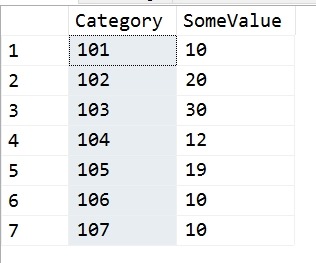
    2017-09-14 18_09_39-SQLQuery1.sql - (local)_SQL2016.sandbox (PLATO_Steve (72))_ - Microsoft SQL Serv

    Their goal was to run through these values, in Category order, and whenever the running total sum of SomeValue exceeded 30, reset the sum. Their requirement was that this could only be a single value or two values, which boxes in the problem nicely. In other words, they wanted these results:
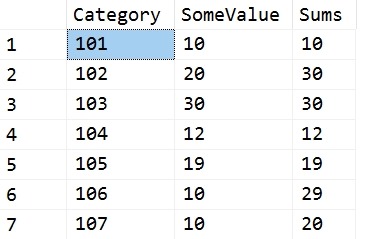
    2017-09-14 18_12_02-SQLQuery1.sql - (local)_SQL2016.sandbox (PLATO_Steve (72))_ - Microsoft SQL Serv

    The first two rows equal 30, so we reset for the third row. The third row is 30, so we reset for the fourth. The fourth and fifth would exceed 30, so each gets a reset. Five and six give 29, so we stop there.

    I don’t know what the use case is here, but it’s an interesting problem.

    My Solution

    I had a quick solution using Lag. I created a quick query that looked back 1 and 2 rows. I could have stopped with one, but originally I thought that the poster might go to three rows if the 30 value wasn’t met. I use a CTE to get the current row and previous values, then  a simple CASE to sum values or return the current row.

    WITH lagCTE
    AS (SELECT
              Category,
              SomeValue,
              LagValue1 = LAG(SomeValue, 1, 0) OVER (ORDER BY Category),
              LagValue2 = LAG(SomeValue, 2, 0) OVER (ORDER BY Category)
         FROM Source
        )
    SELECT
          lagCTE.Category,
          lagCTE.SomeValue,
          Sums = CASE
                     WHEN lagCTE.SomeValue + lagCTE.LagValue1 > 30 THEN
                         lagCTE.SomeValue
                     ELSE
                         lagCTE.SomeValue + lagCTE.LagValue1
                 END
    FROM lagCTE;

    I also created a test, because, why do the math. Once I’ve done this, I want to ensure any code changes, any logic changes will still pass the same test. Here’s my test code:

    EXEC tsqlt.NewTestClass @ClassName = N'tTSQLTests'
    GO
    CREATE PROCEDURE tTSQLTests.[test running total reset]
    AS
    -----------------------------------
    -------   Assemble
    -----------------------------------
    EXEC tsqlt.FakeTable
         @TableName = N'RTSource'
    
    INSERT RTSource
    VALUES ('101', 10),
            ('102', 20),
            ('103', 30),
            ('104', 12),
            ('105', 19),
            ('106', 10),
            ('107', 10);
    
    CREATE TABLE tTSQLTests.Expected
    (   Category     VARCHAR(5),
         SomeValue    INT,
         RunningTotal INT
    );
    INSERT INTO tTSQLTests.Expected
    VALUES
           ('101', 10, 10),
           ('102', 20, 30),
           ('103', 30, 30),
           ('104', 12, 12),
           ('105', 19, 19),
           ('106', 10, 29),
           ('107', 10, 10);
    SELECT
           Category,
           SomeValue,
           RunningTotal
    INTO  tTSQLTests.Actual
    FROM  tTSQLTests.Expected
    WHERE 1 = 0;
    
    -----------------------------------
    -------   Act
    -----------------------------------
    INSERT tTSQLTests.Actual EXEC RunningTotalQueries
    
    -----------------------------------
    -------   Assert
    -----------------------------------
    EXEC tsqlt.AssertEqualsTable
         @Expected = N'tTSQLTests.Expected',
         @Actual = N'tTSQLTests.Actual',
         @Message = N'incorrect query'
    GO

    Adding Counters

    The poster then asked for a group counter, which becomes much harder. I was about to try for another CTE that would give me some counter I could work with when Jeff Moden used the quirky update to build a better script. You can read his code here.
  • Getting the tSQLt Run Adapter working in Visual Studio 2017

    Last year I heard about the tSQLt test Adapter for Visual Studio from Ed Elliot. I’ve been wanting to try it, but various items got in the way. Finally I had the chance to play and it worked well in Visual Studio 2015, but I needed it in VS 2017. Fortunately Ed had a tSQLt Run Adapter beta for Visual Studio 2017, but I had a few issues. This is a debugging post.

    I downloaded the file and ran setup. Since this can cause issues with VS 2015, I unchecked that box. Unfortunately, I think I messed up my VS 2015 project. No matter, we’ll forge on.

    I had a Readyroll project where I was doing some work. In following some of the work at Redgate from a developer, I set up a new test project according to the tutorial. I got through and no tests.

    Hmmm.

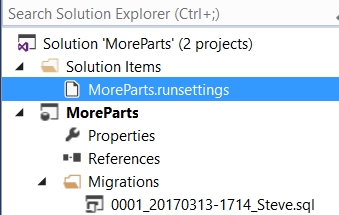
    The .runsettings file is set in the root of my solution, as shown here:

    The contents are:

    <?xml version="1.0" encoding="utf-8"?>
    <RunSettings>
      <TestRunParameters>
        <Parameter name="TestDatabaseConnectionString" value="Data Source=.\SQL2016;Initial Catalog=PartsUnlimitedDB;Integrated Security=True;" />
        <Parameter name="IncludePath" value="Tests" />
      </TestRunParameters>
    </RunSettings>

    My local instance is .\SQL2016, a named instance, and I have a PartsUnlimitedDB database on this instance.

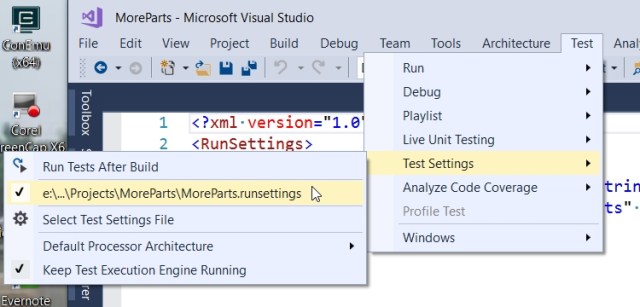
    Here the file is selected:

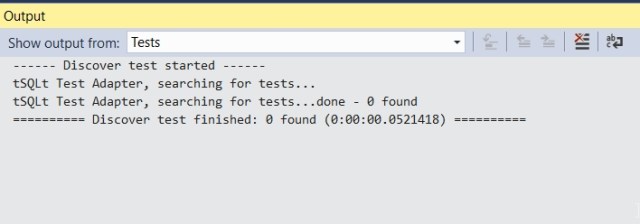
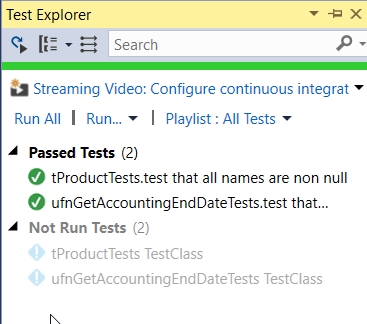
    When I run all tests, I get this:

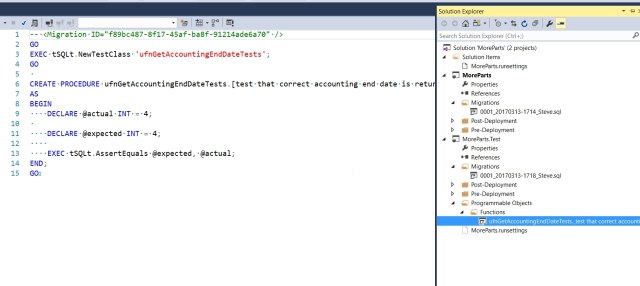
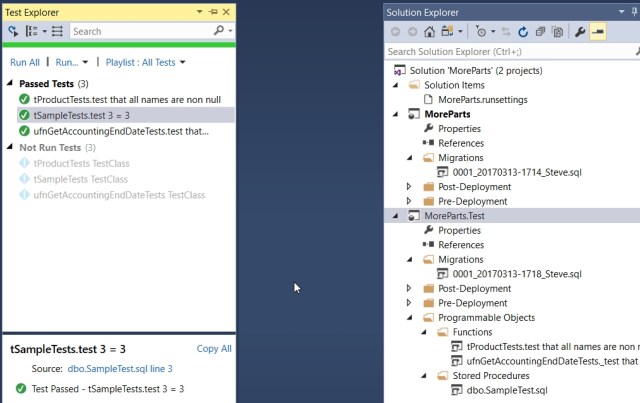
    I heard from Ed that I needed to have the name “tests” in the filename, so I changed that. Here’s the test and the file name

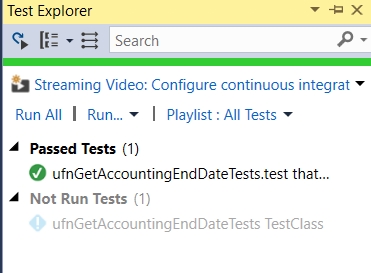
    Now I see my tests in the test explorer. Success!

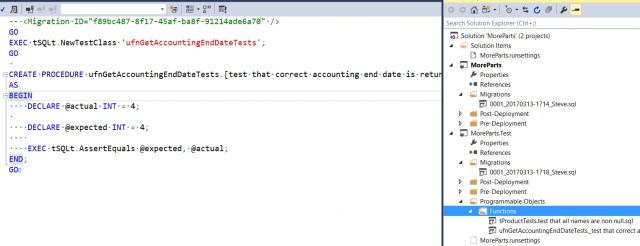
    Just to check a few things, let’s try another file. Here I’ll use a shorter name, though still descriptive.

    And again, success.

    That felt strange, but some back and forth with Ed showed me that the IncludeFile filter in the .runsettings file needs to be set to some value. In the default file I used, it’s set to “tests”. If I change it to test, and include a new test, then I things still work:

  • Using tSQLt to Find Min/Max Times

    I love tSQLt. It’s a good way to write tests that can determine if your code is actually working. Since I’m a fan of unit testing, I think using tests to verify your logic is great. What’s excellent with tSQLt is that I can verify a number of cases at once.

    I ran across this post asking for help with a query. Given the sample data and results, I wrote this proc and test. In the test, my “Act” is calling a proc I wrote that executes the first post’s query.

    CREATE OR ALTER PROCEDURE RunTimeTests
    AS
    BEGIN
        SELECT
            Taskid,
            MIN(StartTime),
            MAX(EndTime),
            DATEDIFF(MINUTE, MIN(StartTime), MAX(EndTime))
        FROM TimeTests
        GROUP BY Taskid;
    END;
    GO
    EXEC tsqlt.NewTestClass @ClassName = N'tTimeTests'
    GO
    CREATE OR ALTER PROCEDURE [tTimeTests].[test calculation min max time from timetests]
    AS
    BEGIN
        -- assemble
        EXEC tsqlt.FakeTable @TableName = N'TimeTests', @SchemaName = N'dbo'
    
        INSERT into TimeTests
            VALUES 
            (1, '2017-02-23 09:48:47.413',NULL ),
            (1, '2017-02-23 09:50:47.413', '2017-02-23 10:59:47.413' ),
            (1, '2017-02-23 09:49:47.413',Null ),
            (2, '2017-02-23 10:40:47.413','2017-02-23 11:55:47.413' ),
            (2, '2017-02-23 10:39:47.413', NULL ),
            (2, '2017-02-23 10:11:47.413','2017-02-23 11:30:47.413')
    
        CREATE TABLE tTimeTests.Expected
        ( taskid INT, Mindtime DATETIME2(3), maxtime DATETIME2(3), Minutes int)
    
        INSERT tTimeTests.Expected
         VALUES (1, '2017-02-23 09:48:47.413', '2017-02-23 10:59:47.413', 71)
              , (2, '2017-02-23 10:39:47.413', '2017-02-23 11:55:47.413', 76)   
    
        SELECT *
         INTO tTimeTests.Actual
          FROM tTimeTests.Expected
          WHERE 1 = 0;
        -- act
        INSERT tTimeTests.Actual EXEC RunTimeTests;
    
        -- assert
        EXEC tsqlt.AssertEqualsTable
         @Expected = N'tTimeTests.Expected', @Actual = N'tTimeTests.Actual', @Message = N'Incorrect times'
        
    END

    When I run this, it easily verifies the answer that the data is incorrect from the poster.

    2017-02-24 13_08_32-SQL Test - Microsoft SQL Server Management Studio

    If I change my expected results:

        INSERT tTimeTests.Expected
         VALUES (1, '2017-02-23 09:48:47.413', '2017-02-23 10:59:47.413', 71)
              , (2, '2017-02-23 10:11:47.413', '2017-02-23 11:55:47.413', 104)

    and re-run the test, it succeeds.

    2017-02-24 13_09_53-SQL Test - Microsoft SQL Server Management Studio

    Now, does this mean the developer wouldn’t make this mistake? After all, if you think you should be getting those results, you will struggle with the query.

    It doesn’t help there. However, it does help if you modify this code later and start to have strange results. This also means that I can add in more rows to the data, even more cases, and determine if the procedure still works. If I’m trying to cover a dozen cases, it’s much easier to re-run a tSQLt test than manually looking through results.

    Give tsqlt a try. It’s free, and if you have the SQL Toolbelt, you can get a GUI with SQL Test for executing your tests.

  • Detecting Issues

    Here’s a simple question: how are more of your application issues detected, by people or systems? I bet most of you initially think of your monitoring systems and the automated messages or pages that are sent out regularly as detecting most, or even all, of your problems. Have you stopped to think how many times a phone call lets you know about an issue? Do you consider the ways in which a code review or human tester brings up a concern?

    I try to think about all software problems, both the ones that reach production and the ones that are prevented early. If I catch a SELECT * in a view during development, I can prevent a problem months later when a table adds a column and no one refreshes the view in production. Those potential issues that never get to the customer are wins for me, and I think this is something we should be proud of as software engineers and testers.

    Can you move the numbers, though? Is there a way to find problems before people find them? I think there is, and it’s with better monitoring and better testing. For monitoring, we need better, and more, instrumentation that measures what we expect, looks for deviations, and (low level) alerts someone. This is an area where I think machine learning and better analysis will help. Those ML models can be hard to setup, so I’m hoping that some individuals or projects will start some work here. Microsoft is doing some of this in Azure, and I hope they share some knowledge with us.

    Testing is really the way to catch more issues before humans do. We’ve known this for decades in software development, but so many developers have been resistant to the idea of building some sort of formal test for their code. It’s not fun, it’s hard to maintain, and really, it’s just hard for most people to start writing tests.

    I think things are getting better with testing frameworks that make building and executing tests easier. We have frameworks for all major application languages, and even quite a few for T-SQL. We’ve also learned more about the types of tests to write, which type to ignore, and how to avoid building so many brittle tests that testing is more work than coding features. If you know nothing about testing, you owe it to yourself to spend a little time learning about unit testing and practicing writing tests.

    Now that we are collecting more and more data about our applications, we have the opportunity to really build software that better meets the goals and needs of our customers. However, we have to take advantage of this data, and the advances in testing, to ensure that we build the best software we can.

    Steve Jones

    The Voice of the DBA Podcast

    Listen to the MP3 Audio ( 4.0MB) podcast or subscribe to the feed at iTunes and Libsyn.