Tag: testing

  • tSQLt tests for Day 5 Advent of Code 2017

    This is day 5 of the Advent of Code 2017. If you want to read about the puzzles, start with Day 1.

    As I worked through the puzzles, I decided that I should be testing using their test sets and solving the issues that way. This lets me use the sample data, but also add in my own sets to cover strange situations.

    Here are the tests that I used for each part.

    Part I

    For part 1, only a short test is needed. Since we’re looking for a scalar value, I could easily just added an INT variable for the actual and expected values. I set this to the value given in the problem.

    Then I fake the table and insert the test set. From here, I can call my proc that implements the algorithm and get the result value.

    EXEC tsqlt.NewTestClass @ClassName = N'tDay5';
     GO
     CREATE OR ALTER PROCEDURE tDay5.[test day5 a initial set]
     AS
     BEGIN
    
    -- Assemble
     DECLARE @actual INT = 0, @expected INT = 5;
    
    EXEC tsqlt.FakeTable @TableName = N'Day5' , @Identity = 1
     INSERT Day5
     VALUES
     (0 ), (3), (0), (1), (-3);
    
    -- Act
     EXEC @actual = SolveDay5a;
    
    -- Assert
     EXEC tsqlt.AssertEquals @Expected = @expected, @Actual = @actual, @Message = N'Failed to account'
    
    END

    Part II

    The test is the same, just calling a different procedure that implements the part II algorithm.

    CREATE OR ALTER PROCEDURE tDay5.[test day5 initial set]
     AS
     BEGIN
    
    -- Assemble
     DECLARE @actual INT = 0, @expected INT = 10;
    
    EXEC tsqlt.FakeTable @TableName = N'Day5' , @Identity = 1
     INSERT Day5
     VALUES
     (0 ), (3), (0), (1), (-3);
    
    -- Act
     EXEC @actual = SolveDay5b;
    
    -- Assert
     EXEC tsqlt.AssertEquals @Expected = @expected, @Actual = @actual, @Message = N'Failed to account'
    
    END
  • tSQLt Tests for Advent of Code 2017 Day 4

    This is day 4 of the Advent of Code 2017. If you want to read about the puzzles, start with Day 1. As I worked through the puzzles, I decided that I should be testing using their test sets and solving the issues that way. This lets me use the sample data, but also add in my own sets to cover strange situations.

    Here are the tests that I used for each part of day 4.

    Part I

    This is a fairly simple test. I’m returning a result set since the solution is a single query, but this is really a scalar. In this cas,e I’ll create a one row, one column expected table and then get the results from my solution (inside a proc) and insert into Actual.

    The rest is standard tSQLt testing framework. Fake a table, enter data.

    CREATE OR ALTER PROCEDURE tDay4.[test Day4a sample data]
    AS
    BEGIN
         -- Assemble
         EXEC tsqlt.FakeTable @TableName = N'Day4';
         
         INSERT dbo.Day4
    (
         passphrase
    )
    -- SQL Prompt formatting off
    VALUES
        ('aa bb cc dd ee' )
      , ('aa bb cc dd aa')
      , ('aa bb cc dd aaa')
    
    -- SQL Prompt formatting on
        CREATE TABLE #Expected (valid INT);
        INSERT #Expected
        ( valid)
        VALUES
        (1  );
        SELECT *
         INTO #actual
         FROM #Expected AS e
         WHERE 1 = 0;
    
    
         -- Act
       INSERT #actual
        EXEC dbo.Day4_a;
    
        -- Assert
         EXEC tsqlt.AssertEqualsTable @Expected = N'#Expected' ,
                                      @Actual = N'#Actual' ,
                                      @Message = N'Incorrect number of valid passphrases';
         
         
    END
    GO
    
    EXEC tsqlt.run 'tDay4.[test Day4a sample data]';

    Part II

    This is the same as part I, but I change the inputs and results.

    CREATE OR ALTER PROCEDURE tDay4.[test Day4b sample data]
     AS
     BEGIN
     -- Assemble
     EXEC tsqlt.FakeTable @TableName = N'Day4';
    
    INSERT dbo.Day4
     (
     passphrase
     )
     -- SQL Prompt formatting off
     VALUES
     ('abcde fghij' )
     , ('abcde xyz ecdab')
     , ('a ab abc abd abf abj')
     , ('iiii oiii ooii oooi oooo')
     , ('oiii ioii iioi iiio')
    
    -- SQL Prompt formatting on
     CREATE TABLE #Expected (valid INT);
     INSERT #Expected
     ( valid)
     VALUES
     (3  );
     SELECT *
     INTO #actual
     FROM #Expected AS e
     WHERE 1 = 0;
    
    -- Act
     INSERT #actual
     EXEC dbo.Day4_b;
    
    -- Assert
     EXEC tsqlt.AssertEqualsTable @Expected = N'#Expected' ,
     @Actual = N'#Actual' ,
     @Message = N'Incorrect number of valid passphrases';
    
    END
     GO
    
    EXEC tsqlt.run 'tDay4.[test Day4b sample data]';
  • tsqlt Tests for Advent of Code 2017 Day 2

    This is day 2 of the Advent of Code 2017. If you want to read about the puzzles, start with Day 1. As I worked through the puzzles, I decided that I should be testing using their test sets and solving the issues that way. This lets me use the sample data, but also add in my own sets to cover strange situations.

    Here are the tests that I used for each part of day 2.

    Part I

    This wasn’t a tough puzzle, and the test is fairly simple. I had a function that solves the puzzle with the help of input. My test just sets up the sample input in the table, tab delimited, and then calls the function to calculate the total.

    EXEC tsqlt.NewTestClass @ClassName = N'tDay2'
    go
    CREATE OR ALTER PROCEDURE tDay2.[test day2 sample input]
    AS
    BEGIN
         ---------------
         -- Assemble
         ---------------
         DECLARE
             @expected INT  18,
             @actual   int;
         
         EXEC tsqlt.faketable @TableName = 'Day2', @SchemaName = 'dbo';
         INSERT dbo.Day2 (DataRow)
          VALUES ('5    1    9    5')
               , ('7    5    3')
               , ('2    4    6    8')
    
        ---------------
         -- Act
         ---------------
         SELECT  @actual = SUM(b.diff)
          FROM day2 a
          CROSS APPLY dbo.AdventChecksum (a.DataRow) b
    
        ---------------
         -- Assert    
         ---------------
         EXEC tSQLt.AssertEquals
             @Expected = @expected,
             @Actual = @actual,
             @Message = N'An incorrect calculation occurred.';
    END
    GO
    EXEC tsqlt.run 'tDay2.[test day2 sample input]';

    Part II

    The test here just calls a different function and has different input.

    CREATE OR ALTER PROCEDURE tDay2.[test day2 b sample input]
    AS
    BEGIN
         ---------------
         -- Assemble
         ---------------
         DECLARE
             @expected INT = 9,
             @actual   int;
         
         EXEC tsqlt.faketable @TableName = 'Day2', @SchemaName = 'dbo';
         INSERT dbo.Day2 (DataRow)
          VALUES ('5    9    2    8')
               , ('9    4    7    3')
               , ('3    8    6    5')
    
        ---------------
         -- Act
         ---------------
         SELECT  @actual = SUM(b.divmatch)
          FROM day2 a
          CROSS APPLY dbo.AdventChecksum3 (a.DataRow) b
    
        ---------------
         -- Assert    
         ---------------
         EXEC tSQLt.AssertEquals
             @Expected = @expected,
             @Actual = @actual,
             @Message = N'An incorrect calculation occurred.';
    END
    GO
    EXEC tsqlt.run 'tDay2.[test day2 b sample input]';
    
    GO


  • My Second Pester Test

    I should write about my first one, but I just copied Rob’s test, so that’s not so exciting. Instead, I decided to take his advice and write some code, then decide how I test it. This isn’t really TDD, but I need to understand how Posh returns things, so I’ll figure that out first.

    I decided to work with SQL Clone, since that’s an area I’m working in a bit already. SQL Clone has a set of PoSh cmdlets that you can use to create database clones, so I thought that would be a good test.

    What do I test?

    My process is to remove a clone if it exists and then add one back. For testing, I need to consider what actually is happening here.

    • If a cloned database exists, remove it
    • Create a new cloned database

    The result of this process means that I’ll have a Clone, no matter whether I created a new one or had to remove one and recreate a new one. Or, if I had a Clone already and my script failed. This last one is something a tester needs to be aware of.

    In my case, I can determine if there is a new clone by looking at the created date of the database object. If that was later than the beginning of my test, then I could likely assume my clone was new.

    To start with, I created a function that would destroy and create a simple clone. Once I had that, I could now write my Pester test.

    I started with a “describe” element, in which I loaded my function and set a starting time.

    Then in the “it” section, I run my function and then check the instance, getting the CreateDate property of my clone database. If my function has worked, this will be a new clone, created since my test started. I compare that to complete the test.

    I ran this with Invoke-Pester, and it worked.

    2017-11-28 14_58_31-powershell

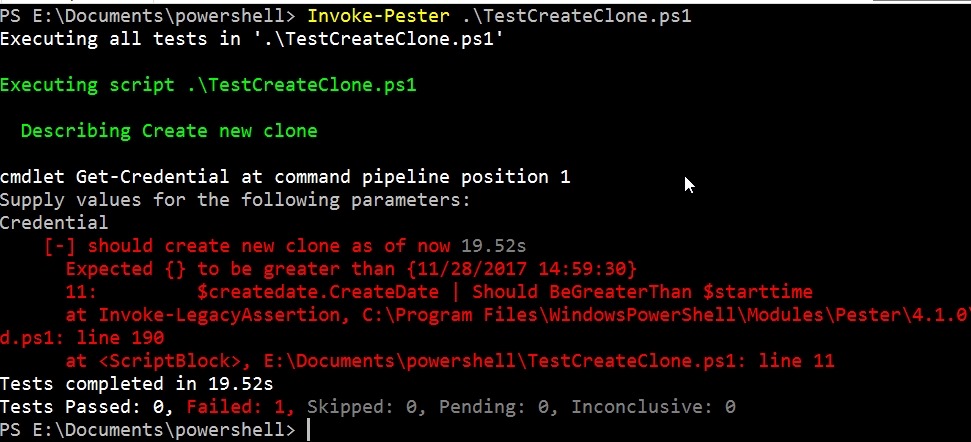
    This wasn’t simple. I had to test my test a few times, and use PoSh commands to verify it was doing what I thought. I also changed my function with a hardcoded db clone name to ensure the test fails. Results for that one here:

    2017-11-28 14_59_55-powershell

    Of course, I changed things back and tested again. Now, as I update my function to include adding in the instance name and image name,  this test should still pass. Of course, I can add in other tests, or change this one, to allow me to test on different images and instances as well.

    A simple test, maybe a silly one, but I learned a few things about my PoSh code (and how to write it cleaner) as well as Pester and adding in another unit test framework. Now I can expand this to test other PoSh items I have and practice writing better tests that will give me confidence my code works in a variety of situations.