Author: way0utwest

  • Escaping a Dollar Sign in PoSh–#SQLNewBlogger

    Another post for me that is simple and hopefully serves as an example for people trying to get blogging as #SQLNewBloggers.

    I’ve been working more with PowerShell lately and ran into a problem I thought would be easy, but it wasn’t. So I decided to blog what I learned.

    Assigning a String

    I had a string that I wanted to use in a command. In this case, the Start-Service command. Here’s what I wrote:

    Start-Service -Name “SQLAgent$$SQL2016_QA”

    This didn’t work, mainly because of this error.

    2016-11-15 14_32_20-powershell

    PoSh thinks my string is “SQLAgent\”, not “SQLAgent$SQL2016_QA”. That’s strange, at least to me. Let’s try a variable.

    2016-11-15 14_33_06-powershell

    OK, I know I need to escape the dollar sign. I ran a quick Google search, because that’s way quicker than looking through documentation and found a piece on escaping strings. It mentions the backtick (`) as the character to use. Let’s try that.

    2016-11-15 14_35_41-powershell

    It works. Now to try to start the service.

    2016-11-15 14_38_46-cmd - powershell (Admin)

    No error, but it is it running? Yes.

    2016-11-15 14_39_26-cmd - powershell (Admin)

    This is a quick look at string work in PoSh. The more I try to automate work and get things to run themselves, the handier I find PoSh. Since I tend to work with named instances, this was valuable.

    #SQLNewBlogger

    This was one of those items that I spent about 5-10 minutes figuring out and then another 10 minutes shooting screens and duplicating my work. The writeup was easy, and it will help me remember how to do that in the future.

  • Getting Team City working with BitBucket

    As a part of building a CI/CD home lab, I set up TeamCity in the past. I plan on using this for multiple projects, and in fact, I’d built a basic Hello, World C# application as my first build.

    Now it is time to work on something more complex. As a part of my SQL Server Builds project, I decided to host the Ready Roll build here. That means connecting TeamCity to BitBucket.

    I had no idea how this might work, and some searching showed that this needed a plugin prior to v10, but the capability was built-in after that. I’ve been meaning to upgrade, so I did that first. As you can see, I have my TC v10 system, and when I go to create a new project, BitBucket is a first class citizen.

    2016-11-15 11_57_33-Projects — TeamCity

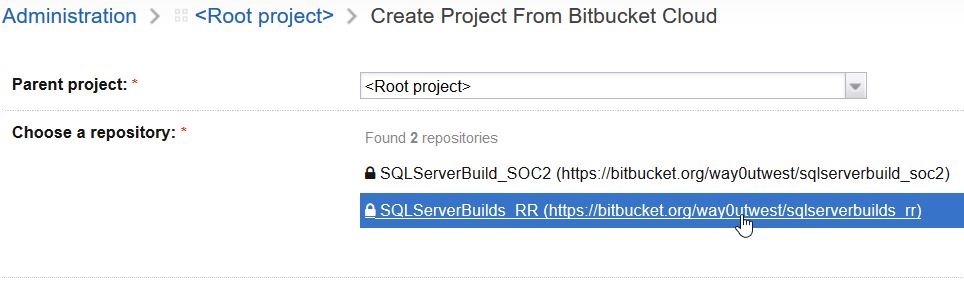
    Once I picked this, the system has me authenticate with Bitbucket (I won’t show this) and then get a key and secret that I paste into the dialog. This is fairly easy to follow, but for security purposes I’ll skip that. Once I’m authenticated, I can see my repos:

    2016-11-15 14_21_23-Create Project From Bitbucket Cloud — TeamCity

    I pick this repo and a project is created. In fact, TeamCity detects that I’ve got a VS solution in the repo, so it sets that as my build config.

    2016-11-15 12_02_58-Build Configuration — TeamCity

    That’s pretty cool, and I’m hooked up. Or am I? Let’s see. I’ll manually run a build.

    2016-11-15 12_43_56-Sqlserverbuilds RR __ Build _ #1 (15 Nov 16 12_36) _ Overview — TeamCity

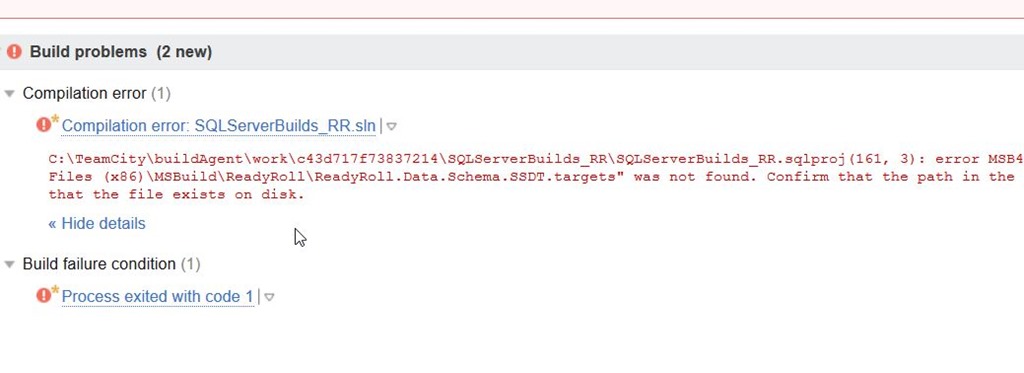
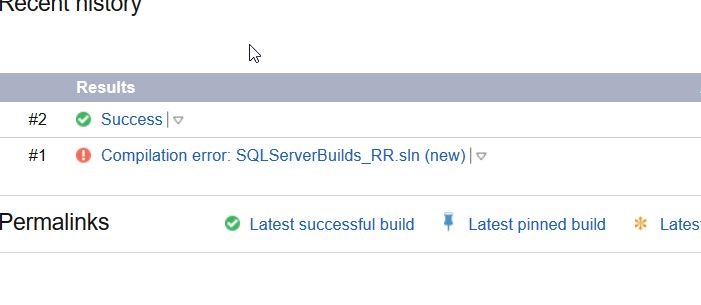
    It doesn’t work. However, if you read the error, you’ll realize that the ReadyRoll project type doesn’t seem to work. That’s because I’m building on this server, which is separate from my development machine. I need to install the ReadyRoll binaries there.

    A quick download from Redgate, and I install ReadyRoll. Now when I click “run”, I get this:

    2016-11-15 12_44_05-Sqlserverbuilds RR __ Build _ Overview — TeamCity

    Success.

    There’s more to getting setup, but this is a quick look at getting TeamCity hooked up to BitBucket.

    If you want to try ReadyRoll, grab an eval.

  • Monitor All the Changes

    Can you monitor every configuration change and setting on all your SQL Server instances? Can you get an alert every time code changes, or even if an option for an object changes, such as the changing of an EXECUTE AS or the rebuild options for an index? Do you want to know about every security change (new logins, grants, revokes, etc.). Can you keep up with every alteration of a SQL Agent job?

    You certainly can, but across any busy enterprise, all these alerts might result in a constant stream of items to review each day. In fact, in some companies, the volume might be high enough that this becomes a full-time job for someone. I’m not sure many of us think that it’s worth an employee’s time to actually review every change.

    Even if you decided it’s worth reviewing every change, is it possible to do a good job actually doing so? Too many alerts usually result in an individual starting to treat all of them as though they are the same priority. It becomes hard to differentiate what’s important to review and what’s not over time if you are always looking at a stream of changes across disparate systems. This is one reason why I never want to get success message, but even failure or change messages can be problematic when the volume is high.

    What can you do in a situation like this? Certainly there are alerts that are critical and need to be addressed right away, aren’t there? There are, but they are probably few. Making the decision about which items are important enough to review daily can be hard. I’ve typically only wanted critical alerts for backup tasks (after some retry) and privileged security alterations (add/change/remove sysadmin/securityadmin/processadmin/serveradmin). Those are items I need to take action on. Most other items, such as failed index rebuilds, job schedule changes, configuration alterations, I just want to capture and log.

    In one of the SQLskills newsletters recently, Paul wrote about an issue where replication settings had changed. The distributor had gone from 72 hours to 72 days, resulting in memory pressure for the workload. While I know this is a problem, is this the type of alert you’d define as critical? I’m not sure I would. In fact, this is the type of alert I’d want logged as a set of changes on this system so that I could review it when it seems that the system is not running as smoothly as it otherwise might be. In fact, this is the type of problem I’d hope I’d catch through performance monitoring, which might pro-actively catch performance degradation that would lead a DBA to review changes and metrics before a user reported the situation.

    Ultimately I want monitoring systems to help me find issues, and only notify me when I might need to take some action. To do this, the system might need to capture everything, but I want most of the items filtered until such time as the information might actually help me solve an issue. This takes some time to setup and tune as you discover holes in your monitoring, or you find that too much data is being passed on. Don’t be more afraid to add more data to capture, but be ruthless about removing extraneous notifications from the system. This is a case when too much information sent to the administrator is as bad as too little.

    Steve Jones

  • Two Weeks to Live! 360 and VSLive Orlando

    A short break in speaking, as I haven’t been on stage since Oct 11.

    LSPK42

    Now it’s two weeks to Live! 360 in Orlando and VS Live, both happening in Orlando on Dec 5-9. You can still register, and save $500 with my link.

    This is my first time at this event, though I’ve been to other VS Live events. I really like these conferences because I get the chance to attend non-SQL sessions and broaden my excitement for other parts of the Microsoft platform.

    If you’ve got some training dollars left for 2016, consider coming down and joining me today.

    Register and use LSPK42 to save $500.