Author: way0utwest

  • Better ReadyRoll Script Naming

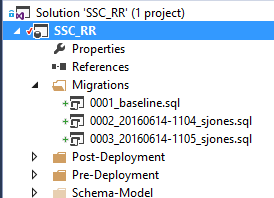
    One of the things that I like about ReadyRoll is that the product will automatically build new scripts that are named in a sequential order. This usually results in a few scripts that look like this:
    2016-06-14 11_05_15-Movies & TV

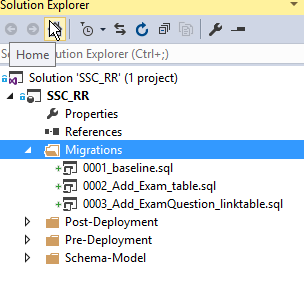
    As you can see, these scripts aren’t very intuitive. In fact, if you get lots of scripts, this starts to look fairly complex and confusing. What about something more like this:
    2016-06-14 11_08_13-Movies & TV

    That’s easier to read and understand. I’d also have a better idea of what happens in each script. How can I do this? It’s easy.

    Add an Object

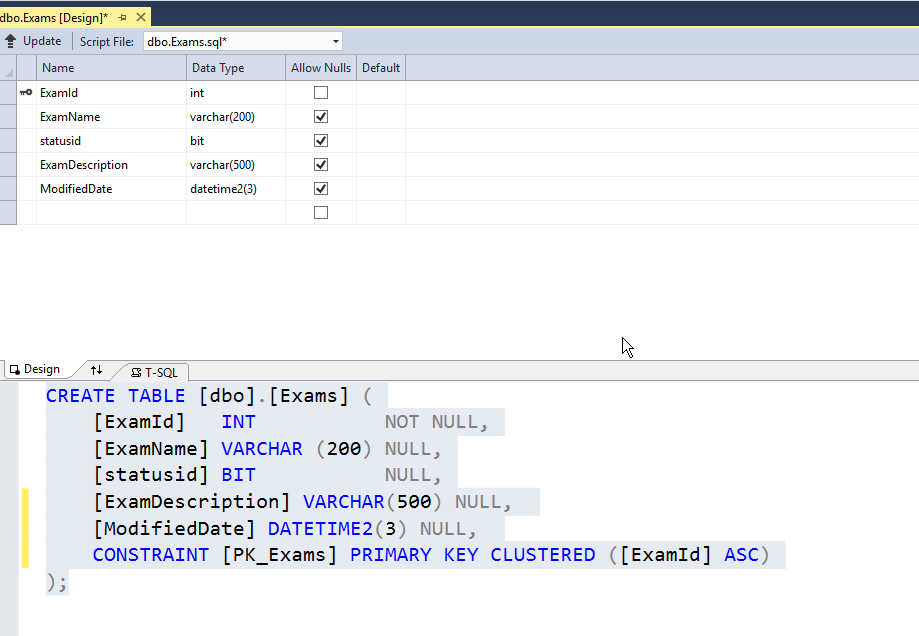
    First, let’s add an object in ReadyRoll. I’ll alter my Exams table to add a few columns. To keep this simple, imagine I want to add a modified date and a short description. I could do this in SSMS, but I’ll open the designer in VS. Here’s the table.

    2016-06-14 11_10_30-Photos

    I’ll make my changes.

    2016-06-14 11_11_01-Photos

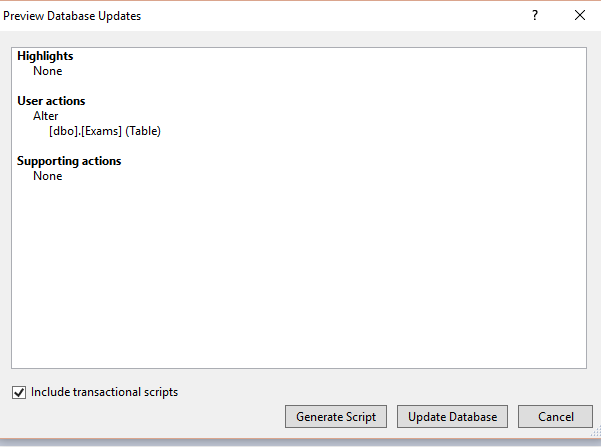
    Now, I click the “Update” button in the upper left. When I do this, I get a Generate script item. I could do other things, but I like to do this and see my script before applying it to the dev database.
    2016-06-14 11_12_04-Movies & TV

    I click Generate, and I get the script. Notice, it’s named with some random number (after the 0004) on the right.
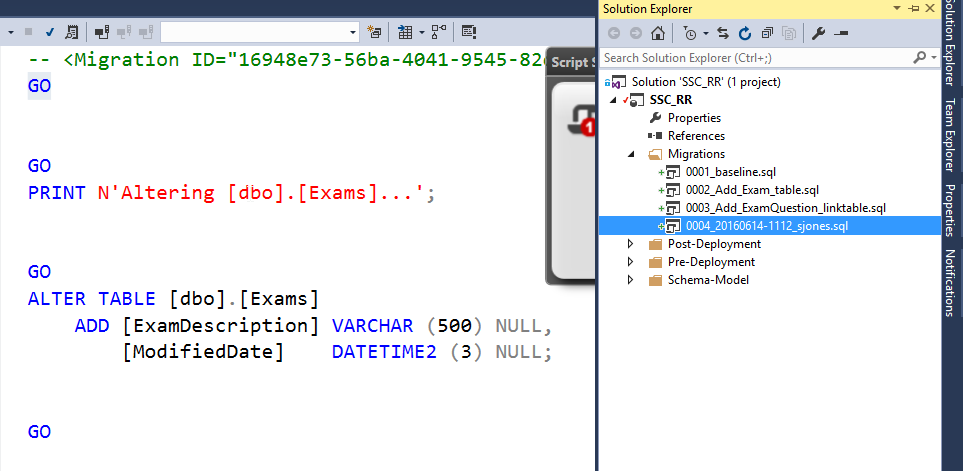
    2016-06-14 11_12_34-Photos

    If I right click the script, I can do all the normal file operations.
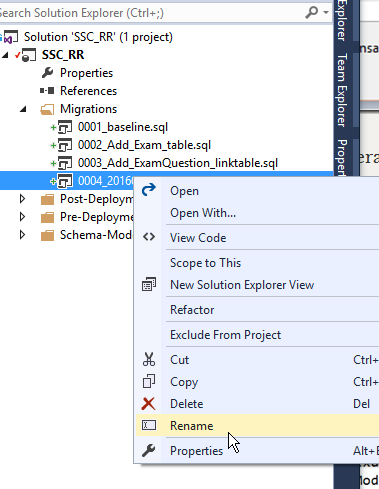
    2016-06-14 11_13_32-Photos

    Let’s give this a more descriptive name. It’s taken me a long time from my 8.3 name days, but I’ve learned to take advantage of file names to make them descriptive. A few bytes in a name is cheap.
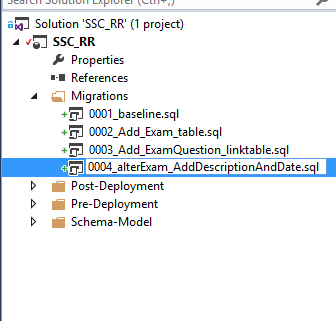
    2016-06-14 11_13_58-Photos

    That’s it.

    ReadyRoll does use the first characters in front of the underscore (_) to order scripts, so I don’t want to change those. I could, but in this case, I need script 4 to come after script 2 at the very least.

    After the underscore, I can do whatever I like. In this case, I can see the changes being made to my database, just reading down the scripts and seeing how things will occur. I always have the detail in the code, but at a high level, I can see the changes.

    I’m sure if you adopt this technique, you’ll find that it’s much easier to manage scripts and track what’s happening to your database.
  • Democratic Data Science

    I know quite a few people that are jumping on the data science bandwagon, brushing up on statistics, learning R, and hoping to land one of those lucrative data scientist positions. I wish you good luck, and some of you will succeed, but I wouldn’t count on there being lots and lots of data science positions in the future. The work is hard, and it will take a lot of learning and practice to become good. Plus, perhaps we won’t need as many data scientists as some are predicting.

    There seems to be a lot of work being done with intelligent agents and “bots” that can perform some lower level analysis of data and interact with humans. However, there is also work being done with more capable software that might analyze data and find patterns by applying different algorithms and analysis to make it easier for business analysts to comb through the mountains of data. After all, the growth of IoT, of more metrics and measurements being made in all kinds of applications mean that we can’t just throw bodies at problems. We need better ways to work with large amounts of data.

    This work isn’t really aimed at eliminating data scientists or data analysts. Rather, this is aimed at trying to free up their time to do the creative, thoughtful work of examining data. The grunt work of playing with algorithms and testing them according to some measure of success is handled by software. I think that this is a mantra that will be repeated over and over in the next couple decades in computing. Grunt work is automated, thoughtful work is done by (well-paid) humans. If you’re not doing the latter, you might not have a job with the former.

    I do think there is still plenty of opportunity for data professionals, after all, we need to manage all that data, find ways to ensure it’s available and can be queried, data is somewhat clean, and certainly that we have some idea of what the data means to our business. I’m not sure software agents will easily be able to set those things up, though certainly they’ll do the work of applying our rules to large sets of data.

    There will still be plenty of data science roles, and certainly humans need to be watching the software to be sure it’s working well. There will always be tuning efforts, and perhaps always reports that users need help in building. However, as software becomes more sophisticated, there will certainly be less grunt work in our industry, just like many other industries have seen lower, or at least lower mid-level positions reduced in number. We should be prepared to prove our value and ensure our skills are useful to our organizations.

    Steve Jones

    The Voice of the DBA Podcast

    Listen to the MP3 Audio ( 3.0MB) podcast or subscribe to the feed at iTunes and LibSyn.

  • The Desktop Rebuild–Part 2

    You can read part 1, but that’s more about the (initial) hardware changes. This one looks at getting moving on the new desktop. Note, that since I changed the MB/CPU/Boot disk, I decided to reinstall Windows as well on a new disk to ensure I wouldn’t have more issues.

    Having a new Windows desktop is a bit disconcerting. After all, many of us techies are used to loading more and more programs and documents onto our systems. We have lots of history with our machines, and Windows hasn’t always made it easy to move things. OSX is better, but I can’t build a Mac, or at least, I don’t want to.

    In this case, I still had me 2nd, 3rd, and 4th drives connected. The contained most of my documents, pictures, and application code. However, certainly some things needed to be installed.

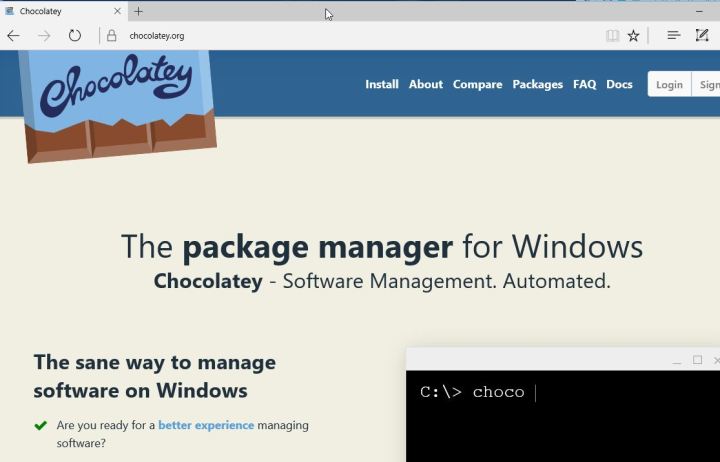
    The first thing I did with the new Windows 10 is run Edge and then go here:

    2016-06-23 23_37_58-Chocolatey ‎- Microsoft Edge

    I used to go get Chrome or Firefox right away, but I have a better way now. I use chocolatey. Once I get here, I first open a Command Prompt as Administrator and run this:

    @powershell -NoProfile -ExecutionPolicy Bypass -Command "iex ((new-object net.webclient).DownloadString('https://chocolatey.org/install.ps1'))" && SET PATH=%PATH%;%ALLUSERSPROFILE%\chocolatey\bin

    Once that finishes, I can begin installing things. In my case, I have a list of packages I want to install in a folder on my Dropbox. However, I need to get Dropbox first.

    choco install dropbox
    
    
    choco install passwordsafe

    Once that’s done, I log in (getting my password from my phone, and then I can run the rest of my installs, using Password Safe to get my passwords.

    choco install googlechrome
    choco install greenshot
    choco install conemu
    choco install firefox
    choco install sublimetext3
    choco install evernote

    I have Chrome and Firefox linked to an account, so my bookmarks come right over when I log in. SQL has to be installed separately, as does Office from my O365 account. I prefer to do Visual Studio myself, but these command line installs get me up and running.

    Fortunately I keep a copy of the .iso’s for those programs and can just run them.

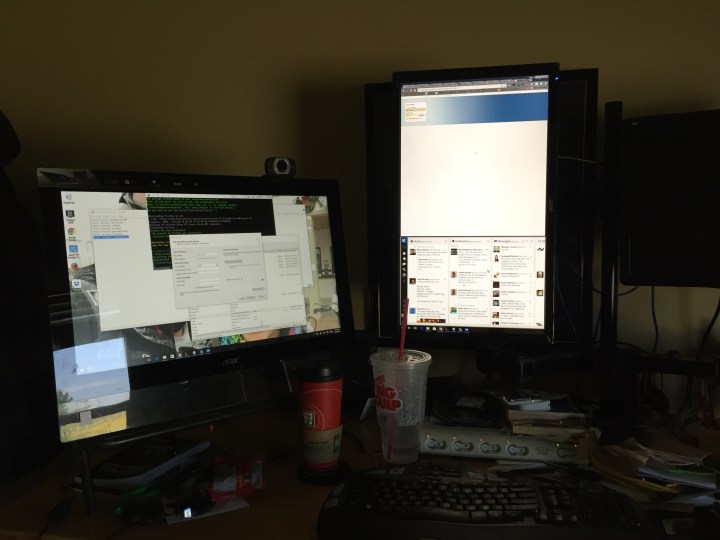
    I also needed to flash my BIOS, which was easy, but I needed to download the newest file from ASRock and put it on a flash drive for a reboot. That went without a hitch, and I now have two monitor support again.

    Photo Jun 24, 10 33 59 AM

    I still need to adjust my monitor and also get a new video card to support the third monitor, but that’s for another day.

  • DevOps and Security

    DevOps is a buzzword these days, and like many of the hyped concepts written about, it has a lot of meanings. There is this idea releasing software more often, using automation, having various groups talk to each other, and more, all of  which we might see as common sense. However other DevOps ideas, such as releasing more often (with potentially less review), being willing to break applications and fix them quickly, having developers able to release code to live, production environments, these don’t seem to be ideas that would enhance security for most organizations.

    However, that’s not necessarily the case. Security and DevOps practices aren’t necessarily mutually exclusive. I ran across a piece from the security perspective, looking at some of the ideas in DevOps that can actually enhance security.

    Writing more code, especially around the configuration and infrastructure, allows versioning, auditing, and more that can ensure we have fewer mis-configured systems. Adding some Desired State Configuration (DSR), with some automated testing of this code, could ensure that the changes made don’t open up security holes. Or, at least, allow us to determine who made the change and when the issue appeared. These are important for understand security risk.

    There are also the ideas of measurement, metrics, and feedback, which are important for ensuring security. After all, anomalous behavior should be investigated, as this could be a sign of intrusion. For databases, it’s especially important with the large number of clients that connect to our systems. Adding DevOps style monitoring can allow us to determine if a workload is normal, or perhaps a sign of intentional, accidental, or malicious data query activity.

    I enjoyed the piece, and I’d recommend you read it. Plus, whenever I see “snowflake” in an article, I think of Grant and want to read further to see how someone else has used the same analogy he does.

    Steve Jones

    The Voice of the DBA Podcast

    Listen to the MP3 Audio ( 2.2MB) podcast or subscribe to the feed at iTunes and LibSyn.